I do not have any program shortcuts on my desktop, only a few text, Excel and Word documents that I like to have in reach whenever I need them. I have also added a Desktop toolbar to my Windows 7 taskbar to access the files when windows are displayed on the desktop that hide the icons underneath them.
If you add the default Desktop toolbar, you get a seemingly random list of all shortcuts and files that are currently on the desktop. There is furthermore no sorting option available, which can be a problem if you have many items on the desktop as you need to look through all of the listing to find the file or shortcut you are looking for.
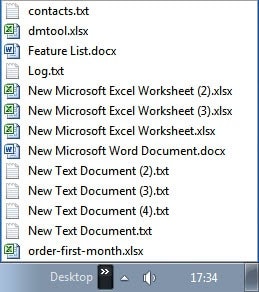
There is however an option to sort the desktop toolbar listing by name. This is done the following way:
Right-click on a blank spot on the taskbar and select Toolbars > New Toolbar from the menu. You now need to select the desktop folder in your user profile folder, and not the special folder desktop. You find that folder under C:\Users\username\Desktop. Pick that folder and it should appear on the Windows taskbar.
All that is left to do now is to left-click on the arrow next to the desktop listing to bring up the file listing. You will notice that it appears unsorted.
Right-click any file listed there and select Sort by name from the context menu to sort the file listing alphabetically. Alphabetical access should speed up the recognition and execution of particular shortcuts and files stored on the Windows desktop.
I have tested this method under Windows 7 where it worked fine. It is likely that it will work under Windows Vista and maybe even Windows XP. Please let me know if you have tested it under those operating systems so that I can update the guide accordingly.
Have you activated the desktop toolbar, or any other toolbar for that matter, on your Microsoft Windows system?
© Martin Brinkmann for gHacks Technology News | Latest Tech News, Software And Tutorials, 2011. | Permalink |
Add to del.icio.us, digg, facebook, reddit, twitter
Post tags: desktop, desktop shortcuts, taskbar, toolbar, windows tips

0 comments:
Post a Comment