Pages

Showing posts with label The Web. Show all posts

Friday, February 17, 2012

Rapidshare Capping Free User Downloads To 30Kb, Resume Disabled

When you try to download a file from the popular file hosting site Rapidshare lately, you may have noticed that the speed of transfer has dropped significantly in comparison to previous downloads you made. This change apparently affects free users, that is users who are not logged into the service or users with free accounts, while they download files from it. Users with premium accounts are not affected at all.

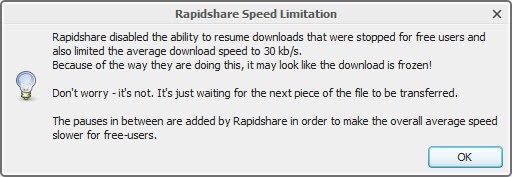
JDownloader, the file hosting downloader, is displaying a warning to users who download files from Rapidshare using the software. It reads:

Rapidshare disabled the ability to resume downloads that were stopped for free users and also limited the average download speed to 30 kb/s.

Because of the way they are doing this, it may look like the download is frozen.

Don’t worry – it’s not. It’s just waiting for the next piece of the file to be transferred.

The pauses in between are added by Rapidshare in order to make the overall average speed slower for free-users.

jdownloader  rapidshare speed limitation

Rapidshare, besides dropping download speeds, seems to have disabled resume capabilities for free users of the service. Resume allows users to continue downloading a file from the position they stopped the transfer. This can be useful during large file transfers, say a 1 Gigabyte file that stops after 500 Megabytes have been downloaded. Instead of having to download the whole Gigabyte again, users would only have to download the remaining 500 Megabytes.

The third change, next to the drop in average transfer speeds and the removal of the resume option, are pauses that the hoster has added to file downloads. These pauses can make downloads look as if they are frozen or stopped, when in fact they are not.

It is not clear why Rapidshare has made the changes. Some users suspected that the company wants to drive more users into signing up for premium accounts, others that users from Megaupload and other file hosting sites that went out of business have caused to much strain on the Rapidshare servers. The effect however is that the site is barely if at all usable anymore if you are a free user.


Thursday, February 16, 2012

Improve Your Userscripts.org Experience With Userscripts

I’m not the only one who thinks that the userscripts.org website, repository for thousands of userscripts, is rather messy to work with. This can be attributed to two core factors if you ask me. First the lack of filtering options to only find scripts for a specific site or category, and second better search options that supports advanced search parameters.

A few userscripts have been created over the years that improve your experience on the site. The following userscripts help you get more out of the site without sacrificing anything.

userscripts.org Bullshit Filter

This script adds filtering options to the script listing on the site. It adds four filters to the top of the scripts listing that let you hide the following scripts:

  • Games: Hides all scripts that have been created for games. This includes all the Facebook games like Mafia Wars or Kingdoms of Camelot, but also games like Travian or ConquerClub.
  • Social Networks: Hides all social networking related scripts. This blocks scripts for Vkontakte, Facebook, Google+ and others.
  • Non-Ascii: Hides all scripts that use non-English characters like accents or cyrillic letters.
  • Clutter: Hides scripts with test or bogus titles, and scripts with titles that have less than six characters

userscripts.org filter

The filters appear when you move the mouse to the scripts and filtered line at the top. Red groups are filtered by the script while green groups are not. You can change the filtering state with a left-click. The userscript is available here.

userscripts.org alternate CSS

Not all of the scripts functionality appears to be working. It does however make everything on the site a big larger, especially the fonts which some users may like. Font sizes are increased both on individual script pages and on script listing pages.

scripts

You can download the userscript here.

Both userscripts can improve your experience on the website. While they do not fix the search issue, they make sure that you get the most out of the site.

Have another script that you use to improve the site? Let everyone know about it in the comment section. (thanks Vineeth Reddy for the tip)


OpenDNS Deluxe Dropped, Price Increase by 900%

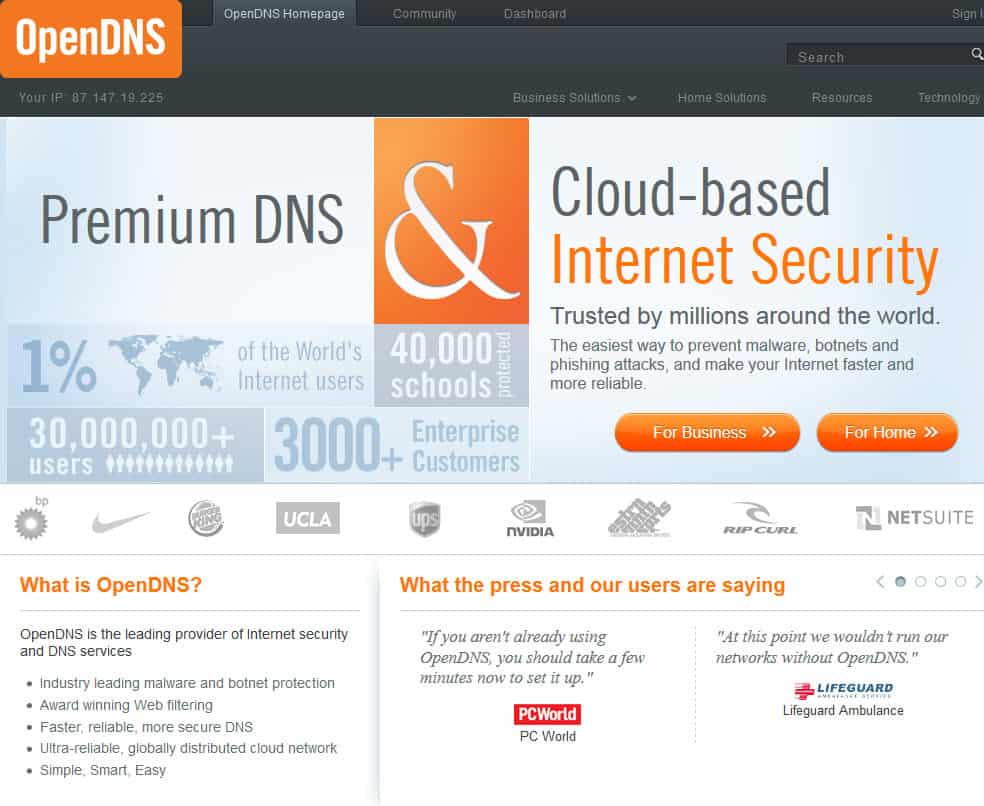
The popular third party DNS provider OpenDNS has been sending out emails in January to part of its customer base announcing an upcoming change in the company’s portfolio. OpenDNS Basic, which was used by home users and businesses alike, has been redesigned as a product for home use only. The product will remain free and offer the same functionality as before. The email was worded in a way that suggested that content filtering was removed from the product on March 15th.

Only businesses are however affected by this. If they have received the email, they will be without content filtering from March 15th forward should they not switch to the paid Enterprise plan. The email only mentions OpenDNS Enterprise as the alternative, and not the companies OpenDNS Deluxe service.

OpenDNS’s CEO David Ulevitch mentioned in a post on Reddit that OpenDNS decided to drop that product. This has consequences for businesses who paid $150 per year for the OpenDNS Deluxe plan as they are left with two options if they want to stay at the company.

The first option is to go back to OpenDNS Premium (which is OpenDNS Home but without the filtering for businesses). The second to subscribe to the Open DNS Enterprise plan instead. The starting price for the Enterprise product is set to $1500 per year for companies with 1-50 users. This could mean a 900% increase for companies who paid 150$ per year for the deluxe plan previously.

opendns

A 30% discount was offered to OpenDNS Deluxe customers, and even more for customers who complained loudly. The discount would still mean a price increase of of more than 300% for the product.

To paraphrase:

  • Home users: OpenDNS Home, with filtering included, nothing changes.
  • Businesses: Either OpenDNS Premium, which only offers DNS services, or OpenDNS Enterprise starting at $1500 with filtering and advanced malware and botnet protection services.

The biggest user complaint is the pricing for the Enterprise product. Smaller businesses with a handful of employees would have to pay as much as larger sized businesses with 40 or even 50 employees.

Businesses looking for an alternative should take a look at the comparison chart over at DNS Redirector which compares popular DNS services.


US Agency Suspending Jotform.com Domain, What You Need To Know Now

Jotform is an online form creation service that can be used by free and paying customers to create online forms in an easy to use what you see is what you get interface. A short blog post by Jotform co-founder Aytekin Tank today revealead that an unnamed US government agency has “temporarily suspended” the jotform.com domain. The announcement itself was posted on the company’s jotform.net domain.

Tank did not go into further details in the short post first, but later on posted two updates that suggested that user generated content was the cause for the domain suspension.

Commenters suggested that it had to do with a phishing attack on a South African bank that used forms on the jotform domain to steal personal information from the bank’s users.

jotform

Tank also mentioned that forms may not be working anymore if they are pointing to the com address. He suggested to change the domain extension to .net instead to make them work again if that is the case. A knowledge base article is available to aid users who have dozens or even hundreds of forms that need to be changed.

Jotform customers should have received emails by now that inform them about the issue.

Some issues have not been addressed yet. It is for instance not clear why only the .com domain was suspended and why the .net domain was left untouched. The most likely reason is that the the contents were posted solely on the jotform.com domain.

And then there is the question how this could happen in first place. Was Jotform contacted by the authorities or bank representatives first to take down the contents without domain suspension? Several users who left comments suggested that a DCMA letter to Godaddy, the domain hosting company, was the culprit. This however does not explain Tank’s statement that a US government agency has shut down the domain temporarily.

Facts are scarce at this point in time. The scary thing about this is that this can happen to any website that is hosting user generated contents. Taking down a phishing site, or phishing contents on a site, is a high priority task, considering that more users become victims of the trap the longer the site stays on line.

Jotform customers at this point in time can only change their form’s domain name extensions to get them working again. It is likely that the domain will be up and running again in the coming days.

Update: The jotform.com website is up again. There is still no word about what happened. You can read more about it here on Hacker News

JotForm.com has been suspended by Godaddy for more than 24 hours now. They have disabled the DNS without any prior notice or request. They have told us the domain name was suspended as part of an ongoing law enforcement investigation. In order to resolve the issue, they asked us to contact the officer in charge at U. S. Secret Service.

When I contacted the Secret Service, the agent told me she is busy and she asked for my phone number, and told me they will get back to me within this week. I told them we are a web service with hundreds of thousands of users, so this is a matter of urgency, and we are ready to cooperate fully. I was ready to shutdown any form they request and provide any information we have about the user. Unfortunately, she told me she needs to look at the case which she can do in a few days. I called her many times again to check about the case, but she seems to be getting irritated with me. At this point, we are waiting for them to look into our case.

Our guess is that this is probably about a phishing form. We take phishing very seriously. Our Bayesian phishing filter has suspended 65.000 accounts last year. We have been training it for many years, so it can detect phishing forms with great accuracy. We also take any reports about phishing very seriously and quickly suspend the accounts and let the other party know about it. By the way, we are also very serious about false positives. If we suspend an account accidentally, we will quickly resolve the issue, and apologize.

I believe this can happen to anybody who allows users to create content on the web. So, if you have such business, my recommendation would be to make sure that you can contact your most active users quickly if your domain is disabled. Many of our users are shocked and angry at us. But, many also thanked us for quickly letting them know about the issue by email and providing instructions to continue operating their forms. Since DNS propagation takes some time, many active users were able to switch their forms to the new domain before it went down. We still have not contacted all users, we are sending emails most active users first.


Tuesday, February 14, 2012

Scrolldit, A Visual Reddit Frontend

I personally like the minimalistic approach over at Reddit as I prefer minimalistic over sites that bombard you with visual eye candy. Some users on the other hand might like a more visual interface, and that’s exactly what Scrolldit offers. It basically takes Reddit posts in realtime to display to display the media of all media related posts directly on its frontpage.

Posts without images or videos are shown with their textual contents, the rest with the first video or image, and title only. The posts are updated in near realtime, with new posts added to the top of the page and older posts pushed down.

scrolldit

Images, included animated images, can be viewed directly on the Scrolldit website. The same is true for videos that you can also play directly there. Animated gifs play right away, which can quickly become a nuisance, especially on pages with multiple animated images and pages where the animated gif is shown for an extended amount of time.

Scrolldit won’t display any not safe for work contents by default, but the checkbox is right there for you to click on to enable those contents as well.

The default page lists all popular posts that made it on Reddit’s frontpage. A small navigator in the upper left corner offers to display contents of a single subreddit instead. Once you have selected a subreddit, you will notice that you can now select the hot, new, controversial and top listings for it.

The by far biggest accomplishment of the service is the visualization of Reddit contents. That’s great for subrddits where images and videos are posted most of the time, and not so great for subreddits that mostly consist of textual messages.

Users currently logged in on Reddit can vote right on the Scrolldit website by moving the mouse cursor over the item to display the up and down vote arrows.

Some Reddit users may like the visual frontend. Others may dislike it for a number of reasons. From the missing comment count to the inability to block animated gifs from playing right away.

Have you played around with Scrolldit? If so, what’s your take on it?


Sunday, February 12, 2012

We Have Got Pinterest Invites For You

By now you have probably heard about the next big thing that is currently taking off on the Internet called Pinterest. It basically lets you create pinboards online, and combines those with social networking features like friends and a commenting system. Users of the site can either use a bookmarklet to select new photos or videos that they want to add to one of their pinboards, or on-site functionality to do the same.

At its core, it is nothing more than a photo and video sharing community that uses pinboards instead of photo albums for the sorting. One of the core difference is that each pin links to the original site, which makes it more of a cross breed between a photo sharing and bookmarking service.

pinterest

Visitors can check on all the pins that users of the site have made. Popular categories include recipes, fashion and clothing, as well as people, location and furniture.

One of the things you can use Pinterest for, besides keeping a growing collection of interesting things you find online, is to get inspiration. This can be fashion related for instance, or for new recipes that you would like to try out once you see a yummy photo of the food on the site.

Pinterest is an invite only site right now. Interested users can leave their email address to get an invite eventually, or find someone who is already using the site to get invited this way. Since I’m already using the site, I figured it would be nice if I’d offer to invite you to join Pinterest. Just leave a comment below using a valid email address, and you can be sure to receive an invitation in less than 24 hours (usually a lot faster than that).

I will send out invitations for as long as I’m able to. I’m not sure if you are only allowed to invite a select number of people.


Sunday, February 5, 2012

How To Create Your Custom Reddit RSS Feed

Even though I knew about Reddit for as long as I knew about Digg, I never really used it for a longer period of time. This changed recently when I started to use my account more actively. I personally like two things the most, next to a big list of smaller things. Reddit first and foremost is one of the few destinations on the Internet that keeps you up to date on things that you are interested in. It is either the first site to know, or among the first to post a link to the original source where it all began.

The second is the community that powers the site. It is the comments that can give you additional insight and perspectives, that may mention alternatives or other information that improve the original story.

Reddit on the other hand is not the easiest site to use, especially its customization options require some explaining. When I first joined Reddit I tried to find public RSS feed links for categories, but could not find any that were working properly.

I then noticed that each Reddit account had its own private and customizable RSS news feed. These private news feed are accessible on the preferences page.

reddit private rss feeds

If you have already customized your frontpage, you can simply right-click on the RSS or JSON buttons and select the copy link option from the context menu to import it into your RSS feed reader of choice.

If you have not done that already, you need to click on the Edit link in the top nav bar first to customize the selection. All Reddit sections that you are subscribed to are listed in the right sidebar of the screen. You can simply click on an unsubscribe link there to remove a section from the feed. You can also add sections again by scrolling down the page and clicking on the subscribe buttons next to each section.

Please note that your private feed gets automatically updated if you are adding new sections to your frontpage.

reddit subscribe

You can only subscribe to groups here, and not subgroups. For that, you need to click on one of the listed subgroups on the page, and click on the subscribe link on the new page to add it to your frontpage (and thus your private RSS feed). This is useful if you are only interested in a specific subgroup.

Lets paraphrase again:

There does not seem to be an option to only subscribe to the top stories of a particular group. If you subscribe, you get all stories that are posted there.