Pages

Showing posts with label Gadgets. Show all posts

Monday, November 7, 2011

Desktop Alarm Clock for Windows

It felt kinda strange to me all this years that Microsoft never improved the clock in the Windows operating system. All you can basically do with it is to set the time, date and timezone. Sure, you can add additional clocks if you like (limited) but where are common features like alarm or a stopwatch?

An alarm can be very handy for computer users, not only to signal the end of the work day but also other events. Say you have an appointment or business meeting in ten minutes, a lunch break or need to wait another five minutes before your coffee is ready. While you could do that by looking at the clock or your watch regularly, an alarm would make it less work intrusive.

Ghacks reader Odio just mentioned the Windows Gadget Alarm Clock which adds alarm functionality to the Windows operating system. When you first install it you will only see a red clock on your desktop. A click opens the configuration menu where you can configure the looks and alarms.
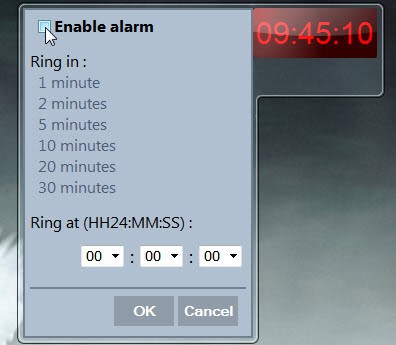
desktop alarm clock

First thing you need to do is to click in the enable alarm check box to enable the functionality. Then you either need to select a time period, e.g. five minutes from now, or a specific time of the day. The alarm clock displays the set alarm above the current time.

A click on the Wrench icon opens the options. Here it is possible to change the color of the clock, the alarm sound, the alarm loop and the appearance of the clock on the desktop. The clock uses a 24-hour style by default which can be changed to a 12-hour time conversion convention (am / pm). The default sound of the alarm is not well suited for that purpose (Windows Balloon on the test system). It is advised to select another audio file for the alarm sound.
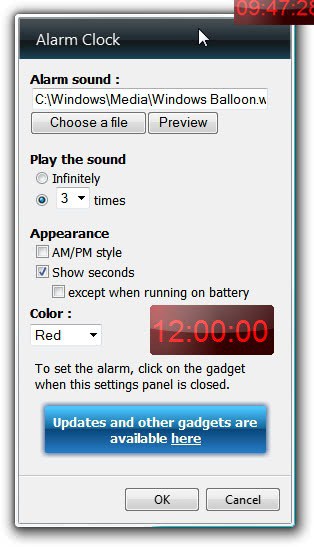
windows alarm clock

The desktop alarm clock is a handy gadget for Windows. It is on the other hand rather limited in functionality. There is for instance no option to configure multiple alarms or recurring alarms. Options to link the alarm functionality to calendar applications provided by Outlook would be handy as well.

Windows users can download the Alarm Clock gadget from the developer website. Check out How To Uninstall Gadgets In Windows 7 for uninstallation instructions.


© Martin Brinkmann for gHacks Technology News | Latest Tech News, Software And Tutorials, 2011. | Permalink |
Add to del.icio.us, digg, facebook, reddit, twitter
Post tags: , , ,


Monday, October 3, 2011

Microsoft Retires Gadgets In Preparation Of Windows 8 Launch

Microsoft introduced gadgets when the company launched the Windows Vista operating system. First in a limited gadget’s sidebar that restricted the location that gadgets could be placed in, and then usable on the full desktop with the release of Windows 7.

Users who visit the Windows Live Gallery page are now redirected to a Looking for gadgets page that states that the “Windows Live Gallery has been retired” in order “to focus support on the much richer set of opportunities available for the newest version of Windows”.

The informational page furthermore states that Microsoft “is no longer supporting development or uploading of new Gadgets”. Some desktop gadgets are still available for download as part of the Windows Personalization Gallery, but no where near as much as before.

It may come as a surprise that Microsoft decided to retire the Windows Live Gallery before the official release of the Windows 8 operating system. While it may make sense to get the majority of developers to develop with Windows 8 compatibility in mind, it means at the same time that Vista and Windows 7 users have less options when it comes to downloading and adding gadgets to their operating system.

The Redmond company wants developers to switch from developing gadgets for Windows to developing Metro-style apps for the upcoming Windows 8 operating system.

Windows Developer Preview allows you to leverage your existing skills and code assets so you can create great experiences for your customers. Gadget and web developers can now use their HTML5 and CSS3 skills to build native Windows apps. .NET Developers can use XAML, C#, and Visual Basic to build beautiful Metro-style apps. Game developers can use the power of DirectX 11.1 to build amazing, immersive gaming experiences. Driver developers benefit from increased productivity with the new, integrated Visual Studio development environment.

Not all developers on the other hand will have enough resources to build apps for an operating system that has not yet been released. It is also unclear how well Windows 8 will do, considering the controversial move to the Metro user interface.

Microsoft’s move to shut down the Windows Live Gallery is on the other hand not the immediate end for existing and future gadgets. Developers and companies on the other hand will have to find hosting for their gadgets if they did rely on the gallery up to this point to host and promote their gadgets.

Microsoft on the looking for gadgets page suggests to use the companies own CodePlex project hosting service as a new home for Windows gadgets.

What’s your take on the retiring of the Windows Live Gallery?


© Martin Brinkmann for gHacks Technology News | Latest Tech News, Software And Tutorials, 2011. | Permalink |
Add to del.icio.us, digg, facebook, reddit, twitter
Post tags: , , , ,