Pages

Showing posts with label browser security. Show all posts

Saturday, December 10, 2011

Google Funded Browser Security Comparison Says Chrome Most Secure

A recently conducted and published browser security comparison by Accuvant Labs comes to the conclusion that Google’s Chrome browser is more secure than Firefox and Internet Explorer. The researchers looked at specific browser security technologies and their implementation in web browsers. That’s an analytical what-if approach, and fundamentally different from analyzing a browser’s vulnerabilities in the past.

Only the most recent versions of Microsoft Internet Explorer (9), Google Chrome (12 and 13) and Mozilla Firefox (5) were analyzed. Other browsers, like Opera or Safari, were not included in the research.

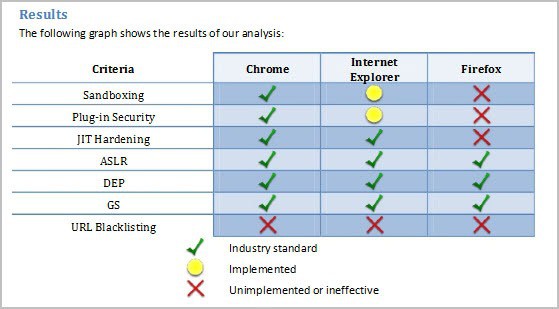
The results and areas that have been analyzed in the study are displayed in the table below.
browser security

All three browsers have implemented industry standard data execution prevention, address space layout randomization and stack cookies anti-exploitation technologies. The researchers found Firefox’s sandboxing, plug-in security and JIT hardening to be either unimplemented or ineffective. They also concluded that Chrome had the edge over Internet Explorer as the browser’s implementation of sandboxing and plug-in security was industry standard, while Internet Explorer’s was not.

Here is the conclusion of the research paper.

The URL blacklisting services offered by all three browsers will stop fewer attacks than will go undetected. Both Google Chrome and Microsoft Internet Explorer implement state-of-the-art anti-exploitation technologies, but Mozilla Firefox lags behind without JIT hardening. While both Google Chrome and Microsoft Internet Explorer implement the same set of anti-exploitation technologies,Google Chrome’s plug-in security and sandboxing architectures are implemented in a more thorough and comprehensive manner. Therefore, we believe Google Chrome is the browser that is most secured against attack

Neither the fact that the research was sponsored by Google, nor the missing definition of industry standard disqualifies the research paper immediately. It is however something that needs to be addressed and looked at.

It needs to be noted that core browser security plays just a part in a user’s threat protection. Other factors include the operating system, up-do-date plugins and browser versions, browser extensions or security software.

What’s your take on the research paper?


© Martin Brinkmann for gHacks Technology News | Latest Tech News, Software And Tutorials, 2011. | Permalink |
Add to del.icio.us, digg, facebook, reddit, twitter
Post tags: ,


Tuesday, October 25, 2011

Browser Autocomplete Feature May Reveal Personal Data

The autocomplete feature can be pretty handy at times. It helps you log in on your favorite website faster or load a website in your browser without having to enter the full web address. Researchers from Minded Security Labs have released a proof of concept that demonstrates how a third party website can get access to a browser’s autocomplete entries (which means stealing).

The proof of concept works in Firefox, but the security researchers state that other browsers are also affected by it. They explicitly mention Microsoft’s Internet Explorer and note that the Google Chrome may be vulnerable as well. They do however mention that an attack may not be as easy to implement for that browser due to the fact that Chrome does not “send keydown/keyup events to JS when the autocomplete drop down menu is focused”.

Here is how the issue can be exploited:

It is possible to get key down / up events via JavaScript when a drop down autocomplete menu is shown. This means that it is possible to lure a user to play a game and steal arbitrary values from browsers autocomplete feature.

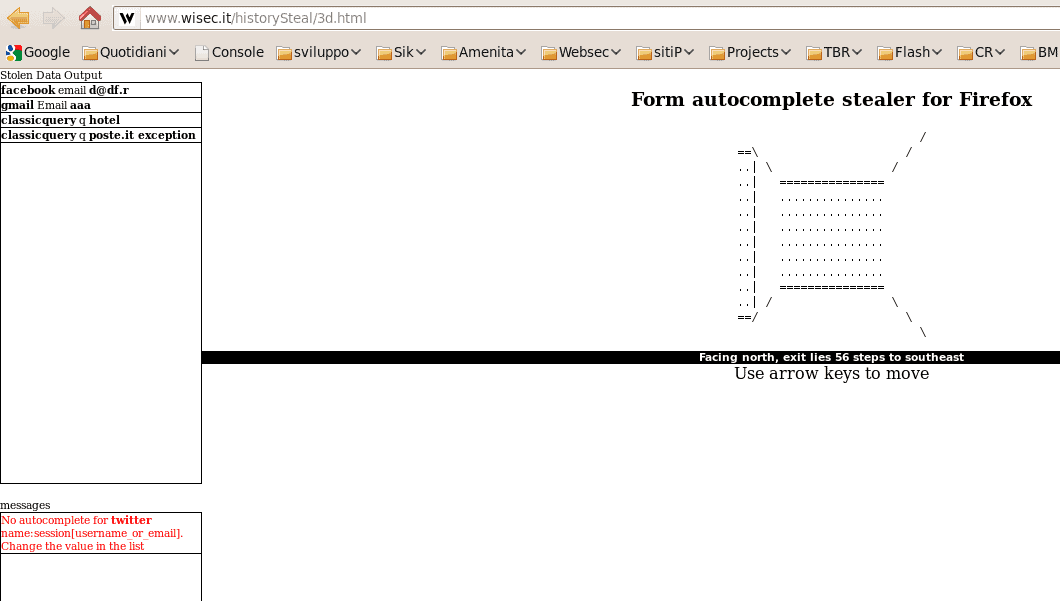
The proof of concept page demonstrates how third party websites can steal autocomplete information from Firefox. The page can check if autocomplete information are available for sites such as Twitter, Facebook, Gmail, Microsoft or Yahoo logins as well as three different types of inputs.

form autocomplete stealer

According to the security researcher, browser vendors should implement a feature into their browsers that ties the autocomplete input to a particular website. The only way to protect the data from being stolen is to disable the browser’s autocomplete feature for forms and searches.

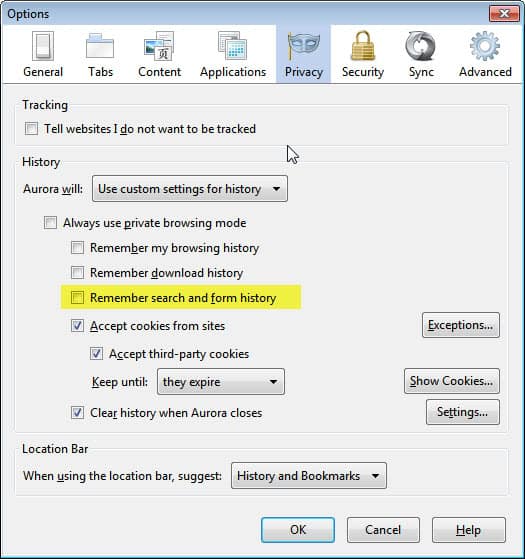
Firefox users can do that in the preferences under the Privacy tab.

firefox form history

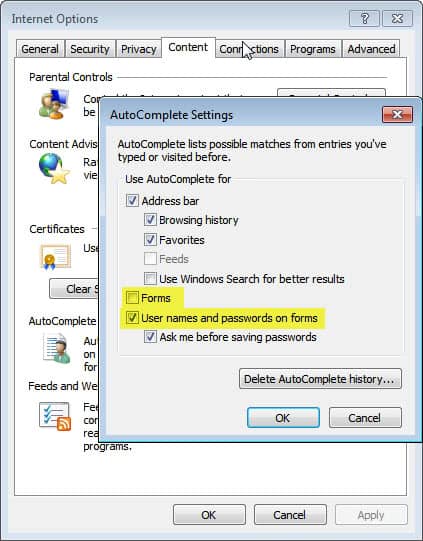
Internet Explorer users can disable autocomplete under Internet Options > Content > AutoComplete > Settings.

internet explorer autocomplete

Are you using your browser’s autocomplete feature for forms? Let me know what you think of the vulnerability in the comments. (Thanks Venkat)


© Martin Brinkmann for gHacks Technology News | Latest Tech News, Software And Tutorials, 2011. | Permalink |
Add to del.icio.us, digg, facebook, reddit, twitter
Post tags: , , , , ,