Pages

Showing posts with label chrome tabs. Show all posts

Monday, November 14, 2011

How To Disable The New Tab Page In Chrome

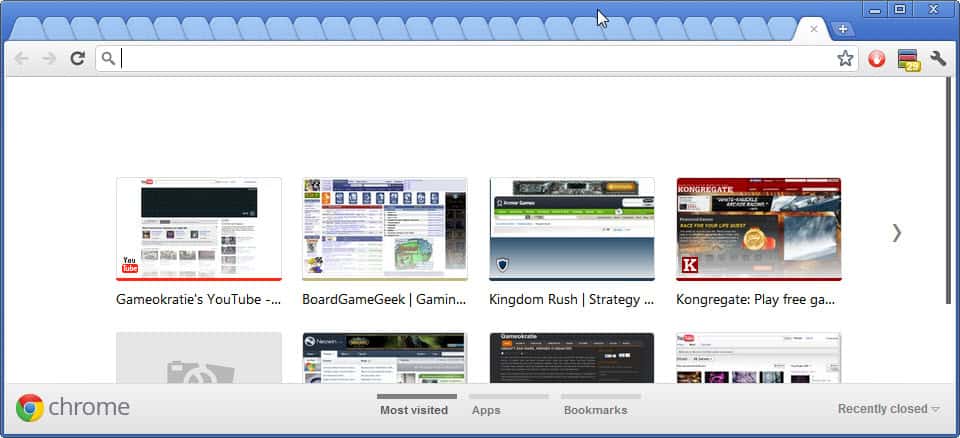
If you are on the Google Chrome Stable channel you may have noticed that Google recently changed the new tab page in the web browser. The page now opens with the most visited sites and navigational elements on the right and bottom of the screen to switch to the web apps listing or bookmarks. The Internet and especially Google’s Help forum is full of users who want their old new tab page back and disable the new one.

There is a way currently to do that on the stable channel. Users on the Dev channel, which is Chrome 17 right now, cannot use that method anymore which indicates that it is only a temporary solution for the time being.

What you need to do is to add the startup parameter --new-tab-page to the web browser start. Close all instances of the Chrome browser on your system. Windows users can right-click the Chrome executable and select Properties from the context menu. The Chrome executable is located in the user directory. Windows 7 users find it under C:\Users\\AppData\Local\Google\Chrome\Application\

The Google Chrome Properties menu pops up once you have selected properties from the context menu. Append --new-tab-page at the end of the Target path (leaving a blank inbetween) and save the changes with a click on OK.
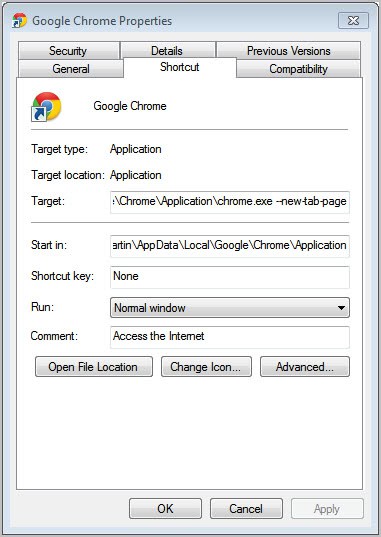
google chrome new tab page

When you start Chrome again you should be able to work with the old new tab page again.

But what if the flag is no longer working? Your only option then is to install a third party extension to change the new tab page of the browser. You could install extensions like Define your own new tab to create your own tab page, New Tab Redirect to select a specific web address that is loaded when the new tab button is activated, Empty New Tab page for a blank page or Awesome New tab Page for a customizable tab page.

What’s your take on the new tab page in Chrome?


© Martin Brinkmann for gHacks Technology News | Latest Tech News, Software And Tutorials, 2011. | Permalink |
Add to del.icio.us, digg, facebook, reddit, twitter
Post tags: , , ,


Wednesday, November 2, 2011

Tab Position Customizer For Google Chrome

Tabbed web browsers like Google Chrome, Firefox, Opera or Internet Explorer have specific orders in which tabs are opened and closed. Developers have to configure orders for opening blank pages and links as well as activation rules when users close tabs. The default behavior of most browsers opens blank tabs on the rightmost side of the tabbar, links to the right of the active tab and activate the last used tab after closing a tab.

Some users may prefer a different order of things. Someone with one hundred or more open tabs would not necessarily want a blank tab opened at the rightmost location of the tabbar as it is easy to lose the orientation this way.

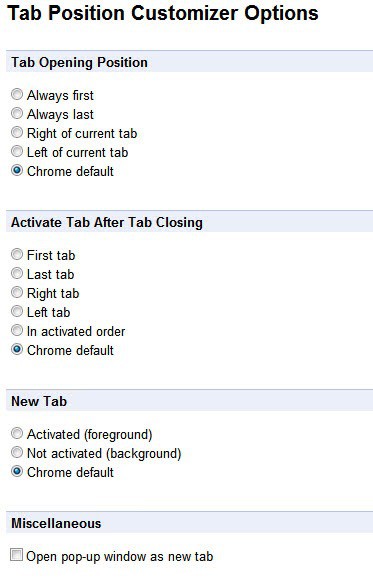
The Google Chrome extension Tab Position Customizer empowers the user to select the tab order. In particular it is possible to select the tab opening position, the new tab behavior and the behavior after closing a tab in the Google browser.

Here are the available options:

  • Tab Opening Position: Always first, Always last, Right of the current tab, Left of the current tab, Chrome default
  • Activate Tab After Tab Closing: First tab, Last tab, Right tab, Left tab, In activated order, Chrome default
  • New Tab: Activated (foreground), Not activated (background), Chrome default

As you can see, there are lots of options to configure the tab opening and closing behavior in Google Chrome.

chrome tab position customizer

Chrome users need to open the extension’s options via the Wrench > Tools > Extensions > Options menu first to make the changes to the tab behavior in Chrome. The changes made on the configuration screen are active immediately which is handy for testing purposes.

The Tab Position Customizer extension empowers Chrome users to pick the tab opening and closing behavior that they want. You may have noticed that the extension has another option under Miscellaneous which configures Chrome to open pop-up windows always as new tabs in the same browser window.

Chrome users can download the extension from the official Google Chrome Web Store.


© Martin Brinkmann for gHacks Technology News | Latest Tech News, Software And Tutorials, 2011. | Permalink |
Add to del.icio.us, digg, facebook, reddit, twitter
Post tags: , , ,


Friday, October 28, 2011

TooManyTabs For Chrome Improves Tab Management

If you have a lot of tabs open in the Chrome web browser, you will notice at one point that you cannot see the favicons (the website specific icons) anymore in the browser’s tab bar. That’s a problem as it is no longer possible to identify the websites that are open in Google Chrome.

Take a look at the following screenshot to see what I mean. The limit varies depending on the size of the Chrome window and the resolution of the computer monitor.

chrome blank tabs

If you look at the Firefox web browser, you will notice that its developers have added a minimum tab width in the browser to avoid this issue.

Back to the Chrome browser. The only viable options for Chrome browser users are to either limit the tabs that they open at the same time in the browser or to install a tab management extension that provides alternate means of identifying and working with tabs in the browser.

The TooManyTabs extension for Google Chrome is one of the most popular Chrome extensions. Here is a video showcasing the tab management extension’s primary features.

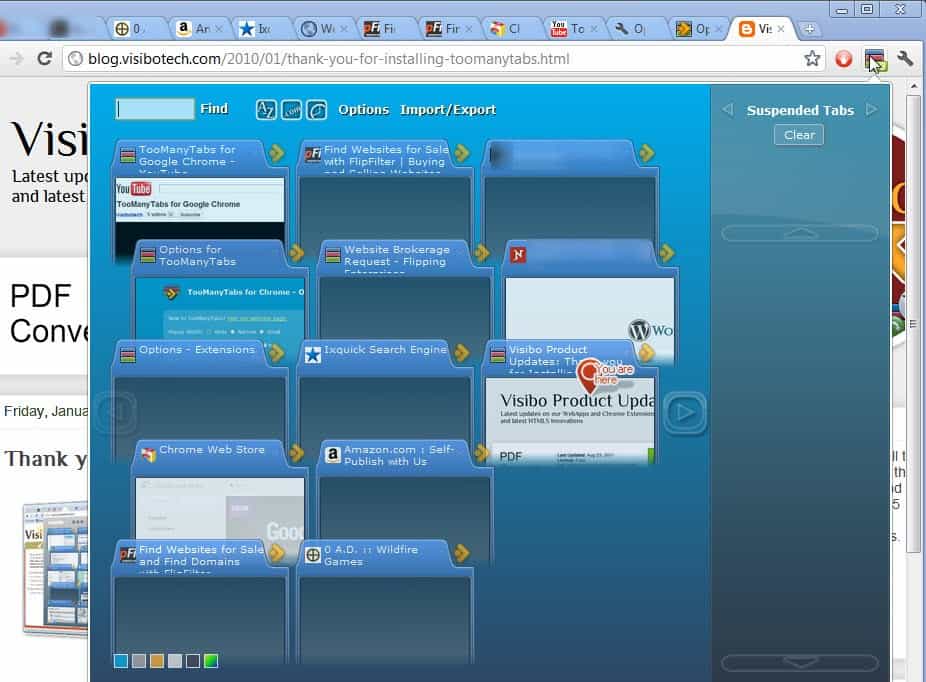
The extension adds a single icon to the Chrome address bar. You can click on that icon at any time to display an overlay of all open tabs in the browser.

chrome too many tabs

Each tab is displayed with its page title and a thumbnail screenshot of the actual web page. Sorting options are available at the top to sort by name, web address or creation time. If you have many tabs open you may also find the search function helpful as you can use it to narrow down the tab listing if you want to find specific websites.

A left-click on a thumbnail or title switches directly to the tab so that it becomes the active tab in the browser.

The right sidebar menu displays a list of suspended and recently closed tabs which can be restored with a single click of the mouse. It is furthermore possible to suspend tabs with a click on the arrow icon in the interface. The benefit here is that suspended tabs do not use memory or cpu cycles.

TooManyTabs is a handy Google Chrome extension for power users who often have dozens if not hundreds of open tabs in the browser. The extension can be installed directly from the official Chrome web store.


© Martin Brinkmann for gHacks Technology News | Latest Tech News, Software And Tutorials, 2011. | Permalink |
Add to del.icio.us, digg, facebook, reddit, twitter
Post tags: , , , ,