Pages

Showing posts with label defraggler. Show all posts

Tuesday, November 15, 2011

Defragmentation Software Defraggler Updated, Better SSD Detection

Two of the three hard drives in my main computer are Solid State Drives (SSD) that do not need defragmenting. In fact, running defragmenting software on them could have an opposite effect on the drive’s speed and health.

One of my personal criteria therefor is that defragmentation software needs to be able to block those drives from being included in defragmentation runs.

The popular defragmentation software Defraggler has recently been updated by its parent company Piriform. The software, while not blocking Solid State Drives outright, is now warning users if they select a SSD for defragmentation.
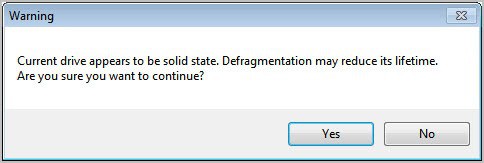
solid state drive defragmentation warning

When you first start the defragmentation software you see a list of all connected drives and various stats collected by the software. Stats include each drive’s overall capacity, used and free space, fragmentation and a status field which indicates if the drive is ready for defragmentation and whether it is a SSD or not.

You can still select a SSD for defragmentation but the program will display the warning message on the screenshot above if you do so.

defraggler

But that’s not the only new feature of the latest Defraggler version. The developers have added disk and file benchmarking capabilities. For the benchmarking options to become available, you first need to analyze a disk or partition. This analysis displays the fragmentation of the partition or drive, plus it displays a button to benchmark that drive. A click on the button runs a disk performance check on the drive that calculates the drive’s random read speed.

It is furthermore possible to benchmark individual files by switching to the file list tab, right-clicking one of the files and selecting to benchmark it from the context menu.

benchmark file

The changelog lists the following additions, fixes and changes to Defraggler 2.08:

  • Added Disk and File benchmarking.
  • Added Volume Shadow Service (VSS) compatible mode.
  • Improvements to disk health tab.
  • Added Real Value information to SMART data.
  • Health tab now supports Fahrenheit.
  • Improvements to SSD detection.
  • Minor fixes to scheduler stop commands.
  • Minor defrag algorithm improvements.
  • Translation fixes.

Better SSD detection is a great addition to Defraggler. Windows users can download the latest version of Defraggler from the developer website. (via)


© Martin Brinkmann for gHacks Technology News | Latest Tech News, Software And Tutorials, 2011. | Permalink |
Add to del.icio.us, digg, facebook, reddit, twitter
Post tags: , , , ,


Thursday, October 6, 2011

CCleaner Network Professional

CCleaner is an indispensable tool for many Windows users to clean up temporary files and other leftovers on the system. The core benefit here is that running the program regularly frees up storage space. Pirisoft, the developers of CCleaner, are offering a commercial CCleaner Network Edition for some time now for easier deployment and administration of the software in computer networks.

Two additional versions of CCleaner, CCleaner Home and CCleaner Business, are also available next to the free and network edition. And with the release of CCleaner Network Professional, users now have the choice between five different versions. Lets take a closer look at their differences:

  • CCleaner Free: Free for non-commercial use.
  • CCleaner Home: Like the free version but with priority technical support.
  • CCleaner Business: Like the free version, but with premium business support.
  • CCleaner Network Edition: Suggested for computer networks with ten or more computers. With SMB and Enterprise network support, simple one-click deployment onto clients and options to analyze single machines, workgroups or the entire network. Additional, the network edition supports Active Directory, management of all operations from one place and encrypted communications.

The newly released Network Professional version of the software looks on first glance much like the Network Edition. The only difference to the network edition is inclusion of the company’s disk defragmentation software Defraggler.

Interested users can download a trial version of the Network Professional version after filling out a form. The download link and product registration code will be send to the email address entered in the form. You won’t find the software download anywhere else on the Internet, as you are asked to enter the product key during installation.

The program offers to scan the entire network for client PCs after installation. The trial version is limited to 500 clients which should be sufficient for the majority of trials.

piriform ccleaner network professional

You can then install clients on connected systems right from the admin client. Once done, you get access to both CCleaner and Defraggler in tabs This is true when selecting a Workgroup or a single client PC.

ccleaner network

The program itself works like the CCleaner Network Edition with an additional program included in the package and manageable from the same admin interface.

Interested users find more information about the Network Professional version of CCleaner at the Piriform website.


© Martin Brinkmann for gHacks Technology News | Latest Tech News, Software And Tutorials, 2011. | Permalink |
Add to del.icio.us, digg, facebook, reddit, twitter
Post tags: , , , ,