Pages

Showing posts with label dns benchmark. Show all posts

Tuesday, October 25, 2011

DNS Jumper Updated, Switch Domain Name Servers Effortlessly

Back in 2009 I reviewed one of the first public versions of DNS Jumper, a portable program for Windows that allowed you to change the system’s DNS with the click of the mouse button. The application back then was released during the “dns craze” where Google and other big players like Symantec entered the market to become providers. The program had its flaws, especially the inability to add your own DNS providers to the list and the lack of information about each server needed fixing to make the program more versatile and comfortable to use.

The developer recently has released DNS Jumper version 1.0.4. The new version shows many improvements justifying a new review here on Ghacks.
dns jumper

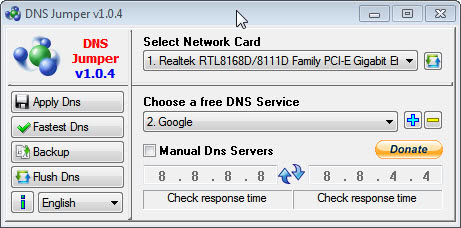
When you start the program now you will notice that it looks completely different from the version reviewed in 2009. You can select one or all network cards of the computer system in the pulldown menu at the top. A refresh button is available to scan for new network cards.

The Choose a free DNS Service menu lists dozens of DNS providers. If you select a provider from the list you will see the IP addresses of the servers in the program interface. Even better, you can click on the check response time button to benchmark all domain name servers listed in the application.

You can add DNS services manually to the list of providers with a click on the + icon in the interface. All you need to do then is to enter a DNS Server Name and the two server IP addresses.

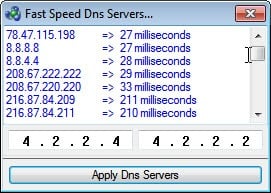
Another interesting feature is the ability to benchmark all servers for speed. A click on the Fastest DNS button runs the benchmark (again) with the option to switch to the fastest server in the end.
fast speed dns server

A click on Apply DNS sets the currently selected DNS Service as the DNS provider for the selected network adapter. The program can backup the settings to restore them at a later time and flush the DNS.

The developer has improved the program noticeably by correcting the issues of the old version. Windows users can download the portable freeware DNS Jumper from the developer website. The program is compatible with 32-bit and 64-bit editions of the Windows operating system.


© Martin Brinkmann for gHacks Technology News | Latest Tech News, Software And Tutorials, 2011. | Permalink |
Add to del.icio.us, digg, facebook, reddit, twitter
Post tags: , , , , ,


Tuesday, October 18, 2011

DNS Benchmark, Speed Test DNS Servers

One of the areas that a lot of computer users do not bother to optimize is the domain name server (DNS) of their Internet connection. A mediocre DNS not only slows down the connection speed on websites and Internet servers in general, but can also be the cause for connection issues and even censorship.

Selecting the right third party DNS provider should require at least some research on the user’s part to find the best suitable server. A user in the US for instance would not necessarily want to pick a European DNS provider and vice versa. Another aspect that plays a role besides speed is the legal situation if a DNS provider in a foreign country or by a foreign company is selected. Plus, you may get extras like options to filter out spam or specific types of sites automatically.

DNS Benchmark is a free portable software for the Windows operating system that can be used to test the speed of multiple DNS servers. The program ships with dozens of pre-added servers that include Google DNS and Open DNS among others. The program comes with options to add or remove particular domain name servers from the listing.

dns benchmark

A click on run benchmark runs a series of tests that include name and owner look-ups, status messages and the response time. The latter is further divided into cached and uncached response times.

You can switch to a tabular data view which offers minimum, average and maximum values as well as a providers reliability in percentage.

The program works best for users who have found a few prospective DNS providers on the Internet. These users would add the server IPs of all prospective domain name servers to the DNS Benchmark software to test their speed and reliability.

Speed is of course only one of the variables that computer users need to look at. Interested Windows users can download DNS Benchmark from the official developer website. The program is compatible with all recent 32-bit and 64-bit editions of the Microsoft Windows operating system. An alternative is the previously reviewed Namebench.


© Martin Brinkmann for gHacks Technology News | Latest Tech News, Software And Tutorials, 2011. | Permalink |
Add to del.icio.us, digg, facebook, reddit, twitter
Post tags: , , , ,