Pages

Showing posts with label facebook news. Show all posts

Thursday, January 12, 2012

Facebook Users Can Soon Listen To Music With Their Friends

When I discover a great video or music track on the Internet I often want to share it with friends who I know have a similar taste when it comes to entertainment. What I really like to do is to watch videos together with friends. This works considerably well as we are often using Teamspeak or comparable voice over IP software for communication.

Facebook has just announced that the company will soon enable a feature on the social networking site that allows users to listen to music together on the site. Friends currently listening to music will have a music icon next to their online status in the Facebook sidebar.

Just hover with your mouse over the username and click on the listen with button to listen to the same music your friend is listening to.

facebook listen with music

The music will automatically be synchronized so that you start listening to the music at the same position that your friend is currently at.

Alexander Roche’s blog post at the official Facebook blog even hinted at the possibility that it will be possible to listening to music in groups, with one friend playing the DJ while everyone is listening to the music.

Information about the current session can be displayed in chat, with the possibility that other users join in to make it a group listening experience and chat session.

Music is powered by third party applications that users need to first enable on their accounts before they can listen with others to the same music.

Facebook notes that only “the people you’ve shared your listening activity with can see when you’re listening with a friend”. General privacy related settings for the application can be set under App Settings which for instance allows you limit music information to just yourself or a close group of friends.

app settings

The new feature is currently being rolled out. Official information indicate that it will take a few weeks before every Facebook user can make use of the new feature. This only affects Facebook users who have a music app installed or will install one on the site.

What’s your take on the new feature?


Thursday, December 15, 2011

Facebook Timeline Profiles Now Available To All Users

Timeline is the name of the new Facebook user profile that was previously only available to beta testers and developers. Interested users can now activate Timeline for their profile on this page before everyone else gets a notification that it is now available to all users. It is not clear yet if all Facebook profiles will eventually be migrated to the new Timeline profile, or if this remains an option.

A word of advise though: there does not seem to be a way to go back to the old profile once Timeline has been activated. The options at least do not list a setting to revert the profile to the old one.

The profile has been revamped completely. The name indicates already that information are now displayed in a timeline on the profile page.

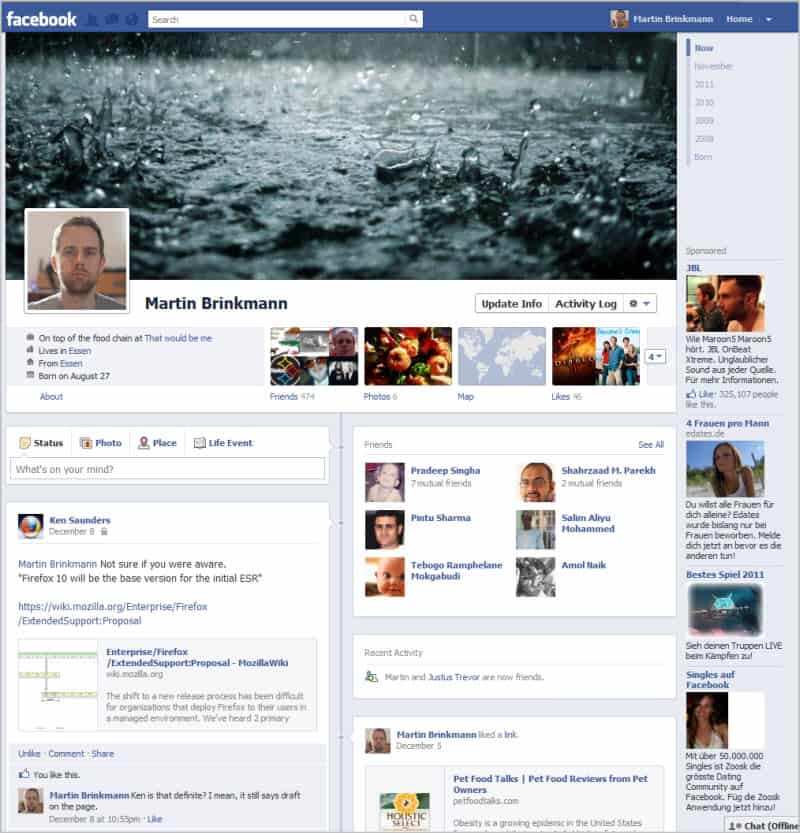
Basic information, like the user’s name and occupation, profile photo, a large image, friends, photos, and likes are displayed near the top. The current and last month, and years are displayed on the right ready for selection. You can use the selection menu to list activities of a friend in a particular year or month.

facebook timeline profile

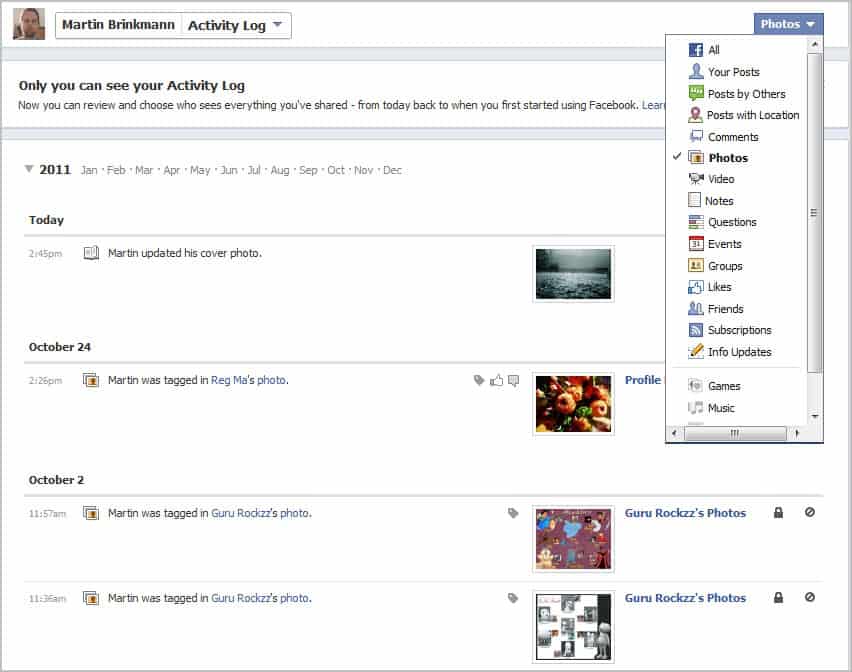
The timeline begins after that header section. The profile page highlights recent activities at the top and not so recent ones below that. One interesting addition is the activity log which highlights all user activities on a single page. Here it is also possible to hide news and activities from appearing in the timeline. A filter at the top offers to filter activities by subject, e.g. to only display likes, photos or comments.

activity log

The privacy options come with a new setting to change the visibility of old timeline posts to friends only (even if they have been public before). This is done under Privacy Settings > Limit the Audience for Past Posts.

The visibility of each post or activity can be changed on the profile page as well. Just hoover the mouse over a post to display the settings menu there. You have the option to feature posts, or to edit or remove them from the timeline.

remove timeline

Facebook users who activate the timeline profile can edit the new profile page for seven days before it becomes visible to everyone else. This has been implemented to give users enough time to make modifications to the information that are displayed on the profile. Users who do not want to wait that long can publish the timeline profile whenever they are ready to do so.

What’s your take on the new profile? (via)


© Martin Brinkmann for gHacks Technology News | Latest Tech News, Software And Tutorials, 2011. | Permalink |
Add to del.icio.us, digg, facebook, reddit, twitter
Post tags: , ,