Pages

Showing posts with label Facebook. Show all posts

Friday, February 17, 2012

Encrypt Facebook Group Communication With Encrypt Facebook

Social networking sites may use the contents that you post on their sites in a variety of ways. They may sell them to advertisers, use them to personalize advertising on their sites, may report them to local authorities or ban your account.

Encrypt Facebook is a new Google Chrome extension that offers an ingenious way out for users who want to communicate on Facebook privately. The idea is simple: All messages are posted in encrypted form on the site, and saved as thus in the Facebook database. Facebook cannot read the contents, and the same is true for third parties requesting access to the contents.

The setup process is divided into three steps:

  • Create a Facebook group or use an existing one
  • Install the Google Chrome extension, and configure it
  • Create a security key that is used to encrypt and decrypt the contents that get posted.

The biggest hurdle to setting this up correctly is getting the security key to all participants. Only those with the correct key can read the encrypted data on Facebook, and can post protected contents on the site that are readable by others.

You need to click on the extension’s icon in the address bar to set it up correctly. Here you are asked to enter the Facebook Group page url and the encryption key.

facebook encryption

Once done, you can write posts or reply as usual on that group page. Your contents are automatically encrypted whenever you finish writing the message. A click on post adds the message to the site

encrypt facebook messages

Group users visiting the page with the extension and correct encryption key installed will see all messages in decrypted form. Everyone else with access sees only the encrypted messages.

The extension uses an AES 256 key to encrypt the messages. The key is stored locally.

The extension has primarily been created for users in oppressive or corrupt governments to allow citizens to communicate freely without fear of repercussion.

Two issues need to be mentioned. It first needs to be noted that the key is posted in plain text on the local system. Anyone with access will be able to access the group messages as well, provided that the group is known and accessible.

Facebook may also notice the garbled contents on their site and put an end to it when they discover it.

Chrome users can download the extension from the official Chrome Web Store.


Tuesday, January 24, 2012

How To Move The Facebook Chat Window

We have covered quite a few Facebook modifications and tips in the past that let you get more out of Facebook Chat. A userscript for instance to add easier access to emoticons in chat or how to hide from friends on Facebook chat.

Pretty Facebook Chat is a Google Chrome extension that lets you customize your Facebook Chat experience further. You will notice the red dot that the extension adds next to Facebook’s Chat menu on the lower right corner of the page. This is used to turn the extension on or off. Once you start a chat with someone on Facebook, you will notice the modified user interface right away.

facebook chat

The first thing that becomes obvious right away is that the chat window is no longer attached to the page. You can drag and drop the chat around on the page to move it to a position that you find more comfortable. You can however only move it around in the Chrome window, and not to a location outside of it.

You may also notice that the chat window is larger than the standard window on Facebook, and that its author has added interface customizations to it, like shadows or little animations.

Another thing that you will notice is the emoticons button that has been added to the window. You can click on it to display a large list of emoticons and images that you can add to the chat with a click. This even includes a list of miniature profile pictures that can be added to individual messages.

Here is a video that demonstrates the capabilities of the extension.

Facebook users who use the Chrome browser to connect to the site may want to take a look at the extension to spice up their chat experience on the site. The extension is available for direct installation at the official Chrome Web Store.


Google Don’t Be Evil Bookmarklet Released

Google has a distinct advantage that other companies on the web do not have. Google Search at the time of writing controls more than 50% of all search on the web, which can go up in some countries to more than 90%. Google uses this to their advantage by promoting their own services in search. And while nearly every other company would certainly do the same if they were in Google’s position, it is quickly turning the company’s image of being an impartial search provider upside down.

Depending on the terms you search for, you may end up with results from YouTube, Google News, Google+, Google Images or other products that Google has hard coded into the search results. That’s fine if those results are relevant to the search term. More often than not though, they are not.

Engineers from Facebook, Twitter and other social networking companies have now released a Don’t Be Evil bookmarklet and browser extension to make Google’s search results more impartial and relevant at the same time.

Once you have dragged the bookmarklet to your bookmark bar or bookmarks folder you can run it whenever you have performed a Google search.

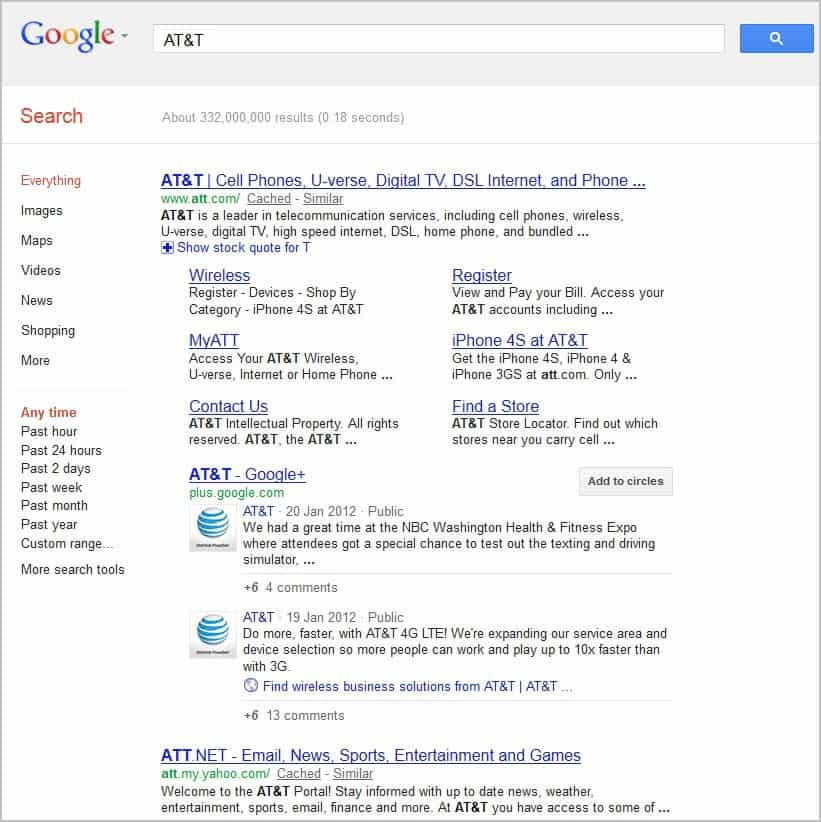
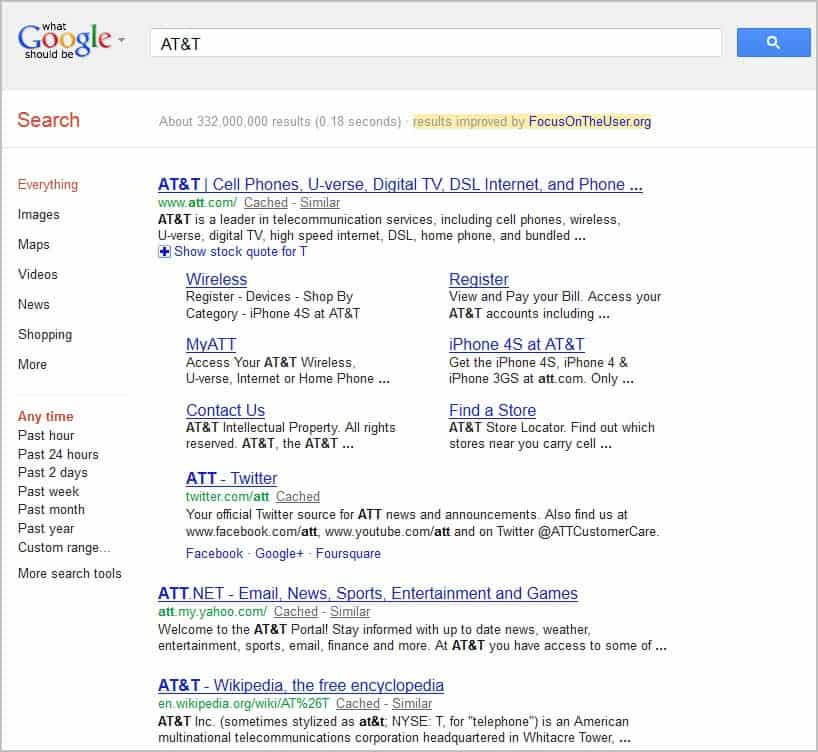
Below are two screenshots. The first is a copy of a standard search for AT&T on Google, the second how the page looks like once you have run the bookmarklet.

google search result

google dont be evil

The bookmarklet has replaced the Google+ listing with the more relevant Twitter account listing. We need to look at how relevancy is computed to make sure that it does not just favor other social networking sites over Google. According to the developers, their tool checks Google Search for the term to select the first social networking listing in the standard results as the most relevant term. Standard result means a page that Google has not hardcoded into the search results.

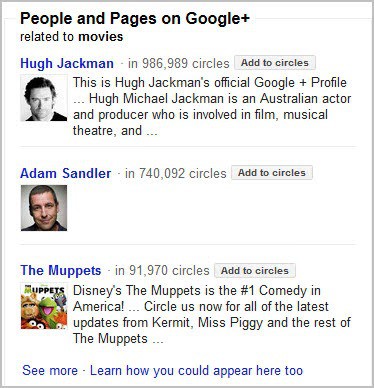
The bookmarklet will also analyze people and pages results on the right side with relevant results

people and pages

and the suggestions when you start typing a name into the search form.

suggestions

It is interesting to note that the bookmarklet enables the feature for the session, and not only for the current page that you are on. Results are automatically adjusted if you use Google Search functionality on the same page again.

Is this making the search results on Google more relevant? The answer should be yes if you look at a pool of users. When it comes down to the individual user, it depends solely on that user’s preference. Some users do not want to see social signals in the results at all, others may be using Google+ exclusively or a mixture of services. Users should not turn this into a Google vs Facebook vs Twitter vs Whatever fight. Instead, they should look at what they want their search results to be and voice that opinion loud and clear.

How they do that? By switching to another search engine for instance if they feel that Google Search has deteriorated in the past year. If users flock to other search engines, then Google may be willing to reanalyze their latest strategies and may return to impartial search results.

The developers have created a browser extension for Google Chrome that automates the process. You can download it only directly from the Focus on the user website.

Here is a video demonstration of the bookmarklet.

Keep in mind that while not officially released by Facebook or Twitter, it still has their stamp all over it. I suggest you read Giga Om’s comment on this.

What’s your take on this? Voice your opinion in the comments.


Thursday, January 12, 2012

Facebook Users Can Soon Listen To Music With Their Friends

When I discover a great video or music track on the Internet I often want to share it with friends who I know have a similar taste when it comes to entertainment. What I really like to do is to watch videos together with friends. This works considerably well as we are often using Teamspeak or comparable voice over IP software for communication.

Facebook has just announced that the company will soon enable a feature on the social networking site that allows users to listen to music together on the site. Friends currently listening to music will have a music icon next to their online status in the Facebook sidebar.

Just hover with your mouse over the username and click on the listen with button to listen to the same music your friend is listening to.

facebook listen with music

The music will automatically be synchronized so that you start listening to the music at the same position that your friend is currently at.

Alexander Roche’s blog post at the official Facebook blog even hinted at the possibility that it will be possible to listening to music in groups, with one friend playing the DJ while everyone is listening to the music.

Information about the current session can be displayed in chat, with the possibility that other users join in to make it a group listening experience and chat session.

Music is powered by third party applications that users need to first enable on their accounts before they can listen with others to the same music.

Facebook notes that only “the people you’ve shared your listening activity with can see when you’re listening with a friend”. General privacy related settings for the application can be set under App Settings which for instance allows you limit music information to just yourself or a close group of friends.

app settings

The new feature is currently being rolled out. Official information indicate that it will take a few weeks before every Facebook user can make use of the new feature. This only affects Facebook users who have a music app installed or will install one on the site.

What’s your take on the new feature?


Friday, January 6, 2012

How To Change Your Birthday On Facebook

When you sign up for a Facebook account you are asked to enter information about you including your birthday. The majority of Facebook users will probably get that right, but it can happen that you pick the wrong date either accidentally or on purpose if you do not want to reveal you true age to the social networking site.

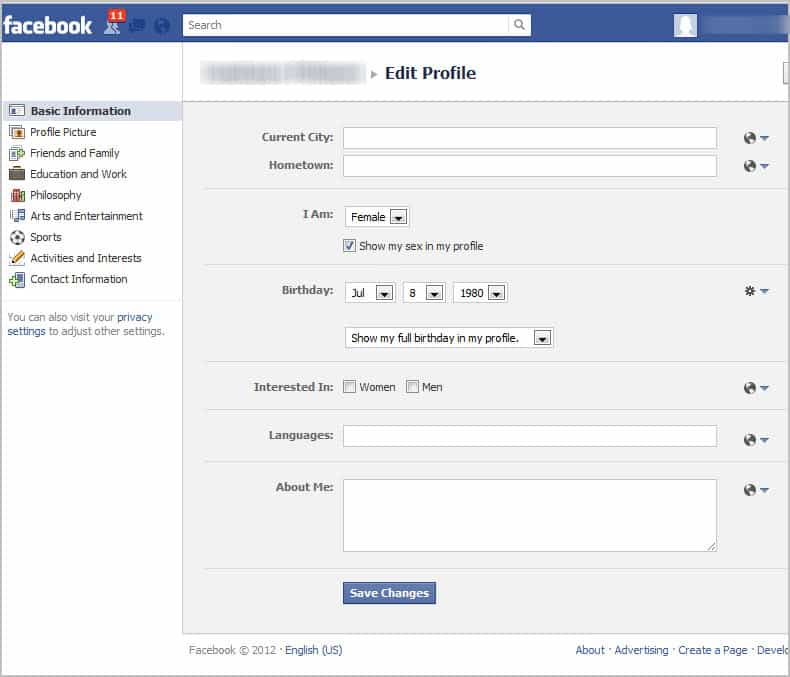
When you later decide to change your age you will notice that this is not possible right away. First you will probably search for options to select a different birthday. When you finally find out that the option is available under Edit Profile, you will notice that the birthday is not editable there. You can open that page right here to test it for yourself.

facebook birthday

Why is it blocked? The most likely reason is to block users from changing their birthday from changing it whenever they feel like it, and to block minors trying to make themselves adults on the site.

This is however a issue if you have accidentally selected the wrong birthday. How can you change it if not in the Facebook profile?

The only way to change your date of birth on Facebook is to contact the Facebook support team to make them change it for your.

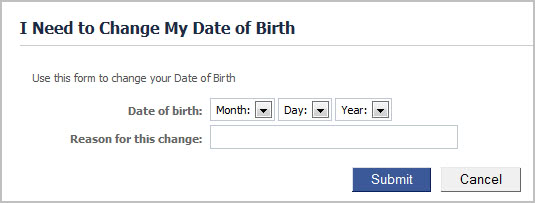
Facebook has made available a form for that request which you can access here.

facebook change date of birth

Here you need to select the new birth date and enter a reason for the change. The most likely reason is that you have made an error during account creation. It is likely that the first request will be granted if you use that reason for changing the birthday.

There is no telling how Facebook will react if you use the form multiple times throughout the years. It is likely that they will deny the second or third request unless you provide them with a very good reason for the change.


© Martin Brinkmann for gHacks Technology News | Latest Tech News, Software And Tutorials, 2012. | Permalink |
Add to del.icio.us, digg, facebook, reddit, twitter
Post tags: ,


Tuesday, January 3, 2012

Pokes, How To Display Them Again on Facebook

A recent redesign on Facebook has changed the look and feel of the user start page on the social networking site. Some of the changes, the ticker for instance, have mostly received negative feedback from users of the social networking sites.

Many smaller more subtle changes have also been introduced in recent times. The Pokes feature for instance has been removed from the homepage. It was previously displayed on the right side of the Facebook page. And while it is still possible to poke users with a click on the “more” button on their profile page, there is no real visible option anymore to look at the received pokes.

For those who do not know: Pokes are a basic way of saying “hi” without actually having to type anything. It is an option to express affection and interest in a person.

Here is a screenshot that highlights where you find the poke option on old Facebook profiles.

facebook old profile poke

And here is a screenshot where it can be found on new Facebook Timeline profiles.

facebook timeline poke

The pokes page on the other hand is not displayed anymore on the profiles page or any other page by default. Let me explain to you how you can get it back to your news feed page on Facebook and all other pages of your Facebook profile. Take a look at the following screenshot to see where the Pokes link will be added to on your profile page.

facebook pokes

All you need to do is to visit the Pokes page on Facebook. When you do that the Pokes link will automatically be added to the sidebar menu. It is displayed under the Apps category afterwards.

You can alternatively right-click it and select Add To Favorites from the menu to add it to the Favorites listing at the top of the page.

Another alternative is to bookmark the pokes page directly to open it whenever you need to look at the pokes that you have received in the past.


© Martin Brinkmann for gHacks Technology News | Latest Tech News, Software And Tutorials, 2012. | Permalink |
Add to del.icio.us, digg, facebook, reddit, twitter
Post tags: ,