Pages

Showing posts with label mouse software. Show all posts

Thursday, February 2, 2012

Speed Clicker, Computer Aided Mouse Clicks

The author of Speed Clicker has created the program to get more out of games such as FarmVille or FarmTown. While I have never played those games on Facebook, it appears as if players need to click the mouse as fast as possible in various situations like harvesting or fishing. Speed Clicker saves your mouse trigger finger from tiring out. It also gives you an advantage in those games which many will see as cheating, especially when competing against other humans in the game.

But Speed Clicker users can utilize the program for other purposes as well. For instance in other games where clicking performs an action that needs to be repeated a lot of times, or applications where selections are made with mouse clicks rather than entering a number or value with the keyboard.

When you fire up Speed Clicker for the first time, you see the main application window in front of you. Here you define the click rate and the variance. The default click rate speed is set to ten clicks per second. The variance value will move the mouse cursor into a random direction after each click.

speed clicker

You activate the computer aided clicking with a tap on the Ctrl key on the keyboard. It is currently not possible to change the hotkeys which is unfortunate as they interfere with other hotkeys on the computer (for instance Ctrl-T to open a new browser tab). The developer has however announced plans to integrate the option in a future release of the program.

Here is a short video that is showing it in action in the popular FarmTown game.

The application requires the Microsoft .NET Framework 4.0 on the computer. Interested users can download the latest version of Speed Clicker from the developer site.


Tuesday, November 29, 2011

Move Your Mouse Through Screen Borders On Your System

When you move the mouse around on your system you will soon realize that borders have been placed at the edge of the screen to prevent it from falling off the earth. And while that may make sense to avoid confusion, it may also mean more mouse movement on the screen as you cannot just move the mouse beyond an edge so that it reappears at the opposite end.

That certainly would add some confusion (where is the mouse pointer) but also reduce mouse movement throughout the day.

Unlimited Mouse is a free program for the Windows operating system that enables that feature. The application is a portable software that can be executed directly on the system.

The functionality that the program provides becomes available immediately afterwards. You can now move the mouse through the edge of the left screen to make it reappear on the right. This works for all four screen edges and directions.

You’ll probably feel a bit dizzy in your first session with the new functionality as you may not be used to the cursor making big jumps on the screen.

You can not only move the mouse cursor from one edge of the screen to another, but also windows or files that you have selected and started to drag around.

I do not have a second computer monitor, and cannot say therefor if the program is multi-monitor compatible. If you test this, let me know in the comments please.

The program displays an icon in the Windows system tray on launch. A right-click displays options to lock or unlock the mouse. Locking means that you cannot move the mouse from one edge to the other.

Windows 7 users may notice that some of their operating system’s functionality, like the Aero Snap feature, stops working once Unlimited Mouse has been started. It is still possible to use the Windows+cursor key shortcut for the functionality though.

Windows users can download Unlimited Mouse from the developer website. The program is compatible with all recent 32-bit and 64-bit editions of the Windows operating system. (via)


© Martin Brinkmann for gHacks Technology News | Latest Tech News, Software And Tutorials, 2011. | Permalink |
Add to del.icio.us, digg, facebook, reddit, twitter
Post tags: , , ,


Sunday, November 20, 2011

Clikka Mouse, Mouse Software For People With Disability

People with disability may have difficulties working on a computer. Sometimes it may not be possible to use a mouse or the computer keyboard. When that’s the case, special software for people with disability comes to the rescue. These programs often emulate mouse and keyboard, for instance with head movement or eye pointer software.

A free program in this regard, best used in combination with the above, is Clikka Mouse. The program can be used to emulate mouse actions at the position of the mouse cursor. Supported by the mouse emulation software are several actions, from left-, double-, right- and middle-clicking to dragging and dropping the target to a new location.

The program needs to be installed before it can be used. It places a small bar at the left side of the screen that hides automatically when it is not selected by the user (this is done by moving the mouse pointer on the bar area).

A click on one of the emulated actions makes it the active action so that it becomes possible to use mouse actions without using the mouse at all.

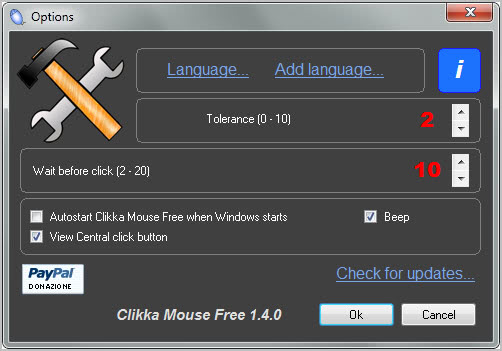
The program interprets the user’s movement and will initiate the action when the movement stops. Lets take the left-click action as an example. A left-click is simulated after selection whenever you stop moving the mouse on the screen. A tolerance value in the program’s settings determines the click target.

emulate mouse

You basically move the mouse and the program does the clicking for you. The same principle applies to all other mouse actions the program offers.

Clikka Mouse could use shortcuts to make the selection process easier, especially for users who switch between actions regularly (and if it is only between left-click and no mouse action).

Windows users can download Clikka Mouse Free from the developer website. The program is compatible with all recent 32-bit and 64-bit editions of the Microsoft Windows operating system.


© Martin Brinkmann for gHacks Technology News | Latest Tech News, Software And Tutorials, 2011. | Permalink |
Add to del.icio.us, digg, facebook, reddit, twitter
Post tags: , , ,