Pages

Showing posts with label operating system. Show all posts

Friday, January 13, 2012

FreeBSD 9.0 Has Been Released

The operating system FreeBSD 9.0 has been released yesterday. The new version introduces several new technologies, feature additions and updates, including USB 3.0 support, the TRIM command for the Fast File System which improves interaction with Solid State Drives (SSDs), an update to Storage Pool Allocator version 28 which adds support for data deduplication and triple parity RAIDZ, and support for the Highly Available Storage (HAST) framework which offers network based Raid 1 functionality for additional data redundancy.

Additional features include updates to Gnome version 2.32.1 and KDE version 4.7.3, support for high performance SSH, an update to the NFS subsystem which now supports NFSv4 in addition to version 3 and 2, and kernel support for Capsicum Capability Mode, “an experimental set of features for sandboxing support”.

Support for USB 3.0 and Fast File System TRIM support are without doubt two of the most important feature additions in FreeBSD 9.0. The USB subsystem furthermore supports USB packet filtering now, which can be used to capture packets which go through the USB host controller.

freebsd

FreeBSD 9.0 is the first update of the operating system after the February 2011 FreeBSD 8.2 release, and the first major version update in two years.

Users interested in all of the changes can access the highlights here or detailed change log here. Please note that both release logs are highly technical.

Users who never came into contact with FreeBSD or another BSD variant before should start at the Resources for Newbies that offers help in selecting the right FreeBSD version, installation instructions and tutorials that should get most people started after installation.

FreeBSD 9.0 can be downloaded from the official website. The operating system can be downloaded as an ISO image which needs to be burned to DVD first, before the computer can be booted from it to start the installation of the operating system.

Additional information are available at the official website.


Friday, November 25, 2011

PC Information Tool Speccy Updated, Better SSD Detection

Piriform, company behind popular programs such as CCleaner, Defraggler and Speccy, is currently producing and releasing updates for all their applications to improve SSD detection among other things.

Speccy, which has been updated yesterday, is the latest to receive that treatment. And since the last review dates two years back, I thought it is as good a reason as any to take another look at the latest version of the PC information tool.

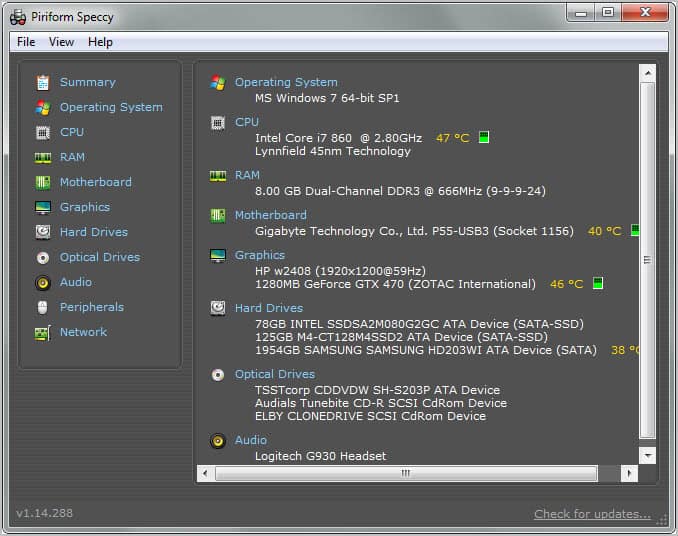
The interface looks exactly the same as it did two years ago when the first public beta of the program was released by Piriform. The program displays a summary of some of the most important system components on startup. This includes cpu, ram, motherboard, graphics card, monitor, hard drives, audio devices and the operating system.

speccy

The temperature of components with heat sensors is displayed in the interface which is excellent for a quick look if any of the temperatures are critical.

Sidebar links lead to software and hardware groups that are examined in detail by the program. Most of the links lead to hardware related information, from cpu and memory to peripherals and network.

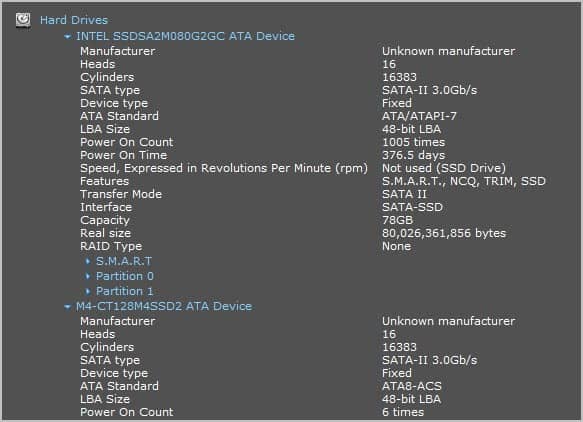
The hard drives are for instance all listed on a single page. Each hrd drive is listed with detailed information about its model and manufacturer, the hard drive partitions and SMART values.

hard-drives

That’s a lot of useful information right there. From transfer modes to raid types, the hard drive’s capacity, real size and features supported by the hard drive.

Especially the operating system listing is interesting, as it lists not only the serial number and basic information about the OS, but also system configuration states. It informs the user about UAC levels, Windows Update, Antivirus, Environment Variables, Power Profiles, System folders, contents of the scheduler, the process list, installed hotfixes and services among other information. That’s excellent troubleshooting information.

Some of the information have been added in the latest version of Speccy. This includes the system folders, hotfix information and uptime information among others.

Snapshots can be saved internally or exported into txt or xml files. Snapshots can furthermore be published online. This creates a unique url on the Internet where the system information report can be accessed.

It is good to see that Piriform continues to add features that make sense to their programs. The new information that Speccy gathers can definitely be helpful for users who troubleshoot a PC system.

Windows users can download the free version of Speccy from the Piriform website. A portable version is available here.


© Martin Brinkmann for gHacks Technology News | Latest Tech News, Software And Tutorials, 2011. | Permalink |
Add to del.icio.us, digg, facebook, reddit, twitter
Post tags: , , , ,


Wednesday, October 12, 2011

The State of Windows 7 Two Years After Release

Back in October 2009 Microsoft released the long awaited and highly acclaimed Windows 7 operating system. Unlike Windows Vista, the operating system’s immediate predecessor, Windows 7 managed to do what where Vista failed: Snag away market share from Windows XP. Depending on which statistics you look at Windows 7 is installed on 39% (Statcounter), 42% (W3CSchools) or 32% (Net Market Share) of all computer systems. In comparison the same companies see Windows Vista at 11%, 5% and 9%, and Windows XP at 40%, 36% and 50% respectively.

If you look at the statistics you will notice that Windows 7 has surpassed Windows XP in one already (W3Schools) and that the operating system is about to surpass XP in another in the coming month (Statcounter) if current trends continue.

Only Net Market Share sees Windows XP still in the lead by a large margin.

One of the interesting things here is that Windows 7 managed to surpass Vista’s market share in less than a year in all three statistics. If you project the rates at which Windows 7 grows in market share you will come to the conclusion that the operating system may gain another 15% to 20% of market share in the coming 12 months. Why is that period important? Because after that time Windows 8 will be released. An earlier release of Windows 8 may slow down the rise of Windows 7, but it won’t halt the market share drops of Windows XP and Vista.

There will still be plenty of users working on Windows XP and at least some that use Windows Vista. When you look at global operating system brands and their market share, you will notice that Microsoft with Windows is still the big fish in the pond. Depending on the statistics service used the company has a worldwide market share between 85% and 93%.

Can Windows 7 be called a success because of this? I’d say yes it can, especially when compared to Windows Vista. The biggest feat in my opinion is that Windows 7 turned around the perception of Windows from a bloated slow operating system to something that people love to work with.

It will be interesting to see how the public perceives Windows 8 once it comes out. Will Microsoft be able to break the good OS bad OS cycle (Windows 98 good, Windows ME bad, Windows XP good, Windows Vista bad, Windows 7 good) and deliver two great operating systems in a row, or will the new operating system fail to impress with its new Metro start page and design changes.

What’s your take on this?


© Martin Brinkmann for gHacks Technology News | Latest Tech News, Software And Tutorials, 2011. | Permalink |
Add to del.icio.us, digg, facebook, reddit, twitter
Post tags: , , , ,