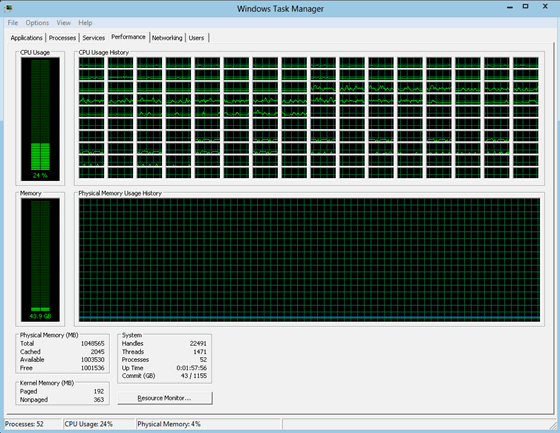
When you look at the performance view of Windows Task Manager on your desktop PC you probably see between two or eight logical processors listed in the interface. On large scale computer systems running Windows 7, the count may be a lot higher. Microsoft showed a screenshot of the performance tab of Windows Task Manager with 160 logical processors.
The issues with the old task manager was that it was difficulty to compare the cells in the cpu usage history with each other. Microsoft has identified three core limitations with regards to the cpu charts in the Windows 7 task manager.
First the already mentioned lack of effective real-time cpu usage comparisons. Then that the graphs were reduced in size the more cpu processors were displayed in the performance chart, and finally that it was almost impossible to identify a corresponding processor ID.
Microsoft has made significant modifications to the Task Manager performance tab under Windows 8. The new features have been implemented in a development version of the operating system that has been produced after the release of the Windows 8 Developer Preview.
When users open the performance tab in the Windows 8 Task Manager, they will notice that Microsoft has integrated a heatmap into the display.
Microsoft has done away with the graphs and replaced the information with percentage values showing the cpu load.
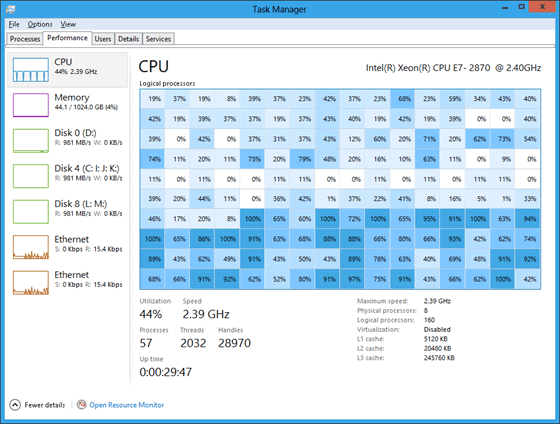
In addition, hovering over any processor ID on the map displays the logical processor ID in a tooltip right in the task manager. The Task Manager scales well even to large data sets or small windows. A scrollbar is displayed in the latter case to make enough room for displaying up to 640 logical processors.
The heat map is an interesting idea for large scale systems. It in combination with the direct display of processor loads and individual process identifications a great upcoming enhancements for server administrators.
It is however not clear why Microsoft in the same news post mentioned that users could set the cpu affinity of each process in Windows individually, as it is a feature that is has been available for a while. Unless of course the settings are saved over sessions.
You can read the new post over at the Building Windows 8 blog.
© Martin Brinkmann for gHacks Technology News | Latest Tech News, Software And Tutorials, 2011. | Permalink |
Add to del.icio.us, digg, facebook, reddit, twitter
Post tags: cpu core affinity, performance, task-manager, windows 8, windows task manager


