Pages

Showing posts with label skydrive. Show all posts

Saturday, February 11, 2012

Microsoft: Attachments Suck, Use SkyDrive Instead

With the average user receiving 15 emails with attachments per day, one would think that companies would have come up with ways to get rid of annoyances and issues caused by attachments. From bouncing emails because of attachment size limitations over sending multiple versions of the same file to storage issues. Most users know from first hand experience that email attachment have limitations.

Microsoft has launched a campaign that aims to convince users that SkyDrive resolves all the core issues and limitations of email attachments. For that, an infographic and website were created. The infographic is backed up with data derived from two studies Microsoft conducted in the past two years.

attachment infographic

It lists all the issues and problems that the majority of users run into when sending attachments via email.

  • Attachment size to large, which causes the email to bounce back
  • Email gets deleted without being opened
  • File has been updated before it is opened by the user
  • File or email cannot be found anymore
  • Updated attachment may get sent back, causing versioning issues, especially if multiple recipients are involved.

Several of the statistics posted are quite interesting:

  • On average, people send and receive about 15 emails with attachments daily, which accumulates to over 5000 attachments a year per person.
  • 73% of attachment senders run into bounce back problems.
  • 53% of people delete 25% of their emails without opening them first which results in 5% of emails getting lost.
  • 71% find that they need to update files after they have already sent them, with 25% running into this problem at least once a week.
  • 75% of people do not save or organize attachments, resulting in 62% losing files sent to them in attachments
  • 44% of documents sent by email go through at least 3 versions before they are final.

Some stats seem awfully high, like the number of attachments per day, or the 73% bounce backs. These issues are however not uncommon in work places, where you may receive that amount of attachments regularly. Even if the count is lower, the underlying issues remain and may need to be addressed.

When I look at my accounts, I have to admit that I do not save email attachments locally, and that I sometimes receive multiple versions of the same file. The bounce back on the other hand was never a problem thanks to my tech background.

Microsoft’s solution? The company’s cloud hosting service SkyDrive which not only offers larger file sharing but also document editing, collaboration and versioning as well. To further proof the point, Microsoft is pitting SkyDrive against competitive services like Dropbox, Gmail or Google Docs. The result? See for yourself.
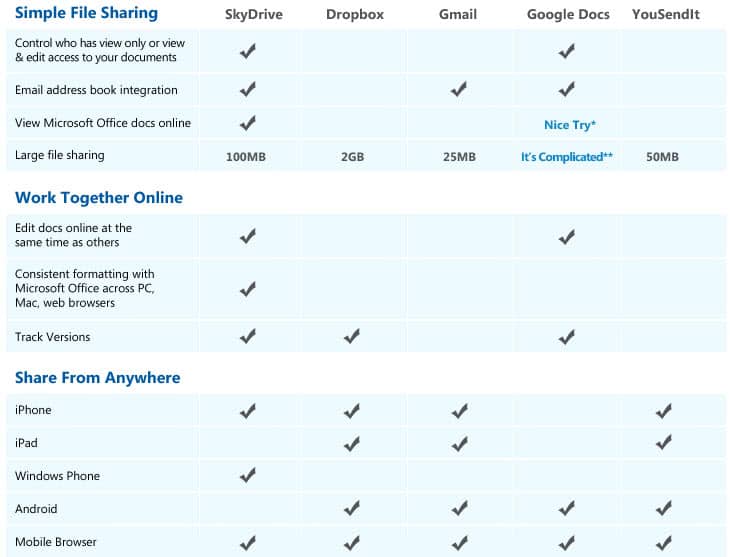
simple file sharing

Is Microsoft SkyDrive the better way of sending files to other users? What’s your take?


Tuesday, December 13, 2011

Microsoft SkyDrive Feature Update

Microsoft in the beginning of December launched a SkyDrive update that improved the functionality of the service significantly. One of the biggest new features is what Microsoft calls simple app-centric sharing. This basically adds easy sharing options to applications. Instead of having to leave the application they are working on and thinking about file permissions and folder structures, users can now share documents directly with other users without having to think about access rights and where those files reside on the computer or in the cloud. Applications in this regard are the Microsoft Web Apps that can be used to view specific documents online in the browser.

SkyDrive now lets users share individual files within a folder without having to first configure that folder’s permissions first.

The Sharing options have been simplified. Users now have three sharing options that are accessible with a click on Share in the SkyDrive info pane.

  • Send Email – This option can be used to share documents and a message to recipients. Recipients receive an email address with links to view, and if selected, edit the document.
  • Post to social networking sites – Users can now post their documents to sites such as Facebook or LinkedIn.
  • Get a link – Grab a sharing link to share it manually with other users.

microsoft skydrive share

Sharing was not the only feature that the Windows Live developers improved in the update. The site makes use of HTML5 uploads now which make it possible to upload files to SkyDrive and navigate the site at the same time.

The service’s file management capabilities have been improved significantly as well. Basic operations like creating or renaming folders that were not optimized previously can now be completed almost instantly. Other improvements include right-click functionality on photos and documents, faster creation of new Office documents, and a rebuilt photo slideshow application.

Watch this video to see a feature overview.

SkyDrive still has a lont way to go to reach the functionality that is offered by Google Docs. The new features do make life for SkyDrive users a lot easier.

Have you tried Microsoft SkyDrive? You can read the official announcement over at the Microsoft website.


© Martin Brinkmann for gHacks Technology News | Latest Tech News, Software And Tutorials, 2011. | Permalink |
Add to del.icio.us, digg, facebook, reddit, twitter
Post tags: ,


Tuesday, November 29, 2011

New SkyDrive Features Launch from Microsoft

Microsoft have today announced that new features are rolling out to users of its SkyDrive service.  There’s no wait for the new features either as they’re going to start rolling out immediately.  SkyDrive has come under extensive criticism in recent months for limiting the sync storage that Windows Live Mesh (and Windows 8) can use to just 5Gb of the full 25Gb available free to users.

Sadly the new update doesn’t address this, but the new features are indeed useful.  Firstly comes new options for sharing files.  Previously you’ve had to create permissions on a file or folder giving explicit permissions for sharing.  Now however you can share documents more easily, and even from within Microsoft’s Web Apps directly by just typing in either the emails addresses for people you want to share it with, or selecting their Facebook, Twitter or LinkedIn profiles.  If neither of those suit you, the other option is simply to grab a link for the file that you can send on.  If you want to you can also post files and documents to Facebook or Twitter; though you should perhaps be careful how you use this feature!

Folder management is also being improved with support for creation of inline folders and with improved moving, deletion and download support, things that have always caused problems.  You can now perform these actions on a simple right-click, just as you would in Windows.

For people using the latest HTML5 compatible browsers there are also additional features such as improved drag and drop file addition and improved photo slideshows.

These have also been improved with support for RAW files, something Microsoft have been working on for a while and briefed me on about six months ago.  This will be a very welcome addition for serious photographers.

On the document front there is improved support for PDF files with better viewing of the files directly within the browser or, if you are using a browser that doesn’t have the Adobe PDF viewer installed, the most appropriate software on your computer or device.

Microsoft say of these new features…

In addition to some of the sharing and file management features, we continue to look for ways we can take advantage of modern browsing technologies. Today we rely on Silverlight to provide rich upload support. In this release, we’re introducing drag and drop as a way to upload files and photos for browsers that support HTML5 File API like Internet Explorer 10, Google Chrome, Firefox and Safari. And while your files are uploading, you can continue to browse and use SkyDrive. You no longer have to sit and wait for uploads to complete.

Microsoft say int heir blog post that they’ve improved many things about SkyDrive including the sign-in time and general actions.  Their aim is to make is simpler and quicker to use generally.

There are other rumours about new features that may be coming to Skydrive.  One of the most interesting and useful is that the service could be used to host email attachments for people using Hotmail.  This means the attachment would never be stored in the email itself but would instead be stored online.  For people like myself with ever-expanding lists of emails going back many years this will be a very welcome addition indeed.

Overall the features are welcome and generally excellent, but they’re only a stepping stone to the service users have been calling for, and they don’t address many of the more important criticisms.  Microsoft will be continually improving SkyDrive and we can expect more Windows 8-centric changes to be made in the run up to the new operating system’s release next year.


© Mike Halsey (MVP) for gHacks Technology News | Latest Tech News, Software And Tutorials, 2011. | Permalink |
Add to del.icio.us, digg, facebook, reddit, twitter
Post tags: ,