Pages

Showing posts with label Email. Show all posts

Wednesday, February 15, 2012

Thunderbird to get Dropbox and File Hosting Integration

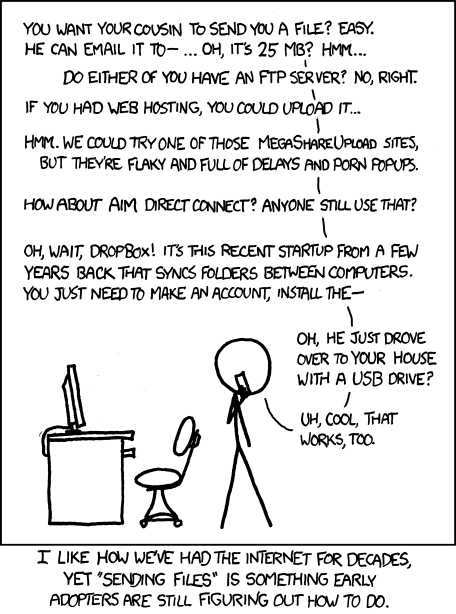
When it comes to sending files to other people, Internet users have a lot of options at their hand. From uploading them to ftp servers or file sharing sites to sending them per email or using a direct transfer client. All are either difficulty to set up for users who are not that tech-savvy, or not reliable enough to trust them with important documents or files.

When you look at email, you will notice that the biggest thing holding it back in this regard is the attachment size limitation per email. These limits are usually in the 20 to 25 Megabyte range, and to make matters worse, selected by the email provider which means that different providers may have different attachment limits.

Microsoft found a way around this by using their online file hosting and management service SkyDrive for this. Users simply upload larger files directly to their SkyDrive account from where they can be downloaded by the email’s recipients. This method offers several advantages, from the ability to upload very large files without having to worry about bouncing emails to being able to replace the files online if necessary without resending them to the recipients.

The Thunderbird team over at Mozilla plans to integrate a similar feature into Thunderbird 13. According to the Big Files feature entry at the official wiki site, the team aims to resolve several attachment related issues with the integration:

  • offer a way to easily share very large files through email
  • reduce ‘file too big’ bounce email situations
  • encourage file sharing over copying
  • save recipients inbox space and eliminate file duplication for multiple recipients
  • increase attachment sending and receiving speed

The idea is to scan the attachment file size and warn the user that it may bounce because of its size. The email client would then offer the user to use online storage services instead of an attachment. The developers furthermore want to include an option to detach attachments to the cloud instead of local storage.
xkcd

Not every user has an account at one of the supported services, which is why the developers aim to include an on-the-fly signup option directly in the email client. The developers want Thunderbird to detect file hosting quote issues in the browser, to avoid situations where a file would go over the allowed quote. The idea is to display multiple solutions, from deleting files to signing up for a premium service.

The following services have been mentioned in the document as potential services that the developers want to implement into Thunderbird:

  • File storage services: YouSendIt, Box.net, DropBox, Ubuntu One, Amazon Cloud Drive
  • Document management platforms: Google Docs, MS SkyDrive
  • Enterprise services: MS Sharepoint
  • Others: FTP, network drives

The team status notes indicate that the developers are currently working on the Dropbox integration in Thunderbird with other services likely to follow later in the development phase.

The idea to integrate file storage services, document management platforms and other services could give the email client a much needed boost. What’s your take on the integration? (thanks to Sören Hentschel for mentioning it casually on Google+)


Tuesday, February 14, 2012

Which Email Provider Offers The Best Spam Protection? Study Suggests Hotmail Is

Spam is one of those things that you never can get rid of completely, it seems. Email providers like Hotmail, Google Mail or Yahoo Mail are battling on the spam front ever since they opened their door for the first users. And while they managed to cut down significantly on spam in past years, there is still work to be done in that compartment. Providers are currently working together to eliminate most of the spam once and for all. Until then though, users will receive spam fairly regularly in their inboxes.

A recent study by Cascade Insights analyzed the spam blocking capabilities of Hotmail, Yahoo Mail and Google Mail. The researchers created email accounts with those services, and one unfiltered account at a web hoster for comparison purposes. The newly created email addresses were then posted on the web to get scraped by spam bots. The researchers furthermore replied to spam email addresses, and created Facebook pages with the email addresses posted openly on the pages.

After some time, the ratio of spam to legitimate emails in the inbox, and not in the spam folder, were analyzed. All unsolicited emails that arrived in the inbox were countered as well.

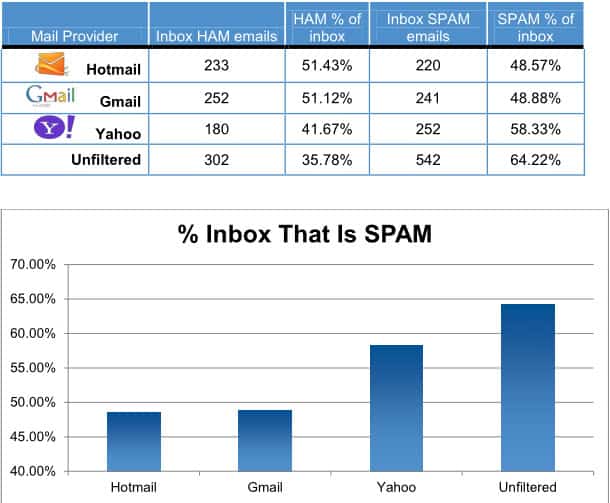
Microsoft’s Hotmail service managed to take the number one spot from Google in a very close finish, followed by Yahoo Mail and the unfiltered email account.

spam distribution

Yahoo Mail’s inbox spam percentage was about 10% higher than that of both Hotmail and Gmail. The small difference between Gmail and Hotmail won’t likely convince anyone to switch providers. It outlines however that Microsoft managed to improve Hotmail’s spam fighting and detection capabilities over the years.

The study does not take into account factors that are beyond its reach. This includes if and how often websites where the email addresses were posted were crawled, or if some email accounts were sold more often than others. These may have influenced the results in one way or the other.

Microsoft was the first company to publish a response. The company attributes the drop in spam on Hotmail to several factors, including the company’s SmartScreen technology that has reduced the spam ratio on a typical Hotmail inbox to below 3% according to Microsoft.

Microsoft confirmed in that blog post that customer complains related to spam have dropped by over 40% over the past year, and that the total number of complaints related to spam shrunk by over 50% over the past two years.

Do you have email accounts at one or multiple of the email providers? Do you receive less spam today than in the past?


Monday, February 13, 2012

Thunderbird 10.0.1 Update Released

Mozilla has just released an update to the Thunderbird email client, shortly after releasing a similar update for the Firefox web browser that brought the version to 10.0.1. Thunderbird 10.0.1 is a stability and security release, and as thus a recommended update for all users of the messaging software.

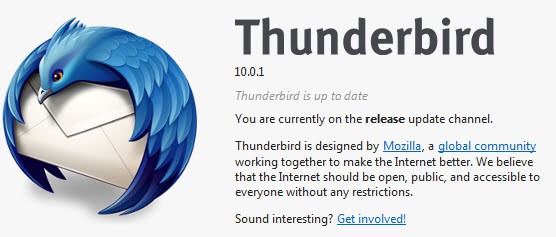
The update is already available, and Thunderbird users can either download it from the official developer website or use their client’s internal updater to download and apply it. A click on Help > About Thunderbird performs the update check and displays the current version of the program in a small window.

thunderbird 10.0.1

Lets take a look at the changes in Thunderbird 10.0.1.

The security advisory page over at Mozilla offers details on the issue that has been fixed in the update. It affected not only the email client, but also Thunderbird and SeaMonkey as well.

Mozilla developers Andrew McCreight and Olli Pettay found that ReadPrototypeBindings will leave a XBL binding in a hash table even when the function fails. If this occurs, when the cycle collector reads this hash table and attempts to do a virtual method on this binding a crash will occur. This crash may be potentially exploitable.

The change log lists several fixes to improve stability without going into further detail on the subject. Sören Hentzschel mentioned a crash in the client’s importer when importing mails from Microsoft Outlook.

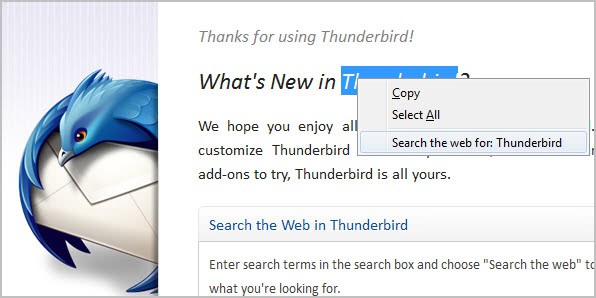
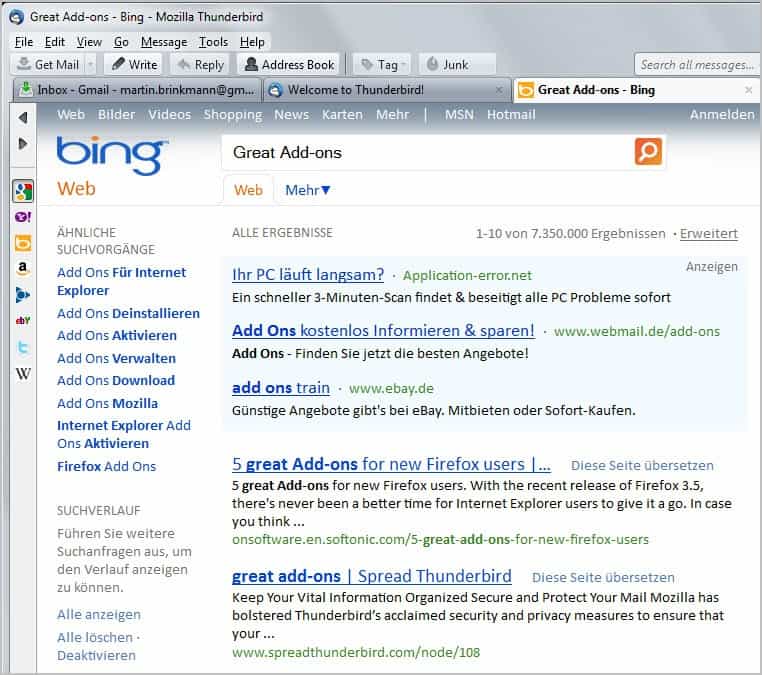
The release of Thunderbird 10.0.1 comes less than two weeks after the last update that moved the version of the email client to 10. Thunderbird 10 introduced a new right-click search option to search directly from within Thunderbird. Results are either displayed directly in Thunderbird in new tabs, or in the default web browser whichever is preferred.

Other changes include new keyboard shortcuts and an extension compatibility change that should reduce the issues that Thunderbird users have in this regard.


Saturday, February 11, 2012

Microsoft: Attachments Suck, Use SkyDrive Instead

With the average user receiving 15 emails with attachments per day, one would think that companies would have come up with ways to get rid of annoyances and issues caused by attachments. From bouncing emails because of attachment size limitations over sending multiple versions of the same file to storage issues. Most users know from first hand experience that email attachment have limitations.

Microsoft has launched a campaign that aims to convince users that SkyDrive resolves all the core issues and limitations of email attachments. For that, an infographic and website were created. The infographic is backed up with data derived from two studies Microsoft conducted in the past two years.

attachment infographic

It lists all the issues and problems that the majority of users run into when sending attachments via email.

  • Attachment size to large, which causes the email to bounce back
  • Email gets deleted without being opened
  • File has been updated before it is opened by the user
  • File or email cannot be found anymore
  • Updated attachment may get sent back, causing versioning issues, especially if multiple recipients are involved.

Several of the statistics posted are quite interesting:

  • On average, people send and receive about 15 emails with attachments daily, which accumulates to over 5000 attachments a year per person.
  • 73% of attachment senders run into bounce back problems.
  • 53% of people delete 25% of their emails without opening them first which results in 5% of emails getting lost.
  • 71% find that they need to update files after they have already sent them, with 25% running into this problem at least once a week.
  • 75% of people do not save or organize attachments, resulting in 62% losing files sent to them in attachments
  • 44% of documents sent by email go through at least 3 versions before they are final.

Some stats seem awfully high, like the number of attachments per day, or the 73% bounce backs. These issues are however not uncommon in work places, where you may receive that amount of attachments regularly. Even if the count is lower, the underlying issues remain and may need to be addressed.

When I look at my accounts, I have to admit that I do not save email attachments locally, and that I sometimes receive multiple versions of the same file. The bounce back on the other hand was never a problem thanks to my tech background.

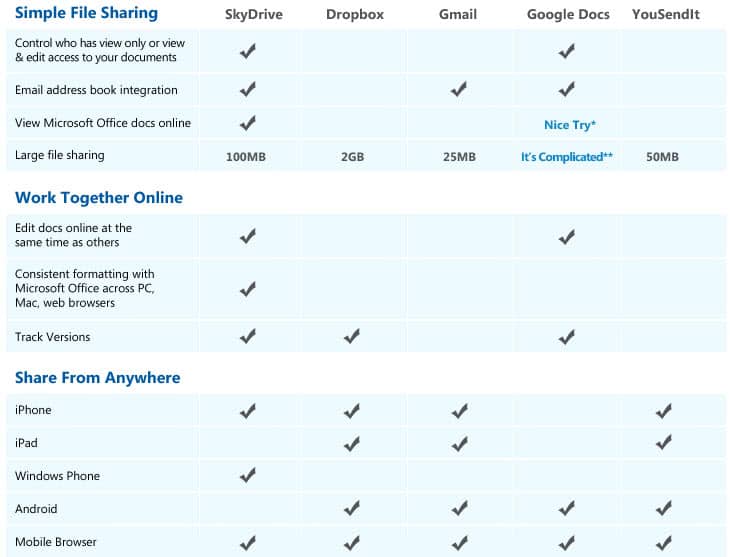
Microsoft’s solution? The company’s cloud hosting service SkyDrive which not only offers larger file sharing but also document editing, collaboration and versioning as well. To further proof the point, Microsoft is pitting SkyDrive against competitive services like Dropbox, Gmail or Google Docs. The result? See for yourself.

simple file sharing

Is Microsoft SkyDrive the better way of sending files to other users? What’s your take?


Tuesday, January 31, 2012

Email Client Thunderbird 10 Released

Regular readers know that Mozilla has synchronized the release schedules for both the Firefox web browser and the Thunderbird email client. Both applications share the same rapid release process, and both are usually updated at the same day.

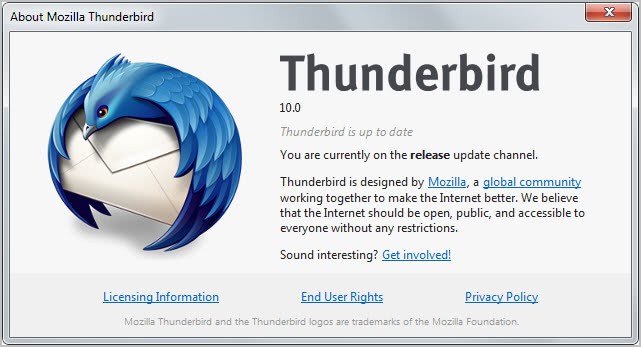
Mozilla today, after releasing Firefox 10, has also released Thunderbird 10, a new version of the email software.

Thunderbird too is now flagging add-ons as compatible by default. Add-ons ship with minimum and maximum version compatibility information. The issue previously was that add-ons were flagged as incompatible if the author failed to update the version information in time. This made it difficulty for developers to keep their add-ons compatible with the latest releases.

thunderbird 10

Another change is the native integration of the Open Search extension in the email client. A right-click now displays an option to search for the selected term on the Internet. This is handled in the email client and not in the default system web browser.

search the web

The rendering component uses the Gecko 10 engine that the Firefox web browser uses as well.

thunderbird web search

Users who do not want their searches to open in the email client can set the preference mail.websearch.open_externally to true. This is done with a click on Tools > Options, switching to Advanced > General, clicking on Config Editor in the menu and filtering for the above preference. Just double-click it to toggle its value from false to true. Is there a way to disable web search completely? Not that I’m aware off. Maybe there is a preference but I have not found it yet.

Two new keyboard shortcuts have been added to Thunderbird 10, in addition to the changes outlined above. It is now possible to add attachments to messages with the Ctrl-Shirt-A (Command-Shift-A) shortcut. Named anchors can now be removed with Ctrl-Shift-R (Coammdn-Shift-R), and messages in the message reader and compose window can now be zoomed with the scroll wheel (Ctrl-Scroll Wheel).

Thunderbird users should have received update information by now in the email client. New users can download the latest version for all supported operating systems and languages from the Mozilla website.


Friday, January 27, 2012

Microsoft’s Guide For Gmail Users To Switch To Hotmail

Google recently revealed the plan to merge the privacy policies and terms of service for most of the company’s products. This move gives all Google services direct access to all user data. Google search for instance can take into account what kind of emails a user gets in Gmail to personalize the search results based on that. This even goes further for Android phone users, who may now reveal their favorite restaurants, shops and locations to all other Google services.

A new post by Microsoft employee Dharmesh Mehta on the Inside Windows Live blog highlights core reasons why users might want to switch from Gmail to Hotmail, before explaining the actual steps that migrates their email account to the Hotmail email service.

  • Hotmail & Facebook work well together. You can update your Facebook status, chat with Facebook friends, view their updates, and comment right from your Hotmail inbox. You can’t do this from Gmail.
  • You can easily share lots of photos and large attachments. Hotmail lets you share hundreds of photos or other files in one message using the integrated online storage from SkyDrive. You can’t do this in Gmail.
  • Hotmail works great with Office. Using the Office Web Apps, Hotmail lets you view and edit Office docs for free right in your inbox. Gmail doesn’t work well with Office.
  • Hotmail lets you get a handle on graymail. With customizable categories and scheduled sweeps, you can quickly clean up things like newsletters, social updates, and daily deals so you only see the mail that really matters to you. Gmail doesn’t have Sweep.

These features alone won’t convince many users to move their email account to Hotmail. Combined with Google’s announcement however they could be enough to get some users to move their accounts.

It needs to be noted though that Gmail offers features that Hotmail does not offer. This includes IMAP support or two step authentication, both of which are not supported by Hotmail.

add gmail account to hotmail

The guide to switch from Gmail to Hotmail lists three steps.

  • Create a Hotmail account. If you don’t already have one, you need to create a Hotmail account. The best way to do this is to get a new email address either @hotmail.com or @live.com. Or, if you already have an email address you want to keep using, you can keep using it and sign up here. You don’t have to use our domain.
  • Import your old messages from Gmail. You’ll probably want to keep your old email and contacts so we’ve made it simple to bring them in. TrueSwitch is an easy tool which will import your email and contacts and forward any new email to Hotmail for 90 days. Go to the TrueSwitch site and follow the steps there. When you sign back in to Hotmail, you’ll notice that it’s beginning to import your emails (this could take a few hours if you have a lot of emails to bring over).
  • Connect your Gmail account. This step is optional, but if you want to make sure you receive future messages from Gmail, you can have Hotmail automatically get all new emails that are sent to your old Gmail account. These are the steps to connect your accounts:
    a. In your inbox, click Options and then More options.

    b. Click Sending/receiving email from other accounts.

    c. Click Add an email account.

    d. Provide your Gmail account details.

Step 2 and 3 address core issues that users who move mail accounts want resolved before they even start thinking about it. Access to all previous mail messages and the forwarding of messages that are send to the old account are covered in those two steps.

Are you considering moving your Gmail account to another provider?


Wednesday, January 25, 2012

Outlook Email Notifications for Important Messages

Most email notifiers inform you whenever messages have been received in a connected email account. These programs usually make no distinctions between important messages and unimportant ones, which can be a issue of the account is regularly flooded with spam, newsletters and other non-time-relevant messages.

The free Microsoft Outlook add-in Important Mail Alert changes this by allowing you to specify exactly when you want to be notified. The program installs itself automatically, and Outlook users find its entry in the Outlook interface after installation. The Ablebits tab displays a single button that displays or hides the add-in configuration screen in Outlook.

The program supports keyword based rules and will look in the mail subject and body for selected phrases. This is the core difference to Outlook’s own rule based system which can only be configured to look for keywords in the subject of the email.

important mail alert

Keyword only rules are somewhat limited on the other hand, as it is not possible to link keywords to senders for instance or integrate the system into Outlook’s own rule based system.

Alerts are then displayed as notifications on the screen and in the program’s alert tab.

email alert outlook

mail notifications

A click on the configuration icon opens the list of mail accounts that you want the rules to be valid for.

Lets take a closer look at the benefits the add-in provides. We have already mentioned that it will not only search the messages subject but also the body text and the to field. That’s however not the only improvement over Outlook’s rule based system. Important Email Alert in fact runs completely independent, which means that you will receive alerts even if the message is moved by Outlook’s own rules system.

Important Email Alert besides that is compatible with Microsoft’s Exchange Server, and offers to open mails with a single click in its interface. The add-in is easy to setup and use, even though it would be great to have additional filtering options available.

Outlook users who want to be notified when email subjects, bodies or recipients are mentioned can download and install the Outlook add-on from the developer website.

The add-on is compatible with Outlook 2003, 2007 and Outlook 2010, provided they run on a 32-bit or 64-bit edition of Microsoft Windows. The add-in furthermore requires the Microsoft .Net Framework 2.0 to be installed on the system. (via Nirmal TV)