Pages

Showing posts with label storage space. Show all posts

Thursday, January 5, 2012

Windows 8 Storage Spaces, What You Need To Know

I had to read Microsoft’s new post at the Building Windows 8 blog twice to fully understand the Storage Spaces feature of the Windows 8 operating system. Storage Spaces is a new drive virtualization technology. It basically allows users of the Windows 8 operating system to create drive pools and virtual disks.

Drive Pools combine the storage space of one or multiple hard drives. Drives with different speeds, storage capacities and connections can be combined in a drive pool.

Virtual disks on the other hand behave just like physical disk with a few exceptions. It won’t be possible to boot from a virtual disk. They do however support thin provisioning and resiliency to failure on the plus side of things.

What does that mean? Thin provisioning basically can be used to assign more storage capacity to a pool than is available at the moment. The pool itself will only use as much storage space as needed to store the data. This is different from regular hard drive partitions that always make available a set amount of space on a system. Thin provisioning can increase the storage efficiency of a system. And if storage space runs out it is just a matter of connecting a new hard drive or assigning unused space to the pool to overcome the shortage.
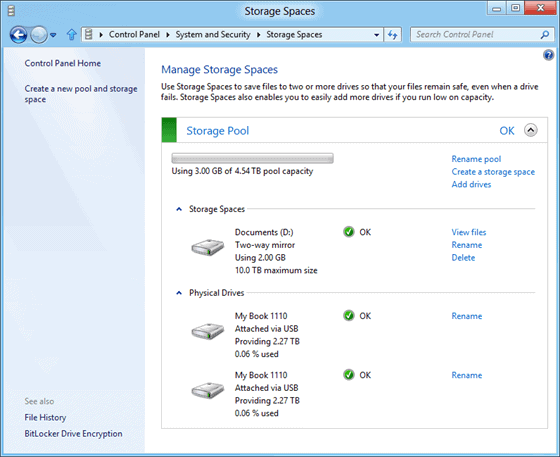
storage spaces

Resiliency through mirroring and parity make sure that data remains available even if a hard drive fails and needs to be replaced. Mirroring basically makes sure that data is available on at least two physical drives so that recovery is possible even if one of the drives fails.

Parity on the other hand saves information “alongside user data within the space” so that data can be reconstructed if a drive fails or if it becomes corrupt. Usenet users may know the parity concept from par files that often get uploaded besides the actual files so that corrupt files can be reconstructed locally.

Drives can be replaced easily if mirrored or parity spaces have been created. If that is the case the drive can simply be replaced. Storage Spaces will automatically synchronize the data once the drives connects. Synchronization is an automatic feature which can also be triggered manually with the help of the repair command via Powershell.

As far as mirroring goes: The technology supports two-way and three-way mirrors, with the possibility to assign data to specific disks manually.

You can read up on the new feature at the Building Windows 8 blog or Windows 8 News site.


© Martin Brinkmann for gHacks Technology News | Latest Tech News, Software And Tutorials, 2012. | Permalink |
Add to del.icio.us, digg, facebook, reddit, twitter
Post tags: , ,


Sunday, November 20, 2011

TDP x-Ray Lite Hard Drive Manager

There are many ways that Windows users can manage hard disk space. You can manage your hard drives with the Windows Disk Management utility, but it is somewhat difficult to navigate. Programs like WinDirStat are great for getting a good visual scheme. Tools with visual graphing for hard disk management are ideal. Everybody has their own style and preferences. TDP x-Ray Lite is a free hard disk management tool that uses a multi-layered pie chart scheme to represent usage of hard disk space.

tdp x-ray lite hard disk

Displayed in the middle of the window is a colorful chart showing memory information in different sizes and colors around the chart. Unused disk space is shown with no extensions, as that part of the drive is blank. On the left panel shows all connected drives. It will show USB drives, external hard drives, SD cards, partitions, etc. When you click on a particular field, you see what that area of the hard drive contains and another pie chart will be presented to represent that space and the different files and folders contained therein. This is quite handy when you need to clean your hard drive space or find specific files and folders.

In the screenshot above, you can see all of the sectors in Drive C: and by placing the mouse over a certain area, a small box provides the information for the occupancy of that sector. In this example, VirtualBox is highlighted. Click on the selected field and you will get the specifics.

hard drive contents

When you get the pie chart for the selected sector, X – Ray Lite allows you to go deeper. For example, the VirtualBox chart has 4 sectors representing virtual machines stored on the hard drive. In this demonstration, the area for Debian Linux is found when the mouse is hovered over an area. When this is clicked, a chart that isolates Debian is displayed.

You follow the same process to isolate any file or folder from the original chart for any given drive highlighted in the left pane. By right-clicking a sector of the chart, you are presented with a context menu with options to Zoom, Recycle or Delete and also view Properties. From there, you can do what you want. To clear any area of the hard drive, select delete and then empty the recycle bin. Alternatively, you can choose the Zoom option to get even more detailed specifics of the drive memory occupation or open the Properties.

There is also an option to access the application from the Windows Explorer context menu. From Windows Explorer, select a folder and right-click to open the context menu. Right-click the selected folder and select “x-Ray it!” and this will show a pie chart for that file.

TDP x-Ray Lite is incredibly easy to use and versatile. For users who work well with pie chart schemes, it is ideal. When you download the application, a desktop icon is generally not created. You will have to open the start menu and use the search box to find it then drag and drop to the desktop if you want an icon there.

Download TDP x-Ray Lite from this link:
http://www.tdp.cz/downloads/en/xray-lite

TDP x-Ray Lite works on all versions of Windows.


© Melanie Gross for gHacks Technology News | Latest Tech News, Software And Tutorials, 2011. | Permalink |
Add to del.icio.us, digg, facebook, reddit, twitter
Post tags: , , , ,