The security software market is flooded with products. Consumers not only have to cope with dozens of companies, but also with multiple products offered by the same company. The majority of companies offer two or three different security programs that are updated every year.
With different security products available, consumers face the problem that they have to evaluate what type of protections their computer actually needs. Even worse, picking the wrong program can leave the computer open for attacks.
Most vendors produce a basic antivirus protection product that protects and removes malicious software from the computer. The programs usually are bare-bones otherwise with little or even no extra features or protections.
Panda Antivirus Pro 2012 Review
If you look at the feature set of Panda Antivirus Pro 2012 you will notice that it comes equipped with a set of tools usually not found in antivirus software. A quick look at the product page over at the Panda Security website reveals that it ships with a personal firewall, a browser sandbox and several other tools usually not found in antivirus products.
Adding a firewall to the product makes sense from a customer perspective considering that many install only one security product on their system. For Panda, it is a way to distinguish their product from other vendors.
Panda Antivirus Pro 2012 users can install the firewall during installation, or later in the program interface. The program furthermore warns during installation if incompatible software is found on the system. This was the case with a Microsoft Security Essentials installation on the test system.

The program opens up in a dark, functional theme that displays the most important status information right there. Users see if the protections are working correctly, the last time of update as well as scan and detection information. A click on a security module, like firewall, leads directly to the preferences of the selected module.
The main screen links to additional modules near the bottom of the screen. This includes built-in tools like network management or the virtual keyboard, and programs that need to be installed first like the sandboxing component Safe Browser or USB Vaccine.
Protection
It is difficulty to assess the efficiency of antivirus protection. While it is without doubt possible to assess a program’s handling of known threats, it becomes virtually impossible to see how it fares with unknown threats. Still test results can act as indicators of a program’s efficiency in this regard.
AV-Comparatives Retroperspective Test of May 2011 saw Panda Antivirus Pro 2011 (the program’s direct successor) complete the test in fifth place with an advanced certification rating (the second highest). Only two programs, Avira Antivir Premium 10 and Kaspersky Anti-Virus 2011 received the highest rating of Advanced Plus.
AV-Test did not test Panda Antivirus Pro, only Panda Internet Security 2012. The program scored 15.5 out of 18 points, only topped by Bitdefender with a score of 16.5 out of 18.
Other reviewers, like Pc Mag’s Neil J. Rubenking came to the conclusion that Panda’s detection rate was better than its malware removal rate.
Reports
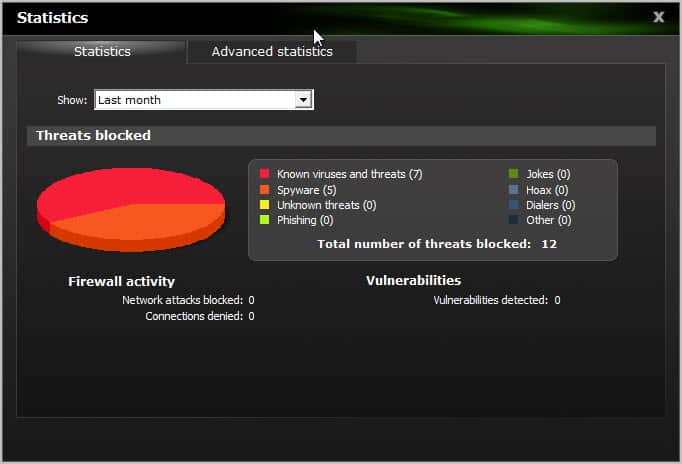
Reports are one of the strengths of Panda Antivirus Pro 2012. A click on the reports tab opens a menu with options to display event reports, and to display statistics and advanced statistics.
The event report is the program’s history log. Updates, malware detections and actions are displayed here in a table. Options to find, filter, print, export and delete entries are available. Panda users can use the information presented here to find out at first glance what happened security wise on their computer at a specific data and time.

The statistics and advanced statistics module display information about a certain time frame. Information include the program’s scanners but also network attacks blocked by the firewall.
Tips
First thing that new Panda users should do is to download Panda Safe CD from the official website. This is a recovery CD that the computer can be booted from when malware has damaged the system.
Another interesting find is that Panda Antivirus Pro 2012 can be installed and run in Safe Mode. Safe Mode is a bare bones mode of the operating system that prevents the majority of installed software and even some system components from being started with the operating system.
Safe Browser, included as a download link in the interface, is actually a standalone program that everyone can download and run. It consists of a version of the Firefox web browser running inside VirtualBox. The sandboxed environment ensures that attacks against the browser are blocked from reaching the operating system. The solution concentrates on one browser, products by other vendors allow the user to sandbox any program.
Warnings can be configured in the program preferences. Here you can enable or disable warnings for specific events.
Cpu load management can be enabled in the preferences as well. That’s especially interesting for slower systems that notice slow downs during scans. Enabling the option reduces the product’s cpu usage during scans.
Verdict
Panda Antivirus Pro 2012 ships with a lot of extras, like the aforementioned firewall component. Some components, Safe Browser and USB Vaccine, are standalone programs and not integrated into the product. More important than the module a security software ships with is how well it protects the operating system from threats and attacks. For Panda that ranged from top results to average results at best.
Giveaway
Panda Security has sponsored 10 Panda Antivirus Pro 2012 licenses. You can win a license by leaving a comment below. Please include your current security software setup in the comment.
© Martin Brinkmann for gHacks Technology News | Latest Tech News, Software And Tutorials, 2011. | Permalink |
Add to del.icio.us, digg, facebook, reddit, twitter
Post tags: antivirus software, ghacks Christmas giveaway, panda antivirus, panda security


