Pages

Showing posts with label ghacks Christmas giveaway. Show all posts

Friday, December 23, 2011

Kaspersky Password Manager Review [Giveaway]

Most password managers today offer more than just a secure storage space for passwords. Most come with options to generate secure passwords, automatically fill out sign in forms on the Internet, or to record notes and other related information.

The core purpose of a password manager however is the secure storage of passwords. With password managers, users can select secure and unique passwords for their online and offline accounts, without fear of forgetting the password at a later time.

Users without password managers often select easy to remember passwords like qwerty, abc123 or password. The problem with those passwords is that they are also easy to guess. Complex passwords like qmBU2tTW3oAC0rRJ4h are hard to remember even when no special symbols are used. Imagine having to remember dozens of strong passwords for your online accounts.

Kaspersky Password Manager is a commercial program for the Windows operating system that leaves little to be desired in this regard.

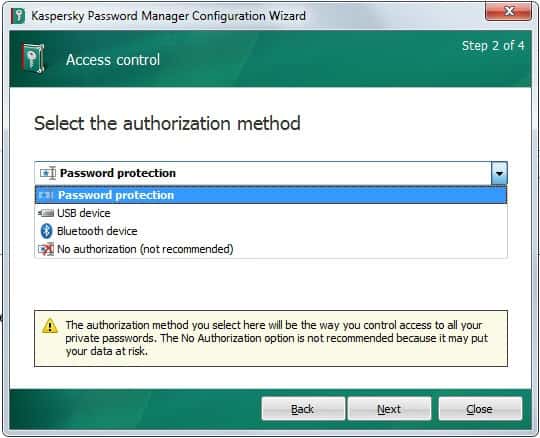
Users on first run need to select a master password to protect the database from unauthorized access. They can furthermore select a different authorization method, using USB devices or Bluetooth devices, if they so desire.
kaspersky password manager

Passwords can be imported from the web browsers Internet Explorer, Chrome and Firefox, the email client Thunderbird, AI Roboform and KeePass. Kaspersky Password Manager connects with Firefox, Chrome and Internet Explorer. This does not mean however that users with other browsers cannot use the password manager, as it is still possible to access the program’s functionality on the desktop. Only automatic sign ins and recognition of account creations is limited to those browsers.

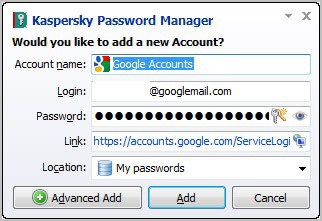
You can select the supported browsers that you want to connect the password manager with. Connecting offers several advantages. The application will notice sign ups and sign ins on websites automatically, and offers to add them to the password database.
password prompt

Accounts can also be added manually or by importing from other password managers. All user accounts that have been added to the program become then available for one-click selection. Chrome users for instance see a Kaspersky Password Manager icon in their address bar by default that displays a list of all web passwords for fast access.
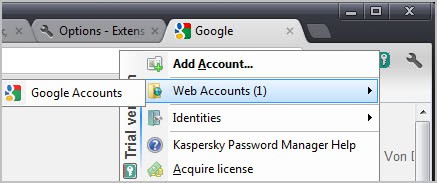
chrome password manager

It takes two clicks to log in to any service this way. The same option is offered by the program’s system tray icon. A right-click on the icon displays a context menu with options to log in to any service saved in the password manager.

Another interesting option is that Kaspersky keeps track of frequently used passwords. These accounts are displayed prominently in both context menus (in the browser and system tray) for direct access.

The right-click context menu links to the built-in password manager as well. Here it is possible to generate secure passwords according to specifications. You can for instance create a 20 character password with upper and lower case letters, numbers, and selected special symbols. Generate passwords are automatically copied to the clipboard.

Web addresses can be added to the list of ignored urls. This basically prevents the password manager from interacting with those websites.

The program ships with an option to create a portable version of the password manager. That’s ideal for users who want to access their passwords on the go.

The identity manager makes form filling on the Internet a pleasant experience. Instead of having to enter the same data over and over again, it allows to create identities that contain pre-filled information that can be automatically filled out when needed.

Verdict

Especially Chrome, Firefox and Internet Explorer users benefit from Kaspersky’s Password Manager as it integrates directly into those browsers. The program ships with everything one would expect from a password manager, from secure storage over password generation and identity management.

The program has no option to synchronize passwords over the Internet. One option to overcome this is to use a service such as Dropbox for that.

Giveaway

We have seven Kaspersky Password Manager licenses for this giveaway. Leave a comment telling us about your current password management setup.


© Martin Brinkmann for gHacks Technology News | Latest Tech News, Software And Tutorials, 2011. | Permalink |
Add to del.icio.us, digg, facebook, reddit, twitter
Post tags: , , ,


Thursday, December 22, 2011

Panda Internet Security 2012 Review [Giveaway]

Panda Internet Security 2012 fills the gap between Panda’s Antivirus Pro and Global Protection products. It is a complete solution that combines protection with disaster recovery options. Installation of the program is straightforward. Users can customize the program during installation to disable some of the features that would otherwise get installed. They can also configure the firewall to allow Internet and net access for common programs. This is useful for all users who do not want to get bombarded with firewall requests on first run. Security conscious users on the other hand can configure Panda Internet Security 2012 to display a prompt for every application that tries to send or receive data.

panda internet security 2012 review

Panda uses the same interface for all its security products. The main interface displays the system protection status, information about program updates and the modules that are currently up and running.

I have already reviewed the majority of security related features in the Panda Antivirus Pro review that is linked above. For this review, I’m going to take a closer look at the features that Internet Security 2012 offers on top of that.

When you look at the comparative chart over at the Panda Security website you will notice that Panda Internet Security 2012 offers six modules that the antivirus program does not include. This includes a backup and restoration option for disaster recovery, identity protection, parental controls, anti-spam protection and remote PC access.

Backups

A click on Automatic backup copy opens the backup configuration screen. Here you can create new backups, restore backups and save backups to CDs or DVDs.

panda backup

A wizard walks you through the creation of new backups. Panda displays a list of data that it suggests to backup on the second screen of the wizard. This includes Office documents, contacts, Internet favorites and email. You can switch to folder backup mode instead to backup file folders on the system. There does not seem to be an option to combine the two though.

panda backup wizard

Once you have made the selection you are asked if you want to schedule backups or create an unscheduled copy. Backups can be saved on the local PC, network shares or at the online backup service Mozy, a cooperation partner of Panda Security. Panda Internet Security 2012 customers get 2 Gigabytes of storage space free of charge.

The backup module lacks advanced features like ftp server backups, password protection or encryption that one would expect from a backup service.

Parental Controls

Parental controls can be enabled for Windows accounts. Available are pre-configured filters for kids, teens and employees, and custom filters which offer the best flexibility. Pandora uses a content filtering system to allow or prevent access to various types of contents. Available for selection are for instance P2P, Instant Messaging and various types of websites. A whitelist and blacklist is available to allow or block access to specific websites, with the option to block access to all websites that are not on the list.

parental controls

The parental controls module has been designed to complement parental controls in Windows. Users who know how can still circumvent protections, for instance by using a web proxy that is not blocked automatically.

Identity Protection

ID protection aims to block transfers of sensitive information over the Internet. This includes plain text passwords, credit card numbers and other information. Important information can be added to the Identity Protection module. This may include passwords, bank account numbers or the social security number.

identity protection

Phishing protection has been integrated into the module as well. Panda’s identity protection module furthermore detects attempts to dial unauthorized numbers.

It does feel awkward to enter sensitive information into the program to protect them from being transmitted on the Internet. Especially so since there does not seem to be an option to password protect those information from local user access.

Anti-Spam protection

Panda’s anti-spam technology has been designed to protect users from spam messages. The program integrates into some but not all email clients available for Windows users. It does integrate with Outlook Express for instance and Mozilla Thunderbird.

Users can maintain a list of trusted senders so that the messages bypass the spam filter automatically.

Remote PC Access

Remote Access needs to be installed on at least two PCs before it can be used. It can then be used to connect to another PC running Remote PC Access over the Internet. Panda seems to have partnered up with Be Anywhere here. The remote access module can be used to access and manage the remote computer, to share and transfer files, and to create guest invites, which can be useful to allow tech support or friends to access your own computer temporarily.

Here is a short video demonstrating the Remote Access feature:

Download

You can download a 30-day trial of Panda Internet Security 2012 from the official Panda Security website.

Verdict

With Panda Internet Security 2012, users get all the features of Panda’s antivirus product plus the additional features listed above. Some of the modules are somewhat limited, which can be a issue for advanced users.

The program is ideal for users who want an all-in-one protection that includes disaster recovery options. Remote PC Access offers some interesting options, especially if you have friends or colleagues that have Panda installed as well. You could for instance ask your tech savvy friend to take a look at a particular problem on your PC using the technology.

Giveaway

We have ten Panda Internet Security 2012 licenses for this giveaway. Leave a comment below to take part in the drawing.


© Martin Brinkmann for gHacks Technology News | Latest Tech News, Software And Tutorials, 2011. | Permalink |
Add to del.icio.us, digg, facebook, reddit, twitter
Post tags: , ,


Tuesday, December 20, 2011

SEO PowerSuite Review [Giveaway]

SEO is all about increasing the visibility of a website on the Internet. This is done through various means like link building or optimizing on-page elements. It is important to keep a record of everything that is done on and off the site, and to check results regularly. And while it is perfectly possible to do all that manually, it is usually a lot faster and easier to use software for that purpose. Software can aid the webmaster in numerous ways. From automatically checking rankings for targeted keywords to auditing websites, doing research on the competition or keeping track of link building efforts.

SEO PowerSuite is a collection of four tools that aid you in those tasks. The suite consists of the following four tools:

All tools are available separately or bundled in the SEO PowerSuite. Lets take a closer look at each individual tool.

Rank Tracker

Tracking ranks in search engines such as Google, Bing, Yahoo or Ask is one of the most important tasks of a webmaster as it is one of the ways to determine the success or failure of optimizations. It is also used as a way to monitor rankings to react immediately if big changes (usually drops) are noticed.

Rank Tracker is profile driven. Each profile consists of a domain name and up to five competing domain names that you want ranks tracked for.

All major and many minor search engines can be selected to be monitored. Most users will probably stick to the big three Google, Bing and Yahoo, but hundreds more are available for selection.

rank tracker

Rank Tracker keeps record of rankings over time, and displays them as a graph in the main interface. It does not end here though. Webmasters can not only monitor rankings but also the visits (pulled from Google, requires a Google Adwords account set up), KEI (an indicator of a keyword’s competitiveness) and Keyword suggestions (to get new keyword ideas).

The extensive options allow lots of customization. One of the most important ones is the ability to add proxy servers to the program. You may know that some search engines – like Google – display different rankings based on location (and several other factors). Proxies can also help to avoid being temporarily blocked from the search engines which can happen if you make to many requests in a set amount of time.

Search engine API keys can be added in the options as well which limits the maximum number of lookups you can do but makes sure on the other hand that you won’t be temporarily blocked.

A scheduler is available to run ranking checks automatically. Export options are available, which can be handy to process data in other applications or as a means to send reports to clients.

Seo SpyGlass

Seo SpyGlass has two main purposes. It can be used to find new pages that you could try and get backlinks from for your project, and to analyze a site’s backlink structure.

Regardless of the method, you end up with a list of backlinks that you can process further to retrieve data such as PR, Alexa traffic rank, IP address, anchor texts, or the link source (e.g. forums, directories or blogs), and the strength of each individual backlink. A competitors analysis furthermore reveals information about a site’s backlink profile. The information presented here can give you insight about link building strategies and the overall strength of the competitors site.

The program can be quite useful for a number of purposes. You can for instance sort the backlinks found by Pagerank or Alexa rank to find links with a lot of linking power (you still need to contact the site owners, register an account or do other things to get a backlink from the site pointing to yours).

You could also try and replicate your competitors link structure. Sites that link to your competitors website may also be willing to link to yours.

Website Auditor

Before you start looking at external means to improve your site’s ranking in the search engines, you may want to make sure that the site’s on-page factors are optimized as well. On-page factors like the title, headings, links or other HTML elements can have an impact on the rankings of a site in the search engines.

Website Auditor can analyze factors for a single page or multiple pages of the same domain. It first checks for available pages linked from the selected root domain before it offers to run the analysis for each page. Analysis includes checking for HTML and CSS validation errors, total links on the page, a page’s title, meta description and keywords, and a page’s PR. The program furthermore keeps tracks of broken links, monitors domain statistics (Alexa rank, DMOZ or Yahoo directory listing, Compete rank, Google Pagerank), Social Activity, overall PR distribution and link statistics (do follow, no follow).

Links are displayed in a table like structure which makes the data very accessible. Reports can be generated at anytime, which is useful if you do the analysis for a client.

website structure audit report

Webpage reports can be generated which highlight missing page elements, errors or other factors that can influence a page’s ranking in the search engines.

Link Assistant

Keeping track of link building efforts can be a time consuming task. You can theoretically use an Excel spreadsheet for that, but that would mean updating it regularly. Plus, it is not really practicable for large link building projects.

Link Assistant helps you manage and track your link building campaigns. The tool can search for prospective link partners based on select factors. It tries to extract a contact email address from the pages to make emailing webmasters easier.

The program supports email templates that you can use or create to customize link proposal messages. A build in email client makes sure that you can handle everything from within the software.

It is usually a good idea to create a custom email address for use in the program to make sure that you catch only related emails in the application.

Verdict

All four tools ship with everything that one would need to get started. They all support proxies, can all be used to generate report for clients or your own, and come with an impressive feature set ideal for experience webmasters who want professional tools for the job.

Free limited versions of all tools are available as well. They usually limit the number of results that you can retrieve or manage.

Giveaway

We have two licenses for each tool to give away today. Please leave a comment below for a chance to win a license. You may add which tools you are most interested in.


© Martin Brinkmann for gHacks Technology News | Latest Tech News, Software And Tutorials, 2011. | Permalink |
Add to del.icio.us, digg, facebook, reddit, twitter
Post tags: , , ,


Monday, December 19, 2011

HD Video Converter Factory Pro 3 Review [Giveaway]

Converting video files can be an intimidating task. Not only are there hundreds of video converters in all sizes and shapes available, but most programs demand at least moderate video technology knowledge. Most just wont work for a user who has no idea what frame rate, bit rate or aspect ratio means. And while it is certainly possible to research the terms or use trial and error to find the perfect setting, it is usually more comfortable to use a program that does most of the hard lifting for you.

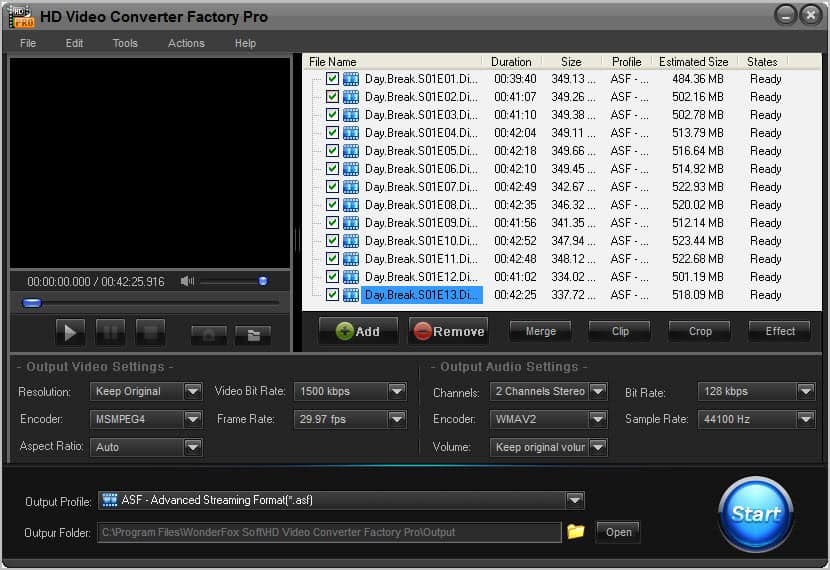
HD Video Converter Factory Pro 3 is a profile driven video converter that can convert nearly any video format into another. The converter supports more than 150 different video formats and containers, including mkv, avi, flv, mp4, rm or mov.

hd video converter factory pro

All it takes to convert supported videos to an existing profile is the following. You use the Add button to load one or multiple videos into the program. All videos are listed then in the program interface with their file name, duration, size, estimated size and conversion profile.

A small player is attached to the window to preview videos

You then selected the output profile from a list of available profiles. The selection menu displays common video formats such as xvid avi or DVD video format as well as device specific profiles for Playstation, Xbox and smartphones running Android, iOS and more.

Most users should find a profile suitable for their situation. It can however happen that no suitable profile is found. Users who encounter this situation can create custom profiles to define their own parameters. Video settings that can be changed in this regard are the video resolution, bit rate, frame rate, aspect ratio, encoder and audio settings.

Users who select an existing profile can still make changes to it. It is for instance possible to reduce the video bit rate to save space or to change the aspect ratio.

The program saves all converted videos into its own program folder. This can be changed under output folder. Before you hit start to run the conversion, you may want to look under Files > Preferences to configure conversion thread priority (set to normal by default) and actions after the conversion has finished (like opening the output folder or shutting down the computer).

converting

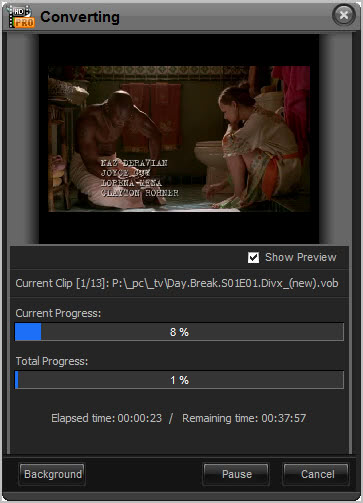
The progress of the current video conversion and the total progress are displayed on a second screen that is also playing a preview of the video. The total remaining time estimates the time left to complete all conversions.

The conversion itself is fast. It took for instance roughly five minutes to convert a standard tv show avi of 370 Megabytes into Vob format.

HD Video Converter Factory Pro users can furthermore use the program to merge videos. A click on merge opens a new window where you can select some or all of the videos that you have added to the program for merging.

merge videos

Video files that you have selected to be merged are then shown in a folder structure in the main interface.

Another interesting option is the cropping option which can be used to remove black borders from videos.

crop videos

The effects menu finally offers video modification options. You can use it to change a video’s brightness or contrast, add a mosaic effect to it or make it look like old film.

Verdict

HD Video Converter Factory Pro 3 is an easy to use video converter that can convert nearly any file into a different format. All it takes is a few clicks to get started. Advanced users have sufficient options at their disposal to customize video outputs.

Giveaway

Wonderfox Soft was nice enough to provide us with unlimited HD Video Converter Factory Pro 3 licenses. You can download the program on the giveaway site. There you also find the registration name and license code.


© Martin Brinkmann for gHacks Technology News | Latest Tech News, Software And Tutorials, 2011. | Permalink |
Add to del.icio.us, digg, facebook, reddit, twitter
Post tags: , ,


Sunday, December 18, 2011

System Mechanic Professional Review [Giveaway]

Many computer users have the impression that their systems become just a little bit slower with every day of use. Software installations, updates and even user actions on the PC can turn a powerful PC into a painfully slow system that is no pleasure to work with.

System tools like System Mechanic Professional can resolve most of the issues encountered semi-automatically.

When you first start System Mechanic Pro you are asked to run an analysis of the system. The program checks common problems and issues and displays its finding on the screen. The scan itself takes less than 30 seconds to complete and rates the PC’s health, security and overall status.

system mechanic pro

Options to repair all issues directly and to display the problems that have been found during scans are available in the main interface. The system tool lists problems and warnings on a summary page. Problems can be both security or health related, for instance that Windows Firewall is not running, that the computer has known security vulnerabilities or that the Internet connection is not optimized for maximum speed. Critical problems are highlighted in red and displayed at the top.

system tool

Actions to resolve the issues are directly displayed next to each listing. Problems can be resolved right away with the click of the button. It is alternatively possible to display additional information about a selected issue. It is for instance possible to display the list of security vulnerabilities on the screen.

Once you start fixing issues your overall system status may improve from its previous rating. System Mechanic Professional suggests to run a deep scan once the initial issues have been resolved or ignored by the user. A deep scan analysis takes longer to complete but finds additional problems that the quick scan may not have found.

Deep Scan among other things checks if the Registry is fragmented or if Solid State Drives have been optimized.

Toolbox

The toolbox lists all-in-one tools and individual tools. All-in-one tools are system tools that can accelerate, repair, cleanup or secure the PC with one click.

toolbox

  • PC Accelerator – Checks for performance enhancing actions. This may include defragmenting the Registry, optimizing the operating system drive or recovering and defragmenting system memory.
  • PC Repair – Repairs crashes, system failures and other PC related errors.
  • PC Cleanup – Can be used to delete temporary files on the system to free up disk space.
  • PC Security – Repair and resolve security issues, and perform actions that improve system security.
  • PC TotalCare runs all four scans at once.

    Individual Tools

    The individual tools group lists specialized tools, from optimizing the Windows startup to repairing shortcuts, recovering deleted files or monitoring the hard drive status.

    individual system tools

    Some of the tools are used by System Mechanic’s scans, while others are specialized tools that can only be started directly from here.

    Increase Performance

    • Memory Mechanic – Defragments the system memory
    • CRUDD Remover – Detects and offers to remove redundant applications (e.g. CCleaner when System Mechanic is installed)
    • EnergyBooster – Turn off background programs to free up system memory
    • Startup Optimizer – Suggests start up items that may slow down system start
    • NetBooster – Optimize the Internet settings to improve the Internet connections stability and performance
    • Designated Drivers – Scan for outdated drivers and suggest updates
    • Registry Compactor – Defragment and compact the Registry to speed up the start of the PC
    • Program Accelerator – Speed up programs by re-aligning the data on the hard drive
    • Drive Accelerator – Defragment hard drives
    • SSD Accelerator – Improve the performance of Solid State Drives

    Enhance Protection

    • Security Optimizer – Scan for and fix Windows security vulnerabilities
    • Registry Backup – Create a backup of the Windows Registry
    • System Guard – A program that blocks malicious programs and processes from loading and interacting with the system

    Clean Up System Clutter

    • Clean PC Clutter – Scan for and remove temporary files on the system to free up disk space
    • Junk File Finder – Find and delete obsolete and unneeded files

    Repair Problems

    • Registry Tuner – Repair Registry problems like obsolete data references
    • Shortcut Repair – Repair broken shortcuts
    • Drive Medic – Find and fix hard drive problems. Option to create a Drive Medic Emergency CD to boot from it when the operating system cannot be started
    • System Troubleshooter – Disaster recovery when a drive becomes unstable

    Ensure Personal Privacy

    • Privacy Cleaner – Erases private data like cookies, chat transcripts or the search history
    • Incinerator and Drive Scrubber – Full functionality of the Drive Scrubber program integrated in System Mechanic Professional.

    Manage System Configuration

    • Startup Manager – Configure Windows startup items to improve boot time
    • Process Manager – Manage running processes on the system
    • System Customizer – Customize Windows settings, apply tweaks
    • NetTuner – Customize advanced Internet settings
    • Duplicate File Inspector – Find and remove duplicate files on the system
    • Advanced Uninstaller – Remove installed programs.

    Recover Deleted Data

    • Recover All Data on a drive or disk – Restores the entire contents of a drive, device or folder
    • Recover Deleted Files – Searches a drive for deleted files with options to recover the findings
    • Recover deleted pictures and movies – Specialized search for recoverable photos, images and videos
    • Recover deleted songs and sounds
    • Recover deleted email – Supports Outlook, Thunderbird, Netscape and other email programs

    Perform Diagnostics

    • DriveSense – Monitor the hard drive status
    • Advanced System Information – Display system information like the installed hardware or software
    • NetSpeed Analyzer – Benchmark the Internet connection
    • System Change Tracker – Tracks changes that have been made to the system.

    Several tasks can be automated to run regularly. This includes repairing Registry and hard drive errors, removing temporary files or backing up the Registry regularly.

    Difference between System Mechanic Editions

    System Mechanic Professional includes all features of System Mechanic. The software furthermore includes four iolo products that can be purchased separately. The products are Drive Scrubber, Search and Recover, System Shield and Online Backup.

    system mechanic pro system tool toolbox individual system tools advanced-system-settings privacy-cleaner system-mechanic-software-redundancies

    Verdict

    System Mechanic Professional ships with a lot of tools, of which most can be quite useful. Some tools could be improved though. The software uninstaller for instance is not checking the system for leftovers after the installation. It also feels strange that a Good system status after resolving all quick scan issues is often changed to a lower level after running a deep scan.

    Especially the one-click repair options are handy for users who experience issues on their PC that they want to resolve without diving deeper into the issue.

    Users who want to try the software find a trial version at the official download site.

    Giveaway

    We have 20 System Mechanic Professional licenses for this giveaway. Leave a comment below to take part in the drawing.


    © Martin Brinkmann for gHacks Technology News | Latest Tech News, Software And Tutorials, 2011. | Permalink |
    Add to del.icio.us, digg, facebook, reddit, twitter
    Post tags: , ,