Pages

Showing posts with label beta. Show all posts

Friday, February 17, 2012

The Last Week Without Windows 8, What is the Tech World Doing?

Unless you hadn’t noticed, Microsoft are gearing up for the release of the Windows 8 (beta) Consumer Preview publicly in just over a week, but others, such as official beta testers and MSDN (Microsoft Developer Network) subscribers will no doubt get it a week before as happened with Windows 7.  We’re now in the last week then with no news.  So far though the old adage that “no news is good news” hasn’t gone so well for Microsoft, and Windows 8 has received some very bad press as IT Pros and businesses express their concerns about Metro, and the relegation of the traditional Windows desktop to almost a side-feature.

Also this week Apple have unveiled the next version of OS X (they’re dropped the Mac bit) called “Mountain Lion”.  It was widely expected that the company would build more tablet-like features into the operating system, expanding on the iOS-style Launcher that was introduced with the previous version.  Almost as if in response to the negative publicity Windows 8 has received they’ve decided not to press ahead with further tablet-friendly features for now, assuming that any such features were even planned, and focus on the desktop instead.

They have added some features that challenge Windows 8 however including some new social networking and cloud integration, and a notifications panel.  Mountain Lion will be released, out of Apple’s normal cycle for OS X, this summer to challenge Windows 8 on the desktop and to try to convince disgruntled IT Pros that Apple is a friend to the desktop user.

Elsewhere on the Internet you’ll have noticed that general tech news on the blogs has been somewhat slow this week, this is because a lot of people will have taken the week off anticipating a mad few weeks from next Wednesday.  For those of us writing Windows 8 books then the process will begin in earnest from the middle of next week, and I have just finished clearing out, tidying and sorting my home office to get everything ready.

You’ll find that authors will probably have been clearing the decks in recent weeks, as I know I have, making sure that all the other work that will need to be done in the next few months, until June in my case, has been finished and put to bed way ahead of time.  It is going to be extremely busy from here’on in and personally I have not just one, but two Windows 8 books to complete by the end of May, one of which has to be written in a format called ASCIIDOC, which is equivalent to writing a whole book in XML  :/

As for everyone else, well you’ll know what you have been doing, but the crescendo of excitement surrounding the release of the Consumer Preview in the last few weeks seems to have fall very quiet in recent days.  People are now sitting and waiting for February 29th to come around.

How many people will download the public release of the Windows 8 Consumer Preview remains to be seen, but Microsoft will need many millions of people to do so in order to claim a success.  This figure would need to be at least 9 million or well into double-figures in the next month or two for the company to claim victory and that people are genuinely excited about Windows 8.  So far, all departments within Microsoft have been banned from discussing Windows 8 at all, with the only outlet being through the Building Windows 8 blog.  On February 29th that embargo looks set to be lifted and we will no doubt then see a torrent of information released, day on day, week on week, that will give the public plenty to read and give the rest of us plenty to write about.

Now though it’s all very quiet.  In a way this is lovely as I’ve been able to enjoy some down time and sort some last minute things out, like my office.  In a way though it’s quite eerie.  I remember this happening the week before the Windows 7 beta was released, and believe me, all hell’s gonna break loose soon.


Thursday, February 9, 2012

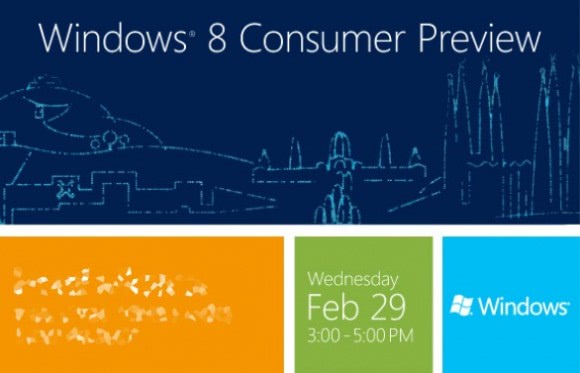
Windows 8 Consumer Preview Coming February 29th

The beta “Consumer Preview” version of Microsoft’s new Windows 8 operating system could be released on Wednesday 29th February.  Microsoft have announced a “Windows 8 Consumer Preview event” in the city, that is also home to the Mobile World Congress expo that week.

This looks like a reasonable time to launch the beta given that Microsoft previously said it would release it at the end of February.  For those on the official testing programme or who subscribe to their software via the MDSN website, with Windows 7 these groups received the beta around one week to ten days before so if this is repeated this could mean that they get delivery of the beta any time from the 17th of this month, which is what I was expecting personally.

The Consumer Preview will include many features not seen in the previous Developer Preview release, which Microsoft gave out publicly in September last year.  This is because many of those features either had not been written yet or were not finished.  One of the things that is set to change considerably is the new Metro interface, and several leaks in the last couple of weeks have shown that in some ways Microsoft has changed it significantly.

The Developer Preview has received some criticisms from business users and IT Pros, primarily because of Metro, but it remains to be seen how many of those criticisms are answered satisfactorily by the Consumer Preview.  Business users should not be concerned about the name “Consumer Preview” either as this is basically code for, “We’ve got developers excited [hopefully] but now we need to spur those developers on and make sure they’ve not forgotten about us by getting millions of members of the public excited as well.”

New features that have been demonstrated but not yet used by the public, including the new “Windows App Store” will open at the same time.  The final release of the operating system is expected later in the year around October.


Monday, January 30, 2012

The Windows 8 “Consumer Preview”, What’s in a Name?

It is widely expected that when Microsoft launch the Windows 8 beta in a few weeks that it will be labelled the “Windows 8 Consumer Preview”.  This has alarmed and concerned many IT Pros who feel that Windows 8 is cutting them out with Microsoft putting all the focus on consumers and tablets with its new Metro interface.  I thought this deserved some discussion, especially in light of the concerns that IT Pros, businesses and enthusiasts currently have.

Let’s look first at the missing IT Pro features in the Developer Preview and what this release was actually for.  Microsoft are going after the tablet market aggressively, frankly they have no choice to do this now or to wave goodbye to it forever.  This is why Windows 8′s new Start Screen and Metro apps have been engineered the way they have.  Nobody can blame them for this either.  As we all now know from smartphones and tablets, any platform will live or die on the quality and quantity of the apps available for it.  Let’s just look at what happened to HP’s TouchPad, with the same now beginning to happen to the RIM Playbook.

For this reason it is essential that Windows 8 have a critical mass of Metro apps available in the new Windows store on the day that Windows 8 goes on sale.  The only way to do this is to start early, and the only way to get developers writing for the new interface and platform is to give them a copy to play with.  It was far from essential therefore that anything other than Metro was actually working for the giveaway date at their BUILD developer conference last September.

This doesn’t mean that Windows 8 will be bereft of IT Pro features, it just means that Microsoft’s focus in the run up to September was finishing Metro and making sure it was stable.  Microsoft have told me privately that plenty of new features for IT Pros simply weren’t finished by then.  They are coming and will all be finished for the beta.  In fact that build of Windows 8 will already have been signed off by now and will be going into escrow this week.

Microsoft have a huge mountain to climb in the tablet market and they’ve got to create a buzz with the beta.  Some people at the company have admitted to me privately that the company made a mistake in releasing the Developer Preview publicly instead of just through developer channels.  People downloaded it, expecting it to be a finished product and it simply wasn’t.  This has resulted in the new OS getting large volumes of negative publicity and people damning the finished product when they’ve actually seen less than half of it.

So why Consumer Preview then if IT Pros hated the Developer Preview?  Microsoft need to get consumers worldwide downloading, installing and using the Windows 8 beta in their multi-millions.  They need people talking on blogs and forums and in the press about how much they love it to spur on developers in writing apps for the platform.  Microsoft haven’t released any figures yet about how quickly Metro apps are being written, but this could mean it’s off to a slow start potentially.  Generating excitement and press coverage then is huge.  This doesn’t mean that the IT Pro features won’t be there, just that Microsoft have got to get Metro off to a flying start from being three or four years behind the market leaders.

The company will also want to completely differentiate the latest release from the Developer Preview by indicating that they were both completely different builds and intended for completely different audiences.  Simply calling it the beta next month wouldn’t do this and many people might assume that it will just include a few tweaks and bells on top of what was seen in September.  Thus this differentiation is absolutely necessary.  Especially given Microsoft’s private admission that a public release was an error last time.

The other reason to call it a Consumer Preview is that, for a while at least, all the media attention will be on the new Metro interface.  Microsoft know this and will try to use this coverage to spurr on app developers.  In short it’s actually quiite a clever move calling it this.   It doesn’t mean, as I’ve already said, that it won’t include the ability to switch off the new Start Screen, or won’t include Hyper-V, new multi-monitor tools and much more besides.  It is, frankly, just a name and IT Pros need not be concerned any longer.


Saturday, January 7, 2012

Musings on the Windows 8 Developer Preview

As a Microsoft Windows MVP and a Windows author I’ve got a busy year ahead of me.  I’ve got several Windows 8 books to write for starters, all to be out during 2012 so I really do need to know Windows 8 backwards.  The Building Windows 8 blog has been extremely useful in this respect with the level of detail that the development teams at microsoft have gone into but then there’s the first hands-on version, the Windows 8 Developer Preview.

This was released, as you’ll remember, back in mid-September at Microsoft’s BUILD developer conference.  The aim was to get people excited about writing apps for the new operating system’s ‘Metro’ interface.  With the Developer Preview having been made publicly available at the time it was downloaded in huge numbers and it’s been interesting reading blogs from tech journalists who have been using it in anger.

So, with Windows 8 books to write, webcasts to give on it and talks already underway you’d have thought that I too would have been using the Developer Preview in anger, right?  Actually I do still have a copy installed on my Windows tablet, but only because I use my HP TouchPad for day to day use.  I did have a copy installed in a dual-boot system on my main PC, but soon got rid of it as I never used it, and I did have a copy installed in a virtual machine on my laptop, but never used that either and so it too is now gone.

If I need to get right under the hood of Windows 8 then, why haven’t I been using the Developer Preview?  There are several answers to this, the first is that the preview is, and many people have commented on this, pretty unusable for day to day work.  At the moment and especially without a working Windows app store there’s not much you can do in Metro and, as such, you need to spend all your time on the desktop.  This causes problems too because many of the features that will make working on the desktop pleasurable weren’t finished in time for the preview.

Then there’s all the things under the hood of the operating system.  We’ve been reading a steady stream of articles from Microsoft since September on new and sometimes even cool features coming for the beta.  None of these exist within the Developer Preview and to assume that for features such as Hyper-V which can be unlocked in the preview already have their final interfaces is perhaps a little foolish.  There really isn’t that much in the Developer Preview and it’s quite devoid of anything new or changed outside of Metro.

I’m looking forward to downloading, installing and using the full Windows 8 beta in anger.  I have already decided that I will blow away the copy of Windows 7 on my work touch-enabled laptop and use exclusively Windows 8 on the device.  As for my desktop I’ll see how things go.  With the beta however we can assume that Windows 8 will be feature-locked when the beta is released next month, and so this will be the time to start exploring the features and taking screenshots (though these might change slightly).

You might be of the same mind as myself regards the preview, in that you too might have tried it briefly, got bored of it and gone back to Windows 7 until something more stable and complete comes along.  For all the bloggers, writers and authors who say they’ve been using the Developer Preview in anger, I do wonder how productive they’ve been and how much they’ve actually been using it.

Suffice to say, the beta will be a very different beast and very complete.  I’ve been reserving judgement over Windows 8 until I see it, in the same way I have during the alpha and beta programmes for previous versions of Windows.  It might be genuinely exciting, it will certainly be extremely interesting but one thing is for sure…  It will for the very first time be properly usable.


© Mike Halsey MVP for gHacks Technology News | Latest Tech News, Software And Tutorials, 2012. | Permalink |
Add to del.icio.us, digg, facebook, reddit, twitter
Post tags: , ,


Wednesday, December 7, 2011

Windows 8 Beta Coming “Late February 2012″

As Martin wrote earlier, today marked the unveiling of the new Windows Store that will be integrated into all Microsoft products including Windows 8, Windows Phone and the Xbox.  One very interesting snippet of information that came from the Windows Store launch though was ‘confirmation’ of the availability date for the Windows 8 beta.

I say confirmation in inverted commas because it doesn’t answer all the questions and does indeed throw up some interesting ones too.  Many people were expecting the beta to appear sometime in early to mid-January.  This is what happened with Windows 7 just after it was officially unveiled at the Consumer Electronics Show in 2009.  This is also consistent with a release schedule that could see the final code released to manufacturing by July for release on new PCs at the end of August.

PC makers complained strongly about the Windows 7 launch in October 2009 because it had missed the important back to college sales period.  Indeed Microsoft had to issue vouchers to PC makers to give away with new PCs enabling people to get a free copy of Windows 7 later on.

However today we heard that the Windows 8 beta will be made available in “Late February 2012″.  This is much less consistent with a final release that will meet the late August / September sales deadline and if anything, more consistent with a January release as was seen with Windows Vista.

But it doesn’t answer all the questions.  For instance there will be private and public beta programmes as usual.  With Windows 7 these began only ten days apart but there’s no word yet on when the private beta will begin.  It also doesn’t explain why we’re looking at a late February beta release when January was the date expected by many people.  Microsoft received a great deal of backlash over the Developer Preview and had to re-engineer some features such as search and expand on others.  In blog posts Steven Sinofsky, the Windows chief at Microsoft admitted that many people had not been happy with the Developer Preview and Microsoft had to do more work.

Does this late February release then mean that the required work has pushed Windows 8 back and maybe even wrecked the original release schedule?  It is possible that the final release schedule will be announced at CES in January, though it is more likely we will have wait until some time in the spring before we get this information as we did with Windows 7.

If Microsoft miss a July RTM date then PC manufacturers, who are already feeling squeezed will no doubt be very angry and a voucher scheme will have to begin again in earnest.  If we see a late August / September RTM then a pre-Christmas release will happen.  If the schedule slips further into January 2013 then Microsoft will be in trouble, not just with PC makers worldwide, but also over their own finances.

When a new Windows release comes out the company want to say six months in how strongly it is selling, it helps with their share price.  With a release as “bold”, “risky” and “contentious” as Windows 8 to use just some of the words people both inside and outside Microsoft have used to describe it this will be even more important.  If sales of the new OS begin after the back to college and Christmas holidays sales periods are over then those figures will inevitably look weak.  This could reflect very badly on Microsoft overall.

It will be CES in January at the very earliest before we get answers to any of these questions.


© Mike Halsey (MVP) for gHacks Technology News | Latest Tech News, Software And Tutorials, 2011. | Permalink |
Add to del.icio.us, digg, facebook, reddit, twitter
Post tags: ,


Tuesday, November 29, 2011

New Microsoft Security Essentials Public Beta Begins

Microsoft have begun issuing invitations to testers who expressed an interest in the next generation version of their Security Essentials, free anti-virus product.

In the invitation email the company say…

The Beta program is a fully functional antimalware app with ongoing updates to help protect your PC from viruses, spyware, and other malicious software.  In addition to ongoing virus and spyware definition updates, we’ll provide software updates to the Beta for download through Microsoft Update on a periodic basis. To have these updates installed automatically, you must be subscribed to Microsoft Update with preferences set to Automatically download and install new updates.

This edition, version 4.0.1111.0 comes in both 64 bit and 32 bit versions and can upgrade a current Security Essentials installation automatically.  The company also say that…

At the end of the Beta program, participants who are subscribed to automatic updates through Microsoft Update will be upgraded to the released version of Microsoft Security Essentials.

Which is news that will be welcomed by many people who simply don’t want to have to worry about it.

Microsoft have said that among improvements will be a much simplified interface, though on initial inspection it is very difficult to tell the difference between this and the previous version.

The new features are…

  • Enhanced protection through automatic malware remediation: The Beta program will clean highly impacting malware infections automatically, with no required user interaction.
  • Enhanced performance: The Beta includes many performance improvements to make sure your PC performance isn’t
    compromised.
  • Simplified UI – Simplified UI makes Microsoft Security Essentials Beta easier to use.
  • New and improved protection engine: The updated engine offers enhanced detection with cleanup capabilities and better performance.

This software, which is based on the company’s Forefront anti-virus engine for enterprise customers, has been receiving some criticism in the last year for dropping down the ranking in anti-virus tests.  This beta includes an improved scanning engine and Microsoft will be counting on this to put Security Essentials back in the top two or three for quarterly effectiveness surveys.

Microsoft Security Essentials is being built into Windows for the first time with Windows 8 and as such is bound to become a significant target itself.  If people aren’t to install other third-party anti-virus software in Windows 8 they need to be reassured that Security Essentials, currently badged as Windows Defender in Windows 8, is a quality product that will protect them.

This inclusion into Windows 8 will make Security Essentials a target for malware writers who will try and undermine its effectiveness.  The overall security features in Windows such as User Account Control will help minimise the surface for attack, but this must be high on Microsoft’s mind at the moment.

The download is 19.91Mb for both the versions (the 64-bit version is 11.04Mb and the 32-bit version is 8.87Mb) and runs on any version of Windows from XP with Service Pack 3 or later.  The version you install must match the edition of Windows you are running, 32-bit or 64-bit.

The public beta is available through the Microsoft Connect website at connect.microsoft.com and I should stress it is just a beta, so should not be considered bug free and it might include vulnerabilities that leave your system vulnerable to malware and viruses.


© Mike Halsey (MVP) for gHacks Technology News | Latest Tech News, Software And Tutorials, 2011. | Permalink |
Add to del.icio.us, digg, facebook, reddit, twitter
Post tags: , ,


Wednesday, November 23, 2011

BBC Goes for Touch-Friendly Beta Website

The British Broadcasting Corporation (BBC) has for many years now had one of the biggest and most visited websites on the whole Internet.  The company has taken great pride over the years and in 2002 a leaked document, still available online called “The Glass Wall” provided a masterclass in website usability that many people still consider an invaluable document today.  Now though the broadcaster is taking things to the next level with what can only be described as a properly touch-friendly website.

The new beta site can be found at http://beta.bbc.co.uk and displays an almost metro’esque sliding panel system with more traditional links in the bottom half of the page.  The whole web needs to move inexorably towards full and complete touch-friendliness in short order.  The amount of people using Tablets to navigate the web is already growing exponentially, and the forthcoming Windows 8 with it’s touch-centric interface will mean that by the end of 2012 touch-screens will be the norm on new PCs and laptops.

I myself am currently revamping my own website to make it completely touch-friendly and will be relaunching the new design within a week or two.  It’s noticeable however that the major players, including Amazon, eBay and YouTube haven’t yet caught on to the fact that traditional drop down menus, text links and crowded lists simply can’t be used effectively with touch.

This does raise interesting questions as to whether website UI components that we’ve come to know and love such as dynamic drop down menus and text lists can survive the transition to touch at all.  Any touch website has to be cross-compatible with every touch device, and many will work in their own unique way.  When it comes to touch on computers a proper standard is yet to emerge, if it ever will, about how swipe and touch gestures are interpreted.

The BBC haven’t got everything right when it comes to touch, but this is still a beta and with a website as utterly enormous as this, with literally terabytes of video, educational and article content sitting underneath it would be extremely difficult to create an interface simple enough and that included everything.

In part this is the biggest challenge that the touch web, and touch-screen apps as well, has to overcome.  For things to be truly finger-friendly you have to limit what is available and make clever use of screen real-estate, this is a challenge I had to content with as I too have ever growing libraries of video and other content on my own website.  For a small site like my own it’s easy to juggle things around, for the BBC and other major corporations however the challenge might simply be too big.

The new design is lovely, I think anyway and a radical departure from the current BBC homepage with it’s customisable and arrangeable tiles (circa Yahoo from some years ago).  The design will no doubt change slightly, indeed I have noticed changes being implemented within the last 24 hours.  It is great though to see this website, deliberately or otherwise being made finger-friendly.  Pressure now needs to be brought on the other major website owners to do the same, and do it quickly.  It is entirely possible however they they won’t even consider this until their visitor numbers begin to drop, and by then it might well be too late for them.


© Mike Halsey (MVP) for gHacks Technology News | Latest Tech News, Software And Tutorials, 2011. | Permalink |
Add to del.icio.us, digg, facebook, reddit, twitter
Post tags: , , ,