Pages

Showing posts with label firefox tabs. Show all posts

Friday, February 3, 2012

NOverflow for Firefox Makes Sure Your Tabs Stay Visible All The Time

Firefox, like other web browsers, can only display a certain amount of tabs at the same time. This is handled by minimum and maximum width parameters. Once the limit is reached, arrows are added to the right and left side of the tabbar that need to be used to access tabs that are no longer visible on the screen. We dealt with the issue before here at Ghacks, and suggested to change minimum and maximum tab width values to display more tabs in the tabbar at the same time.

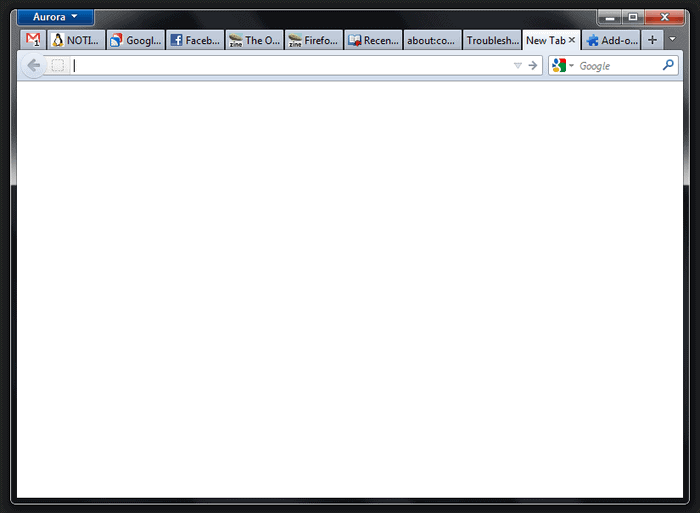
The Firefox add-on NOverflow takes the concept a step further by dynamically changing the tab width values. The add-on, instead of letting Firefox hide tabs in the tabbar, reduces the minimum tab width whenever necessary to keep all tabs visible on the screen. And when you start closing tabs, the width of the remaining tabs is adjusted again to use the freed room on the tabbar.

This works well for a medium amount of open tabs. Once you reach an upper limit, scrolling buttons are displayed again to scroll to the left or right. A quick test revealed that about twice the number of tabs were displayed at the same time with the extension installed. It should be noted though that this is only valid if the minimum width has not been altered previously.
firefox visible tabs

The core benefit of the extension over adjusting the width of the tabs in the stylesheet is accessibility. All it takes is to install the add-on to get the tabs width adjusted automatically from that moment on. Tech savvy users may prefer to edit the stylesheet directly instead, as it will free up some ram and maybe even cpu that the add-on requires when running.

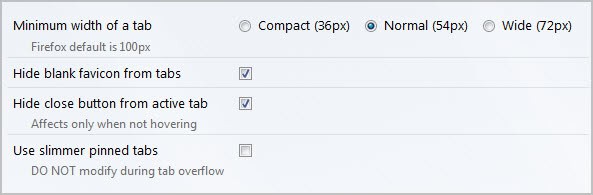
You can change the minimum width in the add-on’s options. It is set to 54 pixels which is nearly half of Firefox’s default value of 100 pixels. You can reduce the size to 36 pixels which would nearly triple the maximum number of visible tabs in the browser, or increase it to 72 pixels.
noverflow

The remaining options let you hide blank favicons from tabs, the close button from the active tab and to use slimmer pinned tabs.

Firefox users who want to give it a try can download and install NOverflow from the official Mozilla Firefox add-ons repository.


Tuesday, December 13, 2011

Display, Search All Open Tabs In Firefox With Tabby2

Firefox users with lots of tab open in the browser often try to find ways to improve the browser’s tab management capabilities. The core issue that they face is that part of the open tabs are hidden from view, and that it may take lots of scrolling to get there.

There are built-in options to handle or mitigate the issue. From altering the browsers minimum tab width to display more tabs at the same time on the screen over extensions like Tab Mix Plus to display multiple rows of tabs, to Firefox’s Panorama feature to group tabs.

The Firefox add-on Tabby2 offers another approach. The shortcut driven extension displays a list of open extension on the screen whenever the shortcut is used. The list displays all open tabs at the bottom of the screen utilizing all of the screen estate of the browser.

firefox tab management

Only the tabs of the active Firefox window are displayed. A filter at the bottom of the screen can be used to find specific pages quickly. Both the page title and web address are used by the filter.

A left-click on a tab in the list switches automatically to that tab in the browser. Middle-click and right-click on the other hand open a blank new tab in the browser or delete the active tab automatically.

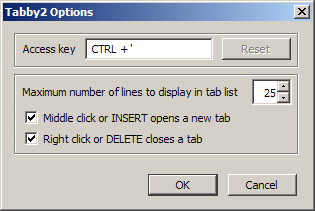
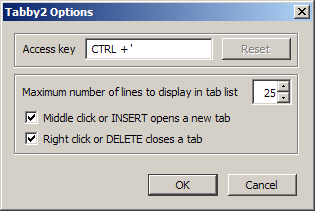
Options are available to change the extension’s default access key (from Ctrl+’ to another keyboard shortcut), and to define the maximum number of lines that are displayed in the tab list. The default value is set to 25 tab lines.

The options highlight the keyboard shortcuts for creating (Insert) and deleting (Delete) tabs as well. The functions are only available when the tab list is open.

firefox tabs

The tab listing and filtering options are very responsive, and unobtrusive at the same time. The tab listing and filtering happens instantly.

Firefox users can download Tabby2 from the official Mozilla Firefox add-on repository.


© Martin Brinkmann for gHacks Technology News | Latest Tech News, Software And Tutorials, 2011. | Permalink |
Add to del.icio.us, digg, facebook, reddit, twitter
Post tags: , ,


Thursday, December 8, 2011

Open Typed Urls In New Tabs In Firefox

Web browsers can be configured to open website urls either in the current tab or in a new tab. The developers of Firefox have added options to Firefox that give the user a choice when opening links with mouse-clicks. A left-click opens the url in the same tab, a middle-click in a new tab. I was not aware of a similar mechanism for manually typed in urls. I used to open a blank new tab first with Ctrl-t before I started entering the url into the address bar of the browser. And I would only type the url in an active tab directly if I did not need to access that particular web page anymore.

Then I discovered that there is an easier way that would optimize that workflow significantly. I started to test holding down Shift, Alt, Cltr plus Enter combinations until I found the combination that would open the typed in text in a new tab page and not the active one.

Firefox users can either hold down Alt before they press enter or the Alt Gr key to open the entered text in a new browser tab. Website addresses (urls) are automatically loaded in the new tab while searches load the results of the default search engine instead in the new tab. Firefox will automatically switch to the new tab and restore the url text in the tab the text was entered in.

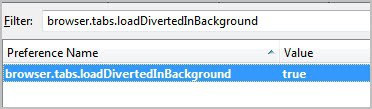
Do you prefer to open new tabs in the background instead of the foreground? No problem, all you need to do is to make a slight configuration change. Enter about:config in the Firefox address bar and hit enter. First time users need to confirm that they will be careful. Enter the parameter browser.tabs.loadDivertedInBackground in the filter bar on top. Only one entry is returned.

firefox new tabs background

The default setting is false, which basically means that new tabs are not opened in the background. A double-click on the parameter changes the value to true which has the consequence that new tabs are opened in the background instead.


© Martin Brinkmann for gHacks Technology News | Latest Tech News, Software And Tutorials, 2011. | Permalink |
Add to del.icio.us, digg, facebook, reddit, twitter
Post tags: , ,


Friday, December 2, 2011

Close Tabs Efficiently In Firefox

Sometimes it is little things that can make a big difference. When it comes to closing tabs in the Firefox web browser, users have options to close the tab with a click on the x icon that is either displayed on the right of the tab or at the end of the tabbar. They can alternatively right-click on the tab and select Close Tab from the context menu, or use the keyboard shortcut Ctrl-w to close the active tab.

Double Click Close Tab is an add-on for the Firefox web browser that adds additional tab closing options to the browser. A double-click on a site in the tabbar closes that tab automatically in the browser. While that’s more convenient than using the right-click context menu it is not the most efficient option that the extension provides.

Closing tabs by moving the mouse to the tabbar to either double-click or click on the x icon is inefficient because of that initial mouse movement. The keyboard shortcut works directly but can only close the active tab.

Double Click Close Tab adds two additional tab closing options to Firefox. Users can alternatively triple left-click anywhere on the page to close the active tab. This may interfere with some actions in the browser, for instance double-clicking on text to highlight it. If you click three times instead of two, which can happen, you’d inadvertently close the current website instead.

close tabs

The options of the add-on provide preferences to change the default behavior. Both the default tab clicking and on page clicking behavior can be altered there. Alternatives are a single middle-click, double right-clicks or triple right-clicks.

It is furthermore possible to disable one of the tab closing options completely, and to change the triple click time (that is the time in which three clicks need to be registered).

Double Click Close Tab can be downloaded and installed directly at the Mozilla add-on repository.


© Martin Brinkmann for gHacks Technology News | Latest Tech News, Software And Tutorials, 2011. | Permalink |
Add to del.icio.us, digg, facebook, reddit, twitter
Post tags: , , ,