Pages

Showing posts with label java. Show all posts

Wednesday, February 15, 2012

Java 6 and 7 Security Updates Released

Oracle today has released a critical patch update for JAVA SE that includes both patches for security vulnerabilities and non-security fixes. The company asks all Java users to update their versions of Java SE as soon as possible to protect the underlying systems from attacks exploiting those vulnerabilities.

The patch advisory for February 2012 lists the following Java SE products and versions as vulnerable to the security vulnerabilities addresses by the critical patch update:

  • JDK and JRE 7 Update 2 and earlier
  • JDK and JRE 6 Update 30 and earlier
  • JDK and JRE 5.0 Update 33 and earlier
  • SDK and JRE 1.4.2_35 and earlier
  • JavaFX 2.0.2 and earlier

The Oracle Java SE Risk Matrix lists 14 unique vulnerabilities of which five have received the highest possible base score of 10. This score assumes that users running Java on the system have administrative privileges. If that is not the case, the base score would lower the base score considerably.

All 14 vulnerabilities can be remotely exploited without authentication, for instance over a network with the need for a username or password.

Users who are not sure which Java version – if any – they are running on their system should open the Java test page that checks the version for them.
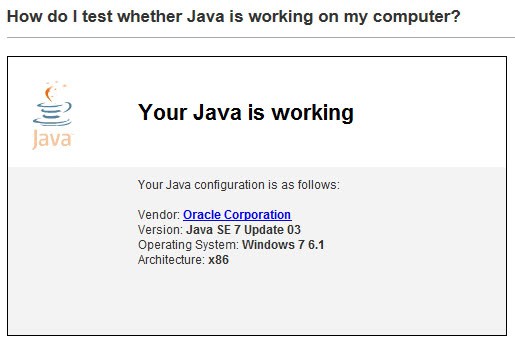
java test

The latest Java SE versions can be downloaded from this page over at the Java website. If you have Java 7 installed, you need to click on the JRE download link next to Java SE 7u3, and if you have Java SE 6 installed, you need to click on the JRE download link there to download the update to your computer.

Updates are provided for all supported operating systems, including Windows 32-bit and 64-bit versions, Macintosh and Linux.

You can furthermore access the Java SE 7 Update 3 release notes on this page, and the release notes for the Java SE 6 Update 31 on this.


Friday, December 23, 2011

System Files, Flash, Silverlight, Java Offline Installer

Setting up computer systems can be a boring repetitive task. While I’m setting up and configuring PCs maybe once or twice a year only, I always repeat the same set of steps after the operating system has been installed. This includes installing common software like the web browser Firefox, the email client Thunderbird, SnagIt for taking screenshots, WinSCP for file transfers or Microsoft Office for documents and spreadsheets. I also install Java, for the excellent feed reader RSSOwl, and the browser plugins Adobe Flash and Microsoft Silverlight. I tend to disable the plugins in the browser for most of the time, but installing the technology is a must.

McRip System Files is a free portable offline installer for Adobe Flash, Microsoft Silverlight, DirectX Redistributable, Shockwave Player and Java. Offline means that the program contains all installers for offline installation. In other words, an Internet connection is not required during installation of the technologies.

The downside is the size of the installer, which is currently weighing in at 192 Megabytes. This can be an issue, especially for users who do not need all of the applications but only some of them.

Just start the installer to install one, multiple or all of the programs on a target system.

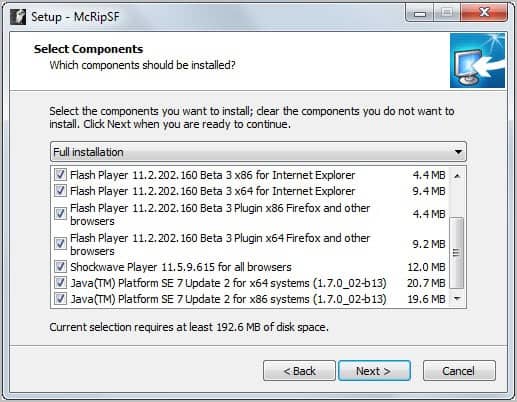
system files setup

Checkboxes allow you to make selections prior to installation. Please note that 32-bit and 64-bit installation files are available. It should also be noted that the developers have added the latest Flash beta version to the program and not the latest stable version of Adobe’s software.

Windows Vista and Windows 7 users need to run the program with elevated privileges. All selected applications will be installed silently on the system and with automatic updates disabled. Users who want automatic updating enabled need to configure the programs accordingly.

System Files can be a useful program for users who need offline installers for multiple of the included programs. Silent installation of all programs and disabled auto updates may be interesting as well.

Windows users can download the program from Softpedia. The developer website is available here.


© Martin Brinkmann for gHacks Technology News | Latest Tech News, Software And Tutorials, 2011. | Permalink |
Add to del.icio.us, digg, facebook, reddit, twitter
Post tags: , , ,


Tuesday, November 15, 2011

Flickr Photo Downloader, Download Public Flickr Photos In Bulk

I have reviewed quite a few programs to download photos from Flickr in the past. From Flickr Download and Flickr Downloadr to Flickr Mass Downloader and the more recent Flickr Mass Downloader.

All tools have in common that they can be used to download public photos that are hosted on Flickr. They differ in handling and features though.

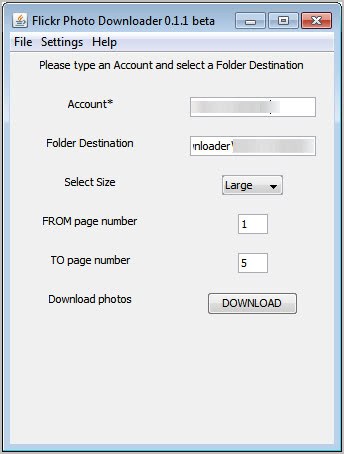
The latest addition is Flickr Photo Downloader, a lightweight easy to use Java application. Everything is configured in the main application interface. Here you can enter the Flickr user account name that you want photos downloaded from.

flickr photo downloader

The download directory is automatically adjusted by the downloader. That’s handy for users who do not want to configure the download location manually, but it is possible for users who want to change it manually to another location on the computer.

The remaining settings are for the photo size, which can be small, medium or large, and the number of pages that should be downloaded by the software.

A click on the download button initiates the process. The download speed depends on the network bandwidth. One issue here is that the program is not displaying a progress bar or indicator. That’s usually not a problem for smaller sized downloads but could be problematic for larger downloads as it is not clear when the downloads will finish. You could look into the download directory to see if there is progress, but that is the only way.

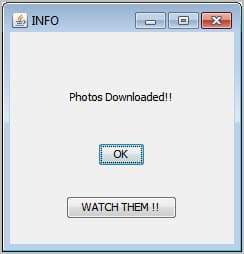
Flickr Photo Downloader displays a message at the end that all photo downloads have been completed.

photos downloaded

The program saves the photos by default into the user directory. The dialog has an option to open the folder containing the newly downloaded photos directly. Users who have to use a proxy to connect to the Internet can configure one under the Settings menu link.

The program seems to block downloads if the page count goes out of bounds. Flickr Photo Downloader is a small handy software to download photos from Flickr. It is compatible with 32-bit and 64-bit editions of the Windows operating system and available at the project’s Google Code homepage. (via)


© Martin Brinkmann for gHacks Technology News | Latest Tech News, Software And Tutorials, 2011. | Permalink |
Add to del.icio.us, digg, facebook, reddit, twitter
Post tags: , , , , ,


Wednesday, October 19, 2011

Oracle Releases Critical Java Update

Oracle has released a critical patch update for its Java products including the Java Development Kit and the Java Runtime Environment. According to the security advisory the cumulative update fixes a total of 20 security related issues across all Java based products.

Java users can verify their computer system’s Java version on this page. Affected by the security vulnerabilities are all JDK and JRE 7, and JDK and JRE Update 27 and earlier versions.

The risk matrix highlights each individual patch, the affected components, attack vectors and scores.

End users can make use of the automatic updating routine or download the new Java versions directly from the Oracle website. Windows users can check manually for updates from the Java Control Panel applet. They need to switch to the Update tab of the applet and click on the Update Now button there to run an update check and install the update on the system.

java control panel update

Users running the Java Runtime Environment 6 (who want to stay on 6 and not switch to 7) can download the JRE 6 Update 29 from this page. The new version is available for all supported operating systems. Windows users can download online or offline installers of the JRE.

Users who are already running the Java Runtime Environment 7 can download the new version that brings their version to JRE 7 Update 1 here.

java update 7

Developers can download the Java Development Kit 7 Update 1 from the Java SE Downloads page. Additional developer related downloads are provided on that page as well.

Oracle classifies the patch update as critical. Users running either the JDK or JRE on their computer system should update the systems as quickly as possible to protect their operating systems from potential attacks and exploits.

Oracle notes that 19 of the 20 vulnerabilities can be remotely exploited without the need for authentication. System administrators who need more information should start with the official patch update advisory linked above. It includes temporary workaround suggestions that may mitigate potential attacks on computer systems.


© Martin Brinkmann for gHacks Technology News | Latest Tech News, Software And Tutorials, 2011. | Permalink |
Add to del.icio.us, digg, facebook, reddit, twitter
Post tags: , , , , ,