Pages

Showing posts with label flash. Show all posts

Friday, December 23, 2011

System Files, Flash, Silverlight, Java Offline Installer

Setting up computer systems can be a boring repetitive task. While I’m setting up and configuring PCs maybe once or twice a year only, I always repeat the same set of steps after the operating system has been installed. This includes installing common software like the web browser Firefox, the email client Thunderbird, SnagIt for taking screenshots, WinSCP for file transfers or Microsoft Office for documents and spreadsheets. I also install Java, for the excellent feed reader RSSOwl, and the browser plugins Adobe Flash and Microsoft Silverlight. I tend to disable the plugins in the browser for most of the time, but installing the technology is a must.

McRip System Files is a free portable offline installer for Adobe Flash, Microsoft Silverlight, DirectX Redistributable, Shockwave Player and Java. Offline means that the program contains all installers for offline installation. In other words, an Internet connection is not required during installation of the technologies.

The downside is the size of the installer, which is currently weighing in at 192 Megabytes. This can be an issue, especially for users who do not need all of the applications but only some of them.

Just start the installer to install one, multiple or all of the programs on a target system.
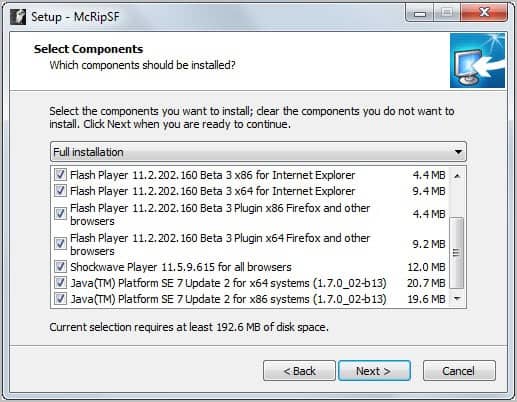
system files setup

Checkboxes allow you to make selections prior to installation. Please note that 32-bit and 64-bit installation files are available. It should also be noted that the developers have added the latest Flash beta version to the program and not the latest stable version of Adobe’s software.

Windows Vista and Windows 7 users need to run the program with elevated privileges. All selected applications will be installed silently on the system and with automatic updates disabled. Users who want automatic updating enabled need to configure the programs accordingly.

System Files can be a useful program for users who need offline installers for multiple of the included programs. Silent installation of all programs and disabled auto updates may be interesting as well.

Windows users can download the program from Softpedia. The developer website is available here.


© Martin Brinkmann for gHacks Technology News | Latest Tech News, Software And Tutorials, 2011. | Permalink |
Add to del.icio.us, digg, facebook, reddit, twitter
Post tags: , , ,


Thursday, November 10, 2011

Adobe Releases Another Flash Security Update

A security update for Adobe Flash Player has been released today that fixes several critical security vulnerabilities that Adobe identified in the software. Affected by vulnerabilities are all desktop versions of Adobe Flash Player 11.0.1.152 and earlier for Windows, Apple Macintosh, Linux and Solaris as well as Adobe Flash Player 11.0.1.153 or earlier versions for the Android operating system. Adobe Air 3.0 and earlier are also affected by the security vulnerabilities.

Flash users are asked to visit the About Flash page to check the Flash version installed on their computer.

adobe flash security update

It is alternatively possible to right-click on Flash content to see the Flash Player version in the context menu.

adobe flash version

Adobe recommends to update Flash Player to the newest version 11.1.102.55 by downloading it from Adobe’s Flash Player Download Center. Is it alternatively possible to download Flash offline installers from the linked guide. Android users can update Flash by downloading the latest version from Android Market on their Android device. Google Chrome users do not need to run the update manually as it is automatically installed by the browser.

The security patch fixes several memory corruption, buffer overflow and stack overflow vulnerabilities in Adobe Flash Player that attackers could exploit to cause a crash on the system running Adobe Flash technologies. Code execution could then give the attacker control of the affected system.

Interested users can read the security bulletin over at the Adobe website. It offers additional information about each vulnerability found and download links to various technologies affected by the vulnerabilities.

The next big Flash release (that is Adobe Flash 11.2) will introduce automatic silent updates on Windows. This means that it will become more comfortable for Windows users to keep their installed version of Flash up to date on their system. See Flash Player 11.2 Introduces Automatic Updates for details.


© Martin Brinkmann for gHacks Technology News | Latest Tech News, Software And Tutorials, 2011. | Permalink |
Add to del.icio.us, digg, facebook, reddit, twitter
Post tags: , , ,


Wednesday, November 9, 2011

Adobe Discontinue Flash for Mobile Devices

The world has been wondering what the next move would be in the stand-off between HTML5 and Adobe’s Flash Player.  Apple has always resisted Flash on the iPhone and iPad demonstrating that it runs slowly on the Mac and citing security concerns, many of which are valid.  Despite this Flash still has many fans and didn’t appear to be losing any traction.  This is despite Microsoft’s announcement that the new Metro version of IE10 for Windows 8 would be HTML5 all the way and not support any plug-ins at all.

Now though Adobe have signalled the beginning of the end for Flash by announcing that they are to discontinue development of the Flash player for Blackberry and Android devices.  In a press release the company signalled their the future would be HTML5 and their existing AIR runtime environment.

Our future work with Flash on mobile devices will be focused on enabling Flash developers to package native apps with Adobe AIR for all the major app stores. We will no longer adapt Flash Player for mobile devices to new browser, OS version or device configurations. Some of our source code licensees may opt to continue working on and releasing their own implementations. We will continue to support the current Android and PlayBook configurations with critical bug fixes and security updates.

Over the past two years, we’ve delivered Flash Player for mobile browsers and brought the full expressiveness of the web to many mobile devices.

However, HTML5 is now universally supported on major mobile devices, in some cases exclusively. This makes HTML5 the best solution for creating and deploying content in the browser across mobile platforms.

We will no longer continue to develop Flash Player in the browser to work with new mobile device configurations chipset, browser, OS version, etc.) following the upcoming release of Flash Player 11.1 for Android and BlackBerry PlayBook.

People’s feelings over this announcement will be mixed.  All of Adobe’s products have been criticised for having lax security over the years and Flash was no exception to this.  It was difficult to disagree with Apple’s decision not to allow Flash on their iOS operating system, no matter how much we might have liked the plug-in itself.

Flash, which was born FutureSplash, has become the bedrock of video and interactivity online.  Quite simply it is the only plug-in to have ever reached nearly 100% adoption.

Questions will also be raised over the future of Flash for OS X and Windows.  It is very likely that these too will be discontinued before too long, and probably before the launch of Windows 8.

What the future of the web will now look like with HTML5 and scripting replacing the compiled code of the SWF file format remians to be seen.  Many popular websites have been shying away from Flash in recent years to return to more traditional interface types.  It is possible that the withdrawal of Flash from the Internet won’t even be noticed as websites such as YouTube complete their transition to true HTML5.

This does mean that devices that have been waiting for the arrival of Flash, including Windows Phone, will now never see it and can begin the full move to HTML5 in earnest; Windows Phone now has an HTML5 browser with the latest update.


© Mike Halsey (MVP) for gHacks Technology News | Latest Tech News, Software And Tutorials, 2011. | Permalink |
Add to del.icio.us, digg, facebook, reddit, twitter
Post tags: ,


Friday, November 4, 2011

Low Quality Flash, Improve Flash Performance In Firefox

Flash applications can be very taxing performance wise. If you ever had to run Flash apps on underpowered hardware, e.g. a netbook or tablet PC, then you know that you may experience frame drops and other performance related issues. Most performance issues are caused by games which can be very taxing. I remember that I once tried to play a shoot em up game on my Acer notebook only to find out that I could not play the game at all because of a low frame rate.

There is not really a lot that users can do to improve the Flash performance on their computer. While some may be able to increase fps by closing background applications or overclocking their graphics adapter, others may not see a difference at all in this regard.

The Firefox add-on Low Quality Flash offers a different solution. The extension modifies the HTML source code to load Flash elements in low quality. This is an automated process that happens on every page load if Flash elements are loaded. This works on games but also on regular Flash applications and media including advertisement banners.

Reducing the quality of Flash should have a positive effect on the overall performance on the page. It can on the other hand reduce the visual quality of the contents. Depending on the Flash element this can be visible or not visible at all. The add-on works on most sites but not on all. You may encounter sites where you won’t see a difference.

low quality flash

The add-on can also improve the performance on Flash heavy sites in general which includes faster navigating or scrolling for instance. The most recent versions of the Low Quality Flash add-on come with a preference to switch from low quality to medium quality Flash contents instead. This may be interesting for computer systems that cannot play high quality or ultra quality Flash contents but are sufficiently fast to play medium quality contents.

Firefox users can install Low Quality Flash directly from the official Mozilla Firefox add-on repository.


© Martin Brinkmann for gHacks Technology News | Latest Tech News, Software And Tutorials, 2011. | Permalink |
Add to del.icio.us, digg, facebook, reddit, twitter
Post tags: , , , ,


Tuesday, October 25, 2011

Why are Two Flash Player Plugins Running In Google Chrome?

Most users of the Google Chrome web browser know that Google has integrated Adobe’s Flash Player in cooperation with Adobe into the web browser. The core advantage here is that Google can update the Flash plugin in the browser for its users. That’s a stark contrast to other web browsers like Internet Explorer, Firefox or Opera, where the user has to make sure that Flash updates are installed in a timely manner to protect the computer system from possible exploits and attacks.

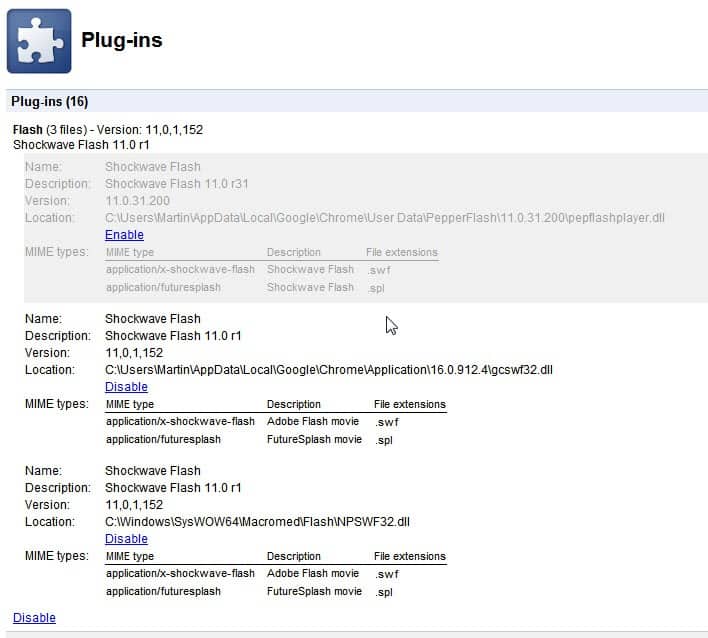
If you look at the plugin listing in the Chrome web browser you may notice that the Flash listing says something like Flash (3 files) or Flash (2 files). You need to click on Details on the page to see what’s going on there.

google chrome flash plugins

You may notice that multiple Flash plugins are loaded in the Chrome web browser instead of just the native plugin. You can click on the Disable or Enable links to disable or enable specific Flash versions in the browser. This can be handy for Flash developers who need to test their applications in a different version of Flash, and for end users who do not want multiple running plugins in the owser.

Multiple enabled Flash plugin versions in the browser are not a problem according to Google.

It’s normal to see two Flash files in about:plugins. When both are listed as enabled, Google Chrome uses the built-in version by default, so you shouldn’t have to specify which one to use unless you specifically want Chrome to use the system version instead (has ‘NPSWF32.dll’ in the location field). Keep in mind that if you use the system version, you’re responsible for keeping Flash updated while the built-in version will update automatically via Chrome’s auto-update mechanism.

If multiple Flash plugins are enabled and the native plugin is one of them, then that plugin is used to display Flash contents in the Google Chrome web browser. This does not explain why a second Flash plugin is enabled in the browser, as it does not make sense if the native Flash plugin is always used if active.

My suggestion would be to disable the non-native Flash plugin in Chrome to be on the safe side.


© Martin Brinkmann for gHacks Technology News | Latest Tech News, Software And Tutorials, 2011. | Permalink |
Add to del.icio.us, digg, facebook, reddit, twitter
Post tags: , , , ,