Pages

Showing posts with label metro. Show all posts

Tuesday, February 14, 2012

Why Enterprise-Level Metro Apps Can and Will Work

I’ve written a lot about Windows 8 over the last few days as we approach the release of the Consumer Preview at the end of this month.  One subject that’s not been touched on so far is how effective new Metro apps can or could be in businesses and enterprises, and if a move to Metro might actually be a good idea for many companies.  I thought it was time to take a look at this subject in a bit more detail.

The first time I saw a Metro business app demonstrated was on a Windows 7 tablet way back in May 2011.  We didn’t know anything about Windows 8 at this point and this demo app, written and presented by Microsoft at their Tech.Days event was something new, we had no idea that it was a demo of something much bigger and in fairness the prople presenting it didn’t know either.

This app was relatively simple, a tracking app for real-estate agents out on the move.  It showed how the computer’s GPS could help locate their next appointment and it had work, task and contract management tools built right into the finger-friendly interface.  I pretty-much dismissed it at the time, as this was a Windows 7 tablet it was being demonstrated on and how could these compete, but I never forgot it.  What we didn’t know was around the corner was the deal with ARM and the promise of a new tablet-friendly OS.  But what about the rest of business?  Could Metro apps really be the way forward and how might they work?

One of the biggest pluses for businesses to move to Metro apps is that all too many companies are still using older bespoke software that runs only in either Windows XP or the much hated Internet Explorer 6.  These apps will simply have to be re-written and up until now companies have resisted.  With all support for XP ending in April 2014, which is less than 800 days from now, a critical deadline is approaching.  My argument is why redevelop these apps for Windows 7 when developing for Metro will be a better idea.  Let me explain why.

Microsoft have really pushed the boat out with the Software Development Kit (SDK) for Metro, developing it in such a way that it’s easier than ever before to write apps for the new platform.  On top of this any app compiled using the new tools will automatically run on any and all Windows 8 devices, regardless of the processor they run on.  This is an incredible achievement and is the most significant part, for me anyway, of Windows 8 overall.  This will make redevelopment of bespoke apps, and the development of new apps, much easier and cheaper.
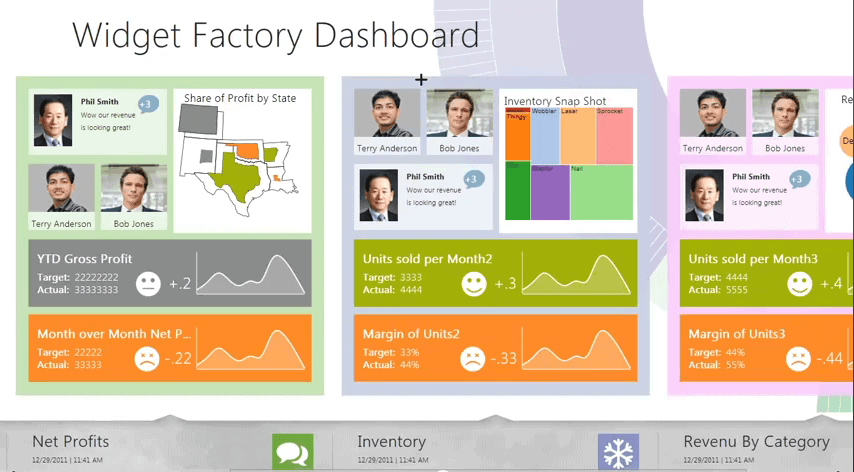
There is also the look and feel of Metro apps to be considered.  Just because Microsoft have shown off Metro apps with minimal pull down and push up touch menus doesn’t mean that this is the way they have to be written.  A screen width of 1080 pixels is still the same resolution regardless of whether its running Metro or the Windows desktop and just as much text and information can be fitted on it.

Moreover some of the examples of Metro business apps that have appeared so far are very reminiscent of the Flash and Shockwave apps that people were designing five to seven years ago.  Back then they never took off because the plug-ins didn’t provide all the power and resources that were necessary, and could be quite hungry for processor-cycles and memory themselves.  Now though, all these resources are baked into the operating system.

The opportunity exists then for creating rich, imaginative and friendly interfaces that are, and this is the important part, designed to work with a mouse and keyboard.  Let’s not forget that what we’ve seen so far with Metro is not the only way to design a Metro app!  Software development for Windows over the years has shown us that the only limit to innovation on the desktop is the limit of the Human imagination.

Imagine then you have a book-keeping app where you can take advantage of sliding pages, even creating a ledger style and feel if you like, or a data-entry app that, rather than having people squint at small boxes and bemoan having to stare at the world’s nastiest interface all day, every day, has a user-friendly tabbed or animated interface that does the same job.  Things don’t need to be scaled up 10-times, you can design for a mouse and keyboard and everything still can be bespoke!

On top of this you then have the same apps available for people working on laptops and tablets with various hardware configurations and, with almost no problems at all, you end up with apps that can be ported to your company’s Windows Phone smartphones.

I want to finish though by answering the question about requiring to have multiple windows open on a screen at one time, each one usually a different running app.  Sharing between apps and even cloud services is baked into Windows 8 for the very first time.  Metro apps here can save you time by being designed to automatically share your data between these apps, sparing your workload.  A cleverly designed app suite in Metro could use tabs or panels to easily switch between, or display, multiple apps on your screen side by side, making everything accessible.

There is nothing to stop any of this from happening and much of it is happening already.  In short I believe that the arguments against using Metro in the business space have been clouded by the over-simplistic apps we’ve seen so far.  Nobody has yet seen the true potential of a Metro app when designed properly, these are still to come.  I believe that when they begin to appear, the world will suddenly stop and want to take another look.


Friday, February 10, 2012

Can Windows 8 Be All Things to All People? The Case for Splitting It Up!

Yesterday Microsoft finally announced their plans for Windows 8 running on ARM-designed processors.  The news came with two very interesting pieces of information…

“WOA (Windows on ARM) includes desktop versions of the new Microsoft Word, Excel, PowerPoint, and OneNote. These new Office applications, codenamed ‘Office 15,’ have been significantly architected for both touch and minimized power/resource consumption, while also being fully-featured for consumers and providing complete document compatibility. WOA supports the Windows desktop experience including File Explorer, Internet Explorer 10 for the desktop, and most other intrinsic Windows desktop features—which have been significantly architected for both touch and minimized power/resource consumption.”

Now before I begin I want to talk about some of the things that happened in the last century, namely the birth of the consumer versions of Windows.  This began with Windows 95 which was bold in much the same way as Windows 8 is now because it broke the clearly defined user interface paradigm and went with a new way of working with our desktops.  It turned out that this new way was hugely successful, but this freedom to innovate with Windows came at a cost.  The consumer and business editions of Windows had begun and they stayed on this track until the launch of Windows XP in 2001.

By the end of the 20th century things were not going well for consumer editions of Windows.  The operating system had become a stability nightmare while its business counterpart was doing fine, and clearly the Windows NT kernel, the core of the operating system, was much more stable and secure than anything the consumer team could come up with.  Thus at this point the teams were merged and Windows became a single product for both consumers and businesses alike.  Even this had its problems however with Windows XP, the first outing, being criticised as being too “consumer friendly” and not business-like at all.  The arguments passed however and XP became, and still is, hugely popular on the workplace desktop.

Now the kernel discussion has moved to other platforms with Windows Server and Windows 7 already sharing the same core and rumours abounding that the next major update of the Windows Phone operating system will follow suit and adopt what’s been called MinWin.  This makes complete sense.  If Microsoft have only one kernel across all their products it makes it easier to update, makes cross-device compatibility simpler and much more besides.  This is what Apple has been doing for several years already when they based the first version of iOS on their desktop OS X operating system.

Now however Windows 8 is changing the game, and the problem is tablet computing.  Microsoft are so far behind in the tablet market that if they don’t do something radical, right now, they’ll lose it forever and at that point their market share will inevitably dwindle to the point where they become the next IBM and have to find something else to do.

Windows 8 is giving everybody the new Metro tablet interface as the default Windows 8 UI.  Sure, business users will be able to switch it off and revert to the desktop but that’s not the point.  The point is yesterday’s announcement about Windows 8 running on ARM-powered processors.  Here Microsoft have now stated that the desktop will exist on ARM and that the platform will come pre-loaded with versions of the next editions of Word, Excel, PowerPoint and OneNote.  Surely this is great news?  Anybody who wants a Windows tablet that they can use for serious work will now be able to.  The desktop is being modified to work much more effectively with touch and all is going to go brilliantly.

If you detected a hint of sarcasm running through that last paragraph then you’d be right.  I am deeply concerned about the inclusion of the Windows desktop in the ARM version of the operating system.  While its easy to argue that this paves the way for hardware manufacturers to create low-power ARM-based laptops and ultrabooks, the simple fact remains, and Microsoft have confirmed this, that no existing x86 or x64 apps will run on the ARM version of Windows.  The existence of desktop versions of these Office programs won’t even give hardware makers the option to hide the desktop on their devices.

This means, for starters that the most common question asked by people with ARM-powered Windows 8 devices will be “Why won’t my software install on this computer?”  But the ramifications run much deeper than this.  It means, for instance, that Microsoft have pretty much given up, in the short term anyway, of creating any meaningful versions of their Office apps for Metro.  Adobe has shown with Photoshop Touch how powerful touch apps can be, and a Metro implementation of the Ribbon UI, which is already very finger-friendly, could be extremely effective.

But no.  Microsoft have stated “desktop versions” instead, despite the fact that past Windows explorer these people will have nothing else that ever will, or ever can run on their desktop.  The term, ‘frustrating’ will probably come up a lot from these people.

Meanwhile, business users and IT Pros are bemoaning having Metro foisted on them when they’d much rather get used to that at home but still keep the traditional desktop at work.  This doesn’t sound unreasonable on the face of it.  What Microsoft are doing here though is taking Windows 95 too far.  They’re forcing an unwanted consumer interface onto business users, while now at the same time plugging a pointless and useless business interface into consumer devices!

I could have coped with the former but the latter just makes no sense to me.  Thus I believe the time has come to split Windows once again into consumer and business versions, managed by different teams.  It’s a good time to do it too.  The Windows kernel is very well managed and there’s no reason in the world why both versions couldn’t just be features and skins on top of MinWin, much in the way Windows 7 and Windows 8 are already.  We need a clear separation and demarkation between what is a consumer product and what is a business product.

I can understand installing Metro onto some business machines because there are a great many times when a Metro app will work great in the workplace, I’ve seen them demonstrated personally, and for everything else there’s the desktop.  Putting a desktop that won’t run existing Windows programs though, and for which the major software companies are unlikely to ever recode their applications due to the small size of the market they’d be selling into just doesn’t make any sense.  So now Windows has to be split.  There has never, in my view, been a better case for doing it and frankly there’s never been a more appropriate time.


Tuesday, February 7, 2012

On Keeping An Open Mind When It Comes To Windows 8 – A Response

Yesterday Martin wrote up his thoughts and concerns about the forthcoming Windows 8 operating system from Microsoft.  I’ve spent much more time with Windows 8 so far, have given talks about and I’m current writing two books about how to get the best out of it, one for complete novices and another for IT Pros and Enthusiasts.  I thought then that I might be a good person to respond to some of Martin’s concerns and perhaps bring a different perspective to the discussion.

I don’t want you to think though that I will be spouting Microsoft’s official PR line, the company is perfectly capable of doing that on their own and they don’t need me to help them.  What I want to bring to the discussion though are the thoughts from someone who has spent some time with the OS, knows perhaps a bit more about what’s coming than I generally let on  ;)  and understands the different aspects of the OS in some depth.

Many of Martin’s concerns centre around the new dual-interface between the desktop and the Metro UI.  This is a legitimate question about why we either need or should have a dual-interface in an operating system.  I feel that Windows 8 is a transitional OS between the way we’ve been doing things now for around 30 years and the way we’ll be doing them in the future.  Anybody who has spent any time working with a tablet will intuitively use Metro and won’t even think about the fact that they’ve only got one (or two) apps open at a time.  We’ve just gotten used to it.

Martin is quite right though that people often have other things running in the background such as messenger apps, multiple browser tabs and so on.  If you look at the way some tablet operating systems handle these you can get some idea of the direction that we’re going in with Windows 8.  Don’t assume for a moment though that Metro in Windows 8, as seen in the Developer Preview or as expanded in the Consumer Preview (beta) will be anything like Metro when Windows 9 arrives, or even Metro when Windows 8 Service Pack 1 is delivered.  As a UI it’s still a concept, even though it’s roots can be traced back almost a decade ot Windows Media Centre, and as such much is set to change and evolve in the next three years.

So how this multi-application space works in Metro with Windows 8 will be determined by how people and companies write their apps.  We will see a great many different ways of doing things as many imaginative people bring their own ideas and concepts to the Metro UI, and it will be interesting to see where these take us and what Microsoft officially adopt.

Ultimately then we will lose the desktop.  The fact that we’ve been using it for the last thirty years doesn’t mean there isn’t a better way of working.  Metro may not be it, but we have to start somewhere.  I’m not sure how much I’ll use Metro myself but despite having a very uncluttered desktop, the prospect of having an interactive one that is telling me, all in one place, what my latest email is, who’s mentioning me on Twitter, what the forecast is for tomorrow, what my next appointment is, the current currency rate between the £ and the US$ and more is very appealing.

Regards using the desktop, Microsoft have said that, even if it’s just in group policy, you will be able to set the desktop as your default UI.  This will be important for people for whom all their software requires it.  While we’ve seen some very imaginative tablet apps appear such as Adobe Photoshop Touch, it will be several years before top quality professional-grade apps appear for Metro.

Martin also raised concerns about using Metro and the new Windows-orb’less desktop with a mouse and keyboard.  While Microsoft have not announced anything yet, they have said that everything you can do with touch you will be able to do with the mouse and keyboard.  Personally I’m looking forward to seeing what new mouse gestures they offer.  Also don’t forget that very soon we will have monitors and laptops with Kinect sensors in them as well.

Martin is quite right though that as things stand the dual-interface, and how you switch between them and control them, can be confusing.  It’s partly for this reason that one of my new books “Windows 8: Out of the Box” has been commissioned where it probably wouldn’t have been for Windows 7.  On this we’ll just have to see what Microsoft offer us to increase usability and to minimise the learning curve.

So what about the Start Menu?  Microsoft wrote a very long blog post detailing why they were making the changes they were back in October.  I am of the opinion however that the Start Menu should have been dropped when the Windows 7 taskbar was introduced.  These essentially offered us two completely different ways to find and launch programs.  All Microsoft need to do is find a way to control (or bucket) all the extra programs (uninstallers / utilities etc.) that appear in the Start Menu and all new programs should be pinned to the taskbar by default.  For my part, I won’t be sad to see the Start Menu go.

To reassure you Martin there is a great deal more coming for desktop users and IT Pros, but that none of it was finished in time for the Developer Preview.  When the Consumer Preview is released in a couple of weeks we will all see what these features are but Microsoft have promised several hundred small and large features in total still to come.

Let’s be honest that Windows 8, as I said earlier is a transitional OS, much in the way early builds of Apple’s OS X were when the company was moving people off old PowerPC software.  It is probably going to be painful for some, but if there really is a new way of working ahead of us that can genuinely help productivity, usability and most importantly accessibility with computers, then I believe we should embrace it.  For a while though it will have to co-exist with the traditional desktop and there can never be a truly integrated way to do that.