Pages

Showing posts with label mozilla thunderbird. Show all posts

Friday, January 6, 2012

Email Account Colors For Thunderbird

If you have multiple email accounts set up in the desktop email client Thunderbird, you’d probably noticed that it is hard to near impossible to distinguish accounts on first glance. The core reason for this is that there is no visual distinction between accounts. Everything is displayed in the exact same color scheme with no options to change it.

The Thunderbird add-on Account Colors changes this. The extensions allows to assign font and background colors to accounts or identities to visually distinguish them from other accounts set up in the email client.
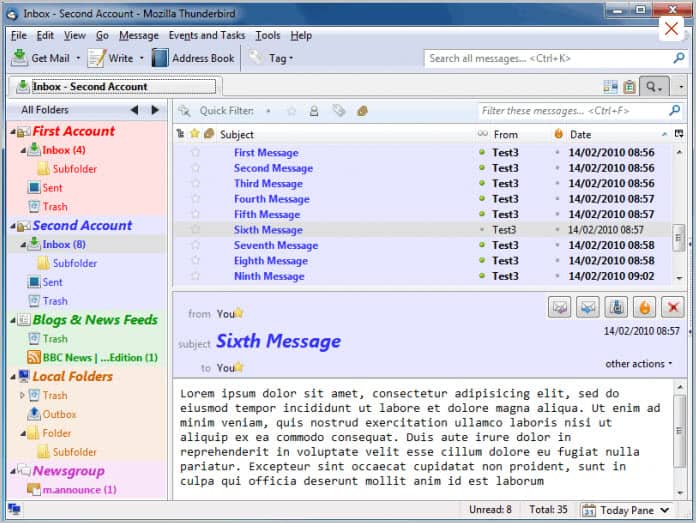
thunderbird email account colors

The extension makes no modifications to the email client on its own. It is up to you to customize the program in the add-on options. Just click on Tools > Add-Ons and there on the options button next to the Account Colors entry.

Settings are displayed in five tabs in the interface that allow you to make modifications to the folder, thread and message pane, as well as the compose window.

account color options

Font styles and font sizes can be changed for different identifiers that are displayed in the email client. This includes account names in the folder pane, and subject names in message lists or message headers.

Font and background colors are taken from the account and identity colors tab. All colors are set to black and white by default, which you need to change during setup if you want to distinguish accounts from each other.

Other options include bolding fonts, showing tree lines in the folder pane, row stripes in the thread pane or increasing the row spacing in the folder or thread pane.

The main purpose of the add-on is to improve the visibility of email accounts. Assigning colors to email accounts makes it a lot easier to identify those accounts on first glance.

Thunderbird users can download the Account Colors extension from the official Mozilla Thunderbird add-ons repository. The extension has been tested under the latest stable version of Thunderbird (that is Thunderbird 9.0.1).


© Martin Brinkmann for gHacks Technology News | Latest Tech News, Software And Tutorials, 2012. | Permalink |
Add to del.icio.us, digg, facebook, reddit, twitter
Post tags: ,


Tuesday, November 8, 2011

Email Client Mozilla Thunderbird 8 Released

Ghacks veterans know that Mozilla has synced the release schedules of the Firefox web browser and the Thunderbird email client. Whenever a new stable version of Firefox gets released, a new version of Thunderbird is just around the corner. Both Firefox and Thunderbird have not really shown to many exciting new features ever since the development teams switched to high gear in the form of the rapid release process.

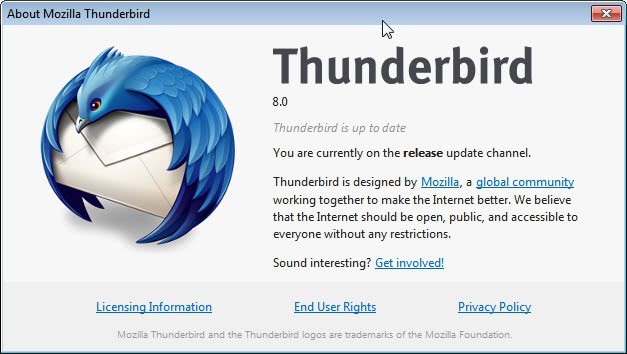
Thunderbird 8 has just been released. Existing Thunderbird users may have already noticed the update when they have stared the desktop email client today. Users who have not can check for new updates by going to Help > About Thunderbird in the main menubar of the email client. This triggers an automatic check for new updates in the program itself.

thunderbird 8

So what’s new in Thunderbird 8? The beta release notes, which have been published last month list the following improvements:

  • Add-ons installed by third party programs are now disabled by default
  • Added a one-time add-on selection dialog to manage previously installed add-ons
  • Improved accessibility of the attachment lists
  • Several user interface fixes and improvements
  • and numerous other platform fixes

The big new feature is the blocking of automatic installations via third party software programs. This is actually the same feature that made it into Firefox 8 released a few days ago. In addition, Thunderbird users now get a one-time dialog when the update in which they can manage installed add-ons. The email client will suggest add-ons that may not be compatible giving the user the choice to disable them to improve stability of the email client.

The official download site is still listing Thunderbird 7.01 as the latest stable version. It may take some hours or maybe even a day until the new Thunderbird 8 version is published on the official website. Download portals such as Softpedia or MajorGeeks are already hosting the new version, so grab it from there if you are in a hurry.

Update: The calendar add-on Lightning for Thunderbird has been released in version 1.0 as well today.


© Martin Brinkmann for gHacks Technology News | Latest Tech News, Software And Tutorials, 2011. | Permalink |
Add to del.icio.us, digg, facebook, reddit, twitter
Post tags: , , ,


Wednesday, September 28, 2011

Mozilla Thunderbird 7 Email Client Released

Thunderbird has joined the rapid release process just like Firefox did. The two programs are now being developed and updated in sync, which means that you will see updates for both programs pop up at around the same time.

With the release of Firefox 7 came also the release of Thunderbird 7. The email program made a big jump from version 3 all the way to version 7, even skipping a version to sync with the Firefox browser.

Existing Thunderbird users should get update notifications right in the email client. They can then update from within without having to download the client from the official website. Users who have not received the notification of the update yet can check for it manually by going to Help > About Thunderbird.

thunderbird 7

The release notes list several changes and feature enhancements.

  • Thunderbird is based on the new Mozilla Gecko 7 engine
  • Several user interface fixes and improvements
  • Several fixes to attachment handling
  • Ability to print a summary of selected email messages
  • Platform improvements to Address Book
  • Fixed several security issues
  • Numerous platform fixes that improve speed, performance and stability

Nothing major as you can, mostly under the hood improvements or changes that the majority of users might not even recognize.

The Welcome to Thunderbird page after updating or installing the new version lists additional features. I’m not sure if they all made their way into this version or if they have been available before. Thunderbird 7 starts up faster and is more responsive according to that feature listing. A new troubleshooting information page is listed there as well. It looks exactly like the page of the Firefox web browser.

New users can download the latest Thunderbird version from the official Mozilla Thunderbird project homepage. It is available there for all supported operating systems and languages.

Are you using Thunderbird? Let me know what you think of the latest update.


© Martin Brinkmann for gHacks Technology News | Latest Tech News, Software And Tutorials, 2011. | Permalink |
Add to del.icio.us, digg, facebook, reddit, twitter
Post tags: , , , ,