Pages

Showing posts with label thunderbird update. Show all posts

Tuesday, January 31, 2012

Email Client Thunderbird 10 Released

Regular readers know that Mozilla has synchronized the release schedules for both the Firefox web browser and the Thunderbird email client. Both applications share the same rapid release process, and both are usually updated at the same day.

Mozilla today, after releasing Firefox 10, has also released Thunderbird 10, a new version of the email software.

Thunderbird too is now flagging add-ons as compatible by default. Add-ons ship with minimum and maximum version compatibility information. The issue previously was that add-ons were flagged as incompatible if the author failed to update the version information in time. This made it difficulty for developers to keep their add-ons compatible with the latest releases.
thunderbird 10

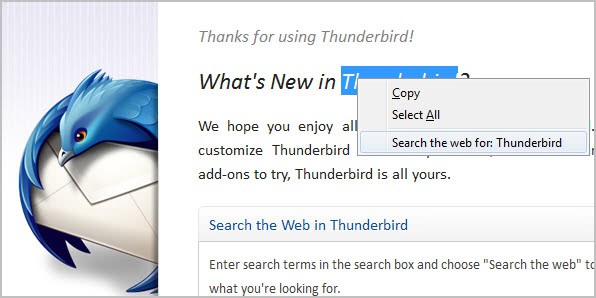
Another change is the native integration of the Open Search extension in the email client. A right-click now displays an option to search for the selected term on the Internet. This is handled in the email client and not in the default system web browser.
search the web

The rendering component uses the Gecko 10 engine that the Firefox web browser uses as well.
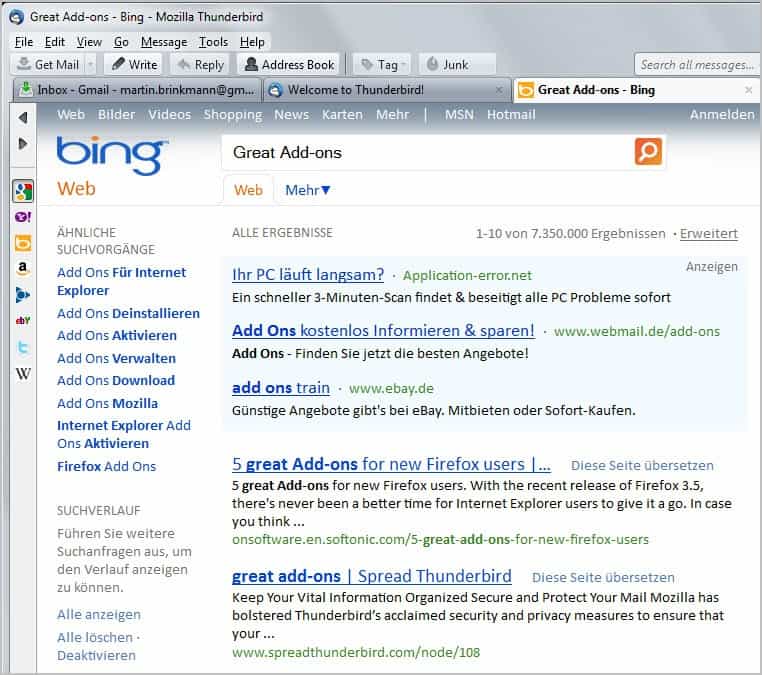
thunderbird web search

Users who do not want their searches to open in the email client can set the preference mail.websearch.open_externally to true. This is done with a click on Tools > Options, switching to Advanced > General, clicking on Config Editor in the menu and filtering for the above preference. Just double-click it to toggle its value from false to true. Is there a way to disable web search completely? Not that I’m aware off. Maybe there is a preference but I have not found it yet.

Two new keyboard shortcuts have been added to Thunderbird 10, in addition to the changes outlined above. It is now possible to add attachments to messages with the Ctrl-Shirt-A (Command-Shift-A) shortcut. Named anchors can now be removed with Ctrl-Shift-R (Coammdn-Shift-R), and messages in the message reader and compose window can now be zoomed with the scroll wheel (Ctrl-Scroll Wheel).

Thunderbird users should have received update information by now in the email client. New users can download the latest version for all supported operating systems and languages from the Mozilla website.


Wednesday, December 21, 2011

Email Client Thunderbird 9 Is Now Available

Thunderbird users who are running the latest stable version of the browser are currently receiving update notifications in the email client. Mozilla Messaging has just released version 9 stable of the program for all supported operating systems. Thunderbird users can alternatively download Thunderbird 9 final from the Mozilla website where it is also offered for all operating systems and languages.

The release notes list several fixed security vulnerabilities which make Thunderbird 9 a mandatory update for all users of the email client. The security advisories page lists a total of seven security vulnerabilities, of which one has been rated critical and the other six as moderate.

It is however relative unlikely that Thunderbird will see attacks exploiting the issue, as it uses a crash when scaling an Ogg video element to extreme sizes.

thunderbird 9

The remaining list of changes is not nearly as spectacular. Thunderbird 9 uses the new Mozilla Gecko 9 engine, and an opt-in system to send anonymous performance and usability reports to Mozilla. The data is used to improve future versions of the email client. This is the same feature that has already been implemented into the Firefox web browser.

Windows users can now show and hide the menu bar when they press the Alt key. The change log furthermore lists better keyboard handling for attachments without going into details as to what has been improved in the version.

The only other features listed in the change log are additional support for Personas, and “several user interface fixes and improvements”.

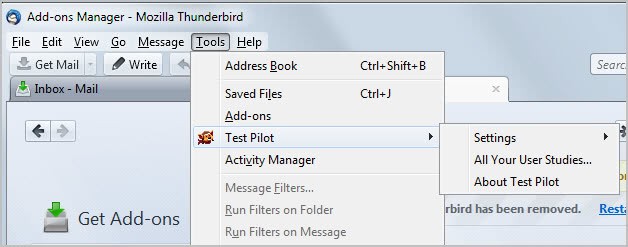
Thunderbird 9 ships with another change that has not been mentioned in the release notes. Users who click on the Tools menu will notice a new Test Pilot entry there. This is a Thunderbird extension that the developers have installed in the email client. Test Pilot is used to “make Thunderbird better by running user studies”.

Silently installing the extension without giving users options to opt-out during updating or installation is definitely something to be criticized. Thunderbird users can however uninstall the extension in the add-ons manager.

thunderbird test pilot

Have you updated your version of Thunderbird yet? What’s your take on the new version?


© Martin Brinkmann for gHacks Technology News | Latest Tech News, Software And Tutorials, 2011. | Permalink |
Add to del.icio.us, digg, facebook, reddit, twitter
Post tags: , ,


Tuesday, November 8, 2011

Email Client Mozilla Thunderbird 8 Released

Ghacks veterans know that Mozilla has synced the release schedules of the Firefox web browser and the Thunderbird email client. Whenever a new stable version of Firefox gets released, a new version of Thunderbird is just around the corner. Both Firefox and Thunderbird have not really shown to many exciting new features ever since the development teams switched to high gear in the form of the rapid release process.

Thunderbird 8 has just been released. Existing Thunderbird users may have already noticed the update when they have stared the desktop email client today. Users who have not can check for new updates by going to Help > About Thunderbird in the main menubar of the email client. This triggers an automatic check for new updates in the program itself.

thunderbird 8

So what’s new in Thunderbird 8? The beta release notes, which have been published last month list the following improvements:

  • Add-ons installed by third party programs are now disabled by default
  • Added a one-time add-on selection dialog to manage previously installed add-ons
  • Improved accessibility of the attachment lists
  • Several user interface fixes and improvements
  • and numerous other platform fixes

The big new feature is the blocking of automatic installations via third party software programs. This is actually the same feature that made it into Firefox 8 released a few days ago. In addition, Thunderbird users now get a one-time dialog when the update in which they can manage installed add-ons. The email client will suggest add-ons that may not be compatible giving the user the choice to disable them to improve stability of the email client.

The official download site is still listing Thunderbird 7.01 as the latest stable version. It may take some hours or maybe even a day until the new Thunderbird 8 version is published on the official website. Download portals such as Softpedia or MajorGeeks are already hosting the new version, so grab it from there if you are in a hurry.

Update: The calendar add-on Lightning for Thunderbird has been released in version 1.0 as well today.


© Martin Brinkmann for gHacks Technology News | Latest Tech News, Software And Tutorials, 2011. | Permalink |
Add to del.icio.us, digg, facebook, reddit, twitter
Post tags: , , ,


Wednesday, September 28, 2011

Mozilla Thunderbird 7 Email Client Released

Thunderbird has joined the rapid release process just like Firefox did. The two programs are now being developed and updated in sync, which means that you will see updates for both programs pop up at around the same time.

With the release of Firefox 7 came also the release of Thunderbird 7. The email program made a big jump from version 3 all the way to version 7, even skipping a version to sync with the Firefox browser.

Existing Thunderbird users should get update notifications right in the email client. They can then update from within without having to download the client from the official website. Users who have not received the notification of the update yet can check for it manually by going to Help > About Thunderbird.

thunderbird 7

The release notes list several changes and feature enhancements.

  • Thunderbird is based on the new Mozilla Gecko 7 engine
  • Several user interface fixes and improvements
  • Several fixes to attachment handling
  • Ability to print a summary of selected email messages
  • Platform improvements to Address Book
  • Fixed several security issues
  • Numerous platform fixes that improve speed, performance and stability

Nothing major as you can, mostly under the hood improvements or changes that the majority of users might not even recognize.

The Welcome to Thunderbird page after updating or installing the new version lists additional features. I’m not sure if they all made their way into this version or if they have been available before. Thunderbird 7 starts up faster and is more responsive according to that feature listing. A new troubleshooting information page is listed there as well. It looks exactly like the page of the Firefox web browser.

New users can download the latest Thunderbird version from the official Mozilla Thunderbird project homepage. It is available there for all supported operating systems and languages.

Are you using Thunderbird? Let me know what you think of the latest update.


© Martin Brinkmann for gHacks Technology News | Latest Tech News, Software And Tutorials, 2011. | Permalink |
Add to del.icio.us, digg, facebook, reddit, twitter
Post tags: , , , ,