Pages

Showing posts with label music player. Show all posts

Wednesday, February 1, 2012

Chromus A Last.fm Web Music Player

You have got plenty of options if you want to listen to music. From Internet radio to online services such as Spotify or YouTube to CDs or ripped mp3s. Some services have changed over the years, and Last.fm is without doubt one of those services. It is still highly popular thanks to its vast database, but not so much anymore when it comes to listening to music directly on site.

The free web service Chromus could change that again. The service combines Last.fm’s music database with the music found on the Russian social networking site Vkontakte. The result? A player that knows and plays nearly every song and album on the planet.

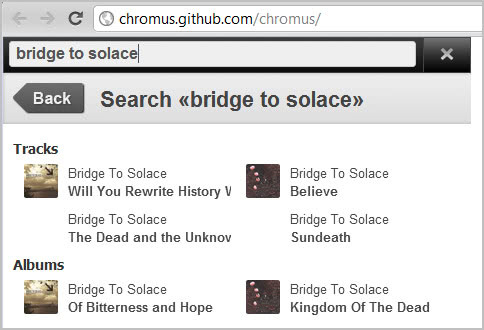
Here is how it works. You visit the Chromus website over at Github. Now type in a band name, artist, song or album after clicking on the search icon in the upper right corner of the screen.
last.fm music. player

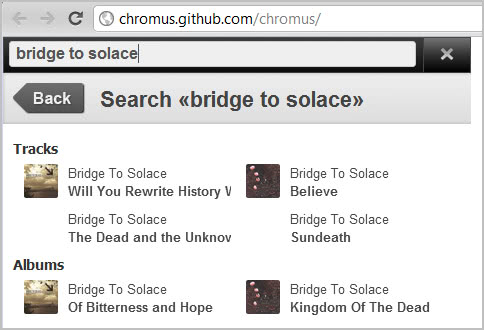
Tracks and albums are displayed on a result’s page afterwards. You can now click on an album or track to start playing it right away on the site. If you select an album, all tracks of the album are queued in a playlist. This lets you listen to all songs of an album in full length online. All without a Last.fm or Vkontakte account.
last.fm music.player

You can select individual tracks with a click on the playlist entry. The player supports all basic controls from pausing and changing the volume to seeking and repeating the playlist.

Last.fm or Vkontakte users can sign in to their accounts to make use of scrobbling and music playback more reliable.

Chromus looks like a spin-off of the popular Google Chrome extension Last.fm free music player which provides more or less the same functionality. It is not clear if the two are linked in any way or if the author of Chromus has used the Chrome extension for inspiration only.

It is interesting to note that many non-English and non-Russian songs can be played as well. If you are looking for a free web music player that does not require you to register, and that does not limit your music listening experience, then you may have found it in Chromus. (via Caschy)


Monday, November 28, 2011

Jet Audio, A Versatile Music Player For Windows

In the world of media players, it often seems the sun doesn’t shine on anything new. Between Windows Media Player, Winamp, RealPlayer, VLC, and iTunes, it seems as though everybody has maximum market penetration and saturation. Enter the not-so-quiet contender, JetAudio. You can get JetAudio at this link: http://www.jetaudio.com/download/

Installation is easy. Click through the dialogue boxes and launch the app. The user has the option of a number of different configurations for initial use, although the default setup will give you a single, integrated interface, not unlike many other media players.

Point the application toward your library of choice, or more than one library. Give it few minutes to scan through your files, and you’re ready to start listening. The basic module only used about 30MB of RAM for just playing music.

jetaudio

You have the choice of different module configurations. Below is an example of two separate equalizer displays; with a compact audio control interface and a file navigator. This is a great application that includes audio editing tools, lyric composer, different visualizations, video components, internet radio options, and yet it remains lightweight and friendly to use. All of this comes with a high degree of potential for customizing each module. And, this is just the basic application. This is the free version with no add-ons or plug-ins installed. If this application hung out at Muscle Beach, it would probably stop dead-lifting its 800-pound barbell just to carry your groceries home for you. It is that good.

For a relative unknown in the universe of media players, JetAudio stands out against the backdrop of form-over-function. This piece of software is all functionality. There’s nothing it can do that isn’t meant to directly enhance your listening experience.

At this site, you can share .pls files to broadcast playlists or access those created by others. While not as convenient as other streaming music services, the ability to integrate this functionality into such a feature-rich and robust music player is a real treat.

jet audio player interface

Even the lyrics component has its own integrated player controls which allow for scrubbing with a slider, incremental fast-forward and rewind controls all included with a text editor. Furthermore, the visualization system can integrate some of the great titles like G-Force or Aeon from Soundspectrum. The JetAudio free version also comes with a backup manager, called JetShell, for archiving your media files.

The paid version of the application includes a number of additional features that extend both the listening possibilities of the free version and its audio editing capabilities. All-in-all, we have only begun to discover the ways in which JetAudio can bring a more inclusive and flexible user listening experience. Yet, it seems as if we have found our new pet software addiction for at least a little while. JetAudio is a music player for music people. It has heart. It is rich in features and configuration options. It does something few applications of any kind manage to do by presenting the option for the user to re-think what is possible in using an application. Rest assured you have not heard the last from this little digital boom box.


© Melanie Gross for gHacks Technology News | Latest Tech News, Software And Tutorials, 2011. | Permalink |
Add to del.icio.us, digg, facebook, reddit, twitter
Post tags: , , ,