Pages

Showing posts with label Music and Video. Show all posts

Wednesday, February 1, 2012

Chromus A Last.fm Web Music Player

You have got plenty of options if you want to listen to music. From Internet radio to online services such as Spotify or YouTube to CDs or ripped mp3s. Some services have changed over the years, and Last.fm is without doubt one of those services. It is still highly popular thanks to its vast database, but not so much anymore when it comes to listening to music directly on site.

The free web service Chromus could change that again. The service combines Last.fm’s music database with the music found on the Russian social networking site Vkontakte. The result? A player that knows and plays nearly every song and album on the planet.

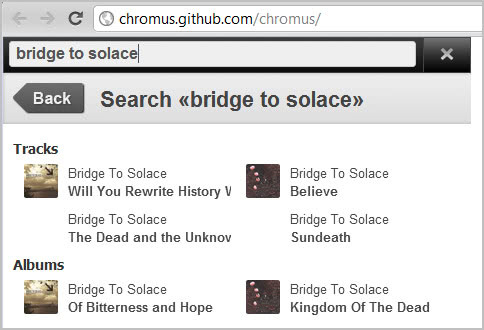
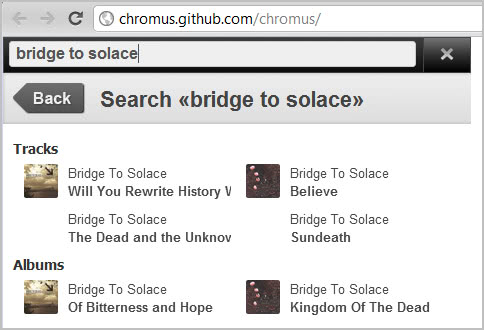
Here is how it works. You visit the Chromus website over at Github. Now type in a band name, artist, song or album after clicking on the search icon in the upper right corner of the screen.

last.fm music. player

Tracks and albums are displayed on a result’s page afterwards. You can now click on an album or track to start playing it right away on the site. If you select an album, all tracks of the album are queued in a playlist. This lets you listen to all songs of an album in full length online. All without a Last.fm or Vkontakte account.

last.fm music.player

You can select individual tracks with a click on the playlist entry. The player supports all basic controls from pausing and changing the volume to seeking and repeating the playlist.

Last.fm or Vkontakte users can sign in to their accounts to make use of scrobbling and music playback more reliable.

Chromus looks like a spin-off of the popular Google Chrome extension Last.fm free music player which provides more or less the same functionality. It is not clear if the two are linked in any way or if the author of Chromus has used the Chrome extension for inspiration only.

It is interesting to note that many non-English and non-Russian songs can be played as well. If you are looking for a free web music player that does not require you to register, and that does not limit your music listening experience, then you may have found it in Chromus. (via Caschy)


Wednesday, January 25, 2012

Audiobooks.com Launches Audiobook Flatrate Service

Audiobooks these days are usually delivered on CD or as a digital recording on the Internet. They are not cheap by any means, new bestsellers cost anywhere between $15 to $30 which often is more than you would pay for the bestseller in book format.

Why am I telling you this? Because Audiobooks has just launched an audiobook flatrate service that lets you listen to as many audiobooks as you like for $24.95 per month. The store features more than 10,000 audiobooks right now, with new books being added on a regular basis.

How does it work? You visit the website and sign-up for a free trial account. You now have seven days to test the site and its functionality.

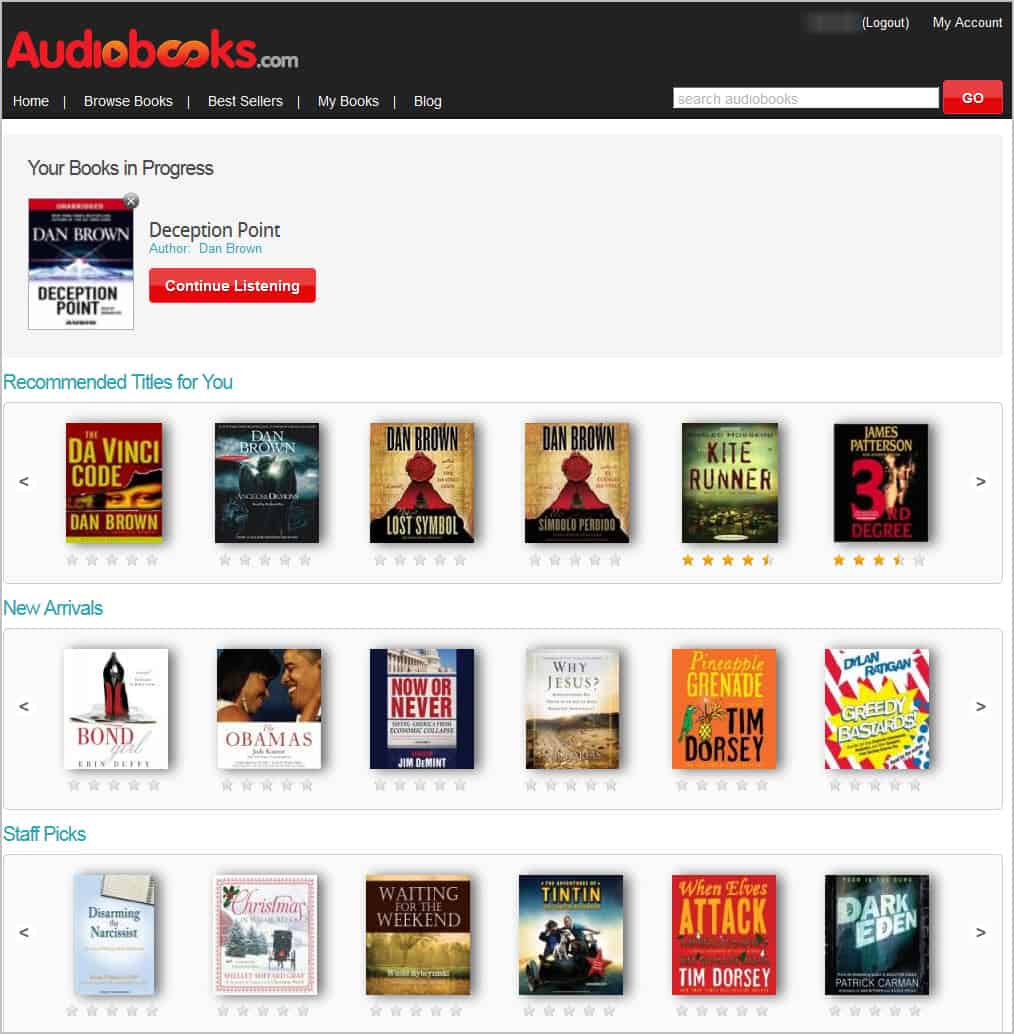
The homescreen displays the books that you are currently reading, recommendations based on your preferences, new arrivals, and staff picks.

audiobooks

When you hover the mouse over a listing, a short description is displayed. A click takes you to the audiobook’s profile page that features a larger description as well as information about the play time, narrators, version, genre and publication date. You may also see user comments and ratings on the page which can further aid you in determining whether you’d like to start listening to that particular audiobook.

You can preview audiobooks here, which may be useful to get a feeling for the quality of the audiobook, or start playing the full version right away.

Audiobooks open in a new window with basic controls that allow you to stop and pause the playback, rewind or forward 30 seconds, and to add bookmarks which is useful if you want to continue from a specific position the next time you play the audiobook.

audiobook player

The player was developed using HTML5 which ensures that it is not only compatible with desktop PCs but also with many mobile devices that support HTML5 audio.

The site features a search that you can use to find specific books, authors or narrators. You can alternatively browse the audiobook collection by genre in case you are interested in a specific topic. Categories include history, non-fiction, comedy, politics and science & technology among others.

Tastes differ but it is not difficulty to find audiobooks that suite your taste. From Steve Jobs’ biography over Russian language instructions to marketing audiobooks and bestsellers such as Dan Brown’s Deception Point or Bond Girl: A Novel by Robin Gwyne.

audiobook genres

There is also a bestseller listing of 50 bestselling audiobooks for fast access.

The Good

As many audiobooks as you can listen to for $24.95. If you are buying at least one audiobook a month, you will certainly enjoy the service as it gives you access to thousands over thousands of books for the price of one. Plus, you can listen to the audio books not only on your desktop PC, but on mobile devices like tablets or the iPhone.

You can browse and search the selection of books prior to signing up, which can be useful to make sure that the books you are interested in are offered on the site.

The bitrate is rather low, but still acceptable, and it means that less data needs to be transferred to the computer.

The Bad

You need to keep in mind that all audiobooks are streamed which means that you cannot make use of the service in situations where you do not have Internet or only limited Internet connectivity. If you like to listen to an audiobook during travel for instance, you may not be able to make use of the service in that situation. And since there is no way to download an audiobook to your computer, you still may need to purchase some audiobooks in CD format.

The service is also only offered to users from the United States at this point in time.

There is also no option to listen to audiobooks while offline.

Verdict

If you are living in the United States and purchasing audiobooks regularly, you may be interested to try out the new Audiobooks.com service. This service is mainly for computer and smartphone users who listen to audiobooks on their devices though.

I personally like the idea of an audiobook flatrate, and would welcome it if the developers would add offline listening capabilities to their service.

Tuesday, January 17, 2012

Mentor FM Tunes Into Your Facebook Account To Play Music You Like

Mentor FM is one of those tools that it is pretty awesome and scary at the same time. The Internet radio tunes into your Facebook account to play music that you like. The awesome part is that it usually gets things pretty right in this regard. All you need to do is to give the app permissions to connect to your Facebook account before you can start listening to a playlist that has been specifically made for you.

The scary part is actually what makes the application that good: Facebook seems to know your music taste pretty well. The application displays up and down vote buttons on the radio page that you can use to further finetune the music listening experience.

mentor.fm

Basic playback controls are displayed on the page as well. Here you can change the volume of the music, pause, stop and play songs or skip ahead to the next song if you do not really like the one that is currently playing.

Mentor.fm displays the artist or band, and the genre of the music on the page as well. It feels rather strange that the name of the song is not among the information displayed there.

If the playlist is not what you are looking for, you can let the radio station load a new playlist with different songs.
The surprise me mode finally lets you look beyond your music taste to discover a different kind of music. When I first used surprise me the radio started to play songs from artists such as Emilio Santiago, Jazzkantine or Renata Tebaldi, music that I would not listen to at all otherwise.

The site is a music experiment, that will be online for about 2 months before the makers will take it offline again. One of the interesting aspects of the site is that you can just turn on the radio and start listening, without having to perform searches or songs first. The service uses a user’s likes on Facebook and generates the playlist from those information. (via Freeware Genius)


Display The Inbox On The YouTube Frontpage

With YouTube’s redesign now live on the site and with no turning back opportunity anymore, it is time to realize that the changes have not all be for the better. If you are not logged in or an active YouTube user you can probably live with the new frontpage design and all, but if you are an active user who gets lots of messages and stuff you’d probably like a way to reach those messages more easily.

You see, YouTube made the decision to move the easily accessible inbox from the front page behind the account name in the top right corner of the screen. To reach the YouTube inbox, you need to first click on the name and then on Inbox to be taken there. Once there you still may need to select a different entry, e.g. comments instead of personal messages which means yet another click before you land there.

The free userscript YouTube startpage inbox changes this by adding the inbox and all of its links back to YouTube’s homepage.

youtube inbox

Once installed, you will see direct links to all inbox entries on the homepage again. The script adds them to the right sisdebar just above the recommended video section there. The links point to personal messages, shared with you, comments, contact suggestions and video responses. Each entry lists the number of unread messages which makes the feature that more convenient as you can now see directly if you have new messages or notifications waiting for you in your inbox.

The inbox at the top lists the total of unread messages and notifications.

Please note that the inbox is only displayed on the frontpage and not on other pages of YouTube.

The script has been tested in the Firefox web browser with the Scriptish extension. It likely works in other browsers such as Google Chrome as well.


Monday, January 9, 2012

How To Switch Back To YouTube’s Old Page Design

If you are a regular on YouTube you probably know that Google has recently redesigned the page completely, turning pretty much everything up side down. The new design has received quite the criticism, for instance for the centered fixed width layout, or the larger frame at the top of the YouTube home page.

Most YouTube users do not know that there is an option to reset the page to the old layout. This can be achieved by writing a cookie to the local system that tells the video hosting site that the old layout needs to be loaded and not the new page design.

Please note that this may cease to work at any time as YouTube may simply remove the old page design from their servers. Setting the cookie would have no effect then. For now though, it works splendid.

You can revert the YouTube homepage to its former self with the help of a userscript or by writing the cookie directly on the system. The userscript appears to be working in Firefox, with Greasemonkey or Scriptish installed, Google Chrome and Opera. The developer notes that Opera users need to import the script manually in the browser though. Instructions on how to do that are offered on the userscript page.

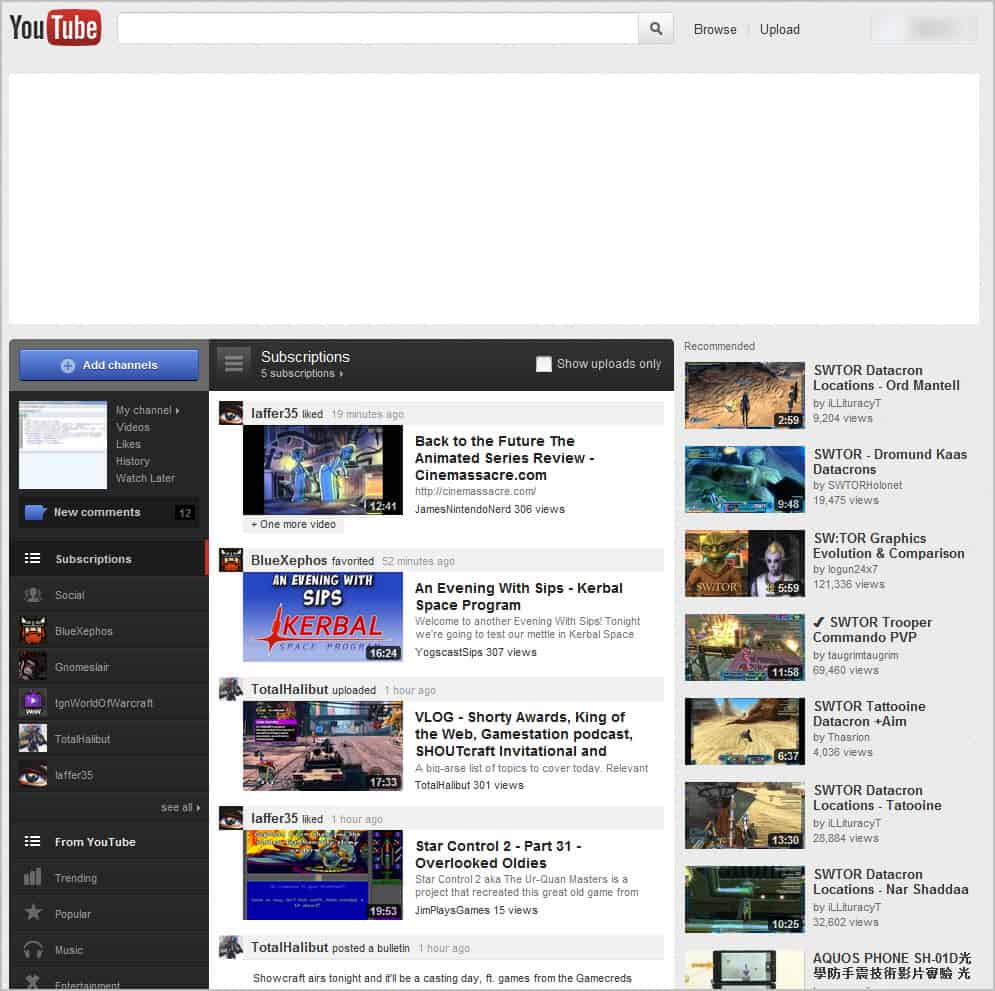
Take a look at the following two screenshots to see the difference. First the new YouTube page (no idea why the big header is showing up blank)

new youtube homepage

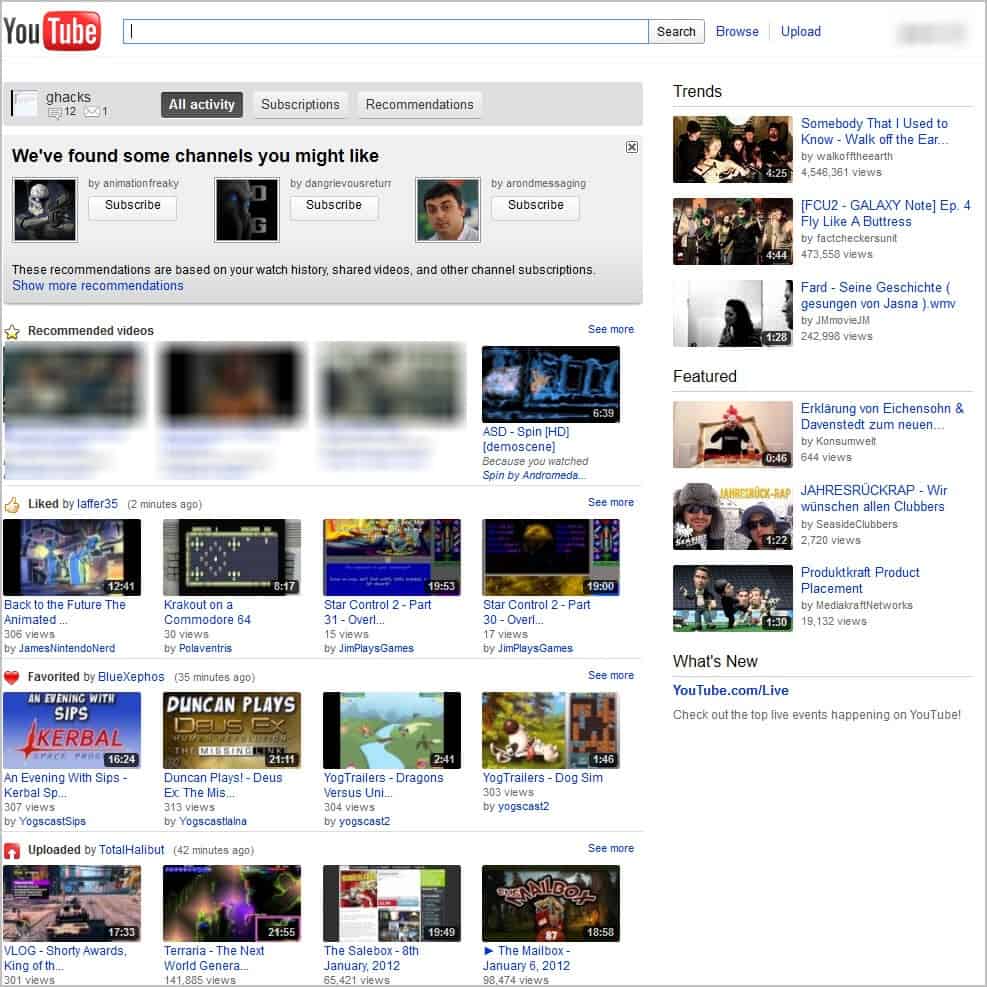
and then the old YouTube page.

old youtube page

All you need to do is to install the userscript to set the cookie. Please note that the homepage layout will stick even if you uninstall the userscript again. You need to clear the cookie that it writes on your system to get the new YouTube homepage layout again.

As I mentioned before, you can also set the cookie manually.

Open the YouTube website.
In Chrome, press Ctrl-Shift-j to open the Developer Tools
In Firefox, press Ctrl-Shift-k to open the web console
Enter document.cookie=”VISITOR_INFO1_LIVE=VISITOR_INFO1_LIVE=tYJElFX0sZI”; in the console tab and press Enter.
Reload the YouTube page.

If you are visiting YouTube regularly, which design do you prefer? (Thanks Odio for the tip)


© Martin Brinkmann for gHacks Technology News | Latest Tech News, Software And Tutorials, 2012. | Permalink |
Add to del.icio.us, digg, facebook, reddit, twitter
Post tags: ,


Wednesday, December 28, 2011

YouTube Slam, Vote For YouTube Videos

Logged in YouTube users can vote for videos by clicking on the like or dislike buttons displayed underneath each video. The total number of likes and dislikes are then displayed on the video page.

YouTube is taking that concept a step further with YouTube Slam, a new feature where videos are battling it out against each other.

The idea is simple: Promote talented video makers on YouTube with the help of Slam. Three different games are currently offered, comedy, cute and bizarre slam.

Two videos are displayed on the same page to the user. YouTube users now watch both videos and vote for one that they like more. The video they like gets a vote which moves it up on the overall leaderboard.

youtube slam

A question like “which one’s funnier” is displayed on the battle page. Videos are not obviously played at the same time, even though that’s possible by clicking play on both at the same time.

youtube video battle

Users can also click on the skip button to skip the decision and load two new videos that they can watch and vote for.

Videos are exchanged on a weekly basis with about a thousand videos to watch in each category each week. That’s 3000 videos per week and 12000 per month.

YouTube users who do not want to vote can visit the leaderboard pages right away to watch the top videos of the current week and past weeks. A play all button is available too.

YouTube Slam serves a number of purposes. It provides users with an never ending wave of upcoming videos to watch, and video makers with an opportunity to gain extra exposure if their videos are selected by YouTube to participate in a weekly battle.

The most popular category by far currently is Comedy Slam with about four times the number of total votes.

YouTube Slam could become highly popular with the “funny” or “cute” video crowd. What’s your take on the new service?


© Martin Brinkmann for gHacks Technology News | Latest Tech News, Software And Tutorials, 2011. | Permalink |
Add to del.icio.us, digg, facebook, reddit, twitter
Post tags: ,


Sunday, November 20, 2011

How To Get The New YouTube Homepage Right Now

If you are following the chatter on social networking sites such as Google+, Facebook or Twitter, you may have noticed that YouTube is currently testing a new homepage design. Clever folks found out a way to enable the new design right now with a cookie. The advantage of this method is that you can clear the cookie to return to the old YouTube interface, no harm done.

Please note that this is being tested right now by Google. This new test homepage may or may not become the new YouTube homepage in the future. For now, YouTube visitors can enable it in the following way:

  • Open the YouTube website.
  • In Chrome, press Ctrl-Shift-j to open the Developer Tools
  • In Firefox, press Ctrl-Shift-k to open the web console
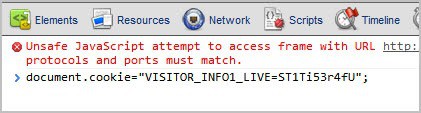
  • Enter document.cookie="VISITOR_INFO1_LIVE=ST1Ti53r4fU"; in the console tab and press Enter.
  • Reload the YouTube page.

google chrome javascript console

It is likely that this is working in other web browsers as well. I could not get it to work in the latest Opera web browser though.

The YouTube homepage looks like this after a reload.

youtube new homepage

YouTube users find their channel information prominently displayed on the left side. Listed here are links to the channel videos, likes, history and watch later groups, subscription information, YouTube specific information like trending or what’s popular as well as suggested channels to subscribe to.

The middle column is filled with updates from a user’s subscriptions. The right column finally displays recommended videos based on past videos that have been watched and activities on YouTube.

The new design seems to only affect the homepage and no other parts of the site. Several users seem to confuse the new YouTube homepage design with the previously released Cosmic Panda update. They are not the same and can in fact be run at the same time. I would suggest to first enable the new homepage design and then enable Cosmic Panda via the link above.

What I do not like about the new homepage is that it uses a fixed width for the content. If you have a widescreen monitor you end up with lots of whitespace there.

Have you tried the new homepage? If so, what is your opinion? I’m not sure where this all started, but one of the first, if not the first, to point it out was Moritz Tolxdorff on Google+.

And while we are at it. If you want to try out the new YouTube video uploader, you need to open the following web address: http://upload.youtube.com/my_videos_upload?forceui=4.

Update: You can remove the new YouTube homepage again by repeating the steps and changing the cookie command to this one: document.cookie="VISITOR_INFO1_LIVE=0";


© Martin Brinkmann for gHacks Technology News | Latest Tech News, Software And Tutorials, 2011. | Permalink |
Add to del.icio.us, digg, facebook, reddit, twitter
Post tags: , , ,