Pages

Showing posts with label opera update. Show all posts

Tuesday, January 24, 2012

Opera 11.61 Has Been Released

Opera Software has just released a new version of the Opera desktop browser bringing the stable channel of the browser to version 11.61. Opera users should receive update notifications in the browser, those who do not want to wait for them to pop up can run a manual update check the following way: A click on Opera > Help > Check for Updates runs a manual check for updates.

The browser should pick up the new version information from the server and display an update window right away. A click on Download and Install updates the browser to the latest version.

opera 11.61

Opera 11.61 is a stability and security upgrade, which makes it a recommended update for all Opera users. Two security issues are fixed in the new version, one that allowed manipulation of framed content to allow cross-site scripting, and another were script events “could be used to reveal the presence of local files”.

The change log lists about 50 additional changes and fixes that went into the new version of the browser. This includes several crash related fixes, including the following ones:

  • Crash when clicking “Use master password to protect saved passwords” checkbox
  • Occasional crash when clicking a link or opening a new tab
  • Opera crashes when closing a tab that has the Star Menu opened
  • Opera crashes on updating mail from version 9.27
  • Crash in host resolver when closing browser after loading large number of tabs simultaneously

Interested users can access all change logs on this page. Opera 11.61 has been released for all supported operating systems. New users and those who do not want to use the internal updater can download the latest version of the browser from the official Opera download page. It is suggested to update as soon as possible to fix the security vulnerabilities in the browser.


Tuesday, December 6, 2011

Opera 11.60 Final Available

Opera Software has published a recommended upgrade for the stable channel of their browser. Opera 11.60 includes security and stability enhancements as well as new and improved features. This version is the intermediary version of Opera 11 which will be followed by Opera 12 (there may be small patches for Opera 11.60 though).

The new version of Opera 11.60 is already available on the official Opera website. Existing Opera users can consult the release notes for their operating system to find out what’s new in the release.

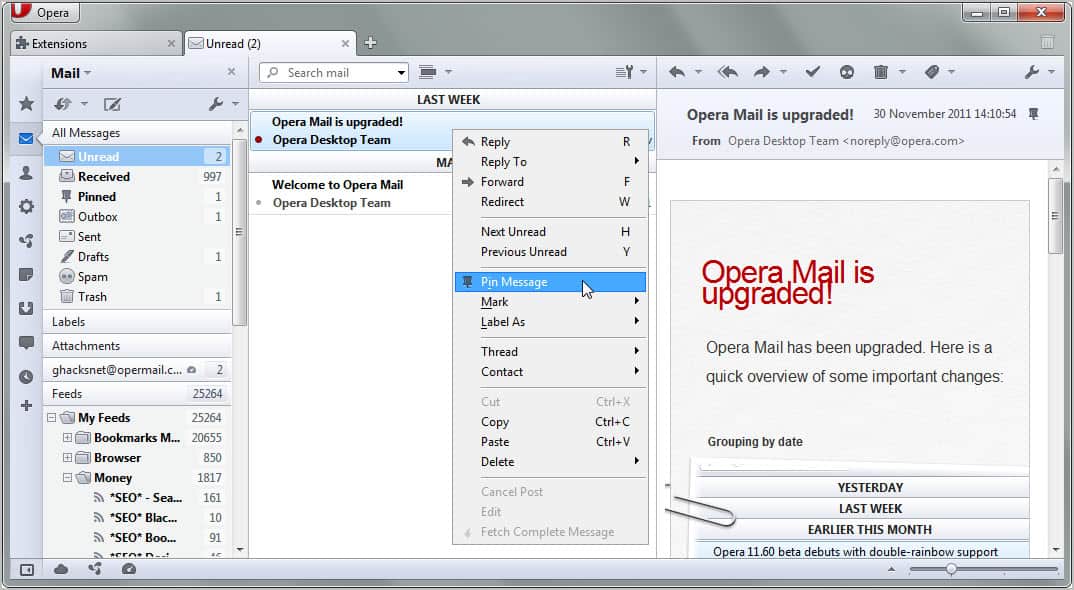
When you look at the changes you will notice that Opera has packed a lot of them in the release. Opera Mail users will find that the mail client has received a redesigned interface. New features include automatic mail grouping by date, pinning of messages which corresponds to Imap’s flagged feature and Gmail’s starred message feature, a new settings dialog and two lined message lists.

New HTML5 and CSS technologies have been implemented in the browser. This includes the HTML5 parsing algorithm, HTML5 audio and video attributes such as preload or muted, HTML5 microdata support, HTML5 custom scheme and content handler support, ECMA Script 5.1 support, XMLHttpRequest Level 2 support, full support for radial-gradient and repeated-radial-gradiant as well as support for applying image-rendering properties to HTML contents.

Dozens of bugs and issues have been fixed in Opera 11.60. This includes problems opening the Google Mail inbox, a mouse gestures crash, a 100% cpu usage on subpages of the Cisco domain or an inline find crash.

opera 11.60

The security section lists five security related issues that have been fixed in the new version of the web browser.

It is recommended to upgrade Opera stable versions to the latest version as soon as possible.

You can read the announcement over at the Opera Desktop Team blog.


© Martin Brinkmann for gHacks Technology News | Latest Tech News, Software And Tutorials, 2011. | Permalink |
Add to del.icio.us, digg, facebook, reddit, twitter
Post tags: , ,


Tuesday, November 8, 2011

Opera’s Latest 11.60 Builds Shows Mail Improvements

The Opera web browser is the only popular web browser – and with that I mean market share wise – that ships with its own built-in email client. While I have not used Opera Mail in a long while thanks to the excellent desktop mail software Thunderbird, I have always followed the news closely. Opera is currently working on two different Opera versions. First the soon to be released Opera 11.60 and then on the version after that, Opera 12.

Mail improvements and changes have been implemented into the latest snapshot build of Opera 11.60. Snapshot builds are Opera versions released for testing and bug finding. While they usually work fine they are not suitable for productive environments.

Please note that the released snapshot build will upgrade existing Opera stable builds by default. Users who want to install the snapshot for testing purposes should click on Options and select a different home directory to avoid this. (One option would be to select the Stand-aline installation in the advanced options).

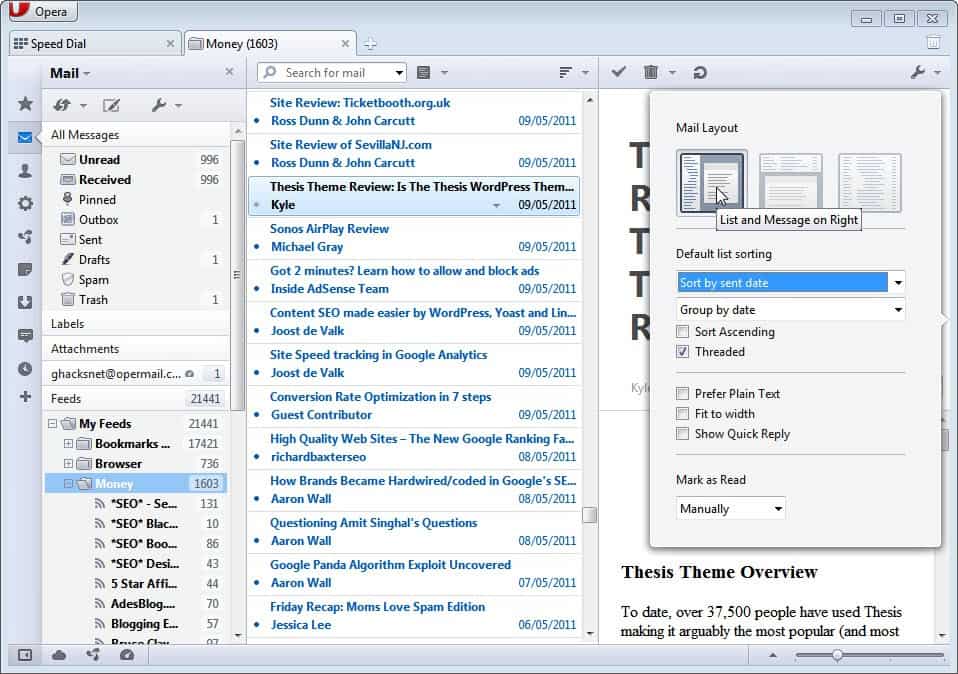
Probably the biggest change in this release apart from the cleaned up look is the new two-lined message list.

opera 1160 mail changes

The new layout displays three mail columns when Opera Mail is opened. First the Opera Mail message, feeds and attachment listing on the left, then the actual messages from the selected mail folder and after that the selected message.

Users who do not like the change can switch back to list only or list and message below views easily.

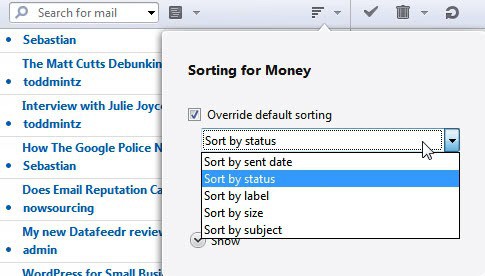
Mails are now also automatically grouped by date. This can be switched as well to status, label, size or subject sorting, and grouping by read status, flag or date.

opera mail sorting

Another interesting new feature is the ability to pin important messages in Opera Mail. That’s handy if you need to reply to an important message but cannot do so right away, or if you need to access contents of a mail regularly. The pin message button appears in the message’s header and as a small dot next to the message listing.

Interested computer users can download the latest Opera 11.60 snapshot with improved mail module from the announcement over at the Opera Desktop team blog. Downloads are provided for all supported operating systems (which means Windows, Mac and Linux).


© Martin Brinkmann for gHacks Technology News | Latest Tech News, Software And Tutorials, 2011. | Permalink |
Add to del.icio.us, digg, facebook, reddit, twitter
Post tags: , , ,


Wednesday, October 19, 2011

Opera 11.52 Security Update

The Opera desktop team has released an Opera web browser update that resolves two security issue. The update fixes a non-exploitable security issue that “allowed injection of untrusted markup into the X-Frame-Options error page” and a “issue where manipulating fonts in SVG could allow execution of arbitrary code”.

The second o-day security issue has received a critical severance rating as it can be used to crash the web browser and execute arbitrary code on the system.

Users running the latest stable version of the Opera web browser, which is 11.51 at the time of writing, should receive automatic updates right away.

It is alternatively possible to check for updates manually by clicking on Opera > Help > Check for Updates. The new version is also available for download at the official Opera website.

opera update

The new Opera version comes with stability enhancements as well. Opera 11.52 fixes a issue on YouTube where adjusting the volume on playing HTML5 videos could freeze the web browser. It furthermore fixes a issue where BitTorrent downloads would lead to a crash of the web browser.

It is likely that Opera 11.52 is the last 11.xx version of the browser. The development team has recently released Opera 12 alpha which showed improvements all over the board. The new version introduces new technology support. This includes support for WebGL and full hardware acceleration.

Tech enthusiasts interested in this development version of the browser can download it directly from the Opera desktop team blog.


© Martin Brinkmann for gHacks Technology News | Latest Tech News, Software And Tutorials, 2011. | Permalink |
Add to del.icio.us, digg, facebook, reddit, twitter
Post tags: , , ,


Thursday, October 13, 2011

Opera 12 Alpha

Just a day after posting the first look at Opera 12 on Ghacks the Opera team decided to release the alpha version of the browser publicly. The review the other day was based on the latest snapshot release, and while changes between that latest snapshot of Opera and the alpha are scarce it justifies a second deeper look at the upcoming version of the Opera web browser.

I ran Opera 12 Alpha through a series of tests and boy did the new version manage to impress. Opera 12 Alpha scored 336 points and 9 bonus points in the HTML5 test, that’s more than Firefox’s 314+9 and a lot more than Microsoft Internet Explorer 9′s 141+5. Only Google Chrome Dev managed to beat Opera by 8 standard points and 6 bonus points.

opera 12 alpha

Opera still trails behind in the Peacekeeper benchmark when compared to the most recent Chrome Dev version, at least on a fairly standard Intel Core i7 system running Windows 7 Professional (Ghacks reader Matthew mailed me on the other hand stating that Opera beat Chromes run by nearly a factor of 2. Then again, he failed to mention the Chrome version tested).

This version of Opera has full hardware acceleration support. The browser is set to auto detect hardware acceleration capabilities of the graphics card. Opera notes that support works best if graphics card drivers are the most recent and that users may experience bugs in the alpha release.

Users who want to disable – or force – full hardware acceleration support in the browser need to open opera:config in the browser and filter for EnableHardwareAcceleration to disable (0), auto-detect (1) or force (2) hardware acceleration in the browser. Similar settings are available for the WebGL. Users need to filter for EnableWebGL to turn it off (0), auto-detect (1) or force on (2) the technology.

You can check if hardware acceleration is enabled in your version of Opera by loading the opera:gpu page in the web browser. If you see Vega backend: Software it is not enabled. Hardware acceleration uses a OpenGL backend currently. Opera has announced that support for DirectX will be implemented at a later time in the browser.

The developers have added new personalization features to the browser. Skins have been renamed as themes, and you can download and install a few on the official Opera themes page.

Interested users can download Opera 12 Alpha for all supported operating systems from the Opera Desktop Team blog.


© Martin Brinkmann for gHacks Technology News | Latest Tech News, Software And Tutorials, 2011. | Permalink |
Add to del.icio.us, digg, facebook, reddit, twitter
Post tags: , , , ,