Pages

Showing posts with label pandora. Show all posts

Thursday, December 22, 2011

Listen to and Download Music from blocked Music Services

Some of the best web services may not be available to you if that service is limited to users from a specific region or country of the world. This is for instance the case with Pandora and many other entertainment related services. Your only option to access the service is to use a proxy server or virtual private network to bypass the country restrictions.

It is not often that you come upon an application that provides everything you need to access restricted services. Saver 2 Bundle is a free software collection for Windows that is an all-on one solution providing access to services such as Pandora, Rhapsody Radio, Last.fm, Songza or Meemix.

The program installs several programs on your computer that work well together. You can start the core application directly and use the integrated Opera USB browser to load the web services. It is alternatively possible to use other web browsers which may need to be configured properly before they can be used, or the optional Pandora Radio player that can be installed with the main program.

Saver2 uses the Tor Network to establish proxy connections. This basically tunnels the connection so that it appears as if it is coming from one of the allowed locations in the world. For Pandora Radio, this would be an endpoint in the United States.

saver2 pandora

The connection to one of the supported services should work right away and without the dreaded “country unsupported” message that users would see otherwise. Quality of playback during tests was good; Music streams from Pandora Radio and several other services were playing without buffering issues and errors.

Saver2 can be configured to download music from supported services automatically or on demand. The program is configured to download everything automatically. The preferences offer options to save only on approval.

The program furthermore tries to replace lower quality songs with higher quality versions, looks up album art on Amazon and may query the MusicDNS service for additional information.

Files can be re-encoded, for instance to a lower quality setting or file extension. Other options include configuring a blacklist or whitelist.

supported services

New users may feel overwhelmed at first by the applications that get installed and displayed on the screen when the main program is started. The majority of windows can be minimized though. All it takes to get started is to run the main application, wait until a proxy connection has been established to finally load the website that you want to access.

Windows users can download the Saver2 Bundle from the developer website.


© Martin Brinkmann for gHacks Technology News | Latest Tech News, Software And Tutorials, 2011. | Permalink |
Add to del.icio.us, digg, facebook, reddit, twitter
Post tags: , , , ,


Elpis, Open Source Pandora Client For Windows

Remember Pandora, the Internet Radio service that went viral shortly after its release thanks to its interesting music suggestion service and the fact that it was available to users from all over the world? Pandora shortly thereafter went US-only blocking access for users who tried to connect from other countries.

It is still possible to listen to Pandora if you are not in the US, but you need a web proxy or virtual private network for this.

One of the things that I never liked that much was that Pandora was only accessible on the official website. This meant that you had to keep the browser window open all the time if you wanted to listen to music from the service (mobile clients are now available).

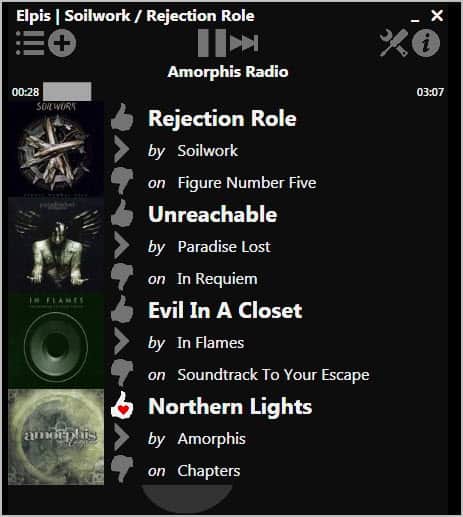
Elpis is an Open Source Pandora client for Windows that changes this. It basically moves all important options that the Pandora web player offers to the client. A free or subscription based Pandora account is however required to start playing music with Elpis. New users can create Pandora accounts right from within the program interface.

Once you have linked your account you can start searching for music to play it in the client. Results are then displayed in a list that you can click on to tune into that radio station.

elpis pandora radio client

Music is from that moment on played automatically. You can now minimize the Pandora player to just listen to music, or use the player controls to vote for songs or pause and skip songs.

Global Media hotkeys can be enabled in the program interface. That’s useful if you want to minimize the program window, as it allows you to control the player when it is minimized.

Elpis will log in to Pandora automatically when the program is started. You can configure the program to start playing the last played station automatically.

pandora radio

Individual songs can be bookmarked and favorited with a click on the > icon in the program window.

Elpis is an easy to use yet feature rich Pandora client for Windows. The program and its source code are both available at Adam Haile’s website. Elpis requires the Microsoft .Net Framework 4.0 to be installed on the system. It is compatible with both 32-bit and 64-bit editions of the Microsoft Windows operating system.


© Martin Brinkmann for gHacks Technology News | Latest Tech News, Software And Tutorials, 2011. | Permalink |
Add to del.icio.us, digg, facebook, reddit, twitter
Post tags: , ,


Monday, November 28, 2011

Download Pandora Radio To Your PC

I have not looked at Pandora Radio ever since the service closed down its international access. Before that, I published two guides on saving Pandora music. That was back in 2006; Five years later and the situation has not changed a lot. Pandora is still only available for US Internet users and those who use virtual private networks (vpns) or web proxies to bypass the country IP limitation.

The two guides published in 2006 are obsolete now. They are both about software programs that are no longer available. This guide takes a look at a new and at the time of writing working method of downloading Pandora Radio to the PC. Even better, it uses a freeware application for that.

Head over to the Nirsoft website and download Video Cache View. Don’t let the name irritate you, it supports audio as well. The program basically scans web browser caches for media files and displays all files it finds in its interface.

The portable software scans for all media file formats in all browser caches. That may be a bit much and the first thing that we need to do after starting Video Cache View is to restrict the listing to audio. Click on Options in the menu and remove the checkmark next to show video files.

Now head over to the Pandora website and tune into a radio station there. I suggest you pick one of the top streams that are listed on the start page while testing. Make sure the radio streams music to your computer. When it does, switch back to Video Cache View and either wait until the program refreshes the listing automatically, or click on the refresh button manually to see the song that is now playing in the listing.

download pandora radio

Chance is, you see multiple audio files in the listing. Use the following indicators to locate the correct one that Pandora sent to your computer. You can first sort by browser to limit the display. The file size should be more than 1 Megabyte and less than 5 Megabytes. The Pandora Radio music files usually show up as .tmp files without content type and download url. A right-click on a file and the selection of Play opens the file in the default media player on the system.

play pandora music

Once you have identified the song that is playing right now right-click it again and select the Copy selected files to option from the context menu.

Please note that cached music files are removed from the cache automatically when the song stops. This means that you need to save the Pandora song while it is playing. You will always download the full song though no matter when you start the downloading.

Is there an easier way to download Pandora Radio music to the computer? Probably. It would for instance be nice if the identification and download could be automated, or if the cached files would not be deleted right away after the music stops playing.

Know of a different way to rip Pandora streams? Let me know in the comments.


© Martin Brinkmann for gHacks Technology News | Latest Tech News, Software And Tutorials, 2011. | Permalink |
Add to del.icio.us, digg, facebook, reddit, twitter
Post tags: , , , ,