When it comes to making backups of data stored on your computer, you have got a lot to consider. Two of the most important aspects are the frequency of backups, and the location where they are stored. Storing backups in the cloud has advantages (if your house burns down or someone steals your PC, and you still got access to the backup), and disadvantages (the data is usually not hosted on a server that you have control over, and it may be quite expensive depending on the volume, both storage and bandwidth wise). Local backups basically reverse the disadvantages and advantages of cloud based backups. They are usually a lot cheaper to create and store, but are often stored in the same room as the PC.
EaseUS Todo Backup Workstation 3.5 is a commercial backup solution for Windows operating systems. The program is the big brother of the free EaseUS Todo Backup solution which I have reviewed a few weeks ago. If you look at the feature comparison chart over at the Todo Backup homepage you’ll notice that the Workstation version offers some interesting features that the free version does not offer.
This includes a remote control feature for remote backup and recovery sessions, and creating and recovering system snapshots.
The program interface displays core features prominently on the Home tab. This includes system and file backup options, disk cloning and backup management.
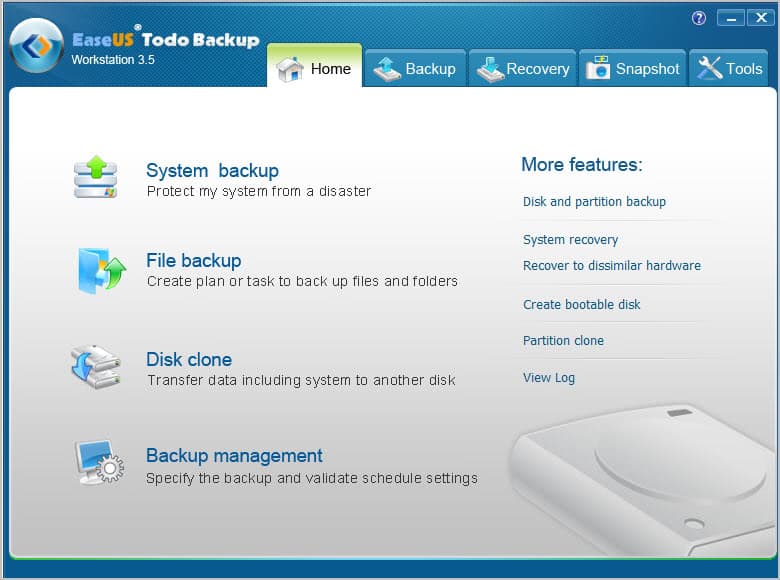
The backup and recovery tabs display all related options. The option to create a disk and partition backup is displayed under backup next file backup and system backup. EaseUS recommends the create snapshots before software installations or as a recovery option when the system fails to boot.
Tools finally lists related applications that can be used to check the integrity of a previously created backup, mount backups to access files diretly, convert images to virtual disks or to create a bootable rescue disc to launch the backup software if the operating system is no longer loading properly.
System Snapshots
The snapshot feature needs to be enabled before it can be used. It creates virtual space on the main drive for snapshots

The recovery tab lists options to recover previously created backups. Here it is furthermore possible to recover the system to different hardware, which can be useful if you want to move the operation system to a new PC.
The Snapshot tab offers to create and restore system snapshots. This works similar to Window’s system restore feature. Snapshots need less storage space than full system backups. Due to their size, it is usually a lot faster to restore a snapshot than it would be to restore a full backup.
The first snapshot is automatically activated on first boot after the feature has been enabled in the software. It is from that moment on possible to create snapshots from the menu.
Previously created snapshots can be deleted at any time to make up room for instance.
Remote Control
The second feature that is not available in the free version of EaseUS Todo Backup is the remote control feature. It helps you manage multiple PCs from a single machine.

The remote control feature needs to be installed on the main system. Remote PCs also need to be running the program. You need to enter the computer’s IP address and log in with an existing user account to make use of the functionality. Please note that the user needs to have administrative privileges.
All program functionality becomes available once a remote session has been established. It is in particular possible to backup or recover files, disks and partitions, and the system.
Feature Overview
- File backups – Create backups of files. Supports incremental and differential backups.
- Disk and partition backups – Backup hard disks or partitions.
- System Backup – Creates a backup of the operating system.
- Schedule backups – Backups can be scheduled run regularly.
- Backup options – Include compression, password protection, image splitting, notifications, programs that can be run before or after an operation and offsite copies.
- Tools – Clone a partition or disk, mount images, check image integrity, wipe disks or partitions.
- Pre-OS Recovery – Displays a boot menu with options to launch the backup software before the OS starts.
EaseUS Todo Backup Workstation is compatible with all recent 32-bit and 64-bit editions of the Microsoft Windows operating system. The program supports FAT and NTFS file systems, dynamic discs and hardware RAIDs.
Verdict
EaseUS Todo Backup Workstation is a powerful backup solution for the Windows operating system. Backups can be created with a few clicks. Advanced users find settings and options to customize backups to their liking.
The offsite copy option could however use more options than just backing up to ftp. Integration of cloud space providers, or even secure ftp connections would be welcome.
You find more information about EaseUS Todo Backup Workstation on the program page.
Giveaway
We have ten EaseUS Todo Backup Workstation 3.5 licenses for this give away. Please leave a comment below if you want to take part in the draw.
© Martin Brinkmann for gHacks Technology News | Latest Tech News, Software And Tutorials, 2011. | Permalink |
Add to del.icio.us, digg, facebook, reddit, twitter
Post tags: backup software, ghacks Christmas giveaway


0 comments:
Post a Comment