Pages

Showing posts with label Google. Show all posts

Thursday, February 9, 2012

Google Drive Supposedly Launching in the Coming Weeks

Rumors of Google Drive, or GDrive as it was named in the beginning, started to emerge at around the same time that the popular file synchronization and hosting service Dropbox opened its doors to the public (that was 2007). All went quiet shortly thereafter and it appeared as if the project had been canceled by Google.

The Wall Street Journal is reporting that Google is about to launch Google Drive for real this time. Sources are not disclosed, and information other than the name of the cloud based hosting service are not offered in the article.

It is likely that Google Drive will offer free basic storage options and upgrades for users and teams that require more than the basic amount of storage. The pricing structure has not been revealed yet, but it seems possible that Google could simply add Drive o the list of services that you can already purchase additional storage for.
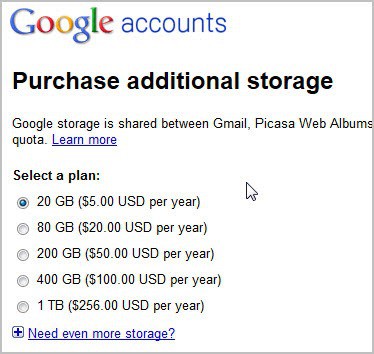
google purchase additional storage

When you compare those prices to Dropbox’s tiered structure, you will notice that they are a lot cheaper. Google Drive users had to pay $5 per year for 20 Gigabytes of extra space, while the cheapest storage increase on Dropbox would set them back $99 per year for 50 Gigabytes.

Then again, it is not only about storage space but also about functionality and accessibility.

Techcrunch back in September of 2011 mentioned that Google Drive would come with a synchronization software to sync data between desktop computers and mobile devices. If that is the case, and if support goes beyond Windows and Android, then it could force Dropbox to adjust their pricing structure to stay competitive.

It is not clear yet if Google will encrypt data stored on their servers.

Drive ultimately would allow users to access data on the Internet and on all supported devices.

It is likely that Google will make the service available under http://drive.google.com/. The page is currently returning a 404 not found error which indicates that it has already been created by Google (if you open a bogus subdomain you get a different error).


Google Wallet Pin Vulnerable To Brute Forcing

Google Wallet is the name of Google’s recently launched cell phone-based credit card payment system. The system uses Near Field Communication (NFC) to exchange data between the cell phone (that is containing the user’s financial information) and the store. The system has several advantages over physical credit cards, including a potential for greater security when implemented correctly. Security can however also be a weakness if vulnerabilities are discovered that allow attackers to gain access to the pin that is protecting Google Wallet.

Google Wallet as of now is only available in the United States, on two wireless providers – Sprint and AT&T, and only if the Samsung Nexus S 4G smartphone is used. Whenever Google Wallet users make purchases, they need to enter the pin to verify it. One of the weaknesses of the system is that Google decided to use a four digit pin limiting the possibilities to just 10,000. While that is convenient for the user, it is problematic from a security point of view.

Joshua Rubin over at Zvelo published an article yesterday that describes how his company analyzed the data Google Wallet saves to the phone to find out that the pin could be brute forced quite easily.

Researchers at Zvelo discovered that Google was saving the pin in encrpyted form on the smartphone. With the hash and salt discovered, they immediately started to program a brute forcing software to decrypt the information.

Google Wallet Hacker displays the Google Wallet pin in about a second after it is run. The program has to be run on the smartphone Google Wallet is used, which is currently the greatest restriction.

The vulnerability has been disclosed to Google before it was publicly disclosed. The system has not been updated yet though which poses a risk to Google Wallet users. Mitigating factors have been posted by Zvelo which may help Google Wallet users keep their pin secure from brute forcing attacks.

  • Do Not “Root” the Cell Phone – Doing so will be one less step for a thief.
  • Enable Lock Screens – “Face Unlock,” “Pattern,” “PIN” and “Password” all increase physical security to the device. “Slide,” however, does not.
  • Disable USB Debugging – When enabled, the data on mobile devices can be accessed without first passing a lock screen challenge unless Full Disk Encryption is also enabled.
  • Enable Full Disk Encryption – This will prevent even USB Debugging from bypassing the lock screen.
  • Maintain Device Up-To-Date – Ensure the device is current with the latest official software.

Should you be using Google Wallet right now? This is ultimately your decision, I for one would refrain from using it until the issue gets resolved.


Wednesday, February 8, 2012

Google to Start Paying You To Monitor Your Browsing Habits

As soon as you start using the Internet, your actions are tracked by specialized companies. This not only includes web server logs but also third party tracking through advertisement, social networking scripts and other third party scripts.

Google is about to launch Screenwise, a project that allows them to monitor the sites users visit and how they use them. For that, participating users get paid up to $25 in gift cards over the course of a year. Users who sign up get a $5 Amazon gift card right away, and then additional $5 gift cards for every three months they stay in the project.

According to the information posted on the Screenwise Landing panel, Google attempts to use the information to “improve Google products and services and make a better online experience for everyone”.

Participating users need to download the Google Screenwise browser extension for the Chrome web browser and use the browser for their Internet activities. Eligible are Google account users who are at least 13 years of age. Google notes on the page that the company will not save user email addresses, or “associate it with any other personally identifiable information”.

Google has partnered up with Knowledge Networks, a research company that specializes in Internet research.

Interested users can submit their email address to receive notifications when registration opens. According to the landing page information, users will receive participation information in the coming days.

The process, even though opt-in, will certainly face its share of criticism, especially since Google is currently already facing public pressure over their privacy policy and terms of service changes.

The question is, how many users are willing to give up their privacy for 12 months for $25 in Amazon gift certificates? What’s your take on this?


Sunday, February 5, 2012

Is Google Making Another Homepage Layout Change?

Google is running yet another design test on their homepage currently. With the frequency of layout changes increasing, it feels as if the search giant does not really know what they really want anymore. As of right now, at least two designs are life for all users. First the single button menu interface with a gray header area, and then the black bar.

Yesterday a third design was spotted that combines the black bar with the menu structure of the single menu bar.

google black bar

The new bar displays Google’s most popular services directly again on the bar for quick access. The More link leads to additional services. Users of the gray bar design will notice that the black bar has been moved on top of the design. Everything else, with the exception of the Google logo menu has remained the same.

The Google Operating System blog has posted instructions on how to enable the new Google bar design.

  • Open google.com in your web browser of choice.
  • In Google Chrome, press Ctrl-Shift-J
  • In Mozilla Firefox press Ctrl-Shift-K
  • In Internet Explorer press F12 and select console
  • Paste the following code into the form

document.cookie="PREF=ID=381502750b6e9119:U=aaee74aefea7315a:FF=0:LD=en:CR=2:TM=1328391998:LM=1328392000:S=yPtlCgLbEnezu5b4; path=/; domain=.google.com";window.location.reload();

  • Press enter and close the console again.
  • Local users need to replace the domain in the information (google.com) with the country code domain, e.g. (google.de)

The page should refresh automatically, and you should see the new layout on the Google page. Please note that it will only be active for as long as the cookie remains on your system.

Users who want to return to the old Google homepage layout can repeat the steps, by loading the following code in the console.

document.cookie="PREF=; path=/; domain=.google.com";window.location.reload();

My personal opinion? Google should give users more choice when it comes to the services that are displayed on the homepage. I’m for instance not using Google News, so why should it be there that prominently on the page? Google furthermore needs to select a design and stick with it, instead of confusing users with different designs and layouts. Some users, depending on the browser they use to access Google, have reported that they are seeing different layouts on the same computer.

What’s your take on this, and what’s your favorite bar so far?


Friday, February 3, 2012

Google to Block Per-Country Blogger Blogs

Following the announcement last week from Twitter that they can now block specific Tweets on a per-country basis, Google have now announced a similar move with Blogger that allows specific blogs to be blocked for individual countries, while keeping them online and active in the rest of the world.

Google describes the move on their blog as happening because…

“Migrating to localized domains will allow us to continue promoting free expression and responsible publishing while providing greater flexibility in complying with valid removal requests pursuant to local law. By utilizing ccTLDs, content removals can be managed on a per country basis, which will limit their impact to the smallest number of readers. Content removed due to a specific country’s law will only be removed from the relevant ccTLD.”

This move comes just under a year after the beginning of the Arab Spring which began with the people taking to the streets of Egypt and protesting against the thirty year rule of President Hosni Mubarak in which social networks such as Twitter were used extensively.  Similar uprisings quickly spread to neighbouring countries with Syria now the target of sanctions discussions at the United Nations.

It also follows Google’s discussions with China last year which saw the company temporarily withdraw from the country, only to return later having made concessions to the Chinese government.  Currently the changes apply only to Australia, New Zealand and India though Google apparently plan to roll the new system out globally.  It does not appear however that this has been introduced at the request of any specific country or countries.

The move would allow both Twitter and Google to block access to specific web content at the request of a country’s government or court-order.  This could include specific words in the case of Twitter or the blogs of people who are seen as dissidents or criminals.

When Twitter announced their censorship move last week it was met with heavy criticism from freedom-of-speech campaigners, however the Blogger move is meeting so far with a more even response with the BBC reporting Joss Wright, a research fellow at the Oxford Internet Institute who told them “Google’s new approach to supporting country-level takedown requests in Blogger strikes a good balance between free speech, legality and practical issues for end users.  By allowing per-country takedown requests, Google can meet local laws without blocking content at a global level.”

In a statement the company said…

“If you visit a blog that does not correspond to your current location as determined by your IP address, the blogspot servers will redirect you to the domain associated with your country.”

Google believe the move will allow them to comply with local laws while keeping the content online around the world.  It is not yet clear however how this and the Twitter system might work with privacy browsers intended to bypass local filtering.  These are used by dissidents and political activists in countries including China, Burma and North Korea.

In the past Google have blocked specific content from their search engine in China, and blocked other content such as Nazi-related websites in Germany where such things are illegal.  Many people however believe that the Internet should not be filtered at all, and arguments are certain to continue over these moves.


Wednesday, February 1, 2012

Microsoft Slam New Google Privacy Policy in Newspaper Advert

Last week Google announced changes to its privacy policy that, on the face of it seem perfectly reasonable.  In essence they want to treat all the different Google services you use as a single big account and share the data.  What this ultimately means though is that the company will know absolutely huge volumes of information about you.

For instance they’ll see what emails you receive and subscribe to, what videos you watch, what things you search for, what sorts of documents you work on and what the content of those documents is, what you blog about, what you take photographs of and where, what newspapers and blogs you read, what you buy online, what parts of the world you’re interested in (and where you live), who you chat to and what you like to buy.

All of this information, when put together, helps advertisers paint an incredibly detailed picture of you and with about a billion users worldwide, that information is incredibly valuable.

Now Microsoft have hit back with newspaper adverts in the US saying that this isn’t what want at all and that you should ‘obviously’ use their products and services instead.

In the advert they say…

Google is in the process of making some unpopular changes to some of their most popular products. Those changes, cloaked in language like “transparency”, “simplicity” and “consistency” are really about one thing: making it easier for Google to connect the dots between everything you search, send, say or stream while using one of their services.

But, the way they are doing it is making it harder for you to maintain control of your personal information. Why are they so interested in doing this that they would risk this kind of backlash? One logical reason: Every data point they collect and connect to you increases how valuable you are to an advertiser.

So is this fair enough, sour grapes or the pot calling the kettle black?  In fairness it is all of the above as there are elements of all of these in the advert.  Google make almost all of their revenue from advertising and the better and more attractive they can make their own advertising, and the data they collect on their users, the more companies they will attract and the more money they can charge for the (your) personal information.

Many people simply don’t want to be tracked and Microsoft point out that you can do this in the latest version of Internet Explorer.  What they don’t mention is that you can also do it the latest version of Google’s Chrome browser as well and that many of the advertising and data-mining tactics used by Google are also used by Microsoft.

Consumers will have to decide for themselves how they feel about the approach Microsoft are taking here, though many will just see it as a company taking advantage of an open goal for a publicity stunt.  The fact remains though that the US Congress is so concerned about the new changes Google is introducing that they are holding an closed door hearing to discuss what the changes mean.

So what do you think about Google’s new privacy policy?  Have you even heard about it and what do you think of Microsoft’s response?  Why not tell us in the comments below.


Tuesday, January 31, 2012

Blogspot To Start Redirecting To Country Specific Domain Extensions

Users of Google’s blog hosting service Blogger may notice quite a significant change in the coming weeks. Instead of being able to access blogs hosted on Blogger directly, they may now be redirected to a country specific domain. A user visiting a blog from Australia for instance will be redirected to blogspot.com.au automatically whenever a blogspot blog is accessed.

Only custom hosted domains are exempt from the change. Why is Google doing this? According to a recently added help page to “continue promoting free expression and responsible publishing while providing greater flexibility in complying with valid removal requests pursuant to local law”. Google explains the move with greater content removal flexibility as they can now manage those removals on a per country base to limit the “impact to the smallest number of readers” as content removed “due to a specific country’s law will only be removed from the relevant ccTLD”.

blogspot

The company notes that users who want to visit the original domain name can do so by accessing blogspost.com/ncr for that. It is not clear if this can also be attached to deep links, or if it only works to access the root domain of a particular blog.

It is definitely a confusing move both from a webmaster and site visitor perspective. Especially site regulars may think that something’s not right with the site if they are redirected automatically. Some may even believe that they are redirected by a hacked site or computer virus.

What’s your take on this development? Lets discuss it in the comments. (via Techdows)

It is also not clear if users who are locked out of the country domain can access the ncr version of the site, or if they are blocked from accessing that version as well. It is however likely that Google will first check the country of origin before making the redirect, which would suggest that users would be blocked from accessing ncr versions if the blog is blocked in their country.

Blog owners on the other hand may fear that the change will impact their search engine rankings or visibility. Google will make use of the rel”canonical” tag to prevent search engines from indexing different country versions of the same blog or post. It is however still possible that some webmasters will notice negative effects of the change.


Friday, January 27, 2012

Microsoft’s Guide For Gmail Users To Switch To Hotmail

Google recently revealed the plan to merge the privacy policies and terms of service for most of the company’s products. This move gives all Google services direct access to all user data. Google search for instance can take into account what kind of emails a user gets in Gmail to personalize the search results based on that. This even goes further for Android phone users, who may now reveal their favorite restaurants, shops and locations to all other Google services.

A new post by Microsoft employee Dharmesh Mehta on the Inside Windows Live blog highlights core reasons why users might want to switch from Gmail to Hotmail, before explaining the actual steps that migrates their email account to the Hotmail email service.

  • Hotmail & Facebook work well together. You can update your Facebook status, chat with Facebook friends, view their updates, and comment right from your Hotmail inbox. You can’t do this from Gmail.
  • You can easily share lots of photos and large attachments. Hotmail lets you share hundreds of photos or other files in one message using the integrated online storage from SkyDrive. You can’t do this in Gmail.
  • Hotmail works great with Office. Using the Office Web Apps, Hotmail lets you view and edit Office docs for free right in your inbox. Gmail doesn’t work well with Office.
  • Hotmail lets you get a handle on graymail. With customizable categories and scheduled sweeps, you can quickly clean up things like newsletters, social updates, and daily deals so you only see the mail that really matters to you. Gmail doesn’t have Sweep.

These features alone won’t convince many users to move their email account to Hotmail. Combined with Google’s announcement however they could be enough to get some users to move their accounts.

It needs to be noted though that Gmail offers features that Hotmail does not offer. This includes IMAP support or two step authentication, both of which are not supported by Hotmail.

add gmail account to hotmail

The guide to switch from Gmail to Hotmail lists three steps.

  • Create a Hotmail account. If you don’t already have one, you need to create a Hotmail account. The best way to do this is to get a new email address either @hotmail.com or @live.com. Or, if you already have an email address you want to keep using, you can keep using it and sign up here. You don’t have to use our domain.
  • Import your old messages from Gmail. You’ll probably want to keep your old email and contacts so we’ve made it simple to bring them in. TrueSwitch is an easy tool which will import your email and contacts and forward any new email to Hotmail for 90 days. Go to the TrueSwitch site and follow the steps there. When you sign back in to Hotmail, you’ll notice that it’s beginning to import your emails (this could take a few hours if you have a lot of emails to bring over).
  • Connect your Gmail account. This step is optional, but if you want to make sure you receive future messages from Gmail, you can have Hotmail automatically get all new emails that are sent to your old Gmail account. These are the steps to connect your accounts:
    a. In your inbox, click Options and then More options.

    b. Click Sending/receiving email from other accounts.

    c. Click Add an email account.

    d. Provide your Gmail account details.

Step 2 and 3 address core issues that users who move mail accounts want resolved before they even start thinking about it. Access to all previous mail messages and the forwarding of messages that are send to the old account are covered in those two steps.

Are you considering moving your Gmail account to another provider?