Pages

Showing posts with label hotmail. Show all posts

Tuesday, February 14, 2012

Which Email Provider Offers The Best Spam Protection? Study Suggests Hotmail Is

Spam is one of those things that you never can get rid of completely, it seems. Email providers like Hotmail, Google Mail or Yahoo Mail are battling on the spam front ever since they opened their door for the first users. And while they managed to cut down significantly on spam in past years, there is still work to be done in that compartment. Providers are currently working together to eliminate most of the spam once and for all. Until then though, users will receive spam fairly regularly in their inboxes.

A recent study by Cascade Insights analyzed the spam blocking capabilities of Hotmail, Yahoo Mail and Google Mail. The researchers created email accounts with those services, and one unfiltered account at a web hoster for comparison purposes. The newly created email addresses were then posted on the web to get scraped by spam bots. The researchers furthermore replied to spam email addresses, and created Facebook pages with the email addresses posted openly on the pages.

After some time, the ratio of spam to legitimate emails in the inbox, and not in the spam folder, were analyzed. All unsolicited emails that arrived in the inbox were countered as well.

Microsoft’s Hotmail service managed to take the number one spot from Google in a very close finish, followed by Yahoo Mail and the unfiltered email account.
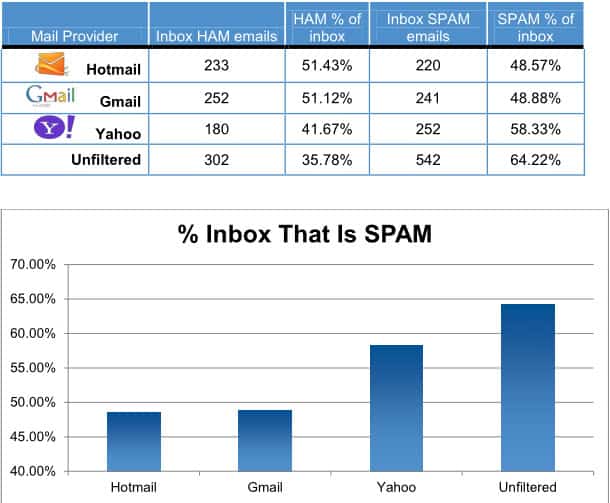
spam distribution

Yahoo Mail’s inbox spam percentage was about 10% higher than that of both Hotmail and Gmail. The small difference between Gmail and Hotmail won’t likely convince anyone to switch providers. It outlines however that Microsoft managed to improve Hotmail’s spam fighting and detection capabilities over the years.

The study does not take into account factors that are beyond its reach. This includes if and how often websites where the email addresses were posted were crawled, or if some email accounts were sold more often than others. These may have influenced the results in one way or the other.

Microsoft was the first company to publish a response. The company attributes the drop in spam on Hotmail to several factors, including the company’s SmartScreen technology that has reduced the spam ratio on a typical Hotmail inbox to below 3% according to Microsoft.

Microsoft confirmed in that blog post that customer complains related to spam have dropped by over 40% over the past year, and that the total number of complaints related to spam shrunk by over 50% over the past two years.

Do you have email accounts at one or multiple of the email providers? Do you receive less spam today than in the past?


Friday, January 27, 2012

Microsoft’s Guide For Gmail Users To Switch To Hotmail

Google recently revealed the plan to merge the privacy policies and terms of service for most of the company’s products. This move gives all Google services direct access to all user data. Google search for instance can take into account what kind of emails a user gets in Gmail to personalize the search results based on that. This even goes further for Android phone users, who may now reveal their favorite restaurants, shops and locations to all other Google services.

A new post by Microsoft employee Dharmesh Mehta on the Inside Windows Live blog highlights core reasons why users might want to switch from Gmail to Hotmail, before explaining the actual steps that migrates their email account to the Hotmail email service.

  • Hotmail & Facebook work well together. You can update your Facebook status, chat with Facebook friends, view their updates, and comment right from your Hotmail inbox. You can’t do this from Gmail.
  • You can easily share lots of photos and large attachments. Hotmail lets you share hundreds of photos or other files in one message using the integrated online storage from SkyDrive. You can’t do this in Gmail.
  • Hotmail works great with Office. Using the Office Web Apps, Hotmail lets you view and edit Office docs for free right in your inbox. Gmail doesn’t work well with Office.
  • Hotmail lets you get a handle on graymail. With customizable categories and scheduled sweeps, you can quickly clean up things like newsletters, social updates, and daily deals so you only see the mail that really matters to you. Gmail doesn’t have Sweep.

These features alone won’t convince many users to move their email account to Hotmail. Combined with Google’s announcement however they could be enough to get some users to move their accounts.

It needs to be noted though that Gmail offers features that Hotmail does not offer. This includes IMAP support or two step authentication, both of which are not supported by Hotmail.

add gmail account to hotmail

The guide to switch from Gmail to Hotmail lists three steps.

  • Create a Hotmail account. If you don’t already have one, you need to create a Hotmail account. The best way to do this is to get a new email address either @hotmail.com or @live.com. Or, if you already have an email address you want to keep using, you can keep using it and sign up here. You don’t have to use our domain.
  • Import your old messages from Gmail. You’ll probably want to keep your old email and contacts so we’ve made it simple to bring them in. TrueSwitch is an easy tool which will import your email and contacts and forward any new email to Hotmail for 90 days. Go to the TrueSwitch site and follow the steps there. When you sign back in to Hotmail, you’ll notice that it’s beginning to import your emails (this could take a few hours if you have a lot of emails to bring over).
  • Connect your Gmail account. This step is optional, but if you want to make sure you receive future messages from Gmail, you can have Hotmail automatically get all new emails that are sent to your old Gmail account. These are the steps to connect your accounts:
    a. In your inbox, click Options and then More options.

    b. Click Sending/receiving email from other accounts.

    c. Click Add an email account.

    d. Provide your Gmail account details.

Step 2 and 3 address core issues that users who move mail accounts want resolved before they even start thinking about it. Access to all previous mail messages and the forwarding of messages that are send to the old account are covered in those two steps.

Are you considering moving your Gmail account to another provider?


Monday, January 16, 2012

How To Add A New Email To Your Hotmail Account

When I signed up for my Hotmail email account I used a custom email address. As a consequence, I never received a “real” Hotmail email address. While I was able to create Hotmail aliases, I could not really use all the features associated with an account on the site as I used the third party mail address only to verify the account.

Yesterday I started to look into the issue more closely to figure out if there was an option to create a new Hotmail email address from within an existing account. It took some digging through Hotmail’s page layout to find the page where new email addresses can be added.

Open the Hotmail main page and sign into your Hotmail account if you are not already signed in. You should now see the inbox and the frontpage of the account.

Locate the Options link in the top right corner and select the more options link from the context menu. This opens the main account control panel where you can configure the majority of account related settings. Click on account details under managing your account. Hotmail may ask you to enter your account password again before the next page is displayed.

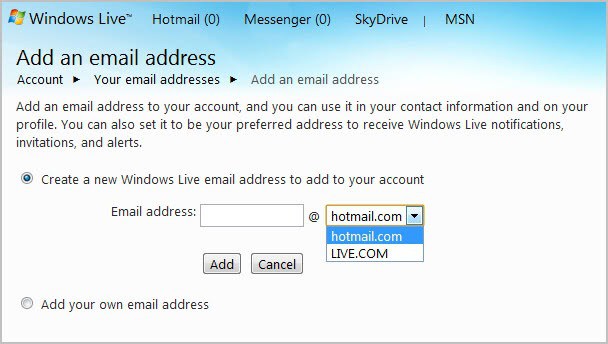
Click on the your email addresses link under other options. This opens a page listing all linked email addresses and aliases. A click on add an email address allows you to create a new Hotmail or Windows Live account, or to link a third party account to the Hotmail account.

add hotmail email address

Just enter a new account name and select whether you would like it to be a hotmail.com or live.com account.

The address is automatically added to the account and you can start using the account right away.

You can alternatively open the following link to create new Hotmail email addresses right away. This opens the mail overview page right away where you can add or remove email accounts.


Hotmail Gets Newsletter Filter

Did you know that newsletters make up about 50% of the email the average user receives? Microsoft discovered this after analyzing what they called graymail. Graymail in short is all mail that is not spam or personal email. When they looked at graymail they discovered that newsletters and social updates were the two biggest groups which were responsible for 50% and 17% of all inbox email respectively, followed by person to person mail with 14%.

Unlike spam, graymail cannot be filtered out that easily, as it is way more versatile. Even more problematic, while email account owners may not want to see most of the graymail on a daily basis, they may want to see some.

Considering that newsletters make up the biggest part of the average user’s mail delivery, Microsoft decided to tackle the problem from that angle.

The Hotmail team started to create a new newsletter filter that would allow users to filter newsletters automatically. When you now open Hotmail, you see the new newsletters filter displayed in the top filtering row. A social updates, contacts and groups filter is available as well.

hotmail newsletters

A click on newsletters displays only mail that Hotmail’s SmartScreen filter has classified as such. According to Microosft, about 97% of all newsletters get identified correctly by the machine. Hotmail users can change email classifications, which may be helpful when emails get classified as newsletters when they are not, or when newsletters do not get recognized as such. These user actions help to improve the filtering further.

The main question is this: How helpful is the new newsletter filter? Newsletters are still displayed in the inbox which means that they will crowd your inbox as they did before. The only real advantage that I see is that you now have faster access to newsletters. This can be helpful in determining which newsletters to keep and which to unsubscribe to. An automatic option to hide newsletters from appearing in the inbox does not seem to be available at this point in time. You can still configure email filters though to move newsletters to a new folder automatically, but that option was available before the update as well.


Saturday, December 17, 2011

New Hotmail Features, Here Is What You Need To Know

If you are using Microsoft’s Hotmail email service you have probably already noticed new options that are displayed in the web interface. Here is the new feature overview for those who have not, and those who have spotted some but not all of the new features.

New email accounts can be created on the official Hotmail website. Please note that you can use an existing Windows Live account to sign in as well.

Schedule Cleanup

The new cleanup option is configured individually for each sender. It basically allows you to delete messages from that particular sender automatically. This can be handy for “daily-offer” emails, logs, notifications or any other kind of messages that are only relevant for a specific amount of time. You can alternatively configure the messages to be moved to another folder instead.

To configure cleanups select a message from the inbox, and then Sweep > Schedule Cleanup.

hotmail schedule cleanup

This displays an overlay menu with the following configuration options:

  • Only keep the latest message from this sender
  • Delete all messages older than 10 days (alternatively 3, 30 or 60 days)
  • Move all messages older than 10 days (3, 30 or 60) to a specific folder.

delete emails automatically

One-click unsubscribe

This is a similar to Gmail’s unsubscribe from newsletter and notification option. Hotmail notifies the sender that the user wants to unsubscribe, and will furthermore configure filters to move existing and future messages into the junk.

unsubscribe newsletter

Flag Important Messages

It is now easier to flag important message to locate them faster in the future. The new “Keep this message at the top of your inbox” option makes sure that important messages stay on top of the box and are not moved down with the rest of the messages.

keep message at top of inbox

The Hotmail team has created a short video demonstrating the new flag capabilities.

Photo Album, Attachment Improvements

Users who send photos regularly now see the photos in Hotmail when they are composing the email. That’s useful considering that you’d only see file names before.

Large attachments can now also be send using SkyDrive which resolves possible attachment size limitations. Instead of compressing emails or splitting them up to stay below the limit, it is now possible to store the files on SkyDrive instead.

hotmail attachments

The new forgotten attachment detector makes sure that you have not forgotten to attach files to the email. This is based on popular words and phrases that indicate attachments.

Instant Actions

Instant actions are one-click actions. Flag to stick mails at the top is for instance an instant action. Hotmail users can configure actions in detail. This is done under Options > More Options > Customizing Hotmail > Instant Actions.

Actions can be configured to always show or only show on mouse over. Flag is the only action that is always shown by default, while delete and mark read/unread are only shown on hoover.

instant actions

Additional actions are moving and categorizing messages, sweep and junk. The order can be configured as well.

Folder Management

Hotmail users can now create and manage folders more easily with a right-click on the folder. Messages can now also be moved directly to folders that are displayed under Folders.

folders

Hotmail for Android

Android users can now download and install the official Hotmail Android app. The app features email, calendar and contact synchronization.

hotmail android

It supports multiple Hotmail accounts on the same device and displays new mail notifications on the Home screen.

Of all the features, the option to stick emails on top of a folder is the one that I like the most.

What’s your take on the new set of features? (via)


© Martin Brinkmann for gHacks Technology News | Latest Tech News, Software And Tutorials, 2011. | Permalink |
Add to del.icio.us, digg, facebook, reddit, twitter
Post tags: ,


Monday, November 14, 2011

Hotmail Single Use Code To Sign In With

Whenever possible I prefer not to enter login information on third party computer systems and networks. Why? Because I do not have full control over the software running in the background. Other means of logging in are preferred, especially passwords that are only valid once and expire afterwards.

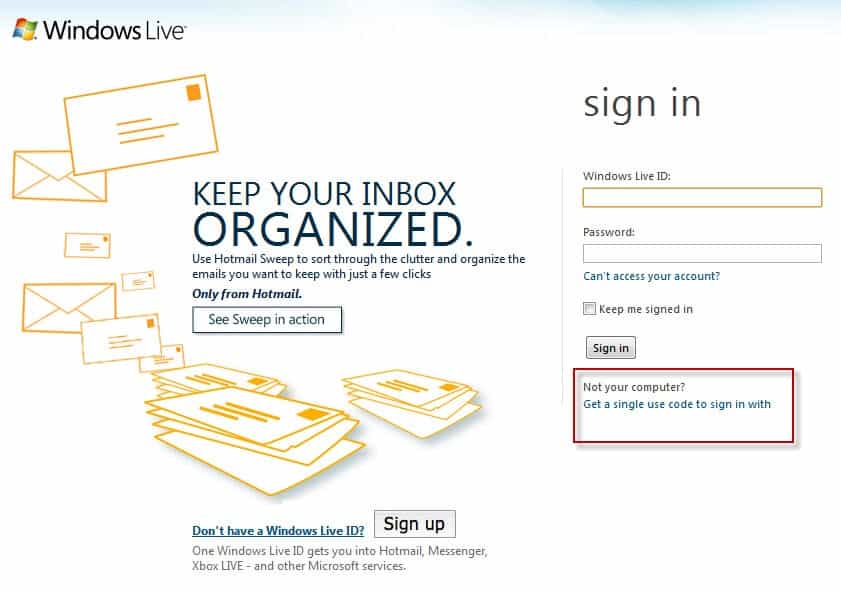
That’s what Hotmail has added to their website recently. When you open the Windows Live Hotmail website you see the standard Hotmail sign in screen for the most part. If you look below the Sign In button you see this:

Not your computer? Get a single use code to sign in with

hotmail sign in single use code

The sign in form changes when you click on the link. You are now asked to enter your Windows Live ID and the single use code instead of your regular password to log in to the service.

This is also indicated at the top where it states:

sign in with single use code. If you’re signing in from a public computer, you can use a single use code instead of your password for added security.

sign in single use code

If you do not have a code yet you can request one with a click on Get one here on the same page. You are then asked to enter your Windows Live ID and a mobile phone number that is linked to the account. Microsoft will send a text message to the phone number containing the single use code that you can use to sign in to Hotmail.

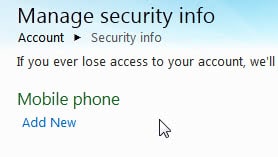
If you have not linked a mobile phone number to your Windows Live account yet you can do so in the account settings. Open the link and enter your standard login information. Click on the Manage link next to Security Info on the page and then on Add New below Mobile Phone on the next page.

hotmail mobile phone

The mobile phone number needs to be confirmed before it can be used for single use codes. Hotmail sends an email to the linked account email address. This email contains a confirmation link that you need to load to confirm the addition of the mobile phone number to the account. This obviously only adds to security if you do not use Hotmail as your email provider for that account email address.

Once the number has been verified you can start requesting single use codes for your Hotmail sign ins.

Single use codes are actually available on all Windows Live sign in forms.

The addition of single use codes adds to Hotmail’s and Windows Live’s security big time. What’s your take on this? (via)


© Martin Brinkmann for gHacks Technology News | Latest Tech News, Software And Tutorials, 2011. | Permalink |
Add to del.icio.us, digg, facebook, reddit, twitter
Post tags: , , , ,