Pages

Showing posts with label google search. Show all posts

Sunday, February 5, 2012

Is Google Making Another Homepage Layout Change?

Google is running yet another design test on their homepage currently. With the frequency of layout changes increasing, it feels as if the search giant does not really know what they really want anymore. As of right now, at least two designs are life for all users. First the single button menu interface with a gray header area, and then the black bar.

Yesterday a third design was spotted that combines the black bar with the menu structure of the single menu bar.
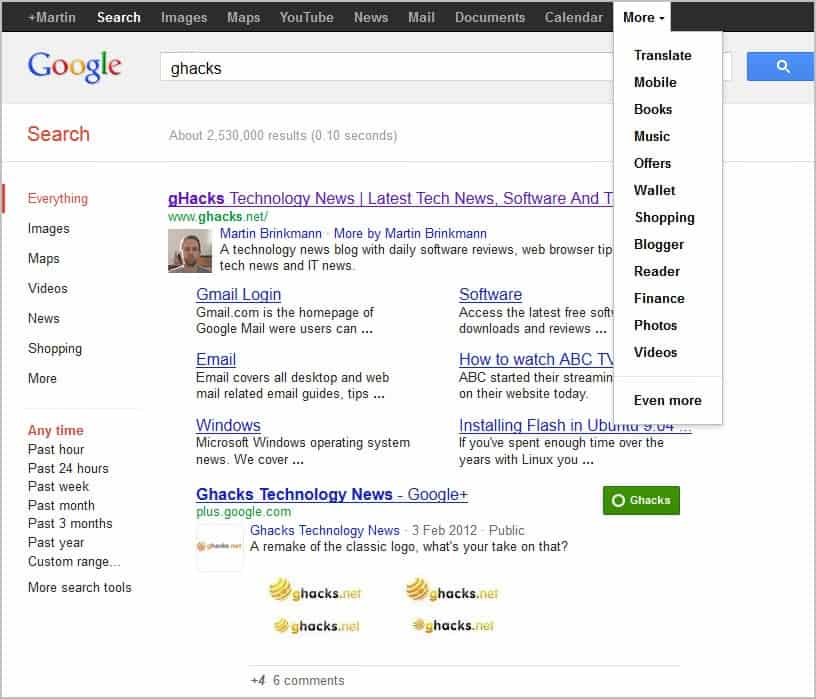
google black bar

The new bar displays Google’s most popular services directly again on the bar for quick access. The More link leads to additional services. Users of the gray bar design will notice that the black bar has been moved on top of the design. Everything else, with the exception of the Google logo menu has remained the same.

The Google Operating System blog has posted instructions on how to enable the new Google bar design.

  • Open google.com in your web browser of choice.
  • In Google Chrome, press Ctrl-Shift-J
  • In Mozilla Firefox press Ctrl-Shift-K
  • In Internet Explorer press F12 and select console
  • Paste the following code into the form

document.cookie="PREF=ID=381502750b6e9119:U=aaee74aefea7315a:FF=0:LD=en:CR=2:TM=1328391998:LM=1328392000:S=yPtlCgLbEnezu5b4; path=/; domain=.google.com";window.location.reload();

  • Press enter and close the console again.
  • Local users need to replace the domain in the information (google.com) with the country code domain, e.g. (google.de)

The page should refresh automatically, and you should see the new layout on the Google page. Please note that it will only be active for as long as the cookie remains on your system.

Users who want to return to the old Google homepage layout can repeat the steps, by loading the following code in the console.

document.cookie="PREF=; path=/; domain=.google.com";window.location.reload();

My personal opinion? Google should give users more choice when it comes to the services that are displayed on the homepage. I’m for instance not using Google News, so why should it be there that prominently on the page? Google furthermore needs to select a design and stick with it, instead of confusing users with different designs and layouts. Some users, depending on the browser they use to access Google, have reported that they are seeing different layouts on the same computer.

What’s your take on this, and what’s your favorite bar so far?


Thursday, February 2, 2012

MediaFire Download Links On Google Search Not Working Anymore

Mediafire was one of the file hosting sites that benefited from the Megaupload take down in January 2012. The site managed to increase its traffic significantly and it appeared as if it would be able to withstand the storm that reached other file hosting sites shortly thereafter. Other file hosting sites frantically started to protect their service from the same demise that had befallen Megaupload. Some like Filesonic blocked all of the site’s file sharing capabilities, while others blocked all traffic from the United States, switched to a country code domain to avoid falling under US jurisdiction or plain simply closed down completely.

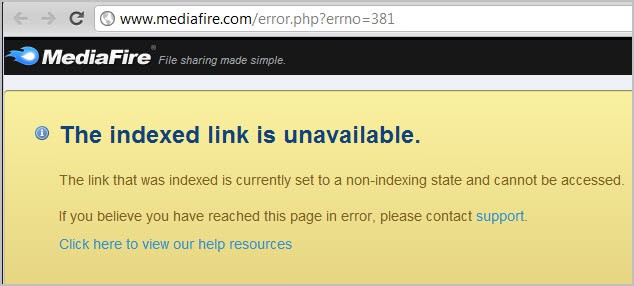
Today when you click on a file link in Google Search that is pointing to MediaFire, you are redirected to the error page http://www.mediafire.com/error.php?errno=381.

mediafire downloads not working

It reads:

The indexed link is unavailable.

The link that was indexed is currently set to a non-indexing state and cannot be accessed.

If you copy the link url and paste it directly in your browser’s address bar, you are taken to the download page from where you can download the file normally. It is also interesting to note that downloads are still working if you are using Bing Search instead of Google.

It is not clear at this point if Google Search is the only referrer that has been blocked by Mediafire, or if there are other sites that have been blocked as well by the file hosting service.

Another thing that is unclear is whether this has been an intentional move by the site, or if it is a technical issue that will be resolved at a later point in time. It does not make lots of sense from a legal point of view, unless law enforcement agencies are using Google exclusively for their research.

Users who find files that they cannot download should copy and paste the url into their browser’s address bar to download it. It is alternatively possible to install an extension like Refcontrol to modify the referrer for sites that are blocked by Mediafire.

Lets discuss the move in the comments.

Update: Download links are working again. It seems to have been a technical issue after all.


Tuesday, January 24, 2012

Google Don’t Be Evil Bookmarklet Released

Google has a distinct advantage that other companies on the web do not have. Google Search at the time of writing controls more than 50% of all search on the web, which can go up in some countries to more than 90%. Google uses this to their advantage by promoting their own services in search. And while nearly every other company would certainly do the same if they were in Google’s position, it is quickly turning the company’s image of being an impartial search provider upside down.

Depending on the terms you search for, you may end up with results from YouTube, Google News, Google+, Google Images or other products that Google has hard coded into the search results. That’s fine if those results are relevant to the search term. More often than not though, they are not.

Engineers from Facebook, Twitter and other social networking companies have now released a Don’t Be Evil bookmarklet and browser extension to make Google’s search results more impartial and relevant at the same time.

Once you have dragged the bookmarklet to your bookmark bar or bookmarks folder you can run it whenever you have performed a Google search.

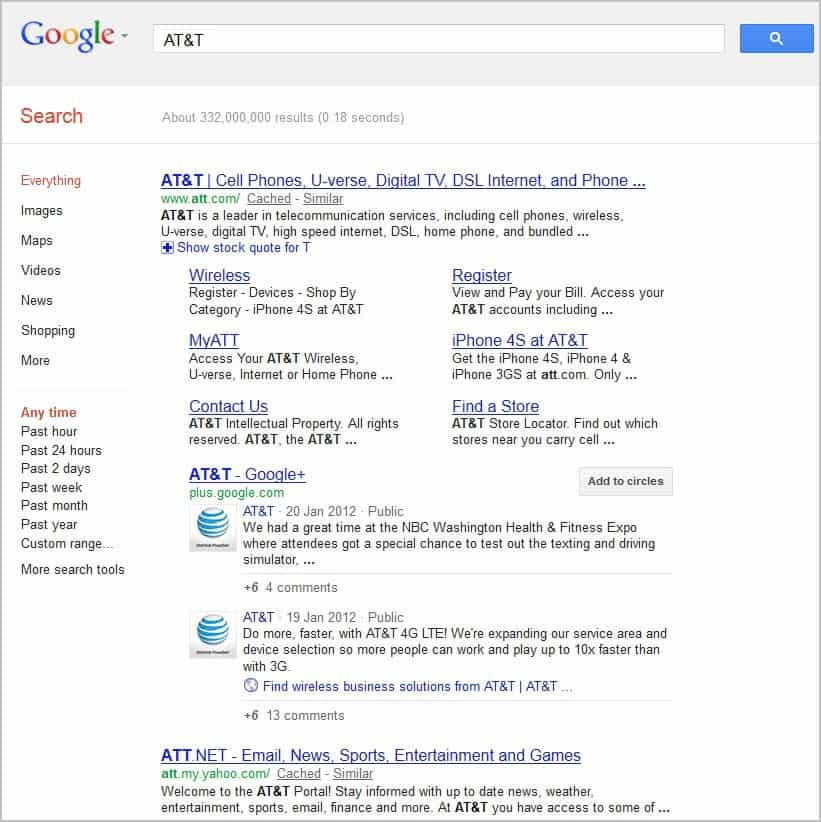
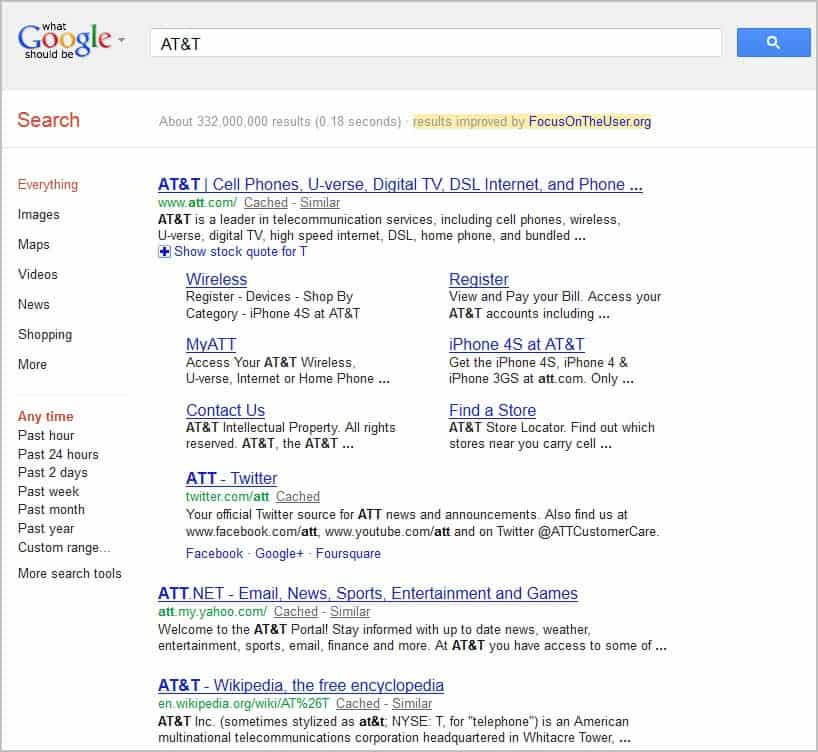
Below are two screenshots. The first is a copy of a standard search for AT&T on Google, the second how the page looks like once you have run the bookmarklet.

google search result

google dont be evil

The bookmarklet has replaced the Google+ listing with the more relevant Twitter account listing. We need to look at how relevancy is computed to make sure that it does not just favor other social networking sites over Google. According to the developers, their tool checks Google Search for the term to select the first social networking listing in the standard results as the most relevant term. Standard result means a page that Google has not hardcoded into the search results.

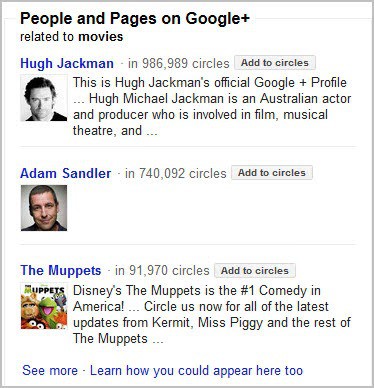
The bookmarklet will also analyze people and pages results on the right side with relevant results

people and pages

and the suggestions when you start typing a name into the search form.

suggestions

It is interesting to note that the bookmarklet enables the feature for the session, and not only for the current page that you are on. Results are automatically adjusted if you use Google Search functionality on the same page again.

Is this making the search results on Google more relevant? The answer should be yes if you look at a pool of users. When it comes down to the individual user, it depends solely on that user’s preference. Some users do not want to see social signals in the results at all, others may be using Google+ exclusively or a mixture of services. Users should not turn this into a Google vs Facebook vs Twitter vs Whatever fight. Instead, they should look at what they want their search results to be and voice that opinion loud and clear.

How they do that? By switching to another search engine for instance if they feel that Google Search has deteriorated in the past year. If users flock to other search engines, then Google may be willing to reanalyze their latest strategies and may return to impartial search results.

The developers have created a browser extension for Google Chrome that automates the process. You can download it only directly from the Focus on the user website.

Here is a video demonstration of the bookmarklet.

Keep in mind that while not officially released by Facebook or Twitter, it still has their stamp all over it. I suggest you read Giga Om’s comment on this.

What’s your take on this? Voice your opinion in the comments.


Friday, January 20, 2012

Too Many Ads Above The Fold Are Bad, Says Google

Advertisements are what keeps many of the sites going on the Internet, including the site you are currently reading. As a user, I do understand that too many ads, or ads in the wrong position, or ads that are highly distracting, reduce the user experience. While I rarely stumble upon sites anymore that have their pages plastered with ads so that it becomes difficulty to find the regular content, I have to say that I welcome the change that Google just announced.

The company basically stated that an algorithmic change was launched that analyzes the ad to content ratio above the fold. Sites that do not have much content above the fold can be affected by this change, according to Google. What does affected mean exactly? They are pushed down in the search results in favor of sites that have a better user experience.

Sites that display ads to a normal degree are not affected by the change.

I personally have two issues with the announcement.

Parameters

Google did not provide information about the parameters that they look at. What’s missing?

  • The definition of what the company considers to be an ad
  • What Google considers to be a normal ad ratio above the fold
  • The screen resolutions they use to calculate that ad to content ratio
  • If popup ads or interstitial ads are also considered by the change

This leaves webmasters again with the nagging feeling that they may be affected by the change, even though they are likely not.

Not everyone is equal

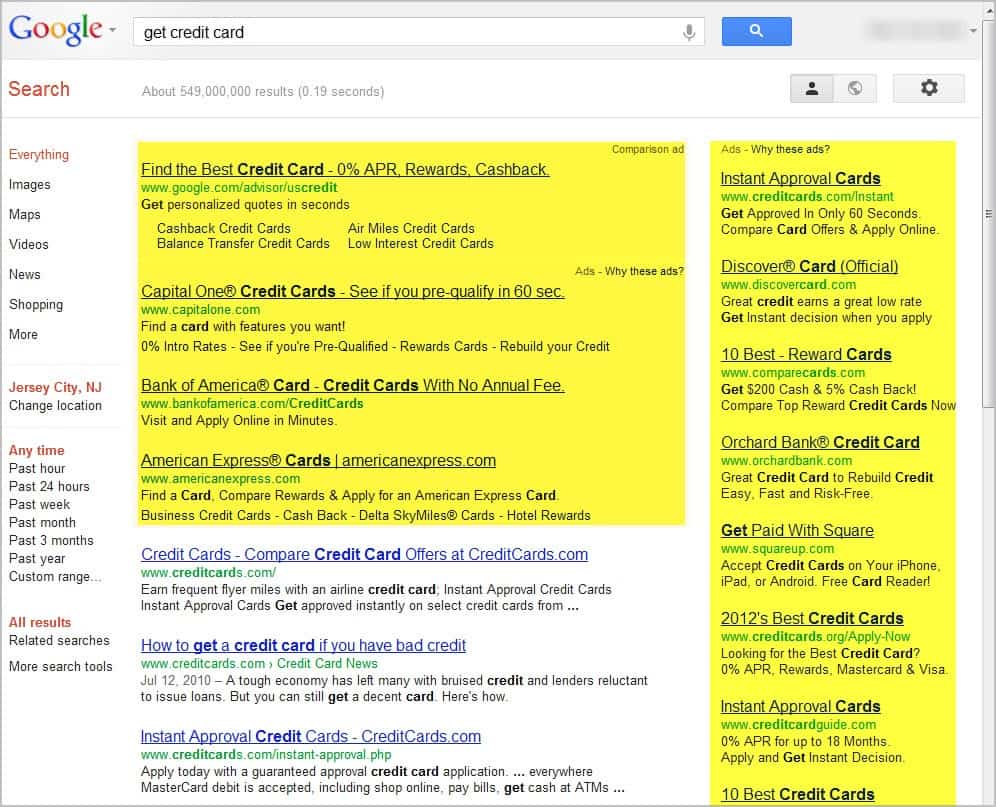
The second aspect weights more heavily in my eyes. Take a look at the following screenshot and let me know if you would consider this a bad ad to content ratio on the page.

google search ads

Please note that this screenshot shows a 1000 to 800 resolution, and that your experience may differ depending on a number of factors.

And now read Matt Cutts’ announcement again:

If you click on a website and the part of the website you see first either doesn’t have a lot of visible content above-the-fold or dedicates a large fraction of the site’s initial screen real estate to ads, that’s not a very good user experience

Is Matt saying that Google Search is not offering a good user experience? I think he does. Lets discuss in the comments.


Tuesday, January 17, 2012

NoCrap Removes Annoyances From Google Search

Google in recent years has started to make many modifications to Google Search, from auto suggestions over live previews to Google Instant. Not every user likes all or even any of those changes which makes those features highly annoying in the eyes of those users. I even know a few who switched to another search engine such as Bing because they did not like how Google changed their search engine.

The biggest issue for many is the fact that the majority of features cannot be disabled if you do not want to use them. It is either an all or nothing deal, unless you happen to run across programs that make the necessary modifications for you.

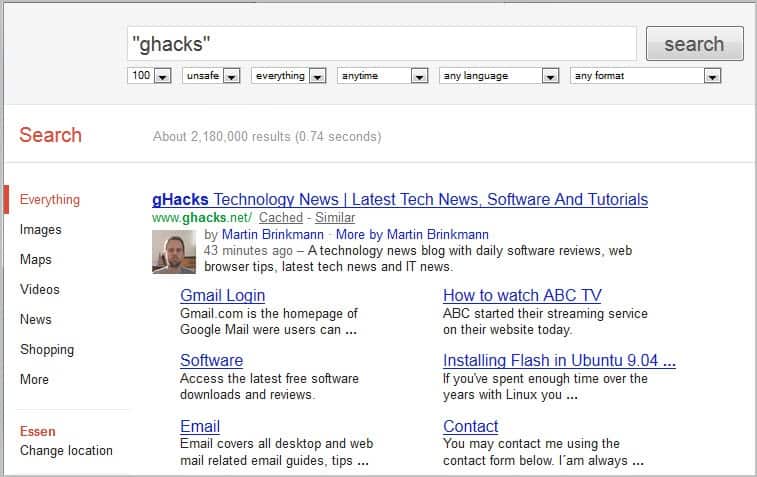
NoCrap Google Search Bar injects itself on Google Search pages. You will see two search forms on the Google homepage, and only the NoCrap search form on results pages.

nocrap google search

You will notice two things right from the start:

  • The Google header bar has been removed. A click on the x icon hides the custom search form so that the standard header is again displayed on the screen.
  • Menus to customize the search are displayed right beneath the search form. Here you can select the number of results per page, safe or unsafe search, whether you would like to only see specific result types (e.g. images or video), the time span, language and format.

You can configure default parameters in the userscript settings.

You may also notice that searches are always enclosed in double quotes automatically which ensures that those terms need to be on all result pages.

NoCrap Google Search on top of that does away with many of the annoyances that one encounters on Google Search:

  • Autocomplete disabled
  • Google Instant disabled
  • Live Preview disabled
  • Personalized web search disabled
  • Cache links show up again in the search results
  • Links can now be copied directly, Google link manipulations on copy or mouse over are removed.

The search parameters do still work even if you clear all Google cookies. Users who have used custom parameters in the past know that clearing the Google cookies will reset the preferences to their default values.

NoCrap Google Search Bar is a useful userscript for Google users who want more control over their search result pages.


Wednesday, January 11, 2012

Display Direct Website Links in Google Search

Sometimes I’m searching on Google to copy the search results link into another application. This is an extremely frustrating experience as links are manipulated by Google. When you copy a link in Google’s search results you’ll notice that the link target are displayed correctly when you hover the mouse cursor over the link, but when you copy the link to the clipboard, you will notice that Google has in fact changed that link. This leaves the option to open the site first to copy it from the browser’s address bar, or to use a tool or extension that removes the data that Google adds to links in the search results.

The link to Ghacks in Google Search for instance should be http://www.ghacks.net/ and not http://www.google.com/url?sa=t&rct=j&q=ghacks&source=web&cd=1&ved=0CBwQFjAA&url=http%3A%2F%2Fwww.ghacks.net%2F&ei=MooNT_vzE5GnsgaegJXbBA&usg=AFQjCNEbVP7B0UnFl1Q9J0q_Vbl9uYoYOw which it is when you copy the link to the clipboard.

Here are two options to display direct website links in Google Search:

Google Search link fix

The Firefox add-on modifies all link targets in the Google search results and all other Google properties where this behavior can be observed, so that they point to the direct web address.

Just install the extension in the Firefox web browser, a restart is not required. If you are on Google Search currently you need to reload the page or run a new search before the extension starts replacing the links.

Firefox users can download the extension from Mozilla’s official Add-ons repository for the browser.

google search links

Don’t track me Google

This is a userscript that does the exact same thing the Firefox extension does. It is compatible with Firefox and Google Chrome, and maybe other web browsers as well. The userscript in addition hides the referral link so that sites you visit do not know where you came from.

Chrome users can install the userscript right away, while Firefox users need to install the Greasemonkey or Scriptish add-on first before they can do the same thing.

The userscript can be downloaded and installed over at the official Userscripts website.


© Martin Brinkmann for gHacks Technology News | Latest Tech News, Software And Tutorials, 2012. | Permalink |
Add to del.icio.us, digg, facebook, reddit, twitter
Post tags: ,


How to Turn Off Google Search Plus Your World

While testing a new userscript for Google I noticed that the company once again had changed search on their site. I was greeted with a “Welcome to Search plus Your World” phrase at the top which takes search results personalization a step further. When you are logged in your Google account you will get personal results in the search results that may include photos from you and your friends, Google+ content if you are a Google+ user, Google+ profiles in search and related people and pages. Take a look at how the results look for the term Facebook.

google search plus your world

You get information about the number of personal results integrated in the search results on top. The right displays Google+ profiles from Facebook employees, and below the Facebook site listing is the first personalized entry that was moved up there.

If you look closer you will realize that almost everything that has been added is related to Google+. The personalized results are taken from Google+, the people and pages listing is taken from that site as well, as are the personal results as they are based on what your Google+ friends have “liked” in the past.

You may also notice that search suggestions will now display Google+ names directly in the window.

search suggestions

All personalized results are highlighted with a blue icon in front of the page title. You can turn off Search plus Your World with a click on the Hide personal results button. There are other options that you can make use of if you thing that personalized search has gone to far.

Log out before running searches on Google or use another search engine like Bing, Duck Duck Go or Ixquick.

Personal results can also be turned off in the Search settings. Click on the options button and select Search Settings there.

search settings

Locate Personal results on the new screen and switch from “use personal results” to “do not use personal results”. Click on the save button afterwards.

google search personal results

Google is starting to promote their Google+ service heavily with the integration of results from that social networking service in the results.

Why I do not like it? I think that the majority of information added by personalized results are not telling me anything that I do not already know. And pages favored by friends are not necessarily better than other pages. Say you search for movies to watch on Google, and one of the first results is a personalized result where several of your female friends have voted for the movie Twilight. Does that mean that you will like the movie as well?

You now have to think about the people who voted for the result to make a decision whether this search result is helping you out or not.

Another issue that I have with person.lized search is that I always feel that the search engine is holding back on me. Instead of displaying the “real” results, it displays crippled results on the first page.

I personally have disabled Google Search plus your World right away. What about you? On a related note, all Google Search pages are now making use of HTTPS by default. You can still switch to HTTP search manually though


© Martin Brinkmann for gHacks Technology News | Latest Tech News, Software And Tutorials, 2012. | Permalink |
Add to del.icio.us, digg, facebook, reddit, twitter
Post tags: , ,