Pages

Showing posts with label charts. Show all posts

Friday, December 16, 2011

Create Charts Online With Chart Creator

Sometimes you may need to create a quick chart without access to a spreadsheet program such as Microsoft Excel or OpenOffice Calc. You could say that installing the spreadsheet program would resolve the issue. But that’s only possible if you are working on a computer where you have sufficient rights to do that. And that’s for instance not the case if you are using a public computer or a mobile phone. You may also be in a hurry and do not have time to download hundreds of Megabytes.

The next best thing is a web service that allows the creation of charts. You have the option to use a service like Google Docs or Microsoft Office Online for that, or something that is not as complicated to use.

Chart Creator is a free lightweight tool to create charts online. The program supports a total of 12 different chart types, from line and area charts to scatter, pie, map and trend charts.

chart creator

A click on Editor opens the configuration menu where you can configure how the chart should look like. A click on the customize tab offers to make additional modifications to the chart. This includes the layout of the legend, the chart title, values for the axis and additional features like log scale, reverse or stack.

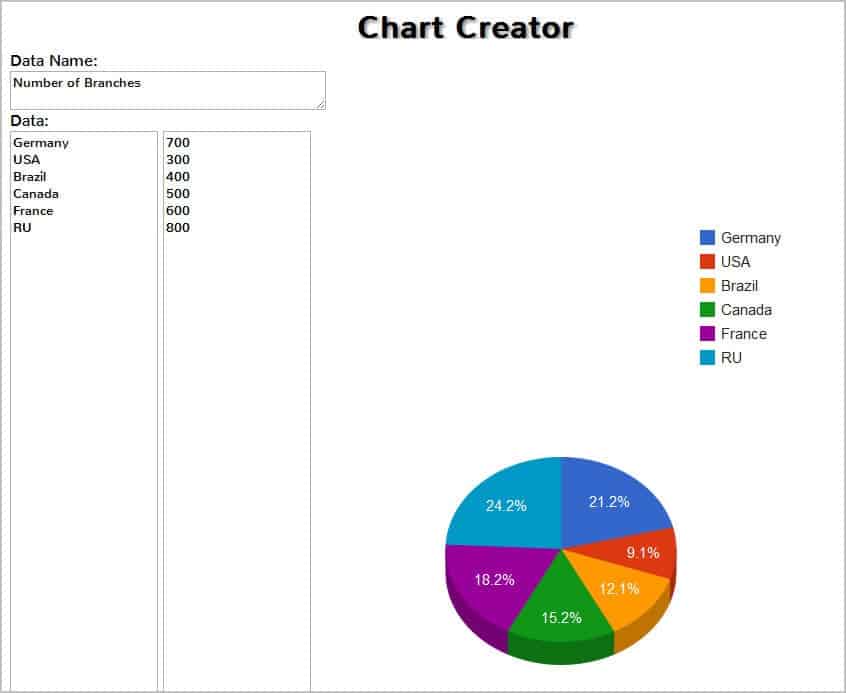
Once you are done with the initial configuration you can start entering data that you want displayed on the chart. The program limits you to charts with two data points, for instance countries and their population.
create charts online

A click on draw draws the chart on the screen. You can then use a screen capturing software to save the chart to your local system or use the print button to print it on a connected printer.

Chart Creator offers an easy option to create simple charts online. Users who need more functionality, for instance the ability to import data into a spreadsheet need to look at services such as Google Docs to do so as that is not possible with this chart creation service. (via)


© Martin Brinkmann for gHacks Technology News | Latest Tech News, Software And Tutorials, 2011. | Permalink |
Add to del.icio.us, digg, facebook, reddit, twitter
Post tags: , ,


Friday, November 11, 2011

Sort, Filter, Manage Tables In Firefox With TableTools2

Having to work with tables in a web browser is not the most pleasant experience, unless you are on a site like Google Docs that offers more than just the ability to copy table cell data into other programs. Tables are displayed using the HTML table tag or by formatting elements with the help of CSS. Regardless of the way they are presented, there is not much that you can do with tables on a website directly.

Most users who need table data will probably copy all of it into a spreadsheet to work with it in there. You can either try and copy the data directly or use specialized browser extensions like Table 2 Clipboard for the Firefox web browser for that.

If you want to do more than that, you need a specialized browser extension like TableTools2 for Firefox, which adds many different table management options to the browser.

firefox table tools

It allows users to copy, sort, search, filter, rearrange, combine and compare HTML tables and create charts using their data.

When it comes to sorting, it supports not only single-column sorts but also multi-column sorts. It comes with automatic and pre-configured sorting options as well as user defined sorting options.

Table data can be transformed into various charts with just a few clicks. The extension supports scatter, pie, line or frequency charts among others that are generated and displayed directly in the browser.

Users who work with large tables in the browser will like the searching options. TableTools2 supports regular expressions for advanced searches, custom filters to find results in a specified range and standard searches that match the entered values.

Take a look at the following video, it demonstrates some of the extension’s capabilities.

One of the interesting features of TableTools2 is the ability to display drop down filters for each table column. This way you can select specific table values that you want displayed. The extension hides all other table rows afterwards and displays additional information about the specific row and its columns on the same page.

The extension offers additional features that come in handy. From hiding columns of a table to restricting range of data rows to a full set of keyboard shortcuts for even faster access to the extension’s feature set.

You can install the table management add-on for Firefox over at Mozilla. The page offers detailed information about the add-on. Additional information and table examples are available on the developer’s own homepage.


© Martin Brinkmann for gHacks Technology News | Latest Tech News, Software And Tutorials, 2011. | Permalink |
Add to del.icio.us, digg, facebook, reddit, twitter
Post tags: , , ,