Pages

Showing posts with label email address. Show all posts

Monday, January 16, 2012

How To Add A New Email To Your Hotmail Account

When I signed up for my Hotmail email account I used a custom email address. As a consequence, I never received a “real” Hotmail email address. While I was able to create Hotmail aliases, I could not really use all the features associated with an account on the site as I used the third party mail address only to verify the account.

Yesterday I started to look into the issue more closely to figure out if there was an option to create a new Hotmail email address from within an existing account. It took some digging through Hotmail’s page layout to find the page where new email addresses can be added.

Open the Hotmail main page and sign into your Hotmail account if you are not already signed in. You should now see the inbox and the frontpage of the account.

Locate the Options link in the top right corner and select the more options link from the context menu. This opens the main account control panel where you can configure the majority of account related settings. Click on account details under managing your account. Hotmail may ask you to enter your account password again before the next page is displayed.

Click on the your email addresses link under other options. This opens a page listing all linked email addresses and aliases. A click on add an email address allows you to create a new Hotmail or Windows Live account, or to link a third party account to the Hotmail account.
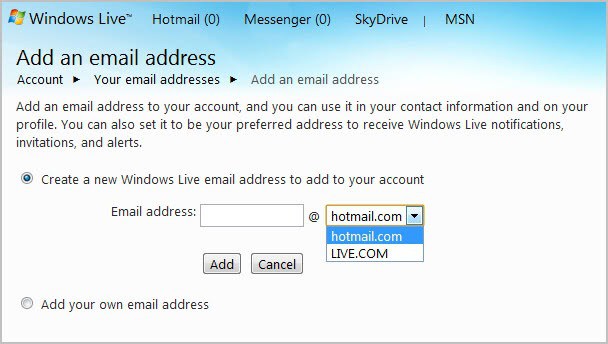
add hotmail email address

Just enter a new account name and select whether you would like it to be a hotmail.com or live.com account.

The address is automatically added to the account and you can start using the account right away.

You can alternatively open the following link to create new Hotmail email addresses right away. This opens the mail overview page right away where you can add or remove email accounts.


Monday, January 9, 2012

How To Verify If An E-mail Address Exists

Sometimes you may want to make sure that an e-mail address exists before you start sending out messages to that address. While you could simply send a test message to the address and see if it bounces off the mail server, you’d may want to try a sneakier solution so that the recipient does not know about it. It should be clear that the recipient will receive the test message if the e-mail address exist.

Before we look at a tool that allows you to verify e-mail addresses, we should for a moment look at reasons for verifying addresses. A common reason is a mailing list that you want to clean up, another if you can only remember part of the e-mail address and not all of it.

EToolz is a free portable program for the Windows operating system that can verify if e-mail addresses exist. While it does not work for all messages, it works fine for many including Google E-Mail addresses (Gmail that is), and not for others like Microsoft’s Hotmail.

Switch to the Mail-Check tab of the program once you have started it. Here you need to key in the e-mail address you want to test, and optionally sender and server information as well as a timeout for the connection.

verify email address

Click the start button once you have entered and modified all parameters to your liking. The program will then try to establish a connection with the selected e-mail address which may or may not work. Gmail will for instance let you know if sender and recipient are accepted. Even better, you will sometimes get information why it is not accepted, for instance if the email account is over quota like in the example on the screenshot above.

Not being able to test multiple e-mail addresses at once is one of the downsides of the program. You can download it from the developer website. Please note that the initial interface language is set to German. Click on Extras > Sprache / Language to change it to English or another of the supported languages.


© Martin Brinkmann for gHacks Technology News | Latest Tech News, Software And Tutorials, 2012. | Permalink |
Add to del.icio.us, digg, facebook, reddit, twitter
Post tags: , ,