Pages

Showing posts with label facebook chat. Show all posts

Friday, February 17, 2012

Hide Offline Contacts From Facebook Chat

Facebook fairly recently made a change to Facebook Chat that is irritating many users of the site. The chat interface, displayed in the lower right corner of the screen is now not only listing contacts who are online, but also those who are not. To make matters worse, online and offline friends are mixed in the listing. The only way to identify online contacts is the green icon next to the contact’s name.

It is not really clear why offline contacts are displayed next to online contacts there. While it is possible to send messages to offline chat partners, it is probably not something that a lot of Facebook users would want to do, as they could use the site’s messaging options instead for that.
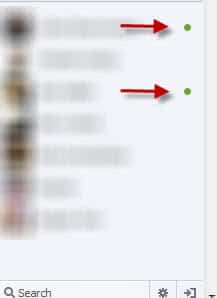
facebook chat contacts

Messages send to offline chat partners are displayed to them the next time they come online. Some Facebook users may prefer to hide offline chat partners from Facebook Chat to increase the visibility of the feature.

The following extensions and scripts let you hide all offline contacts from Facebook’s Chat window.

Firefox add-on: Tidy Facebook Chat

This add-on for the Firefox browser hides all Facebook contacts who are currently offline from the friend’s listing in the sidebar.
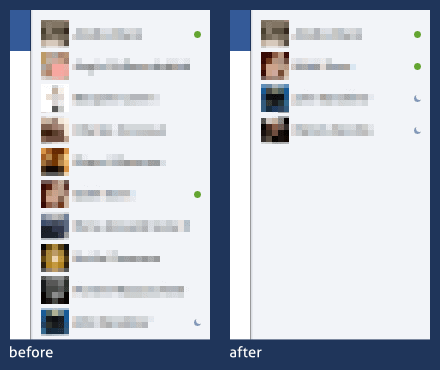
facebook chat addon

Google Chrome: Facebook Chat Fix

This add-on shows only online friends on Facebook in the chat bar. It furthermore hides the mini news-feed that you see on the site as well.
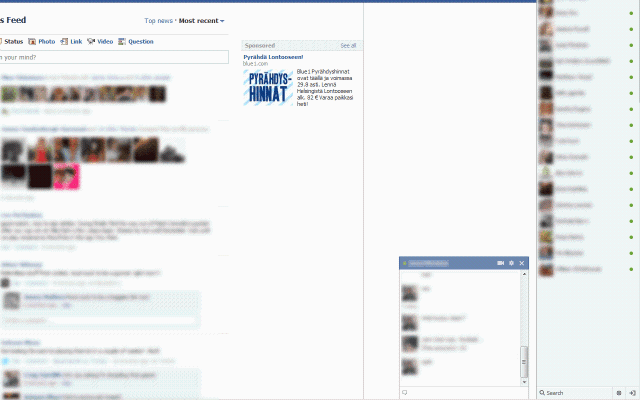
facebook chat

Userscript (Firefox, Google Chrome, Opera): Facebook Old Chat Sidebar

This one is the most sophisticated option of them all. It returns Facebook to the old chat interface. It hides offline friends, so that only online and idle friends are shown, orders friends by first name, displays the total number of online friends and groups friends by status.

That’s not all though. It automatically adjusts the size of the chat bar and makes the chat bar stick to top.

The userscript is probably the best choice as it offers more customizations and options than the browser extensions.


Tuesday, January 24, 2012

How To Move The Facebook Chat Window

We have covered quite a few Facebook modifications and tips in the past that let you get more out of Facebook Chat. A userscript for instance to add easier access to emoticons in chat or how to hide from friends on Facebook chat.

Pretty Facebook Chat is a Google Chrome extension that lets you customize your Facebook Chat experience further. You will notice the red dot that the extension adds next to Facebook’s Chat menu on the lower right corner of the page. This is used to turn the extension on or off. Once you start a chat with someone on Facebook, you will notice the modified user interface right away.

facebook chat

The first thing that becomes obvious right away is that the chat window is no longer attached to the page. You can drag and drop the chat around on the page to move it to a position that you find more comfortable. You can however only move it around in the Chrome window, and not to a location outside of it.

You may also notice that the chat window is larger than the standard window on Facebook, and that its author has added interface customizations to it, like shadows or little animations.

Another thing that you will notice is the emoticons button that has been added to the window. You can click on it to display a large list of emoticons and images that you can add to the chat with a click. This even includes a list of miniature profile pictures that can be added to individual messages.

Here is a video that demonstrates the capabilities of the extension.

Facebook users who use the Chrome browser to connect to the site may want to take a look at the extension to spice up their chat experience on the site. The extension is available for direct installation at the official Chrome Web Store.


Saturday, December 24, 2011

Facebook Messenger, Chat and Notification Client For Windows

First information about Facebook’s plan to release their own instant messaging program appeared on a Facebook support page about a month ago. Facebook Messenger for Windows, according to that page, offers chat, messaging and notification functionality. The program was initially only available to a group of alpha testers.

A direct link to Facebook’s Messenger has now been posted on the Windows Club website. Windows users who install the client on their system need to connect the program with a Facebook account before they can use its functionality.

A click on log in opens the Facebook website in the default browser. Here it is then necessary to log in, the client will automatically recognize the log in. Facebook notes that users need to enable the “keep me logged in” feature if they want to use the messenger after closing the browser.

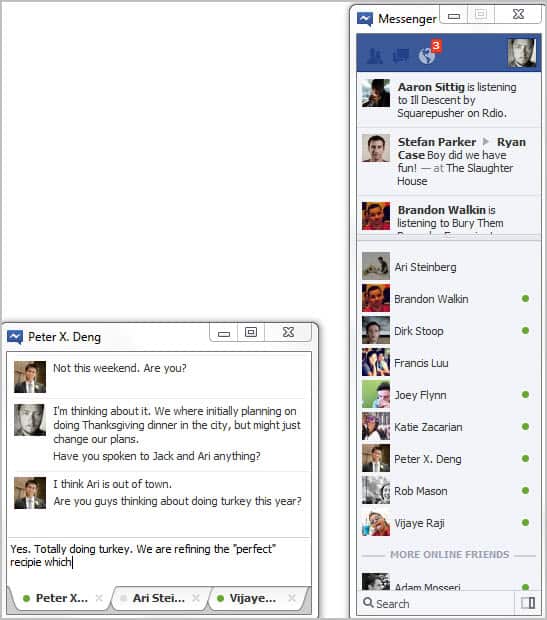
Facebook Messenger looks like a bare bones version of Firefox. Users see three icons at top which indicate friend requests, messages and notifications. Facebook Ticker information and contacts are displayed below.

facebook messenger windows

Chats open in a new window that is using a tabbed interface to separate different chats. The program is bare bones otherwise at the moment. The only other options provided are displayed in the system tray icon’s right-click context menu. Here it is possible to dock the Facebook Messenger window to the right of the screen, and to turn off sound notifications.

Facebook Messenger did not work on a 64-bit version of Windows 7. The client worked fine on the other hand on a 32-bit version of Windows. It is not clear if the software is only compatible with 32-bit versions of Windows, or if a setting on the 64-bit test system caused the incompatibility. The player opened fine, but log in was not recognized on the 64-bit system.

Facebook users who use Windows as their operating system can download the messenger from this link.


© Martin Brinkmann for gHacks Technology News | Latest Tech News, Software And Tutorials, 2011. | Permalink |
Add to del.icio.us, digg, facebook, reddit, twitter
Post tags: , ,