Pages

Showing posts with label flash update. Show all posts

Thursday, February 16, 2012

Adobe Releases A New Security Update For Flash Player

Adobe has released a new security update for Flash Player that fixes several critical security vulnerabilities in the product. The vulnerabilities affect all platforms Flash Player is available on. Affected software versions are Adobe Flash Player 11.1.102.55 and earlier for Windows, Macintosh, Linux and Solaris operating systems, as well as Adobe Flash Player 11.1.112.61 and earlier versions for Android 4.x, and Adobe Flash Player 11.1.111.5 and earlier versions for Android 3.x and 2.x.

Adobe users can test the version of their Flash Player installation at the about page on the Adobe website. There they see the installed version and the latest version available. Flash Player needs updating if the installed version is lower than the most recent version.
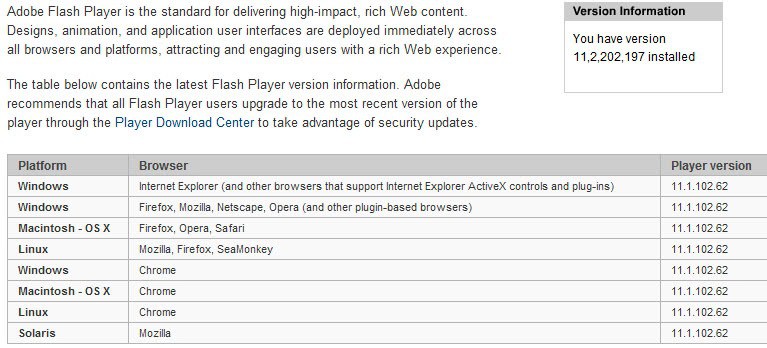
flash player version check

Android users can verify the version of Flash Player by going to Settings > Applications > Manage Applications > Adobe Flash Player x.x.

Adobe recommends to update Flash Player to the latest version as soon as possible to protect the system from attacks targeting the vulnerabilities.

The patch fixes vulnerabilities that could allow an attacker to cause a crash on the system to take control of it, and a single cross-site scripting vulnerability that could allow an attacker to take actions on ” a user’s behalf on any website or webmail provider, if the user visits a malicious website”. Adobe notes that the cross-site scripting vulnerability is actively exploited by attackers who try to trick users into clicking on a malicious link in email messages.

Google Chrome users have received the update automatically. A download at the official Flash Player download center is recommended for all other desktop operating systems. Android users find the latest Flash Player version on Android Market.

Flash Player users who cannot update to Flash Player 11 can download a patch for Flash Player 10.x from this Knowledge Base article.


Thursday, November 10, 2011

Adobe Releases Another Flash Security Update

A security update for Adobe Flash Player has been released today that fixes several critical security vulnerabilities that Adobe identified in the software. Affected by vulnerabilities are all desktop versions of Adobe Flash Player 11.0.1.152 and earlier for Windows, Apple Macintosh, Linux and Solaris as well as Adobe Flash Player 11.0.1.153 or earlier versions for the Android operating system. Adobe Air 3.0 and earlier are also affected by the security vulnerabilities.

Flash users are asked to visit the About Flash page to check the Flash version installed on their computer.

adobe flash security update

It is alternatively possible to right-click on Flash content to see the Flash Player version in the context menu.

adobe flash version

Adobe recommends to update Flash Player to the newest version 11.1.102.55 by downloading it from Adobe’s Flash Player Download Center. Is it alternatively possible to download Flash offline installers from the linked guide. Android users can update Flash by downloading the latest version from Android Market on their Android device. Google Chrome users do not need to run the update manually as it is automatically installed by the browser.

The security patch fixes several memory corruption, buffer overflow and stack overflow vulnerabilities in Adobe Flash Player that attackers could exploit to cause a crash on the system running Adobe Flash technologies. Code execution could then give the attacker control of the affected system.

Interested users can read the security bulletin over at the Adobe website. It offers additional information about each vulnerability found and download links to various technologies affected by the vulnerabilities.

The next big Flash release (that is Adobe Flash 11.2) will introduce automatic silent updates on Windows. This means that it will become more comfortable for Windows users to keep their installed version of Flash up to date on their system. See Flash Player 11.2 Introduces Automatic Updates for details.


© Martin Brinkmann for gHacks Technology News | Latest Tech News, Software And Tutorials, 2011. | Permalink |
Add to del.icio.us, digg, facebook, reddit, twitter
Post tags: , , ,


Tuesday, November 1, 2011

Flash Player 11.2 Introduces Automatic Updates

If you are not running Google Chrome as your one and only browser on your PC system, you are probably tired of having to update Adobe’s Flash Player regularly to protect the system from security vulnerabilities. This could change soon with the release of Adobe’s Flash Player 11.2. The new version of Flash, currently available as a beta download at Adobe Labs, introduces a technology called Flash Player Background Updater.

The auto-updater is only provided for Windows systems in Flash 11.2. Windows users who install Flash Player 11.2 or later will see the following prompt after the successful installation.

adobe flash player automatic updates

It reads:

Security updates and enhancements are periodically released for Adobe Flash Player that can be downloaded and installed automatically.

Choose your update method:

  • Install updates automatically when possible (recommended)
  • Notify me when updates are available
  • Never check for updates (not recommended)

The first option checks for and installs Flash Player versions automatically on the operating system. Depending on the Flash version installed, this may include one (Internet Explorer version or other browser version) or even both versions if both are installed on the system.

The second option will perform the same checks for new versions. Instead of installing new versions automatically it will inform the user instead.

Flash Player will check for updates once per hour if the first or second option are selected. Adobe notes that users need to restart their web browser after an update has been installed to use the new version of Flash Player in the web browser.

The latest version of Adobe Flash Player 11.2 is available on the Adobe Labs download page. The installer is provided for all 32-bit and 64-bit operating systems that support Adobe Flash. The very same page offer downloads for the Flash Player uninstaller for 32-bit and 64-bit systems to uninstall the test version from the system again.

The update checks for new Flash versions are added as a Windows task so that no update program is running all the time on the computer system. It is likely that this new security feature will decrease the number of successful Flash player based attacks on Windows significantly. (via)


© Martin Brinkmann for gHacks Technology News | Latest Tech News, Software And Tutorials, 2011. | Permalink |
Add to del.icio.us, digg, facebook, reddit, twitter
Post tags: , , , , ,