Pages

Showing posts with label Adobe. Show all posts

Thursday, February 16, 2012

Adobe Releases A New Security Update For Flash Player

Adobe has released a new security update for Flash Player that fixes several critical security vulnerabilities in the product. The vulnerabilities affect all platforms Flash Player is available on. Affected software versions are Adobe Flash Player 11.1.102.55 and earlier for Windows, Macintosh, Linux and Solaris operating systems, as well as Adobe Flash Player 11.1.112.61 and earlier versions for Android 4.x, and Adobe Flash Player 11.1.111.5 and earlier versions for Android 3.x and 2.x.

Adobe users can test the version of their Flash Player installation at the about page on the Adobe website. There they see the installed version and the latest version available. Flash Player needs updating if the installed version is lower than the most recent version.
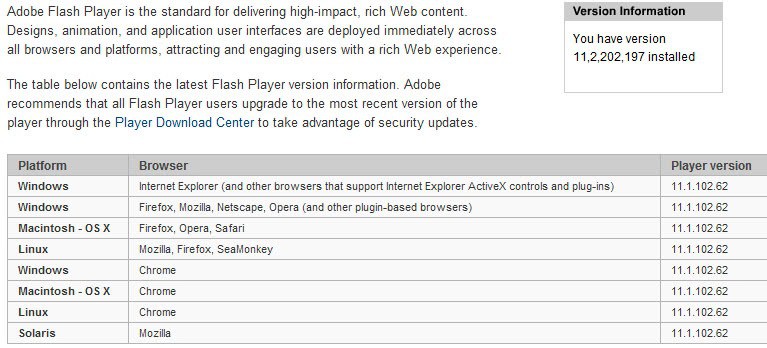
flash player version check

Android users can verify the version of Flash Player by going to Settings > Applications > Manage Applications > Adobe Flash Player x.x.

Adobe recommends to update Flash Player to the latest version as soon as possible to protect the system from attacks targeting the vulnerabilities.

The patch fixes vulnerabilities that could allow an attacker to cause a crash on the system to take control of it, and a single cross-site scripting vulnerability that could allow an attacker to take actions on ” a user’s behalf on any website or webmail provider, if the user visits a malicious website”. Adobe notes that the cross-site scripting vulnerability is actively exploited by attackers who try to trick users into clicking on a malicious link in email messages.

Google Chrome users have received the update automatically. A download at the official Flash Player download center is recommended for all other desktop operating systems. Android users find the latest Flash Player version on Android Market.

Flash Player users who cannot update to Flash Player 11 can download a patch for Flash Player 10.x from this Knowledge Base article.


Tuesday, February 7, 2012

Latest Flash Player Preview Adds Protected Mode Features For Firefox

Popular web browser plugins like Flash Player or Java are a prime target of malware and hackers. The core reasons are simple: Lack of centralized updating and little to no protection of the underlying system if the plugin has been compromised.

Changes have been introduced, but only in select browsers at this point of time. Google Chrome for instance uses sandboxing technology and automatic updates to keep users secure. The global updater that other web browsers use on the other hand is not nearly as thorough when it comes to downloading and applying updates as soon as they get released.

Adobe today has released a new Flash preview version for the Windows operating system that contains a new feature for the Firefox web browser.

Flash Player Protected Mode aims to limit the impact of Flash based attacks in Firefox on Windows systems. The new Flash Player feature is compatible with Firefox 4.0+ on Windows Vista or higher. Only a 32-bit version of the Flash Player release is available for download.

The security mode is automatically enabled when users view Flash Player files in the Firefox web browser. Flash contents are executed in a restricted environment that prevents attacks from reaching the operating system or other applications. It is basically a sandbox comparable with Google Chrome’s sandboxing technology, Protected Mode in Adobe Reader, and Protected View in Office 2010.

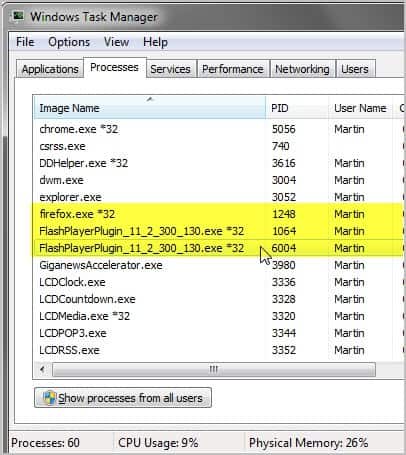
Firefox users running the new version will notice that two processes are started whenever Flash contents are accessed in the web browser with Protected Mode enabled.

flash player incubator

Adobe notes that these are the “broker and sandbox” processes which only run if Protected Mode is enabled. These are child processes of the plugin-container.exe process if enabled in the browser. Plugin-Container adds crash protection to the browser.

The Flash Player Protected Mode version for the Firefox browser has known issues. On 64-bit Windows systems for instance, a right-click on Flash contents causes Firefox to hang. Here is the list of known issues.

  • Flash Access support is not enabled in this build.
  • Secure Sockets are not working in this build. (3101130)
    Open and Save dialogs can hang in Windowless Mode (3096944)
  • Camera streams fail to play back when encoded with the H.264/AVC codecs (3096918)
  • On 64-bit Windows, Right-Clicking Flash Content cases Firefox to hang (3096953)
  • Custom context menus and clipboard copy does not work (3096977)
  • Local Security Dialogs are not displayed (3096714)
    When printing to “Microsoft XPS Document Writer”, the “Save File As” dialog is always minimized (3096958)
    Some Stage3D content may cause Adobe Flash Player to exit silently (#3049089)
  • Closing a SecureSocket connection may block Adobe Flash Player execution and result in timeout (#3045631)
  • Camera fails to play back when camera stream is being encoded with H264/AVC codec (#3049298)
  • IME may not be active in Windows Vista at times between browser sessions (#3055127)
  • In SandBox Stand-Alone Player, some menu items in the Microsoft IME language bar do not respond to mouse clicks (2947549)
  • Some Windows function keys such as F5 may prevent the Japanese IME candidate box to pop up (#3055096

Adventurous Firefox users find the Flash Player Incubator preview release over at Adobe Labs.

A final release version of the new Flash plugin version moves the Firefox browser security wise closer to Google Chrome.


Wednesday, January 25, 2012

Adobe Shockwave Player Now Installs Norton Security Scan

Bundling third party applications with your own software is not a new thing on the Internet. It is for instance quite common that you see the Ask Toolbar, Babylon Toolbar, or any other toolbar added to software installations. Users who do not pay attention to the installation are then not only installing the software they want on their system, but also software they do not want. To make matters worse, it usually is not that easy to get rid of the latter.

The popular download portal Download.com for instance has also started to bundle adware with the majority of downloads they provide site users with.

Today when I was downloading the latest Adobe Shockwave Player from Adobe’s website I noticed that both the slim online installer and full installer were now offering to install a third party application as well.

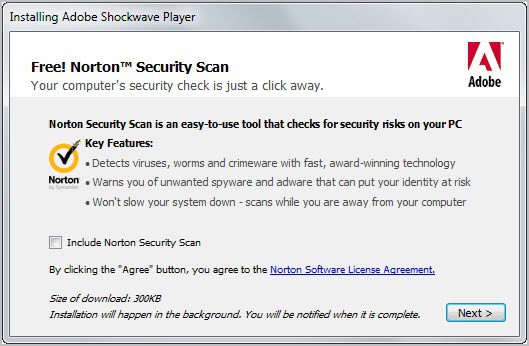
Near the end of the installation you are taken to a screen that will install Norton Security Scan on the system if you do not opt-out of it.

norton security scan

Norton Security Scan is a free program that checks computers for potential threats. It will download the latest definition updates to the system when an online connection is available. The program detects but does not resolve the issues though. It in fact very similar to scareware in this regard, which alerts the user of serious problems on the PC to sell a product.

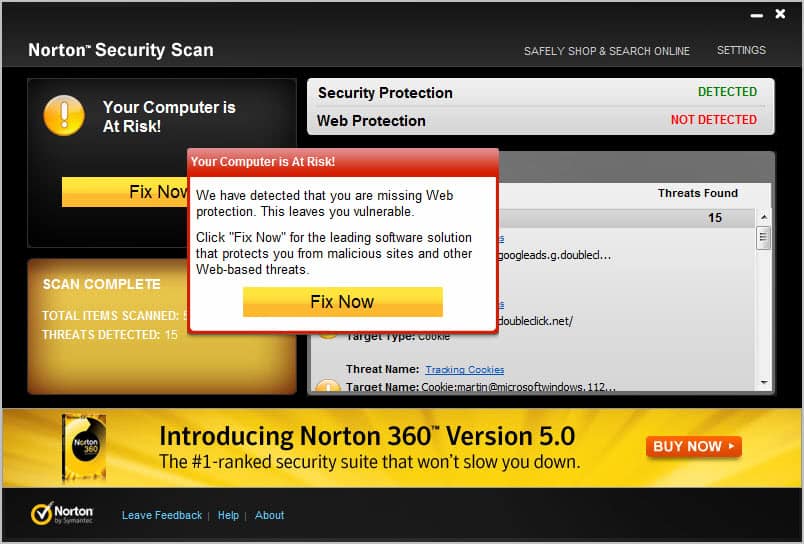
You can only scan the system after launch. Initiating a scan will first check for updates. You will also be notified if security and web protection is installed on the system. Only tracking cookies were detected on the system, which did not keep the program from displaying a big Fix Now button on the left side of the screen. When you press it you are taken directly to a web page where you can purchase one of Norton’s security programs.

your computer is at risk

Removal of Norton Security Scan is straightforward though. Just click on Start Menu > Control Panel > Uninstall a Program and select it for uninstallation. You need to restart the PC to complete the installation.

Looking for free alternatives that you can make use of right away? Try AVG Anti-Virus Free or Avira Free Antivirus, but keep in mind that they too may be bundling their programs with toolbars.


Thursday, November 10, 2011

Adobe Releases Another Flash Security Update

A security update for Adobe Flash Player has been released today that fixes several critical security vulnerabilities that Adobe identified in the software. Affected by vulnerabilities are all desktop versions of Adobe Flash Player 11.0.1.152 and earlier for Windows, Apple Macintosh, Linux and Solaris as well as Adobe Flash Player 11.0.1.153 or earlier versions for the Android operating system. Adobe Air 3.0 and earlier are also affected by the security vulnerabilities.

Flash users are asked to visit the About Flash page to check the Flash version installed on their computer.

adobe flash security update

It is alternatively possible to right-click on Flash content to see the Flash Player version in the context menu.

adobe flash version

Adobe recommends to update Flash Player to the newest version 11.1.102.55 by downloading it from Adobe’s Flash Player Download Center. Is it alternatively possible to download Flash offline installers from the linked guide. Android users can update Flash by downloading the latest version from Android Market on their Android device. Google Chrome users do not need to run the update manually as it is automatically installed by the browser.

The security patch fixes several memory corruption, buffer overflow and stack overflow vulnerabilities in Adobe Flash Player that attackers could exploit to cause a crash on the system running Adobe Flash technologies. Code execution could then give the attacker control of the affected system.

Interested users can read the security bulletin over at the Adobe website. It offers additional information about each vulnerability found and download links to various technologies affected by the vulnerabilities.

The next big Flash release (that is Adobe Flash 11.2) will introduce automatic silent updates on Windows. This means that it will become more comfortable for Windows users to keep their installed version of Flash up to date on their system. See Flash Player 11.2 Introduces Automatic Updates for details.


© Martin Brinkmann for gHacks Technology News | Latest Tech News, Software And Tutorials, 2011. | Permalink |
Add to del.icio.us, digg, facebook, reddit, twitter
Post tags: , , ,


Wednesday, November 9, 2011

Adobe Discontinue Flash for Mobile Devices

The world has been wondering what the next move would be in the stand-off between HTML5 and Adobe’s Flash Player.  Apple has always resisted Flash on the iPhone and iPad demonstrating that it runs slowly on the Mac and citing security concerns, many of which are valid.  Despite this Flash still has many fans and didn’t appear to be losing any traction.  This is despite Microsoft’s announcement that the new Metro version of IE10 for Windows 8 would be HTML5 all the way and not support any plug-ins at all.

Now though Adobe have signalled the beginning of the end for Flash by announcing that they are to discontinue development of the Flash player for Blackberry and Android devices.  In a press release the company signalled their the future would be HTML5 and their existing AIR runtime environment.

Our future work with Flash on mobile devices will be focused on enabling Flash developers to package native apps with Adobe AIR for all the major app stores. We will no longer adapt Flash Player for mobile devices to new browser, OS version or device configurations. Some of our source code licensees may opt to continue working on and releasing their own implementations. We will continue to support the current Android and PlayBook configurations with critical bug fixes and security updates.

Over the past two years, we’ve delivered Flash Player for mobile browsers and brought the full expressiveness of the web to many mobile devices.

However, HTML5 is now universally supported on major mobile devices, in some cases exclusively. This makes HTML5 the best solution for creating and deploying content in the browser across mobile platforms.

We will no longer continue to develop Flash Player in the browser to work with new mobile device configurations chipset, browser, OS version, etc.) following the upcoming release of Flash Player 11.1 for Android and BlackBerry PlayBook.

People’s feelings over this announcement will be mixed.  All of Adobe’s products have been criticised for having lax security over the years and Flash was no exception to this.  It was difficult to disagree with Apple’s decision not to allow Flash on their iOS operating system, no matter how much we might have liked the plug-in itself.

Flash, which was born FutureSplash, has become the bedrock of video and interactivity online.  Quite simply it is the only plug-in to have ever reached nearly 100% adoption.

Questions will also be raised over the future of Flash for OS X and Windows.  It is very likely that these too will be discontinued before too long, and probably before the launch of Windows 8.

What the future of the web will now look like with HTML5 and scripting replacing the compiled code of the SWF file format remians to be seen.  Many popular websites have been shying away from Flash in recent years to return to more traditional interface types.  It is possible that the withdrawal of Flash from the Internet won’t even be noticed as websites such as YouTube complete their transition to true HTML5.

This does mean that devices that have been waiting for the arrival of Flash, including Windows Phone, will now never see it and can begin the full move to HTML5 in earnest; Windows Phone now has an HTML5 browser with the latest update.


© Mike Halsey (MVP) for gHacks Technology News | Latest Tech News, Software And Tutorials, 2011. | Permalink |
Add to del.icio.us, digg, facebook, reddit, twitter
Post tags: ,


Tuesday, November 1, 2011

Flash Player 11.2 Introduces Automatic Updates

If you are not running Google Chrome as your one and only browser on your PC system, you are probably tired of having to update Adobe’s Flash Player regularly to protect the system from security vulnerabilities. This could change soon with the release of Adobe’s Flash Player 11.2. The new version of Flash, currently available as a beta download at Adobe Labs, introduces a technology called Flash Player Background Updater.

The auto-updater is only provided for Windows systems in Flash 11.2. Windows users who install Flash Player 11.2 or later will see the following prompt after the successful installation.

adobe flash player automatic updates

It reads:

Security updates and enhancements are periodically released for Adobe Flash Player that can be downloaded and installed automatically.

Choose your update method:

  • Install updates automatically when possible (recommended)
  • Notify me when updates are available
  • Never check for updates (not recommended)

The first option checks for and installs Flash Player versions automatically on the operating system. Depending on the Flash version installed, this may include one (Internet Explorer version or other browser version) or even both versions if both are installed on the system.

The second option will perform the same checks for new versions. Instead of installing new versions automatically it will inform the user instead.

Flash Player will check for updates once per hour if the first or second option are selected. Adobe notes that users need to restart their web browser after an update has been installed to use the new version of Flash Player in the web browser.

The latest version of Adobe Flash Player 11.2 is available on the Adobe Labs download page. The installer is provided for all 32-bit and 64-bit operating systems that support Adobe Flash. The very same page offer downloads for the Flash Player uninstaller for 32-bit and 64-bit systems to uninstall the test version from the system again.

The update checks for new Flash versions are added as a Windows task so that no update program is running all the time on the computer system. It is likely that this new security feature will decrease the number of successful Flash player based attacks on Windows significantly. (via)


© Martin Brinkmann for gHacks Technology News | Latest Tech News, Software And Tutorials, 2011. | Permalink |
Add to del.icio.us, digg, facebook, reddit, twitter
Post tags: , , , , ,


Tuesday, October 4, 2011

Adobe Releases Flash Player 11, Air 3

Adobe software today has released the final versions of Adobe Flash Player 11 and Adobe Air 3. Probably the biggest feature of Flash Player 11 is hardware accelerated graphics rendering support through Stage 3D. Adobe states that the new technology improves rendering times by a factor of up to a 1000 times over Flash Player 10. This new rendering speed allows for “console-quality” games on the Flash platform, according to Adobe who published two sample videos that demonstrate the capabilities of the new version of Flash.

You can watch both videos below:

They both certainly look impressive. Another important feature of Flash Player 11 is native 64-bit support which previously was not available at all, if you discount the Flash Player 11 Beta phase that is. The release furthermore offers theater-quality HD video and high quality HD video conferencing.

Flash Online Installation

Users of supported operating systems and browsers can install Flash online from Adobe’s website. This installer should work for everyone except Chrome users who are automatically updated to the newest Flash version whenever it is released.

adobe flash player 11

Flash 11 Offline Installers

Not every user can install Flash from Adobe’s website, for instance if the computer that Flash needs to be installed on has no direct Internet connection. Some users prefer offline installers as well.

The following links point to the Flash 11 offline installers on the Adobe website. You can download those to install them on one or multiple systems.

Adobe Air users can download and install the latest version from the Adobe website.

Interested users find announcements of the new releases both on the Flash Player Team Blog and the Flash Platform Blog which are both hosted on the Adobe website.

Both announcements link to additional pages that offer details about some of the new technologies included in Flash Player 11 and Adobe Air 3.

You can check which version of Adobe Flash you have installed by visiting Adobe’s About page on their website. (via)


© Martin Brinkmann for gHacks Technology News | Latest Tech News, Software And Tutorials, 2011. | Permalink |
Add to del.icio.us, digg, facebook, reddit, twitter
Post tags: , , , ,