Pages

Showing posts with label online storage. Show all posts

Thursday, February 2, 2012

Increase Your Dropbox Space By 4.5 Gigabyte

We have talked about Dropbox’s new camera import feature previously which allows you to import photos from digital cameras that you connect directly to your PC to your Dropbox storage. This can be useful if you use Dropbox to store your photos anyway. Free users may run into space issues pretty soon though, as individual photos these days take up Megabytes of free space.

Dropbox is currently running a promotion that extends the available storage space for users who use the service’s photo import feature.

Storage space is increased in 500 Megabyte chunks by a maximum of 4.5 Gigabytes. For this to work, it is necessary to run the new Dropbox 1.3.12 client. This client is experimental and only linked at the Dropbox forum and not on the main site.

It is not clear if users will keep the additional storage space forever, or if it is only available in the beta period.

During this beta period, we are also offering additional free space to test automatic uploading of photos and videos. For every 500MB of photos and videos automatically uploaded, you’ll receive another 500MB space bonus, up to 4.5GB total.

It is however likely that users will receive the space upgrade permanently.

To receive the update, users need to upload photos via the new photo import feature. If you do not have that many photos on your camera, you could simply shoot a lot of photos, connect your camera to Dropbox to get the additional 4.5 Gigabytes of online storage space.

Some users have reported that the feature is not available on their computer, even after installing the latest experimental Dropbox client. It is not clear why it is not there at this point, but there seems to be no option available to force it to appear. Dropbox also notes that photo import is currently not working under Linux or Apple Macintosh 10.4 systems.

The photo import feature relies on Autoplay, which needs to be enabled. This is done under Start Menu > Control Panel > Hardware and Sound > AutoPlay in Windows 7.
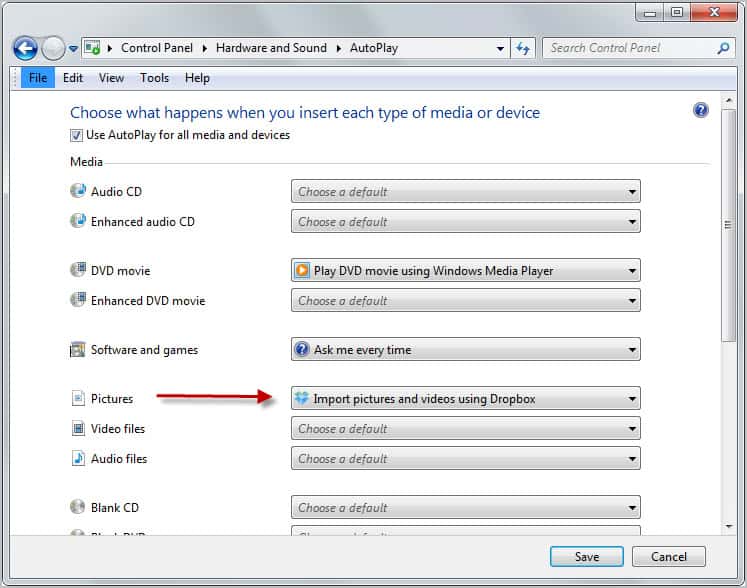
dropbox photo import

Check out the forum post and let me know if you were able to get the import option to work on your computer. (thanks Caschy)

If it works on your computer, you could use it to get an extra 4.5 Gigabyte of Dropbox storage. Not too shabby if you ask me.


Tuesday, December 20, 2011

Giganews Diamond Users Get 30 Gigabytes Of Free Storage Space

Premium Usenet provider Giganews has added several new services that are free of charge to Diamond account users in recent years. Diamond users not only get one of the fastest most complete Usenet experiences on the Internet, but also access to a virtual private network, a free Usenet browser and now also to 30 Gigabytes of free online storage thanks to the new Dumptruck service. All other Giganews account users get 5 Gigabytes of free storage space.

DumpTruck is owned and managed by Golden Frog. Giganews users currently can log in on the Dumptruck website using their Giganews credentials. The Golden Frog developers plan to release smartphone apps to manage the account on the go to access the core storage itself.

The only interface is simple but effective. New files can be uploaded via drag and drop, or by selecting upload from the toolbar which opens the file browser where one or multiple files can be selected for uploading.

Files can be sorted into folders, or moved, copied and downloaded from the storage space. Uploading at the time of writing was not super fast though, it took for instance more than 10 seconds to upload a 1.6 Megabyte file on a 10 Megabyte per second upload line. Downloads on the other hand are faster, with multiple simultaneous downloads reaching all transfer speeds of 1 Megabyte per second and above.

dumptruck online storage

Dumptruck has no file size limitations. It is perfectly possible to download a file with a size of one, two or even four Gigabytes to the storage service. All uploads and downloads, and stored files, are secured with a 256-bit AES encryption key to make sure that no unauthorized parties can access the files at any time.

Planned features, besides the ones already mentioned, include extra password protection, file sharing with friends, and desktop applications for Mac and Windows to access the files directly from the desktop (not WebDav).

The service is rather bare bones at the moment. Options to stop and resume downloads are missing, as are options to synchronize date automatically between devices. It is however likely that the developers will integrate at least some of the new features in the future. For now, it is basic web storage service.

The option to use WebDav or a third party application for access would change this significantly. It would make file management that much more comfortable. Still, it is another free useful service that is free of charge for all Giganews users.

Update: I have just been told that WebDav is already supported by DumpTruck. Information on how to setup the service under Windows 7 are provided on this page.

Support for WebDav is definitely a game changer. Users can now manage their files comfortable from the system file browser, and not solely from the Internet client.


© Martin Brinkmann for gHacks Technology News | Latest Tech News, Software And Tutorials, 2011. | Permalink |
Add to del.icio.us, digg, facebook, reddit, twitter
Post tags: ,