Pages

Showing posts with label photos. Show all posts

Thursday, February 2, 2012

Increase Your Dropbox Space By 4.5 Gigabyte

We have talked about Dropbox’s new camera import feature previously which allows you to import photos from digital cameras that you connect directly to your PC to your Dropbox storage. This can be useful if you use Dropbox to store your photos anyway. Free users may run into space issues pretty soon though, as individual photos these days take up Megabytes of free space.

Dropbox is currently running a promotion that extends the available storage space for users who use the service’s photo import feature.

Storage space is increased in 500 Megabyte chunks by a maximum of 4.5 Gigabytes. For this to work, it is necessary to run the new Dropbox 1.3.12 client. This client is experimental and only linked at the Dropbox forum and not on the main site.

It is not clear if users will keep the additional storage space forever, or if it is only available in the beta period.

During this beta period, we are also offering additional free space to test automatic uploading of photos and videos. For every 500MB of photos and videos automatically uploaded, you’ll receive another 500MB space bonus, up to 4.5GB total.

It is however likely that users will receive the space upgrade permanently.

To receive the update, users need to upload photos via the new photo import feature. If you do not have that many photos on your camera, you could simply shoot a lot of photos, connect your camera to Dropbox to get the additional 4.5 Gigabytes of online storage space.

Some users have reported that the feature is not available on their computer, even after installing the latest experimental Dropbox client. It is not clear why it is not there at this point, but there seems to be no option available to force it to appear. Dropbox also notes that photo import is currently not working under Linux or Apple Macintosh 10.4 systems.

The photo import feature relies on Autoplay, which needs to be enabled. This is done under Start Menu > Control Panel > Hardware and Sound > AutoPlay in Windows 7.
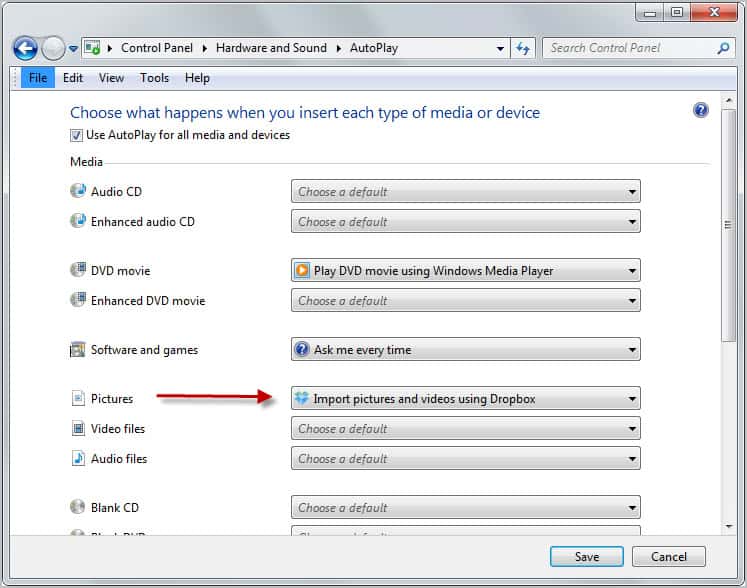
dropbox photo import

Check out the forum post and let me know if you were able to get the import option to work on your computer. (thanks Caschy)

If it works on your computer, you could use it to get an extra 4.5 Gigabyte of Dropbox storage. Not too shabby if you ask me.


Friday, December 23, 2011

Picfull Lets You Add Effects To Your Photos Online

Desktop applications are usually first choice when it comes to adding effects to images and photos. Online services can however be an interesting alternative, considering that they are often more accessible and require no installation whatsoever.

Picfull is a free online image filter service that can add a variety of filters to selected photos. The service requires no registration; All it takes is to load a photo from the local computer and pick one of the available filters.

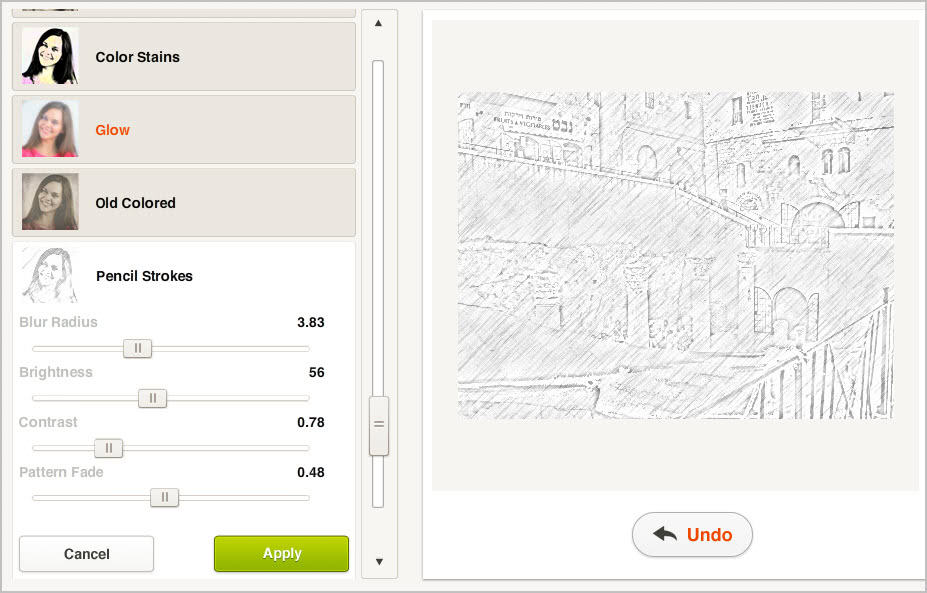
The program supports popular image formats such as jpg or png, and will display loaded images as thumbnails on the application website. A list of 20 filters, from pencil and vintage looks to aquarelle, sepia or color separation are available. A click on a filter applies it automatically to the current picture. It is alternatively possible to first select a filter and load an image afterwards, which applies the filter automatically.

picfull photo effects

Sliders to customize the selected filter are opened as well. Here it is then possible to fine tune the effect further by changing contrast, brightness or saturation values. Available parameters may differ depending on the selected filter. Only one filter can be added to a photo.

image filter

A click on Save processes the image which should not take longer than a couple of seconds. The program displays Facebook, Twitter and e-mail sharing options in an overlay on the screen. This overlay can be closed to display the direct download link instead.

Here it is then possible to download the photo to the local computer, and to start applying filters to other photos.

Image dimensions are not changed in the process. Downloads are however only provided as jpg images even if the source image was uploaded in a different image format.

Picful is an easy to use service. All it takes is one click to apply one of the available filters to an image. Sliders and selectors make customizations easy, and the undo button makes sure that you can go back if you have made a modification that you do not like.


© Martin Brinkmann for gHacks Technology News | Latest Tech News, Software And Tutorials, 2011. | Permalink |
Add to del.icio.us, digg, facebook, reddit, twitter
Post tags: , ,


Thursday, December 22, 2011

Dropbox To Integrate Camera Import In Next Version

Users who have tried the most recent experimental build of the popular file synchronization and cloud hosting service Dropbox may have noticed that a new photo import feature has been added to the program.

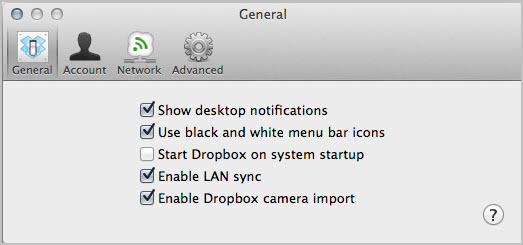
This may have happened by accident, for instance by plugging in a SD card or connecting a smartphone full of photos, by discovering the new “Enable Dropbox Camera import” option in the settings, or by reading the what’s new section in the forum detailing the new feature.

The forum post provides information about the photo uploader. The importer is currently only available for Windows users and Mac users who do not run Os X 10.4 or lower.

enable dropbox photo import

Mac OS X 10.5 users may notice that some devices register as read only. While it is still possible to import photos from such devices, it is not possible to make device settings persistent at this point in time. Windows users on the other hand need to make sure that autoplay is enabled on their computer to use the feature. If it is disabled, the automatic importing won’t function.

There is also some device specific advice. Apple iPhone owners for instance can only import if the phone is unlocked and the passcode has been entered. Android users should use the connect as disk drive feature and not a synchronization feature offered by the phone’s manufacturer.

It is interesting to note that the feature is enabled by default if the operating system meets the requirements. Dropbox users who do not want to use the photo import feature can disable it in the preferences under the general tab.

The feature is currently only implemented in the latest experimental version of the Dropbox client which may explain why it has been automatically activated. Some forum users have criticized Dropbox for adding unnecessary features to the program. What’s your take on the addition?

Dropbox users who would like to try the new version with photo import can download it from the official Dropbox web forum. (via Caschy)


© Martin Brinkmann for gHacks Technology News | Latest Tech News, Software And Tutorials, 2011. | Permalink |
Add to del.icio.us, digg, facebook, reddit, twitter
Post tags: ,


Tuesday, December 6, 2011

Facebook bug can make your private photos public

Nothing is ever 100% completely secure, let’s get this settled from the off.  Whatever security anybody or any company ever puts in place there’s either some way to crack it, or some flaw in the system that will allow people to circumvent it.  Thus it’s not really a shouting a Facebook moment to discover that such a flaw has been found that allows people to see the private photos of others.

The flaw was first reported on the forums of BodyBuilding.com, presumably because the users of that website like taking photos of themselves and putting them online.  The bug exploits the way the offensive photograph reporting tool works.  I’m not going to detail it in too much detail here because I don’t want to encourage anybody to try and view photographs that other people have made private as they obviously want them to be kept private.  However the post does detail how the flaw works.

ZDNet used the flaw to show a picture from Mark Zuckerberg’s private album, taken from a dinner party where everybody seems to be having lots of fun making the food, it’s quite sweet actually as Zuckerberg clearly looks like the shy one.

Facebook have said they are looking into the issue which revolves around being able to report more than just the single photo you can see.  It’s not a bug with the system but it is quite a substantial design flaw and, oddly, surprising that nobody has noticed it before.

Facebook has been heavily criticised in the last few years for matters of privacy and so there are people who will leap on this story as yet another example of how the company simply doesn’t take its users privacy seriously.  Such problems have included a change to the terms and conditions that made all your photographs and statuses Facebook’s property and a settings change that made everything on everybody’s profile accessible to search engines by default.  Both times the change was quickly withdrawn.

ZDNet said…

Details of this flaw were examined in detail. While some browsers restrict this flaw, private photos that are hidden or inaccessible to people who are friends, can not only be accessed but enlarged to their full scale.  This flaw is open for anyone to use — and abuse. While Facebook anonymises the reports that it gets through, the user whose profile pictures can be viewed will also not know that their privacy has been invaded.

There are real problems with privacy and the Internet, much of which seems to stem from people not understanding what the Internet really is and how it works.  I have published a free Facebook Privacy Guide, though some settings have changed and the book needs a second edition when I get time.  There’s lots of advice in here though about how to keep yourself and your personal information safe and private when online, at least as safe and private as Humanly possible.

As is always the case with these things the best advice is not to put embarrassing pictures or messages online in the first place, or to remove them after they’ve been seen by close friends.  Some companies are working on solutions including one ingenious one I’m looking forward to where a picture can be programmed to expire after a specified time.  These types of technology will no doubt help all of us in the future.


© Mike Halsey (MVP) for gHacks Technology News | Latest Tech News, Software And Tutorials, 2011. | Permalink |
Add to del.icio.us, digg, facebook, reddit, twitter
Post tags: , ,


Thursday, November 24, 2011

Photo Event Organizer, Image Organizer

Have you ever worked with a folder full of photos? I’m talking hundreds or even thousands of photos taken with different camera models and in different years and locations. It is pretty difficulty to find specific photos or events in a folder filled with such an amount of photos.

The free software Photo Event Organizer is a freeware for the Windows operating system that can bring order into the chaos. Best of all, it is relatively easy and straightforward to use.

When you start the program for the first time you are asked to select a source path first. This is the folder or folder structure where all the photos are stored in. The program includes subdirectories automatically in the scan.

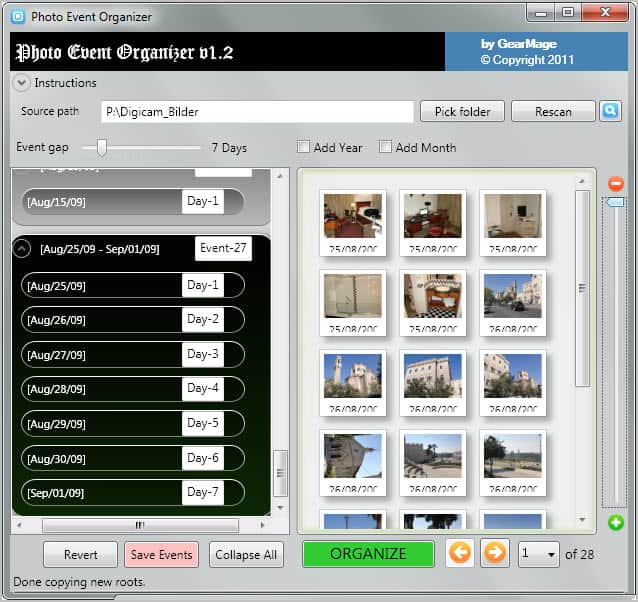
You start a scan with a click on the scan button after you have picked a root folder. Photo Event Organizer crawls through all folders to locate images and photos stored in the folder structure. All photos are then sorted by date folders in the interface. The program uses a gap of two days for events which you can change with the slider on top. You can furthermore add year and month folders to the structure.

photo event organizer

The program will resort the photo structure accordingly. Event IDs and Days can be renamed. You could for instance rename Event IDs to names of holiday destinations or parties, and days to trips or places.

The left side of the interface displays all photos of the selected event or day. A slider on the right zooms in or out of the thumbnails, and a pulldown menu at the bottom loads additional pages with photos if the count exceeds 27.

A click on organize opens a menu where you can save the now organized photo structure. The program offers to move or copy the structure. I suggest to copy them into a different root folder first, so that you still have the old structure available if you need to go back to ot.

organize images

One of the things that it is missing in my opinion is the ability to move specific folders or photos into a different folder in the structure. There is no option for that, and the event gap slide is to inflexible to cover all eventualities (e.g. photos with wrong dates, or photos that are not sorted into the same event because the event gap has is to restrictive).

For users with relative distinct events, e.g. yearly holidays, graduation parties or birthdays, it can be helpful. Especially if all the photos are not ordered by event but by other criteria or not at all.

Windows users can download Photo Event Organizer from the developer website. The program is compatible with 32-bit and 64-bit editions.


© Martin Brinkmann for gHacks Technology News | Latest Tech News, Software And Tutorials, 2011. | Permalink |
Add to del.icio.us, digg, facebook, reddit, twitter
Post tags: , , , ,


Sunday, November 20, 2011

Photo Finder Finds Photos Based On Camera And Other Parameters

Are you currently shopping for a new digital camera? Then you probably would like to see a few test photos taken with cameras that have made it on your list. Or maybe you own a camera and want to know what it is capable of. Whatever it is, the Chrome extension Photo Finder can help you find the answers you are looking for.

But Photo Finder could also aid users who are looking for specific photo types, for instance wide-angle or fisheye photos, or photos taken in a specific month or lightness.

Photo Finder processes Exif data that many digital cameras write automatically as meta data when photos are taken. The extension uses the vast archive of Google Images.

It adds an icon to Chrome’s address bar. A left-click on the icon displays a search form and menus to customize the photo search. It is not necessary to use the menus at all, which means that the extension can also be used as a quick way to search for photos on Google Images.

photo finder

A digital camera manufacturer or model can be entered in the leftmost menu. You can for instance search for all photos taken with Canon cameras, or for photos that have been taken with Nikon’s D7000 digital camera. Once you start typing suggestions are made automatically by the extension.

The second and third menu are used to make changes to the camera’s zoom level and lightness. The fourth and final menu can be used to select a specific month for the photos. Want to find Statue of Liberty, Central Park or Golden Gate Bridge photos in Winter? Just select one of the Winter months and you are good to go.

The loading of the results page is not delayed by the selections. The selection may however have an impact on the quality of the results. Let me give you an example. If you select a camera that is not really that popular, you may up with unrelated or no photo results at all.

Photo Finder is nevertheless a handy extension for Chrome users. The extension can be downloaded and installed directly from the extension’s Chrome Web Store page.


© Martin Brinkmann for gHacks Technology News | Latest Tech News, Software And Tutorials, 2011. | Permalink |
Add to del.icio.us, digg, facebook, reddit, twitter
Post tags: , , , ,