Many spyware programs on today’s market, regardless of being free or commercial, concentrate on the removal of spyware and other forms of malware on the PC system. Only a few try to block spyware before it makes its way on to the computer.
Spyware Blaster focuses on preventing attacks from happening in the first place. Unlike other spyware programs that may need to be run all the time, the program only needs to be run when the protection needs to be updated, and of course initially to configure the spyware protection for the first time.
Here is how it works. Once you have downloaded, installed and started Spyware Blaster you’ll see the main application window for the first time. Here you enable protections, create a system snapshot, update the program or use various tools that ship with the program that may help protect or recover the system.
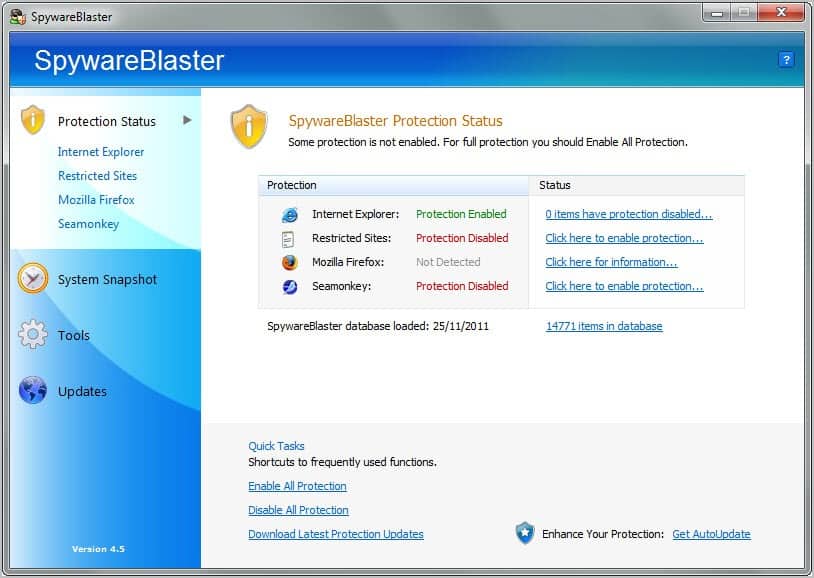
Protection Status displays a summary of the system’s protection. Users can enable or disable protections for specific web browsers. The software is compatible with Microsoft’s Internet Explorer and all browsers that use the IE rendering engine, Mozilla Firefox, Seamonkey and variants. The software did not detect my Firefox profile folder during tests. This may have been caused by me running Firefox Aurora and not Firefox Stable on the system. There is unfortunately no option to point the software to the profile folder manually (it is likely caused by a version check).
Internet Explorer users can protect their browser in three different ways: They can restrict access to sites that are known to spread spyware, block known spyware that uses ActiveX and prevent ad or tracking cookies. The program uses native functions of Windows or Internet Explorer to protect the browser and system from these threats. Blocked sites are for instance added to Internet Explorer’s restricted sites list.
Users can enable or disable items on the block list individually. Can for instance be handy if you want a cookie to be written on your system.
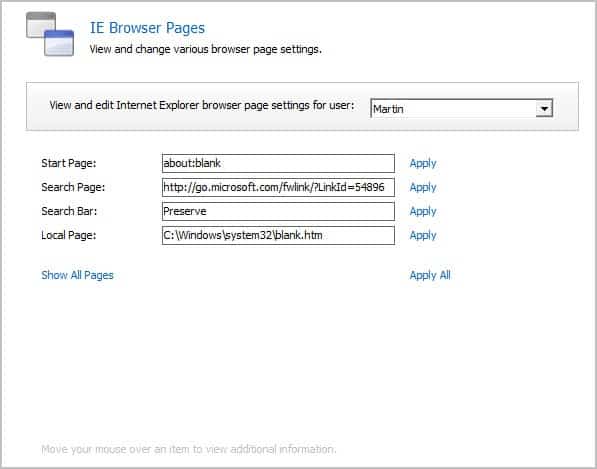
The Tools section lists five additional tools that can be used to take back control. The IE Browser Pages tool lists for instance the browser’s start, search and local page as well as the search bar, making it easy to change the values here directly without opening the browser.
The other tools allow a user to create a backup of the hosts file, disable Flash completely in Internet Explorer and to block ActiveX controls that Spyware Blaster does not block automatically.
Spyware Blaster will not scan the system for spyware or remove it when discovered. It only blocks known threats, and that’s why it needs to be updated regularly. The free version of the program can be updated manually from within.
The program may be especially useful for Internet Explorer users. It blocks thousands of known spyware threats automatically, and without running in the background all the time. Once you have installed the software you should run an update check regularly to add new protections to the PC.
Should you install Spyware Blaster? That depends on your browsing habits. Internet Explorer users can benefit from the program the most. If you use other browser’s you probably won’t benefit at all, or only marginally.
Windows users can download the latest version of the software from its developer site. The program is compatible with all recent 32-bit and 64-bit editions of Microsoft Windows.
© Martin Brinkmann for gHacks Technology News | Latest Tech News, Software And Tutorials, 2011. | Permalink |
Add to del.icio.us, digg, facebook, reddit, twitter
Post tags: security-software, Spyware, spyware protection, windows software


