Pages

Showing posts with label Spyware. Show all posts

Tuesday, November 29, 2011

Spyware Blaster Blocks Spyware Related Threats Passively

Many spyware programs on today’s market, regardless of being free or commercial, concentrate on the removal of spyware and other forms of malware on the PC system. Only a few try to block spyware before it makes its way on to the computer.

Spyware Blaster focuses on preventing attacks from happening in the first place. Unlike other spyware programs that may need to be run all the time, the program only needs to be run when the protection needs to be updated, and of course initially to configure the spyware protection for the first time.

Here is how it works. Once you have downloaded, installed and started Spyware Blaster you’ll see the main application window for the first time. Here you enable protections, create a system snapshot, update the program or use various tools that ship with the program that may help protect or recover the system.
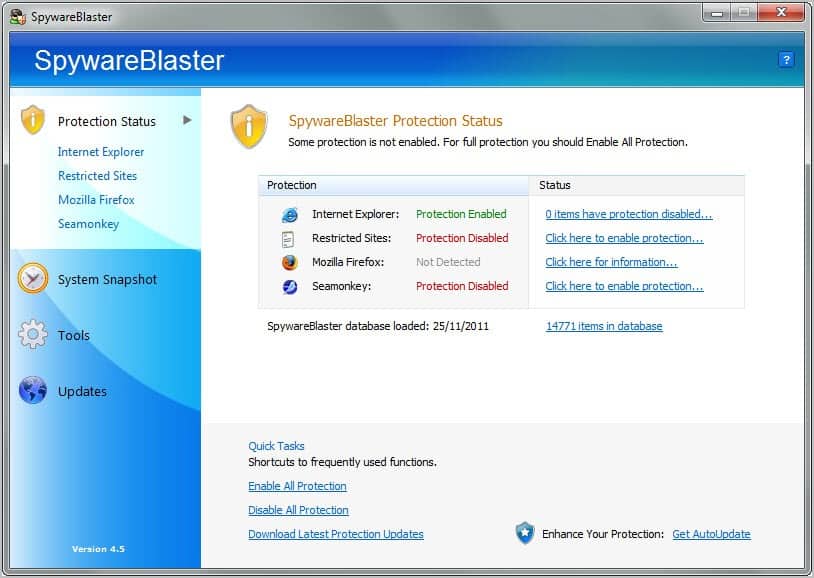
spyware blaster

Protection Status displays a summary of the system’s protection. Users can enable or disable protections for specific web browsers. The software is compatible with Microsoft’s Internet Explorer and all browsers that use the IE rendering engine, Mozilla Firefox, Seamonkey and variants. The software did not detect my Firefox profile folder during tests. This may have been caused by me running Firefox Aurora and not Firefox Stable on the system. There is unfortunately no option to point the software to the profile folder manually (it is likely caused by a version check).

Internet Explorer users can protect their browser in three different ways: They can restrict access to sites that are known to spread spyware, block known spyware that uses ActiveX and prevent ad or tracking cookies. The program uses native functions of Windows or Internet Explorer to protect the browser and system from these threats. Blocked sites are for instance added to Internet Explorer’s restricted sites list.

Users can enable or disable items on the block list individually. Can for instance be handy if you want a cookie to be written on your system.

The Tools section lists five additional tools that can be used to take back control. The IE Browser Pages tool lists for instance the browser’s start, search and local page as well as the search bar, making it easy to change the values here directly without opening the browser.
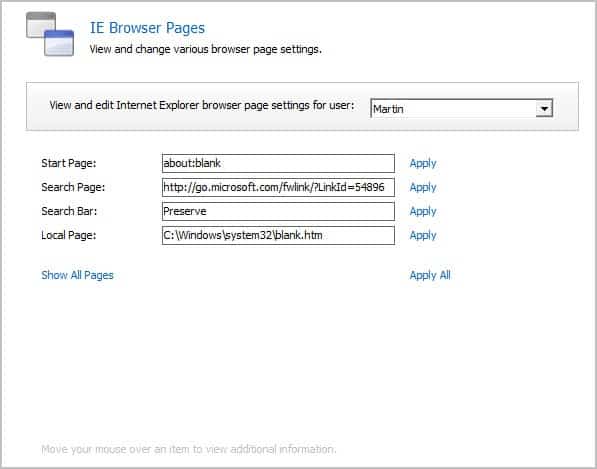
ie browser pages

The other tools allow a user to create a backup of the hosts file, disable Flash completely in Internet Explorer and to block ActiveX controls that Spyware Blaster does not block automatically.

Spyware Blaster will not scan the system for spyware or remove it when discovered. It only blocks known threats, and that’s why it needs to be updated regularly. The free version of the program can be updated manually from within.

The program may be especially useful for Internet Explorer users. It blocks thousands of known spyware threats automatically, and without running in the background all the time. Once you have installed the software you should run an update check regularly to add new protections to the PC.

Should you install Spyware Blaster? That depends on your browsing habits. Internet Explorer users can benefit from the program the most. If you use other browser’s you probably won’t benefit at all, or only marginally.

Windows users can download the latest version of the software from its developer site. The program is compatible with all recent 32-bit and 64-bit editions of Microsoft Windows.


© Martin Brinkmann for gHacks Technology News | Latest Tech News, Software And Tutorials, 2011. | Permalink |
Add to del.icio.us, digg, facebook, reddit, twitter
Post tags: , , ,


Wednesday, October 26, 2011

Visa, MasterCard Plan to link Credit Card Purchases And Online Marketing

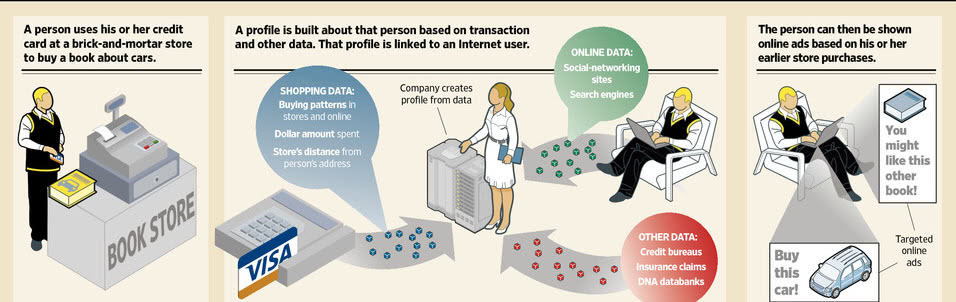
If you thought it could not get worse with all the tracking and personalization on the Internet, then you have just been proven wrong. According to The Wall Street Journal and other sources, both Visa and MasterCard are planning to tie credit card purchases with personalized online advertisement. What does it mean? You recently bought a new BMW? Expect to see car insurance ads! You are a regular customer at Mc Donalds, Burger King or Kentucky Fried Chicken? Expect weight loss ads to dominate your ad experience on the Internet. Paid your membership to that online dating site with your credit card? See mail order bride ads.

Linking “real-world” purchases to online users is one of the holy grails of Internet marketing. Current advertising companies are already able to link online activity to advertisements. Linking offline purchases on the other hand would push behavioral targeting to another level.

visa online advertisement

Both credit card companies interestingly enough confirmed that they are exploring ways of using transactional data for targeted online advertisements. A Visa patent application in April for instance revealed plans to use personal details to create online profiles for ad targeting, with personal details taken from a variety of sources including “information from social network websites, information from credit bureaus, information from search engines, information about insurance claims, information from DNA databanks”.

A Master Card spokesman stated that the company “doesn’t collect card-holders’ names or contact information in transactions it processes”, and that it therefor “doesn’t connect an individual’s Web-surfing activity to their specific cardholder transaction data or provide outside companies with individuals’ transaction data”.

According to the Wall Street Journal article, both companies said that the plans are preliminary. Master Card and Visa are not the only two credit card processing companies that use the billions of credit card transactions for marketing. Most companies disclose in their privacy policies that they may share personal information with third party companies.

Master Card credit card holders can opt-opt of a variety of marketing and tracking related programs. This includes opting-out from the anonymization of personal information to perform data analyzes and from a unique web analytics cookie to avoid the aggregation and analysis of data collected.

The best way to protect yourself? Pay with cash whenever possible. What’s your take on this?


© Martin Brinkmann for gHacks Technology News | Latest Tech News, Software And Tutorials, 2011. | Permalink |
Add to del.icio.us, digg, facebook, reddit, twitter
Post tags: , , ,


Monday, October 10, 2011

F-Secure Online Scanner Scans System For Malware

Sometimes you do not want to or cannot install another security software on your computer system to scan for malware. Maybe you do not have the rights to install software on the computer or you have a program installed and do not want to risk incompatibilities.

The alternative is an application like F-Secure’s Online Scanner which can be started from a web browser. This particular application is a Java app which means that the latest Java Runtime Environment (JRE) needs to be installed on the system.

Users can visit the official website to start a scan of their computer system right away. The online application uses up to date virus and threat definitions that F-Secure maintains for all of their products.

f-secure online scanner

When you start the online app you are asked to select a scan mode. Available for selection are quick scan, which only scans the most important files and folders of the system, a full scan or a custom scan. Custom scan can be configured on an extra screen in the program interface.

f-secure custom scan

Here it is then possible to scan all or only selected folders and file types. The program itself will scan for malware, spyware, rootkits using a database of known virus signatures and heuristics to identify unknown threats.

The program then downloads files from the Internet which may take some time depending on the Internet connection. The scan time depends largely on the selected mode and the speed of the system.

virus scan

The application displays a summary after the scan highlighting potentially malicious files. These files can be deleted from the system and send to F-Secure as a sample (handy if heuristics identified an unknown threat that F-Secure has no information about).

The program is easy to use and comes with enough customizations for advanced uses. I would not recommend relying solely on online scanners for security though, but would recommend them for additional security scans on a regular basis. You can check out our overview of online virus scanners here.


© Martin Brinkmann for gHacks Technology News | Latest Tech News, Software And Tutorials, 2011. | Permalink |
Add to del.icio.us, digg, facebook, reddit, twitter
Post tags: , , , ,