Pages

Showing posts with label virustotal. Show all posts

Sunday, January 15, 2012

Virustotal Updated, Now Accepts 32 Megabyte Files

The Virustotal online virus scanning service is one of the services that I use on a regular basis. Whenever I find a great looking software in a “not so great” location, I use the service to check the software out before I execute it on my system. This is for instance the case when software authors host their files on file hosting sites, and not on their own web space.

The old Virustotal had a file size limit of 20 Megabyte which worked fine for most executables and setups, but not for all. If you encountered a single file that exceeded the 20 Megabyte limit, you could not use the service to scan it at all. The service had other issues that users encountered every now and then, like large queues or pages that were not loading properly.

The developers have recently updated the service website and virus scanning service that improves Virustotal considerably.

When you open the service’s homepage you will notice two of the changes right away.

virustotal

The first is a new professional feel and look, the second that Virustotal now accepts file sizes of up to 32 Megabytes. That’s a reasonable 60% increase that should resolve the majority of “file size to big” issues that users encountered previously on the site.

Once you upload a file you will notice that the reporting interface has changed as well.

online virus scan

The url scanner is now supporting a total of 19 different scan engines that includes a mix of well known (Google Safebrowsing, Opera, Phishtank) and lesser known services. Some url scanning services provide additional information that are now also displayed in the scan results.

Virustotal has moved to Google’s App Engine Service which, according to the developers, speeds up the analysis significantly. Developers of third party apps now benefit from faster response times thanks to a public API update.

Virustotal has improved significantly thanks to the recent update. Especially the maximum file size increase needs to be mentioned in this regard.

Have you used the new version yet? If so, what is your impression of the service? (via Dottech)


Monday, December 19, 2011

Submit Suspicious Files to Antivirus Companies With X-Ray

We all know that there is not a single antivirus software on the market, either free or commercial, that detects 100% of malicious software. Some users help themselves by adding additional layers of protection to their system. This can be virtualization or sandboxing, or the installation of another security application. Others use online services such as Virus Total to check suspicious files online against more than 30 different antivirus engines.

X-Ray, a new portable software by our blog partner Raymond.cc, is a security software for the Windows operating system that combines Virus Total scanning with options to submit files to antivirus companies for manual inspection.

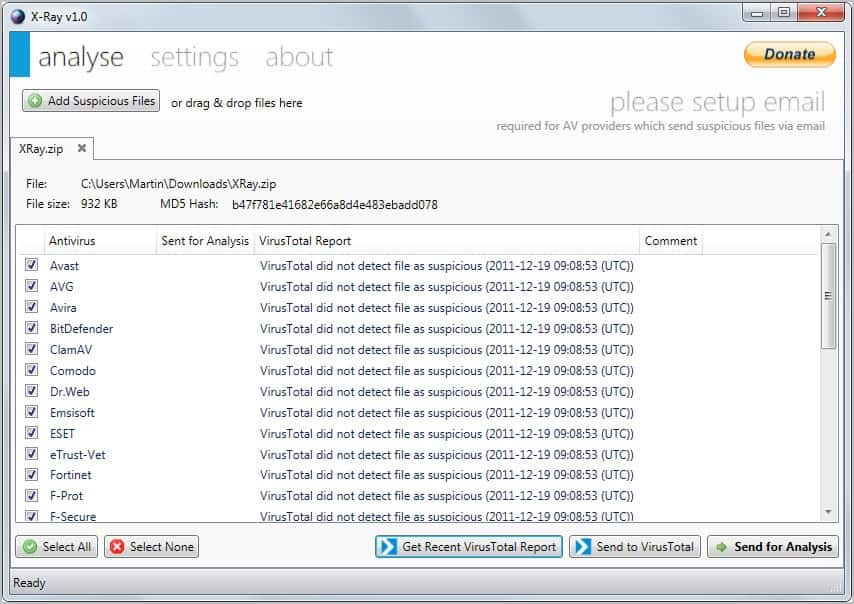
The program asks you to drop one or multiple files into the program interface. You can then start the analysis right away by clicking on Get Recent VirusTotal Report or Send to VirusTotal.

The first computes the hash and submits it to VirusTotal to retrieve previous analysis results (if available). The second sends the file to VirusTotal to run the analysis. The first is faster but results may come up blank if no one submitted the program for analysis before.

x-ray antivirus analysis

Program alternatives are available to submit files to Virustotal. This includes the official Virus Total Uploader among others. Most however do not support retrieving previous reports from the service.

What sets X-Ray apart however is the option to submit suspicious files to antivirus companies for manual review. Before you can use the functionality, you need to setup your email correctly in the program.

The program requires you to enter an email server, port, and username and password. A test button is available to test the settings.

You can configure the preferred submission method for some companies. Available for selection are by email or web form, both of which are processed automatically.

Once you have setup the email provider you can start sending files for analysis. A click on the button in the main interface submits the current file to all companies. Some companies may display captchas as part of the submission process, but that’s the only thing you have to enter before the file is submitted.

The response time depends on may factors, it can take a day, a week or even longer than that. Some companies may not respond at all. But since you are submitting the file to a lot of different antivirus companies, chance is good that you will receive timely responses from some.

X-Ray’s unique approach makes it a must have for Windows users who need to make sure that a file is clean before they run it on their system. And since it is portable, it can be added easily to a troubleshooting tools DVD or USB drive.

Windows users can download the latest version of X-Ray from Raymond’s website.


© Martin Brinkmann for gHacks Technology News | Latest Tech News, Software And Tutorials, 2011. | Permalink |
Add to del.icio.us, digg, facebook, reddit, twitter
Post tags: , ,