Pages

Showing posts with label antivirus. Show all posts

Wednesday, February 8, 2012

Avast 7 Public Betas Available, New Features Included

Avast! has just released the first public beta version of the company’s 2012 security lineup. Interested users can download Avast Free, Avast Pro and Avast Internet Security from the official beta announcement thread in the Avast forum.

First thing that users notice is the new installer. Avast notes that the beta versions can be installed over existing Avast 6 installations, or separately on the system. The custom installation provides options to install a typical, minimal or custom version of the security software on the system. Especially the latter option should appeal to security interested computer users, as it allows them to block modules from being installed on their computer. Here it is possible to disable any module that you do not want to use, and not only some which seems to be more common in custom installers. This can for instance be useful if those modules are not needed or interfering with other security software installed on the system.
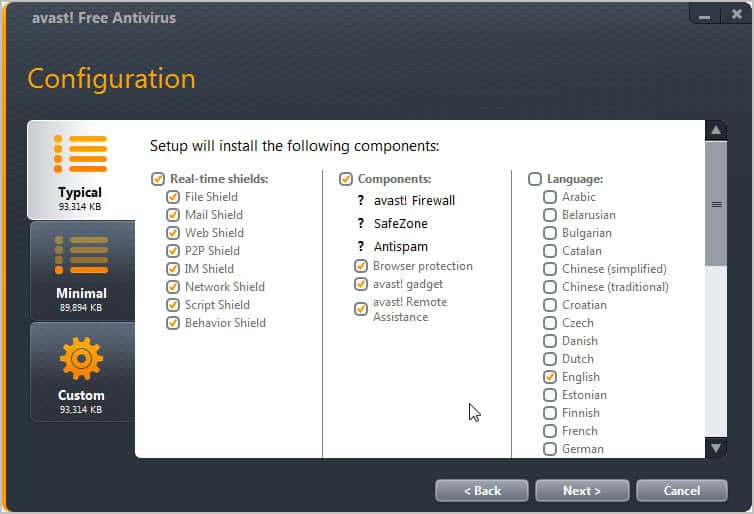
avast free antivirus

Avast 7 Beta is compatible with all recent 32-bit and 64-bit versions of the windows operating system and the Windows 8 Developer Preview version released last year. The program interface has received a facelift as well. Core program features are available in the side bar menu.
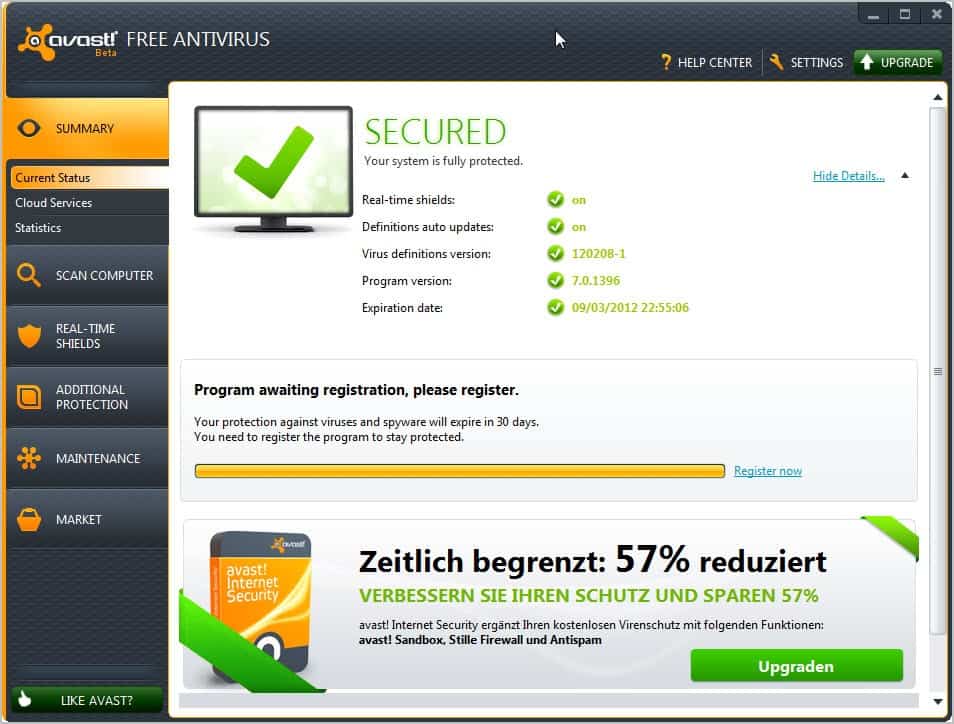
avast free antivirus 7

The Real-Time Shields display for instance displays visual information about each security module installed on the system.
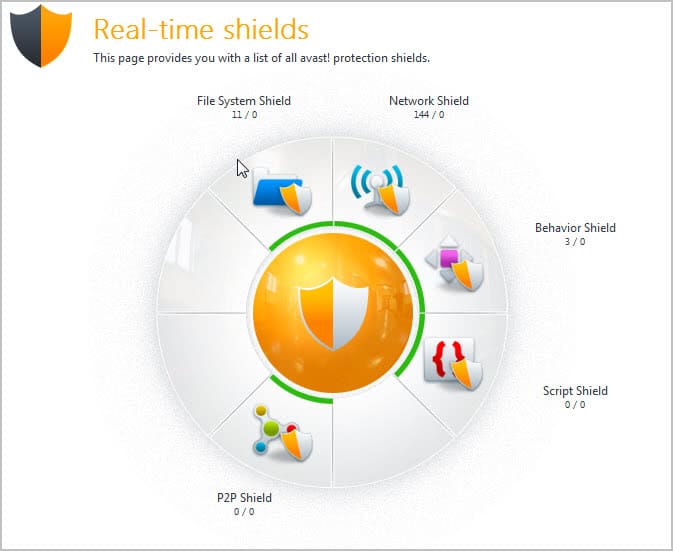
real time shields

One of the new features that Avast has integrated into the beta versions is a cloud based reputation service which improves the decision making process of the program.

cloud services

Here is the full list of new features:

  • New installer
  • UI facelift
  • FileRep service (cloud based)
  • Streaming updates
  • Sandbox & Autosandbox improvements
  • Browser protection improvements
  • Remote assistance feature to help your friends with computer troubles
  • Support tool
  • Export/Import settings
  • Screensaver facelift
  • runs on Win8 Developer Preview

It is recommended to check the known issues before installing the beta software on a system.

- In some cases, WebRep Chrome plugin is not installed correctly
- The Safezone browser is opening each time when you switch back and to the Safezone
- Plugins for Outlook 2k3 and 2k7 show “runtime error” message
- Sometimes autosandbox toaster does not close correctly
- Problems with avast sounds on Win 7 and Win Vista
- Remote assistance feature sometimes crashes on Win 7 32b, Win Vista 64b
- avast! account functionality is disabled

Avast’s Auto Sandbox feature sounds like a real winner, if Avast gets the detection right. It puts suspicious processes automatically in a sandbox to prevent them from damaging the underlying operating system, other programs and files.

I would not recommend running the beta version in a productive environment though. It is likely that Avast will release the final version of the program in the coming months. (via Vishal)


Monday, December 19, 2011

Submit Suspicious Files to Antivirus Companies With X-Ray

We all know that there is not a single antivirus software on the market, either free or commercial, that detects 100% of malicious software. Some users help themselves by adding additional layers of protection to their system. This can be virtualization or sandboxing, or the installation of another security application. Others use online services such as Virus Total to check suspicious files online against more than 30 different antivirus engines.

X-Ray, a new portable software by our blog partner Raymond.cc, is a security software for the Windows operating system that combines Virus Total scanning with options to submit files to antivirus companies for manual inspection.

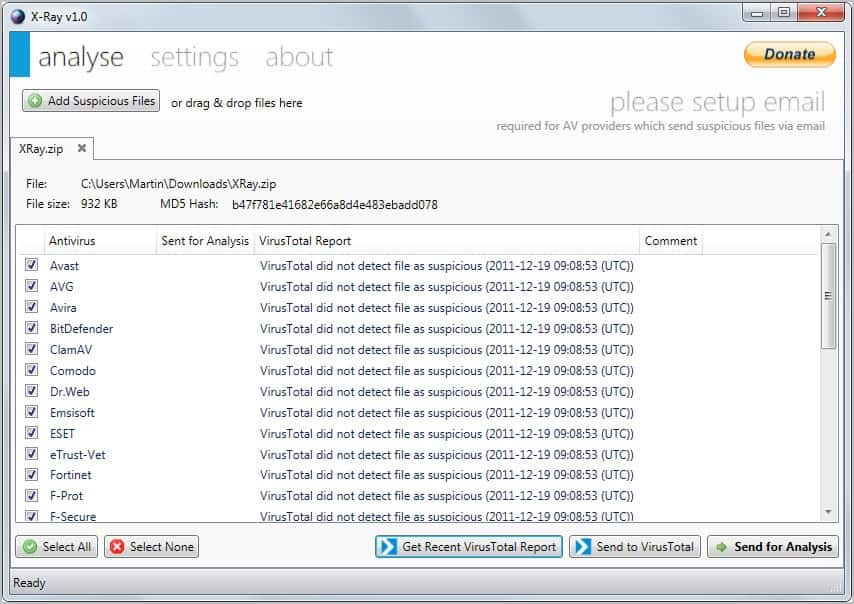
The program asks you to drop one or multiple files into the program interface. You can then start the analysis right away by clicking on Get Recent VirusTotal Report or Send to VirusTotal.

The first computes the hash and submits it to VirusTotal to retrieve previous analysis results (if available). The second sends the file to VirusTotal to run the analysis. The first is faster but results may come up blank if no one submitted the program for analysis before.

x-ray antivirus analysis

Program alternatives are available to submit files to Virustotal. This includes the official Virus Total Uploader among others. Most however do not support retrieving previous reports from the service.

What sets X-Ray apart however is the option to submit suspicious files to antivirus companies for manual review. Before you can use the functionality, you need to setup your email correctly in the program.

The program requires you to enter an email server, port, and username and password. A test button is available to test the settings.

You can configure the preferred submission method for some companies. Available for selection are by email or web form, both of which are processed automatically.

Once you have setup the email provider you can start sending files for analysis. A click on the button in the main interface submits the current file to all companies. Some companies may display captchas as part of the submission process, but that’s the only thing you have to enter before the file is submitted.

The response time depends on may factors, it can take a day, a week or even longer than that. Some companies may not respond at all. But since you are submitting the file to a lot of different antivirus companies, chance is good that you will receive timely responses from some.

X-Ray’s unique approach makes it a must have for Windows users who need to make sure that a file is clean before they run it on their system. And since it is portable, it can be added easily to a troubleshooting tools DVD or USB drive.

Windows users can download the latest version of X-Ray from Raymond’s website.


© Martin Brinkmann for gHacks Technology News | Latest Tech News, Software And Tutorials, 2011. | Permalink |
Add to del.icio.us, digg, facebook, reddit, twitter
Post tags: , ,


Sunday, November 13, 2011

Free Android Anti-Virus Apps are Proved Useless

Of all the smartphone and tablet operating systems available at the moment, the one that I simply can’t recommend to people is Google Android.  Unlike Apple, Microsoft and some other companies Google don’t properly screen programs that go into its app store and, as such, large amounts of malware keep getting through.

This is a real shame as it would be very easy for a company with Google’s resources to manage their app store properly and bring security and peace of mind to their millions of customers.

Now though a test by AV Test.org has showed that the current batch of free anti-virus packages for Android are pretty useless.  In their tests they found that the best overall virus and malware scan result from these packages found on 32% of malware when performing a manual scan with four out of the seven packages tested finding nothing at all.

The “on installation” results were slightly better, but not by much with all but one of the packages finding only 10% of malware.

The results of the real-time guard functionality were quite shocking. The guard should warn the user upon installation of malicious apps. The 10 malware samples were chosen with the help of AV-TEST’s own analysis system, which uses more than 30 virus scanners to analyze the APK files. The test set contains the 10 files, which were most often classified as malware by the virus scanners. Because of the high detection rates these files can be considered as well known and should therefore be detected by a reliable virus-scanner. Did the vendors of mobile security apps know them, too? The test results will show: Zoner AntiVirus Free was the only app with a respectable result. It detected 8 out of 10 samples during the installation attempts. BluePoint AntiVirus Free, Kinetoo Malware Scan and Privateer Lite still warned against one malicious app. Antivirus Free by Creative Apps, GuardX Antivirus and LabMSF Antivirus beta failed completely. In comparison to the free apps the commercial products of F-Secure and Kaspersky detected all threats without a problem.

The packages tested were Antivirus Free, BluePoint Antivirus Free, GuardX Antivirus, Kinetoo Malware Scan, LabMSF Antivirus beta, privateer Lite and  Zoner Antivirus Free.

Even the very best test result here of 80% for Zoner with the installation scan is well below what is considered acceptable for virus and malware protection and scores of 10% or even 0% are unheard of.

People place considerable trust in anti-virus software.  We all want to be able to trust that whatever we choose to use, we will be protected from the vast majority of malware on our devices.  On smartphones however where the handset is capable of running up huge bills for you by texting premium rate numbers, the trust we have in this software is even more important.  A significant number of people are also trusting these anti-virus apps as the report details.

The number of installations, which is given on the market website, shows that many users trust these free apps, although they do not offer a reliable protection. The by far most popular program is Antivirus Free by Creative Apps with 1,000,000 to 5,000,000 installations. The only useful free product Zoner AntiVirus Free has just 50,000 – 100,000 users. The best protection was achieved by the commercial tools of the well known security software vendors Kaspersky and F-Secure. The circulation of obviously near to useless security apps endangers those, who trust them and install apps from 3rd party app markets without further suspiciousness.

I still can’t recommend Google’s Android operating system because of the malware problem, no matter how usable or polished an operating it may be.  For anti-virus packages to be completely missing almost 100% of malware on the platform however just adds salt to the wounds.


© Mike Halsey (MVP) for gHacks Technology News | Latest Tech News, Software And Tutorials, 2011. | Permalink |
Add to del.icio.us, digg, facebook, reddit, twitter
Post tags: , ,


Friday, October 21, 2011

Webutation, Website Reputation Information

When you are on the Internet you face a dilemma. You do not know an awful lot about new sites that you visit. You do not know much about the company or people that operate a website for instance. That may not be a problem on sites that you just access for information, but what about shopping sites or sites where you enter personal information like your email address?

You’d probably want to know if you can trust a site with those information. Website reputation services in theory speed up the time it takes to come to a conclusion. Instead of having to search for information on search engines you could use their ratings to assess a website’s reputation more easily.

Experienced Internet users know that it is often not sufficient to use just one service for that. These services can be manipulated easily, for instance with fake user comments and ratings.

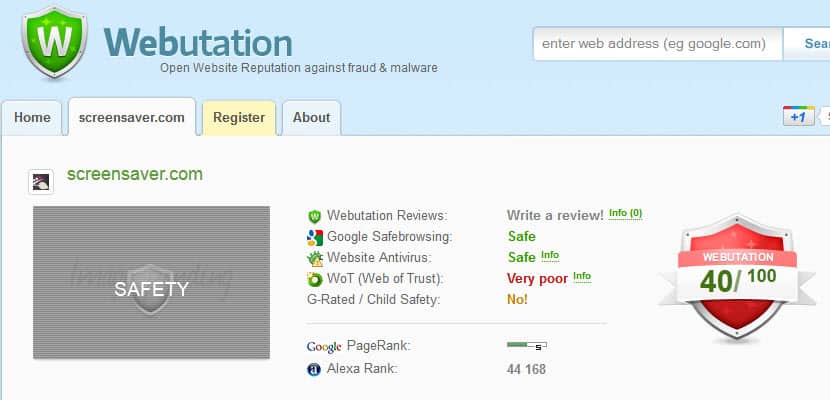
Webutation is a meta service that lists ratings from multiple services when user look up domain names on the website. The reputation service includes its own review service as well as the site’s Google Safebrowsing, Website Antivirus, Web of Trust and G-Rated / Child Safety rating. These ratings are then used to calculate the Webutation score.

webutation website reputation

You also see the site’s Google Pagerank and Alexa rank listed there. Some entries have an Info link next to them. If you hover your mouse cursor over them you will see additional information about the rating.

The only other option that you have is to switch from Rating to Twitter Buzz to see some of the recent Twitter messages that references the domain name.

I personally like Webutation as it combines the rating of multiple reputation and security services. It is still recommended to rely on other sources, e.g. a manual web search for issues related to the domain.

bad web reputation

A Firefox add-on with mixed reviews is available as well. It basically displays the webutation rating of the active website in the browser’s toolbar.

Are you using reputation services? If so, which is your favorite?


© Martin Brinkmann for gHacks Technology News | Latest Tech News, Software And Tutorials, 2011. | Permalink |
Add to del.icio.us, digg, facebook, reddit, twitter
Post tags: , , , ,