Pages

Showing posts with label windows-update. Show all posts

Tuesday, February 14, 2012

Microsoft Security Bulletins For February 2012 Released

Microsoft today has released this month’s security updates. A total of nine security bulletins have been released, of which four address vulnerabilities with a maximum severity rating of critical. This means that at least one Microsoft product is affected critically by the vulnerability. Six bulletins fix issues in the Windows operating system, two in Microsoft Office and one each in Internet Explorer, Microsoft Server Software, Microsoft Silverlight and the Microsoft .Net Framework.

Both Windows 7 and Windows Vista are affected by four critical and one important vulnerability each, while Windows XP is only affected by three critical and two important vulnerabilities.

Here are the bulletins for February 2012:

  • MS12-008Vulnerabilities in Windows Kernel-Mode Drivers Could Allow Remote Code Execution (2660465) – This security update resolves a privately reported vulnerability and a publicly disclosed vulnerability in Microsoft Windows. The more severe of these vulnerabilities could allow remote code execution if a user visits a website containing specially crafted content or if a specially crafted application is run locally. An attacker would have no way to force users to visit a malicious website. Instead, an attacker would have to convince users to visit the website, typically by getting them to click a link in an email message or Instant Messenger message that takes them to the attacker’s website.
  • MS12-010Cumulative Security Update for Internet Explorer (2647516) – This security update resolves four privately reported vulnerabilities in Internet Explorer. The most severe vulnerabilities could allow remote code execution if a user views a specially crafted web page using Internet Explorer. An attacker who successfully exploited any of these vulnerabilities could gain the same user rights as the logged-on user. Users whose accounts are configured to have fewer user rights on the system could be less impacted than users who operate with administrative user rights.
  • MS12-013Vulnerability in C Run-Time Library Could Allow Remote Code Execution (2654428) – This security update resolves a privately reported vulnerability in Microsoft Windows. The vulnerability could allow remote code execution if a user opens a specially crafted media file that is hosted on a website or sent as an email attachment. An attacker who successfully exploited the vulnerability could gain the same user rights as the local user. Users whose accounts are configured to have fewer user rights on the system could be less impacted than users who operate with administrative user rights.
  • MS12-016Vulnerabilities in .NET Framework and Microsoft Silverlight Could Allow Remote Code Execution (2651026) – This security update resolves one publicly disclosed vulnerability and one privately reported vulnerability in Microsoft .NET Framework and Microsoft Silverlight. The vulnerabilities could allow remote code execution on a client system if a user views a specially crafted web page using a web browser that can run XAML Browser Applications (XBAPs) or Silverlight applications. Users whose accounts are configured to have fewer user rights on the system could be less impacted than users who operate with administrative user rights.
  • MS12-009Vulnerabilities in Ancillary Function Driver Could Allow Elevation of Privilege (2645640) – This security update resolves two privately reported vulnerabilities in Microsoft Windows. The vulnerabilities could allow elevation of privilege if an attacker logs on to a user’s system and runs a specially crafted application. An attacker must have valid logon credentials and be able to log on locally to exploit the vulnerabilities.
  • MS12-011Vulnerabilities in Microsoft SharePoint Could Allow Elevation of Privilege (2663841) – This security update resolves three privately reported vulnerabilities in Microsoft SharePoint and Microsoft SharePoint Foundation. These vulnerabilities could allow elevation of privilege or information disclosure if a user clicked a specially crafted URL.
  • MS12-012Vulnerability in Color Control Panel Could Allow Remote Code Execution (2643719) – This security update resolves one publicly disclosed vulnerability in Microsoft Windows. The vulnerability could allow remote code execution if a user opens a legitimate file (such as an .icm or .icc file) that is located in the same directory as a specially crafted dynamic link library (DLL) file. An attacker who successfully exploited this vulnerability could gain the same user rights as the logged-on user. Users whose accounts are configured to have fewer user rights on the system could be less impacted than users who operate with administrative user rights.
  • MS12-014Vulnerability in Indeo Codec Could Allow Remote Code Execution (2661637) – This security update resolves one publicly disclosed vulnerability in Microsoft Windows. The vulnerability could allow remote code execution if a user opens a legitimate file (such as an .avi file) that is located in the same directory as a specially crafted dynamic link library (DLL) file. An attacker who successfully exploited this vulnerability could run arbitrary code as the logged-on user. An attacker could then install programs; view, change, or delete data; or create new accounts with full user rights. If a user is logged on with administrative user rights, an attacker could take complete control of the affected system. Users whose accounts are configured to have fewer user rights on the system could be less impacted than users who operate with administrative user rights.
  • MS12-015Vulnerabilities in Microsoft Visio Viewer 2010 Could Allow Remote Code Execution (2663510) – This security update resolves five privately reported vulnerabilities in Microsoft Office. The vulnerabilities could allow remote code execution if a user opens a specially crafted Visio file. An attacker who successfully exploited these vulnerabilities could gain the same user rights as the logged-on user. Users whose accounts are configured to have fewer user rights on the system could be less impacted than users who operate with administrative user rights.

You can access the bulletin summary here on this page.
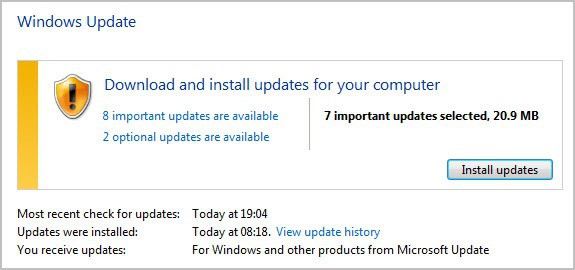
Windows Update has already picked up the new updates. You may need to run a manual check for updates though. Windows Vista and Windows 7 users can open the control panel either by pasting Control Panel\All Control Panel Items\Windows Update into an Explorer window, or by searching for Windows Update in the start menu.
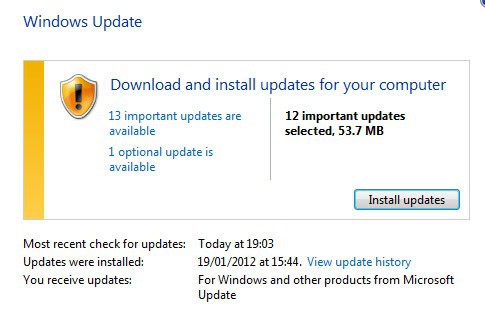
microsoft security bulletins february 2012

A click on Check for Updates there retrieves the most recent update information from Microsoft.

Users who do not want to or cannot update via Windows Update find all security updates at Microsoft’s official download repository.

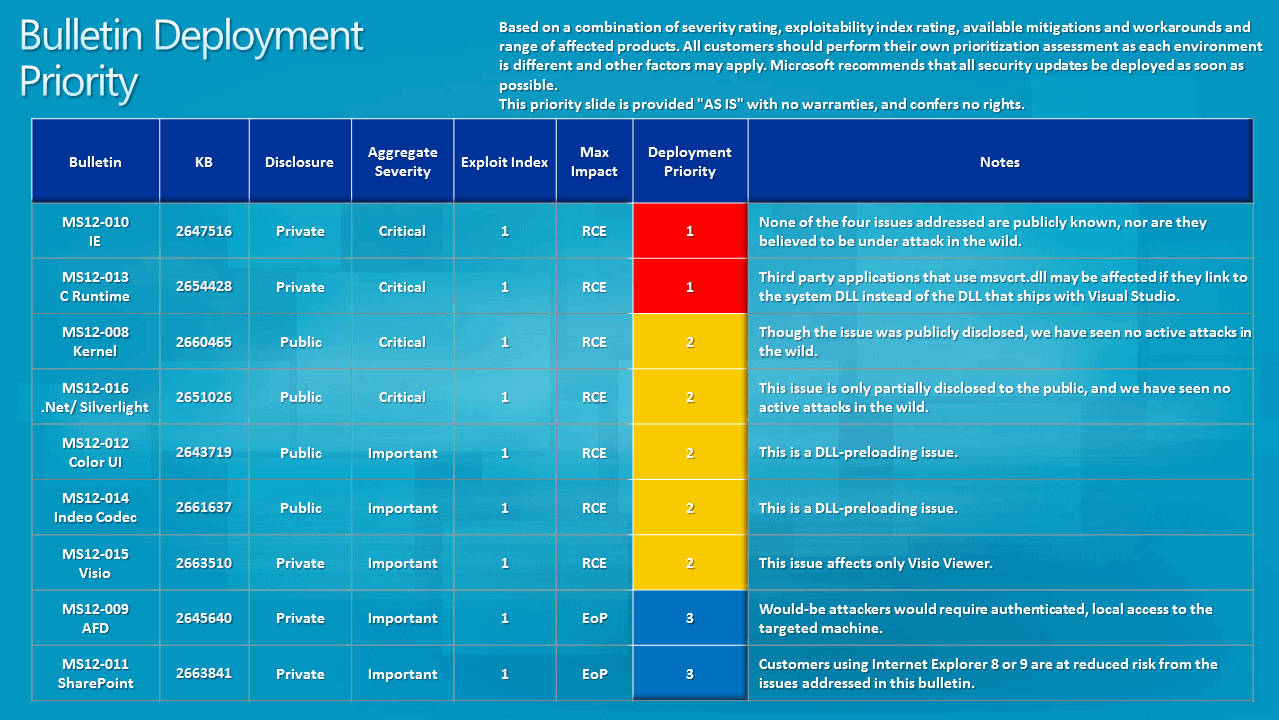
Update: Microsoft has posted the Bulletin Deployment Priority chart and the Severity and Exploitability Index. Images below.
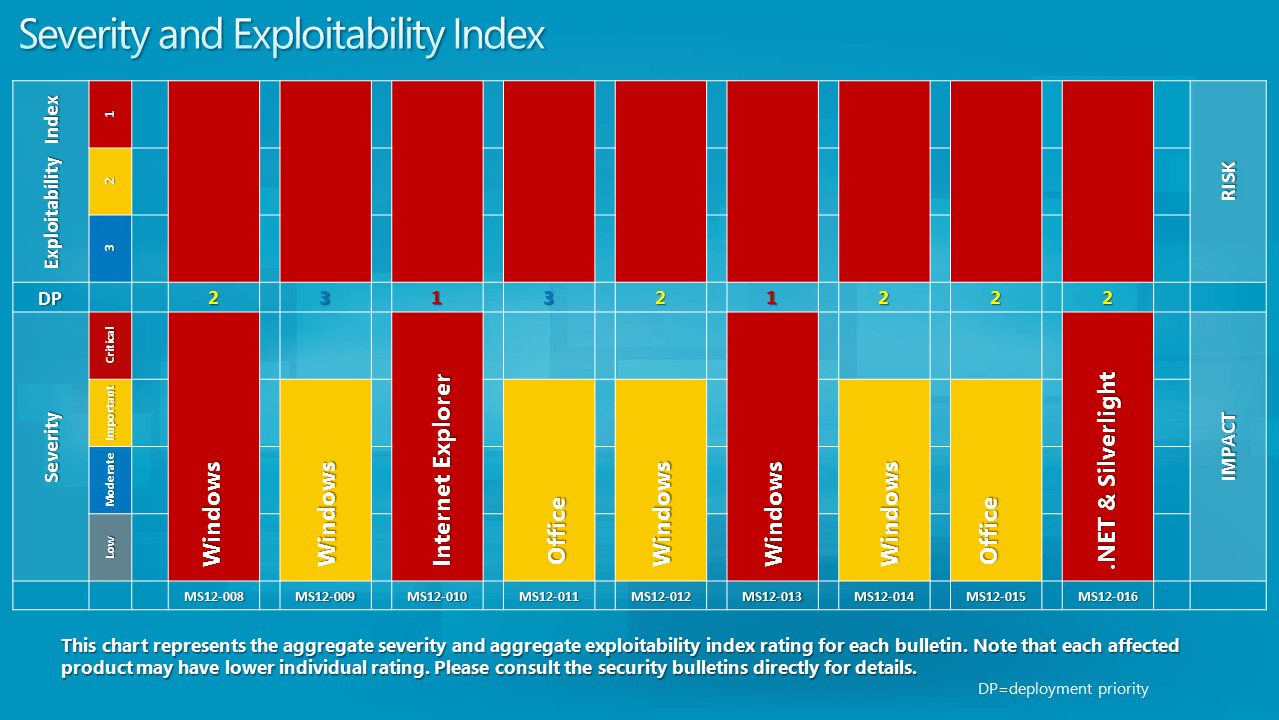
severity explotability index

bulletin deployment priority

You can read up on this month’s bulletins at the Microsoft Security Response Center.

Update: The February 2012 Security Release ISO Image is available now as well.


Thursday, January 19, 2012

How To Disable Restart Your Computer To Finish Installing Important Updates Prompt

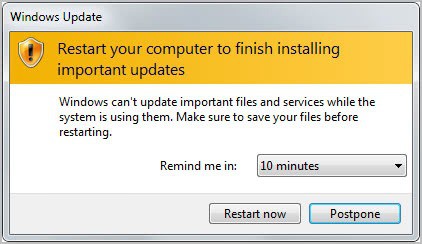
We have all been there and seen it. Whenever updates are installed in Windows that require a reboot, you are prompted in regular intervals to do so. These messages appear shortly after installing the updates, and then regularly until you do so. The Restart Your Computer To Finish Installing Important Updates prompt offers to postpone the update for 10 minutes, 1 hour or 4 hours. The prompt is then displayed again if the computer has not been rebooted in the meantime.

Many Windows users dislike the nagging prompt, especially if they are currently running tasks that would be interrupted by a reboot. This includes video rendering, an important download or upload, or a document that needs to be finished in the next hour or so.

restart your computer to finish installing important updates

While you could select 4 hours from the menu to see the reboot prompt after 4 hours, you may still like to disable the display of the update prompt for a longer period of time. This can be useful if you are currently in a day long presentation that requires the computer.

There are two options to deal with the issue. You could first stop the Windows Update service for the current session. This basically blocks the prompt and any attempt to install new updates until the computer is rebooted.

The following steps are needed for this:

  • Open up an elevated command prompt window. You can do that by clicking on the Start button of the operating system, entering cmd in the search form and using the shortcut Ctrl-Shift-Enter to open it with administrative privileges. A user account control prompt may be displayed.
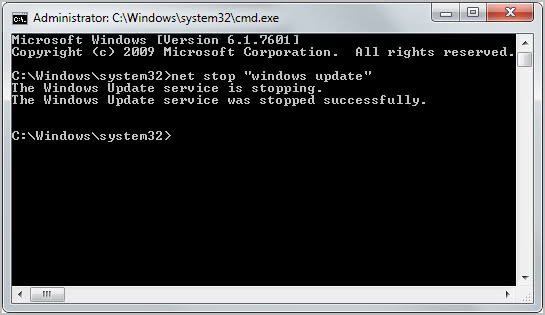
  • Run the command net stop “windows update” to stop the Windows Update service for the current session.

net stop windows update

You can restart the service with the command net start “windows update”. The service will also be started normally on the next start of the system.

The second option lets you disable the auto reboot option when users are logged on. This requires some Registry hacking and is only suggested for advanced users. You may also want to backup the Registry first before you make those changes.

  • Use Windows-r to bring up the run box. Enter regedit and hit enter to open the Windows Registry Editor.
  • Navigate to the following Registry key HKEY_LOCAL_MACHINE\SOFTWARE\Microsoft\Windows\CurrentVersion\WindowsUpdate\Auto Update
  • Locate the ForcedReboot key there and change its value from whatever it is set to to 0.

Please note that this works only under Vista, Windows 7 and newer operating systems.

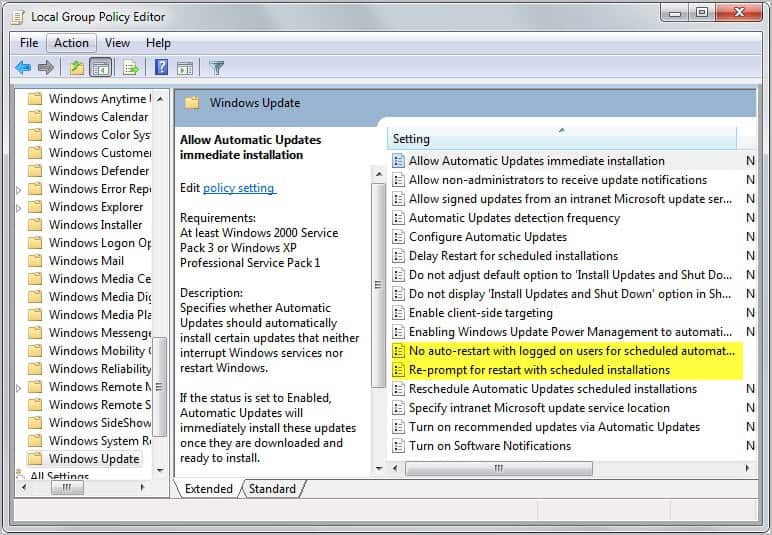
The third and final option is the Local Group Policy Editor which is only available in some versions of the Windows operating system. Go to Computer Configuration > Administrative Templates > Windows Components > Windows Update and locate the following two parameters:

  • No auto-restart for scheduled Automatic Updates installations
  • Re-prompt for restart with scheduled installations

Enable the first parameter to block automatic restarts after update installations, and set the second to a high enough period to receive the reboot prompt less often.

local group policy


Tuesday, January 10, 2012

Microsoft Releases First 2012 Security Update

Microsoft today has released seven security related bulletins that fix issues in the Windows operating system and in Microsoft’s Developer Tools. One bulletin has received the maximum severity rating of critical, the highest available rating, while the remaining six bulletins have all received a rating of important, the third highest rating.

It is interesting to note that the severity rating of the first bulletin is critical on Windows XP and Vista, while only important on Windows 7 and Windows Server 2008 R2. When you look at all bulletins you will notice that Windows XP is affected by all, Vista by five and Windows 7 by four of the vulnerabilities addressed in the bulletins.

The Security Bulletins have just been posted on Microsoft’s Technet website. Here is this month’s summary with links to each security bulletin.

  • MS12-004 – Vulnerabilities in Windows Media Could Allow Remote Code Execution (2636391) – This security update resolves two privately reported vulnerabilities in Microsoft Windows. The vulnerabilities could allow remote code execution if a user opens a specially crafted media file. An attacker who successfully exploited the vulnerabilities could gain the same user rights as the local user. Users whose accounts are configured to have fewer user rights on the system could be less impacted than users who operate with administrative user rights.
  • MS12-001 – Vulnerability in Windows Kernel Could Allow Security Feature Bypass (2644615) – This security update resolves a privately reported vulnerability in Microsoft Windows. The vulnerability could allow an attacker to bypass the SafeSEH security feature in a software application. An attacker could then use other vulnerabilities to leverage the structured exception handler to run arbitrary code. Only software applications that were compiled using Microsoft Visual C++ .NET 2003 can be used to exploit this vulnerability.
  • MS12-002 – Vulnerability in Windows Object Packager Could Allow Remote Code Execution (2603381) – This security update resolves a privately reported vulnerability in Microsoft Windows. The vulnerability could allow remote code execution if a user opens a legitimate file with an embedded packaged object that is located in the same network directory as a specially crafted executable file. An attacker who successfully exploited this vulnerability could gain the same user rights as the logged-on user. An attacker could then install programs; view, change, or delete data; or create new accounts with full user rights. Users whose accounts are configured to have fewer user rights on the system could be less impacted than users who operate with administrative user rights.
  • MS12-003 – Vulnerability in Windows Client/Server Run-time Subsystem Could Allow Elevation of Privilege (2646524) – This security update resolves one privately reported vulnerability in Microsoft Windows. This security update is rated Important for all supported editions of Windows XP, Windows Server 2003, Windows Vista, and Windows Server 2008. All supported editions of Windows 7 and Windows Server 2008 R2 are not affected by this vulnerability.

    The vulnerability could allow elevation of privilege if an attacker logs on to an affected system and runs a specially crafted application. The attacker could then take complete control of the affected system and install programs; view, change, or delete data; or create new accounts with full user rights. This vulnerability can only be exploited on systems configured with a Chinese, Japanese, or Korean system locale.

  • MS12-005 – Vulnerability in Microsoft Windows Could Allow Remote Code Execution (2584146) – This security update resolves a privately reported vulnerability in Microsoft Windows. The vulnerability could allow remote code execution if a user opens a specially crafted Microsoft Office file containing a malicious embedded ClickOnce application. An attacker who successfully exploited this vulnerability could gain the same user rights as the local user. Users whose accounts are configured to have fewer user rights on the system could be less impacted than users who operate with administrative user rights.
  • MS12-006 – Vulnerability in SSL/TLS Could Allow Information Disclosure (2643584) – This security update resolves a publicly disclosed vulnerability in SSL 3.0 and TLS 1.0. This vulnerability affects the protocol itself and is not specific to the Windows operating system. The vulnerability could allow information disclosure if an attacker intercepts encrypted web traffic served from an affected system. TLS 1.1, TLS 1.2, and all cipher suites that do not use CBC mode are not affected.
  • MS12-007 – Vulnerability in AntiXSS Library Could Allow Information Disclosure (2607664) – This security update resolves one privately reported vulnerability in the Microsoft Anti-Cross Site Scripting (AntiXSS) Library. The vulnerability could allow information disclosure if a an attacker passes a malicious script to a website using the sanitization function of the AntiXSS Library. The consequences of the disclosure of that information depend on the nature of the information itself. Note that this vulnerability would not allow an attacker to execute code or to elevate the attacker’s user rights directly, but it could be used to produce information that could be used to try to further compromise the affected system. Only sites that use the sanitization module of the AntiXSS Library are affected by this vulnerability.

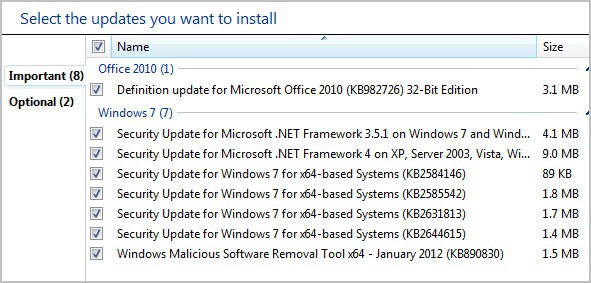
The updates are already available on Windows Update. The easiest way to open the updating tool is to click on the start menu orb and select Windows Update from the program listing there.

windows update january 2012

updates january 2012

Windows users who do not want to or can’t use Windows Updates can download the updates from Microsoft’s Download Center beginning later today. Microsoft as usual will release an ISO image with all security updates of the month for easier distribution.

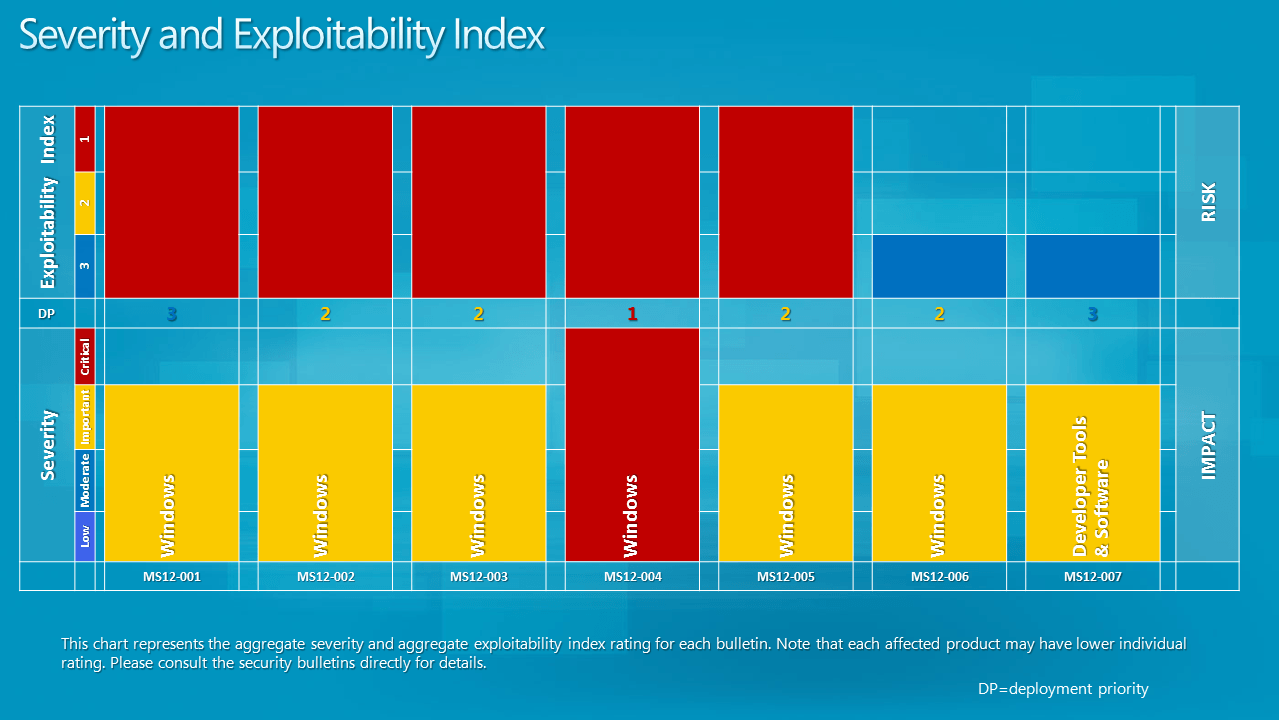
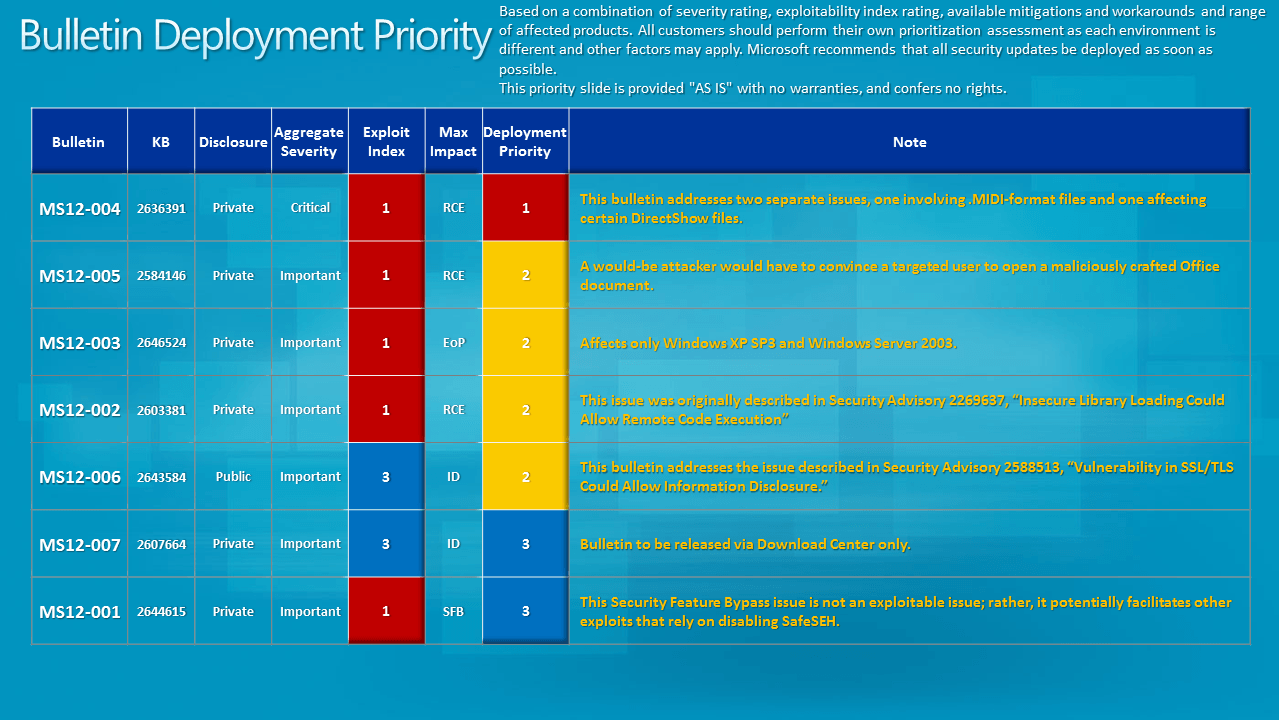
Update: The severity and exploitability index and bulletin deployment information have been posted.

Severity and Exploitability Index

Bulletin Deployment Priority

The next security updates will be released on February 14, 2012.


© Martin Brinkmann for gHacks Technology News | Latest Tech News, Software And Tutorials, 2012. | Permalink |
Add to del.icio.us, digg, facebook, reddit, twitter
Post tags: ,


Wednesday, December 14, 2011

Microsoft Releases Security Patches for December 2011

Yesterday’s Patch Tuesday brought 13 security bulletins fixing a total of 19 different vulnerabilities affecting Microsoft products. The majority of security patches have been released for Microsoft’s Windows operating system and Microsoft Office, with a cumulative security update released for Internet Explorer as well.

The updates are already available on Windows Update and via the Microsoft Download Center for users who prefer to download them separately. A DVD Iso image has also been released with December’s security updates.

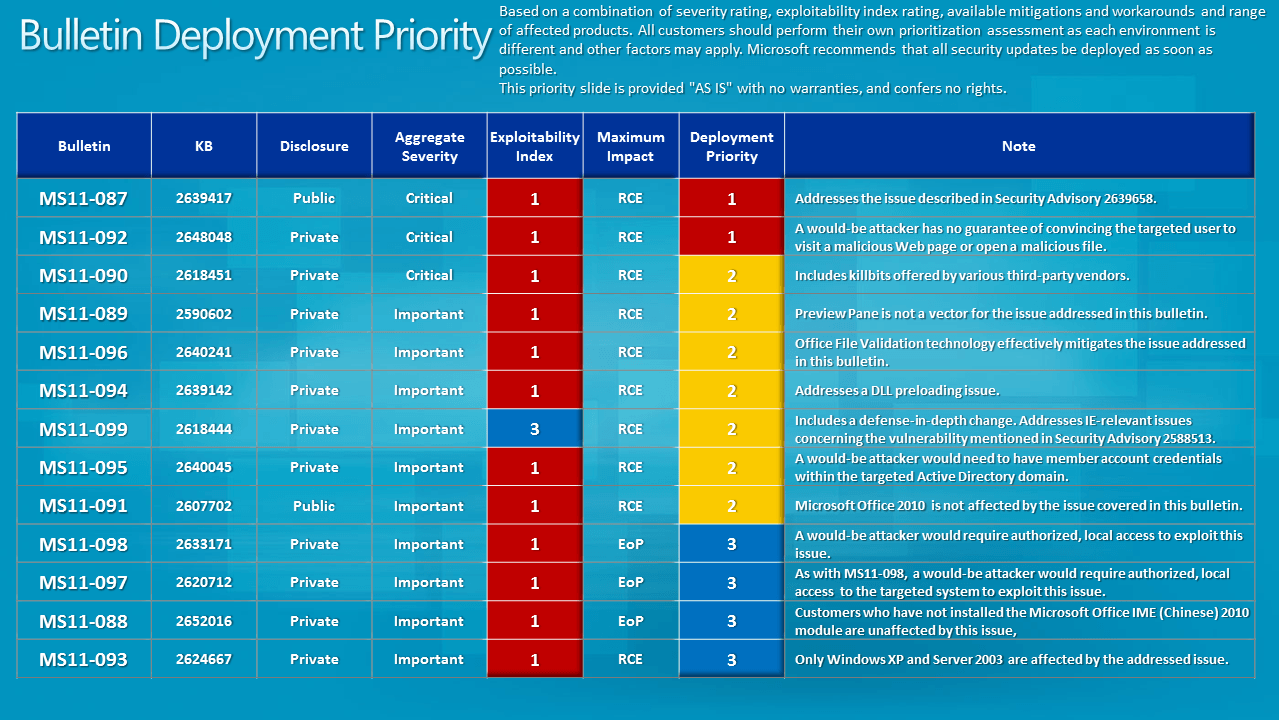
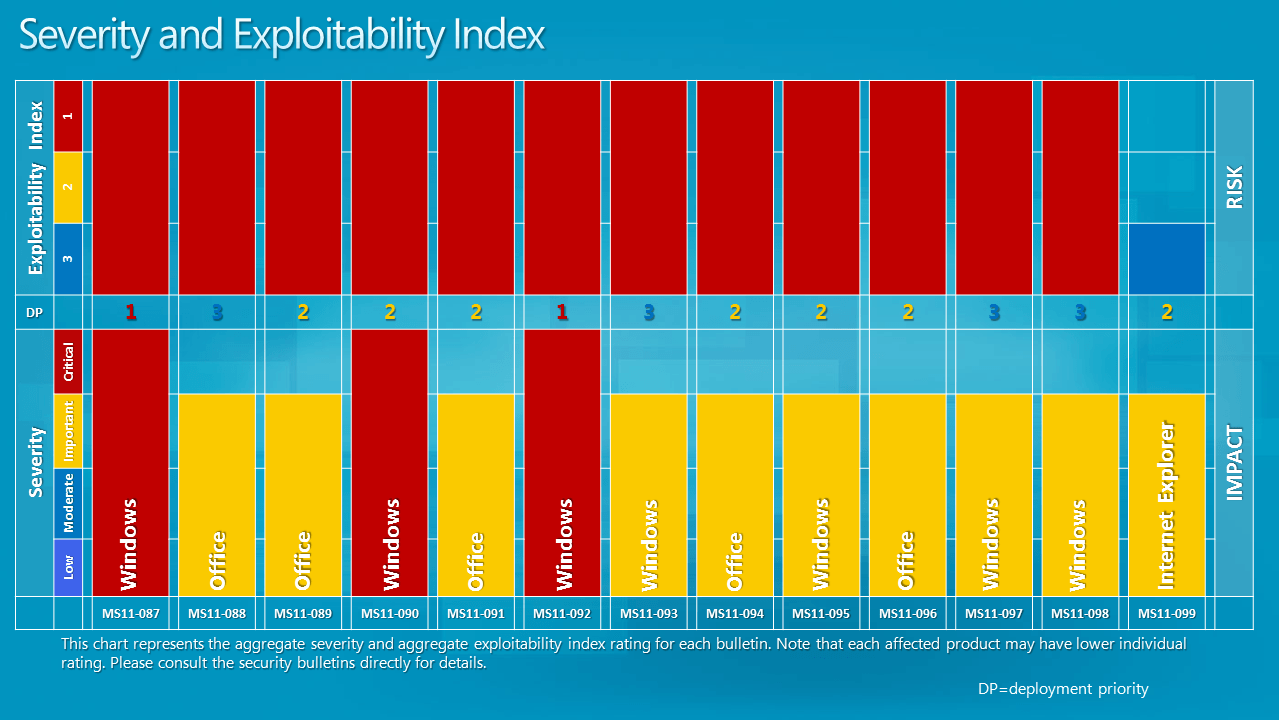
Microsoft recommends to focus the attention on the MS11-092 – Windows Media and MS11-087 – Windows critical updates before installing the remaining patches. The bulletin deployment priority table, and severity and exploitability index provide further assistance.

bulletin deployment priority

severity exploitability index

Here is a list of all bulletins released in December 2011 by Microsoft.

  • MS11-087 – Vulnerability in Windows Kernel-Mode Drivers Could Allow Remote Code Execution (2639417) – This security update resolves a publicly disclosed vulnerability in Microsoft Windows. The vulnerability could allow remote code execution if a user opens a specially crafted document or visits a malicious Web page that embeds TrueType font files.
  • MS11-090 – Cumulative Security Update of ActiveX Kill Bits (2618451) – This security update resolves a privately reported vulnerability in Microsoft software. The vulnerability could allow remote code execution if a user views a specially crafted Web page that uses a specific binary behavior in Internet Explorer. Users whose accounts are configured to have fewer user rights on the system could be less impacted than users who operate with administrative user rights. This update also includes kill bits for four third-party ActiveX controls.
  • MS11-092 – Vulnerability in Windows Media Could Allow Remote Code Execution (2648048) – This security update resolves a privately reported vulnerability in Windows Media Player and Windows Media Center. The vulnerability could allow remote code execution if a user opens a specially crafted Microsoft Digital Video Recording (.dvr-ms) file. In all cases, a user cannot be forced to open the file; for an attack to be successful, a user must be convinced to do so.
  • MS11-088 – Vulnerability in Microsoft Office IME (Chinese) Could Allow Elevation of Privilege (2652016) – This security update resolves a privately reported vulnerability in Microsoft Office IME (Chinese). The vulnerability could allow elevation of privilege if a logged-on user performed specific actions on a system where an affected version of the Microsoft Pinyin (MSPY) Input Method Editor (IME) for Simplified Chinese is installed. An attacker who successfully exploited this vulnerability could run arbitrary code in kernel mode. An attacker could then install programs; view, change, or delete data; or create new accounts with full administrative rights. Only implementations of Microsoft Pinyin IME 2010 are affected by this vulnerability. Other versions of Simplified Chinese IME and other implementations of IME are not affected.
  • MS11-089 – Vulnerability in Microsoft Office Could Allow Remote Code Execution (2590602) – This security update resolves a privately reported vulnerability in Microsoft Office. The vulnerability could allow remote code execution if a user opens a specially crafted Word file. An attacker who successfully exploited this vulnerability could gain the same user rights as the logged-on user. Users whose accounts are configured to have fewer user rights on the system could be less impacted than users who operate with administrative user rights.
  • MS11-091 – Vulnerabilities in Microsoft Publisher Could Allow Remote Code Execution (2607702) – This security update resolves one publicly disclosed vulnerability and three privately reported vulnerabilities in Microsoft Office. The most severe vulnerabilities could allow remote code execution if a user opens a specially crafted Publisher file. An attacker who successfully exploited any of these vulnerabilities could take complete control of an affected system. An attacker could then install programs; view, change, or delete data; or create new accounts with full user rights. Users whose accounts are configured to have fewer user rights on the system could be less impacted than users who operate with administrative user rights.
  • MS11-093 – Vulnerability in OLE Could Allow Remote Code Execution (2624667) – This security update resolves a privately reported vulnerability in all supported editions of Windows XP and Windows Server 2003. This security update is rated Important for all supported editions of Windows XP and Windows Server 2003. Windows Vista, Windows Server 2008, Windows 7, and Windows Server 2008 R2 are not affected by the vulnerability.

    The vulnerability could allow remote code execution if a user opens a file that contains a specially crafted OLE object. An attacker who successfully exploited this vulnerability could gain the same user rights as the local user. Users whose accounts are configured to have fewer user rights on the system could be less impacted than users who operate with administrative user rights.

  • MS11-094 – Vulnerabilities in Microsoft PowerPoint Could Allow Remote Code Execution (2639142) – This security update resolves two privately reported vulnerabilities in Microsoft Office. The vulnerabilities could allow remote code execution if a user opens a specially crafted PowerPoint file. An attacker who successfully exploited either of the vulnerabilities could take complete control of an affected system. Users whose accounts are configured to have fewer user rights on the system could be less impacted than users who operate with administrative user rights.
  • MS11-095 – Vulnerability in Active Directory Could Allow Remote Code Execution (2640045) – This security update resolves a privately reported vulnerability in Active Directory, Active Directory Application Mode (ADAM), and Active Directory Lightweight Directory Service (AD LDS). The vulnerability could allow remote code execution if an attacker logs on to an Active Directory domain and runs a specially crafted application. To exploit this vulnerability, an attacker would first need to acquire credentials to log on to an Active Directory domain.
  • MS11-096 – Vulnerability in Microsoft Excel Could Allow Remote Code Execution (2640241) – This security update resolves a privately reported vulnerability in Microsoft Office. The vulnerability could allow remote code execution if a user opens a specially crafted Excel file. An attacker who successfully exploited this vulnerability could gain the same user rights as the logged-on user. Users whose accounts are configured to have fewer user rights on the system could be less impacted than users who operate with administrative user rights. Installing and configuring Office File Validation (OFV) to prevent the opening of suspicious files blocks the attack vectors for exploiting the vulnerabilities described in CVE-2011-3403.
  • MS11-097 – Vulnerability in Windows Client/Server Run-time Subsystem Could Allow Elevation of Privilege (2620712) – This security update resolves a privately reported vulnerability in Microsoft Windows. The vulnerability could allow elevation of privilege if an attacker logs on to an affected system and runs a specially crafted application designed to send a device event message to a higher-integrity process. An attacker must have valid logon credentials and be able to log on locally to exploit this vulnerability.
  • MS11-098 – Vulnerability in Windows Kernel Could Allow Elevation of Privilege (2633171) – This security update resolves a privately reported vulnerability in Microsoft Windows. The vulnerability could allow elevation of privilege if an attacker logs on to an affected system and runs a specially crafted application designed to exploit the vulnerability. An attacker must have valid logon credentials and be able to log on locally to exploit this vulnerability. The vulnerability could not be exploited remotely or by anonymous users.
  • MS11-099 – Cumulative Security Update for Internet Explorer (2618444) – This security update resolves three privately reported vulnerabilities in Internet Explorer. The most severe vulnerability could allow remote code execution if a user opens a legitimate HyperText Markup Language (HTML) file that is located in the same directory as a specially crafted dynamic link library (DLL) file.

The next upcoming scheduled security update will be on the 10th of January 2012.


© Martin Brinkmann for gHacks Technology News | Latest Tech News, Software And Tutorials, 2011. | Permalink |
Add to del.icio.us, digg, facebook, reddit, twitter
Post tags: ,


Tuesday, November 15, 2011

Microsoft Talks Windows 8 Update Changes

Microsoft has announced changes to the Windows Update mechanism of the upcoming operating system Windows 8. When you look at the current state of Windows Update, you will find it to be relatively disruptive to the user experience. This stems from the fact that the majority of updates require a system start before their installation is complete on the computer system. A system remains vulnerable, in the case of security updates, until the computer is rebooted and the update applied. That’s why Microsoft displays shutdown notifications to the user to reboot the system and apply the update.

Windows Update can be configured, but that tackles only how and when updates are downloaded and installed, and not the shutdown requirement.

Microsoft in a recent blog post over at the Building Windows 8 blog, described how Windows users are currently updating their system, and how the company intents to change that behavior with the release of Windows 8.

If you look at the current way of updating, you will notice that the majority of Windows 7 users are making use of automatic updates. Only minorities make use of notifications or never check for updates (that’s less than 10% total).

Automatically install updates – 89.30%
Notify me before install – 2.38%
Notify me before download – 3.44%
Never check for updates – 4.88%

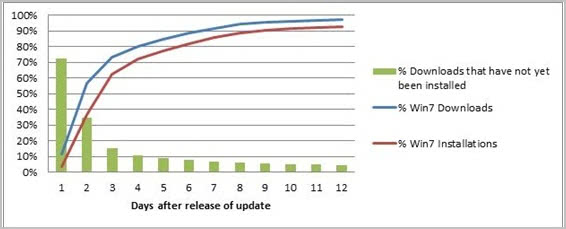
When you look at the time it takes to download and install updates, you will notice that 90% of all Windows 7 users install updates in a week’s time after release. Install here means download, install and reboot the computer to complete the update.

windows 7 updates

The breakout by type of install reveals additional information. 39% of all users of Windows 7 install the update at shutdown of the system, 30% at a scheduled time and 31% interactively.

Install-at-shutdown – The majority of automatic update users (39%) are updating when they shut down their systems. For these users, there is no automatic restart because the system can complete all steps of the installation during shutdown. This is the least disruptive experience for users, and so we do want to “hitch a ride” whenever we can on user-initiated shutdowns instead of inconveniencing users with a separate restart.

Install-at-scheduled-time – For the 30% who are scheduling automatic updates, their installations start at a scheduled time (the default is 3 AM in the time-zone where the PC is located) or the next time the user logs in (if we miss the 3 AM window). WU automatically completes any restarts necessary to finish the installation. To ensure that you get the chance to save any important files and data before the restart, we show you a 15-minute countdown timer before the restart.

Allowing restarts to occur without user interaction has helped us to rapidly update a major portion of the Windows ecosystem with critical updates. On average, within a week of releasing a critical update, 90% of PCs have installed the update (see Figure1). On the other hand, this behavior of automatic restarts has some unintended consequences for the user. Restarts can occur without notice, and might occur monthly or even more often if there is an out-of-band update. This unpredictability can potentially result in loss of user data. Most of our automatic installs and the subsequent restarts happen at 3 AM, when users are not around to save any important work. We have heard a lot of painful stories of users coming back to their PCs in the morning to find that a restart occurred, and that some important data was lost. In other cases, the user doesn’t lose data, but needs to restart a job that they were in the middle of (for example, a long copy job).
Interactive install – We were surprised to see 31% of users interactively installing updates; of these 31%, approximately 20% have selected to automatically install, but they manually intervene anyway. WU provides a pop-up notification telling you when updates are available if you have selected to automatically install. The notifications are clearly capturing people’s attention, so they click on the notification and interactively install the updates. But this is actually reinforcing an unintended behavior. If you signed up to get automatic updates, you really shouldn’t need to bother interactively installing an update every time one is available. Most installs should occur silently in the background, and WU should notify you only for critical actions (for example, a pending restart). This also matches feedback from customers, who tell us they find the constant notifications to be distracting. Their expectation when they choose automatic updating is that updating will occur automatically. This seems to be a case where making sure people are in control of their PC experience actually resulted in too much information, and ultimately the price of being in control was a feeling of a loss of control.

For Windows 8, Microsoft came up with guiding principles to design the update experience. They were:
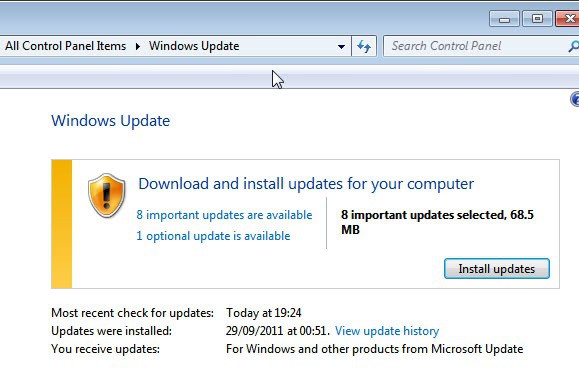
  • The automatic updating experience is not intrusive to users but keeps them aware of critical actions
  • Minimize restarts and make them more predictable
  • Continue to keep the PC and the ecosystem up-to-date and secure in a timely manner

The update process will change in the following ways on Windows 8:

Windows Update will consolidate all non-security updates and synchronize them with the monthly security updates. It is usually not a problem to skip the direct installation of optional updates. It is now not necessary to install the update right away (but still possible if the computer is restarted). The only exception to the once per month rule is the release of critical security updates that require immediate installation.

Windows Update will furthermore inform the user on the login screen that updates have been installed that require a restart.

lock screen update notification

The PC will be automatically restarted by Windows Update after this three day grace period. The program has been designed to wait until the lock screen is displayed after that period before the computer is restarted. This has been implemented to avoid data loss on the PC. In the case of critical applications running in the background while the computer is locked, the user will be asked to close all work on the next login as Windows Update will restart the PC within 15 minutes.

Windows Update can also detect specific system states like full screen movies, games or presentation modes. The program then waits until the state changes before the restart notifications are displayed to the user.

The core benefit of Windows 8′s update mechanism is that users won’t have to shutdown their system as often as they used to. Microsoft also made it clear that the company won’t include third party software updates in Windows Update.


© Martin Brinkmann for gHacks Technology News | Latest Tech News, Software And Tutorials, 2011. | Permalink |
Add to del.icio.us, digg, facebook, reddit, twitter
Post tags: , , ,


Tuesday, October 11, 2011

Microsoft Patch Day October 2011 Overview

Microsoft releases Windows updates on the second Tuesday of the month. A total of eight different security bulletins have been released today by Microsoft. They update the operating system Microsoft Windows and other Microsoft products such as the .NET Framework, Microsoft Silverlight and Internet Explorer. Two of the eight bulletins have been given the highest possible severity rating critical, the remaining six one of important. Maximum severity means that there is at least one product affected by that vulnerability impact.

You find information about each security bulletin below. Please follow the links for information about affected operating systems and Microsoft applications. You find a summary of all security bulletins here.

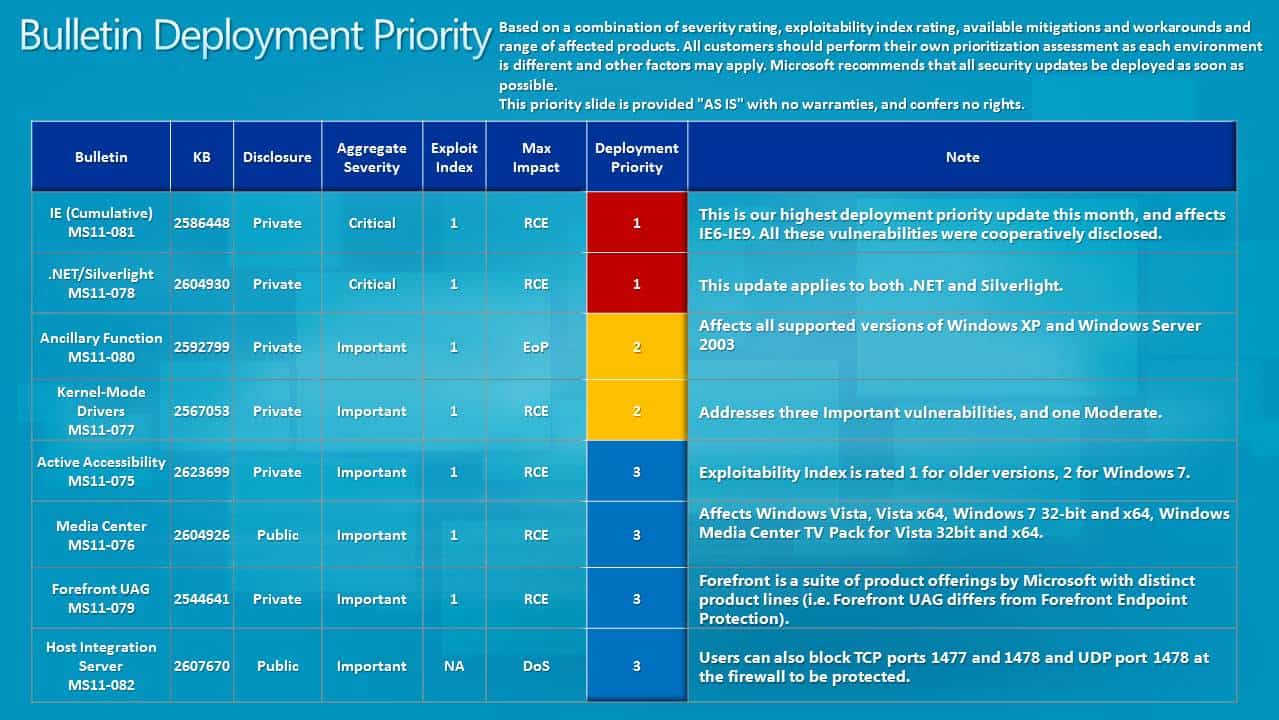
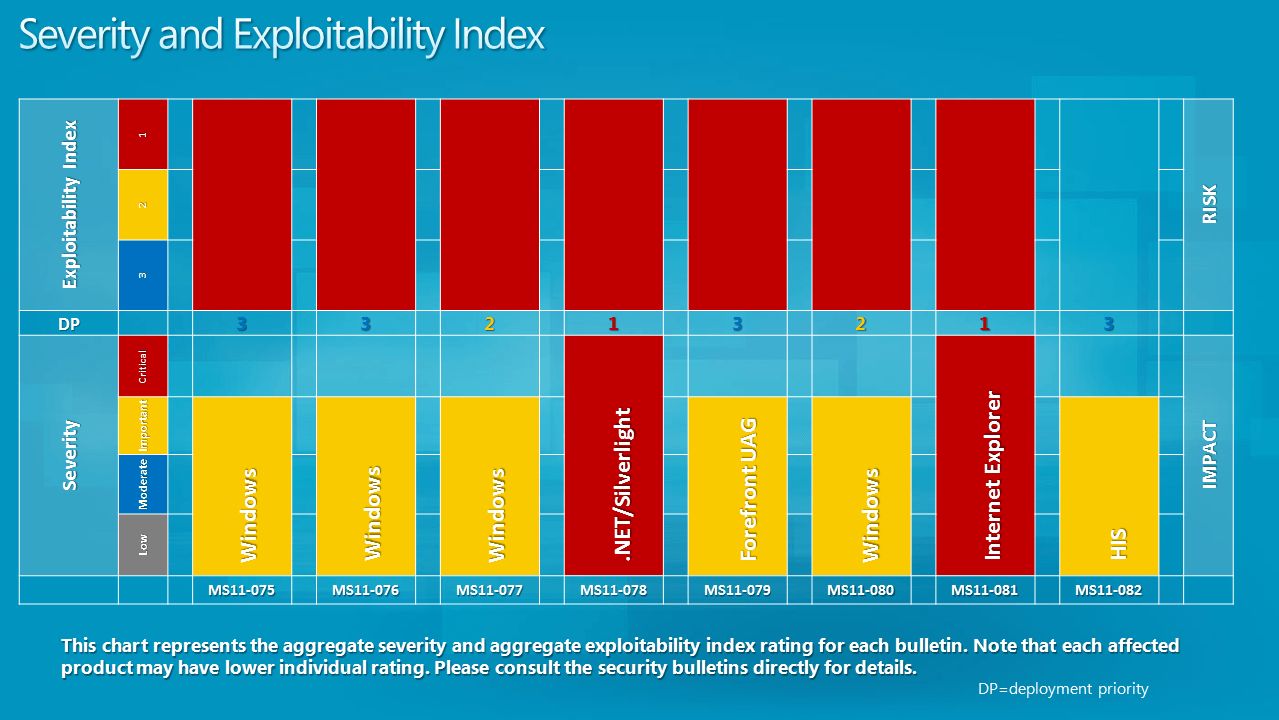
Here are the Bulletin Deployment Priority and Severity and Exploitability Index screenshots for October 2011:

bulletin deployment priority october 2011

severity exploitability index october 2011

And a video in which Jerry Bryant discusses this month’s bulletins:

  • MS11-078 - Vulnerability in .NET Framework and Microsoft Silverlight Could Allow Remote Code Execution (2604930) -
    This security update resolves a privately reported vulnerability in Microsoft .NET Framework and Microsoft Silverlight. The vulnerability could allow remote code execution on a client system if a user views a specially crafted Web page using a Web browser that can run XAML Browser Applications (XBAPs) or Silverlight applications. Users whose accounts are configured to have fewer user rights on the system could be less impacted than users who operate with administrative user rights. The vulnerability could also allow remote code execution on a server system running IIS, if that server allows processing ASP.NET pages and an attacker succeeds in uploading a specially crafted ASP.NET page to that server and then executes the page, as could be the case in a Web hosting scenario. This vulnerability could also be used by Windows .NET applications to bypass Code Access Security (CAS) restrictions.
  • MS11-081 - Cumulative Security Update for Internet Explorer (2586448) - This security update resolves eight privately reported vulnerabilities in Internet Explorer. The most severe vulnerabilities could allow remote code execution if a user views a specially crafted Web page using Internet Explorer. An attacker who successfully exploited any of these vulnerabilities could gain the same user rights as the local user. Users whose accounts are configured to have fewer user rights on the system could be less impacted than users who operate with administrative user rights.
  • MS11-075 - Vulnerability in Microsoft Active Accessibility Could Allow Remote Code Execution (2623699) - This security update resolves a privately reported vulnerability in the Microsoft Active Accessibility component. The vulnerability could allow remote code execution if an attacker convinces a user to open a legitimate file that is located in the same network directory as a specially crafted dynamic link library (DLL) file. Then, while opening the legitimate file, the Microsoft Active Accessibility component could attempt to load the DLL file and execute any code it contained. For an attack to be successful, a user must visit an untrusted remote file system location or WebDAV share and open a document from this location that is then loaded by a vulnerable application.
  • MS11-076 - Vulnerability in Windows Media Center Could Allow Remote Code Execution (2604926) - This security update resolves a publicly disclosed vulnerability in Windows Media Center. The vulnerability could allow remote code execution if an attacker convinces a user to open a legitimate file that is located in the same network directory as a specially crafted dynamic link library (DLL) file. Then, while opening the legitimate file, Windows Media Center could attempt to load the DLL file and execute any code it contained. For an attack to be successful, a user must visit an untrusted remote file system location or WebDAV share and open a legitimate file.
  • MS11-077 - Vulnerabilities in Windows Kernel-Mode Drivers Could Allow Remote Code Execution (2567053) - This security update resolves four privately reported vulnerabilities in Microsoft Windows. The most severe of these vulnerabilities could allow remote code execution if a user opens a specially crafted font file (such as a .fon file) in a network share, a UNC or WebDAV location, or an e-mail attachment. For a remote attack to be successful, a user must visit an untrusted remote file system location or WebDAV share and open the specially crafted font file, or open the file as an e-mail attachment.
  • MS11-079 - Vulnerabilities in Microsoft Forefront Unified Access Gateway Could Cause Remote Code Execution (2544641) - This security update resolves five privately reported vulnerabilities in Forefront Unified Access Gateway (UAG). The most severe of these vulnerabilities could allow remote code execution if a user visits an affected Web site using a specially crafted URL. However, an attacker would have no way to force users to visit such a Web site. Instead, an attacker would have to persuade users to visit the Web site, typically by getting them to click a link in an e-mail message or Instant Messenger message that takes users to the attacker's Web site.
  • MS11-080 - Vulnerability in Ancillary Function Driver Could Allow Elevation of Privilege (2592799) - This security update resolves a privately reported vulnerability in the Microsoft Windows Ancillary Function Driver (AFD). The vulnerability could allow elevation of privilege if an attacker logs on to a user's system and runs a specially crafted application. An attacker must have valid logon credentials and be able to log on locally to exploit the vulnerability.
  • MS11-082 - Vulnerabilities in Host Integration Server Could Allow Denial of Service (2607670) - This security update resolves two publicly disclosed vulnerabilities in Host Integration Server. The vulnerabilities could allow denial of service if a remote attacker sends specially crafted network packets to a Host Integration Server listening on UDP port 1478 or TCP ports 1477 and 1478. Firewall best practices and standard default firewall configurations can help protect networks from attacks that originate outside the enterprise perimeter. Best practices recommend that systems that are connected to the Internet have a minimal number of ports exposed. In this case, the Host Integration Server ports should be blocked from the Internet.
  • windows updates

    Windows users can update their operating system by installing the security patches via Windows Update or Microsoft's Download Center with Windows Update being the better option if the patches do not have to be installed on multiple computer systems.

    Updates are already live and available via Windows Update. Additional information are available at Microsoft's Security Response Center.


    © Martin Brinkmann for gHacks Technology News | Latest Tech News, Software And Tutorials, 2011. | Permalink |
    Add to del.icio.us, digg, facebook, reddit, twitter
    Post tags: , , , ,