Pages

Friday, November 4, 2011

Access Game Cheats And Cheat Codes With Cheatbook Database

Game cheats and cheat codes have been very important for previous gaming generations. They were highly popular before the Internet became popular. Game magazines back then filled a lot of pages with walkthroughs, tips, tricks and cheat codes. Today with Internet access almost everywhere, there is no need for offline access to game cheats. All it takes is a search on the Internet to find all the information you need for practically any game ever created.

Sometimes though you may require offline access. Maybe you have decided to play some older games on your laptop on holiday and know that you won’t have Internet access there. The Cheatbook Database is a free constantly updated cheat codes collection for the Windows operating system. The developers release a new version of the software once a year to keep up with recent game releases.

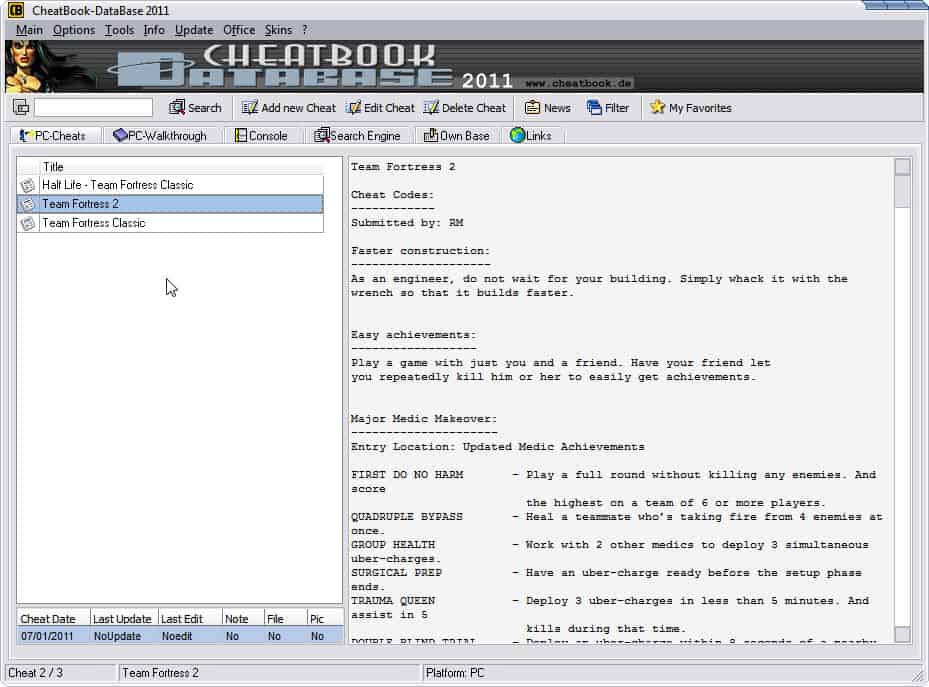
When you first start the software you see a large listing of available game titles in the left sidebar. A search at the top can be used to find cheats for specific games.
cheatbook database cheat codes

Each cheat is listed with a date, last update and other information. The game cheats are listed on the right in text format. The program does not seem to make use of screenshots or other media.

Game cheats vary a lot. From walkthroughs over individual cheat codes for unlimited lives, hexcodes or individual smaller game tips.

If you look at the games listing you will notice that it largely consists of older games. The developers are releasing updates regularly which come in the form of monthly updates in separate programs. The Cheatbook database itself seems to be updated once a year only with all the new games. It would have been better if the program came with an auto-update option.

The program itself supports a wide variety of gaming systems. From PC games to all kinds of consoles, including the Super Nintendo, Sega Genesis, Dreamcast, Sony Playstation, Nintendo DS and this generation’s console systems.

New cheat codes and game tips can be added manually to the database as well. That’s handy for games that are not listed yet in the program, or for adding new cheats to a specific game.

The biggest issue by far is the lack of updates throughout the year. This is somewhat mitigated by the release of the smaller monthly updates. Surprisingly though, only the latest update is available for download at the developer website.

The game cheats database is also searchable directly on the developer site. This database contains all cheat codes, both those that are available in the applications and new ones that have not made their way yet into the programs.

Windows users can download CheatBook from the developer website. The 51 Megabyte download needs to be installed before it can be used. The program is compatible with 32-bit and 64-bit editions of the Microsoft Windows operating system.


© Martin Brinkmann for gHacks Technology News | Latest Tech News, Software And Tutorials, 2011. | Permalink |
Add to del.icio.us, digg, facebook, reddit, twitter
Post tags: , , , ,


Thursday, November 3, 2011

Patch My PC, Check For Windows Software Updates

Protecting a computer system has become one of the most important tasks for computer users in the past decade. While you had your fair share of viruses, hacks and all that stuff on computer systems like the C-64 or Amiga as well, they have never managed to spread far thanks to expensive modems and data plans. Malicious software today benefits from the fact that most computers are not patched properly but still connected to the Internet.

The attacks often exploit vulnerabilities in popular software programs or operating systems.

Software like Patch My PC can aid users in the tasks. The program scans the Windows PC for popular software programs that are out of date offering to download and install the patches and new versions automatically.

The application supports the following programs: Adobe Air, Adobe Flash AX, Adobe Flash Plugin, Adobe Reader, Apple Safari, Audacity, CCleaner, Defraggler, Dropbox, Firefox, Foxit Reader, Google Chrome, Google Earth, Imgburn, iTunes, Java, Keepass, MalwareBytes, Notepad ++, Opera, Pidgen Chat, Piscasa, PowerISO, Quicktime, Real Player, Shockwave, Silverlight, Skype, Speccy, Spybot, Search And Destroy, Thunderbird, VLC Player, Winrar, Yahoo Messenger

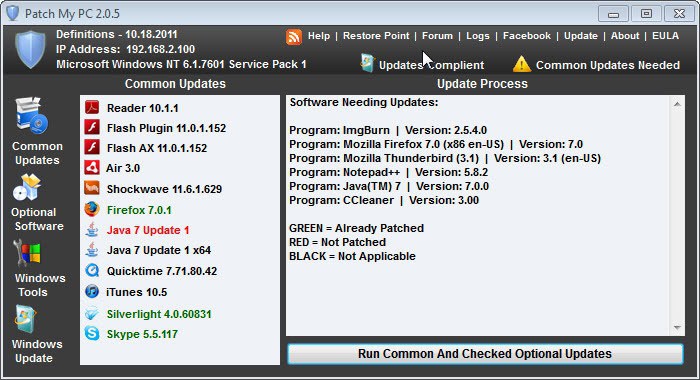
Outdated software will be highlighted in red color, up to date software in green and not installed or detected software in gray.

patch my pc

All programs and plugins that have been identified as “not recent” by Patch My PC will be listed under the Update Process listing in the main interface. Only the current version of the program is displayed here, which makes it more difficulty to verify which new version has been released. for each individual program.

A click on the run updates button downloads all available updates for common (aka popular) products and all updates for checked optional software products. You can click on Optional Software first to select some or all programs there that need updating. It is recommended to check the findings prior to installing the updates to include the updates in the process.

A right-click on an entry under Common Updates opens a context menu with options to skip a particular update or to install or re-install the application.

Patch My PC Video

Some updates may require that certain programs like browsers are closed by the user prior to installation. This is for instance the case when installing technologies like Flash or Java that integrate as plugins into web browsers.

All updates are applied as silent updates that require no user interaction.

It is recommended to create a Restore Point in the menu prior to installing updates. While Windows may create updates automatically on software installations, there is no guarantee that this is happening on all installations.

I would recommend running the Uninstall a Program control panel applet in the background to verify that new versions were successfully installed.

pc software updates

Patch My PC can furthermore check for Windows Updates right from the program window. The native Windows Update app is linked under the Windows Tools section as well. The program can check for and install Windows Updates automatically.

The Windows Tools section links to Windows System Tools like the Windows Firewall, Windows Backup, the Device Manager or the Task Manager.

What’s missing? An option to run a specific software update only, and options to schedule silent checks and installation of updates in the background.

The software catalog is not as big as that of comparable programs like Sumo (see Battle of the Software Updaters for more suggestions). It is also noteworthy that the program does not check beta or alpha versions.

Windows users can download the latest version of Patch My PC from the developer website. The program is compatible with 32-bit and 64-bit editions of the Windows operating system.


© Martin Brinkmann for gHacks Technology News | Latest Tech News, Software And Tutorials, 2011. | Permalink |
Add to del.icio.us, digg, facebook, reddit, twitter
Post tags: , , ,


Free Quizzes With Mega Quiz Software For Windows

Quizzes can be a great way of testing your knowledge or a fun way to compete with others. Students often use quizzes in preparations of upcoming tests.

Mega Quiz is a free quiz software for Windows that comes with all the bells and whistles one would expect. It comes with built-in quizzes, options to download additional quizzes effortlessly from the Internet, create custom quiz sets and to play alone or against other players.

mega quiz

When you first start the program after installation you will notice that only one quiz set – general knowledge – is available for selection. A click on the Get More Sets button opens a menu with a list of quizzes that can be downloaded and added to the software.

quizzes

About 30 different quiz sets are available here, from general knowledge type sets to specialized quizzes about football, tv series or science. All or some sets can then be added to the quiz queue.

You then need to add at least one player by entering the name under Players / Teams on the left side and clicking the Add button. You find additional configuration options like a time limit there as well. A click on the Play button starts the quiz.

Quizzes come in different types, from multiple choices questions over pictures, music, spelling or conundrums. Depending on the type of question, the user may need to identify music, solve a conundrum

quiz question

Some questions will make use of the clock to put extra pressure on the user even if the time limit option has been disabled.

Here is a list of features:

  • Two play modes: Fastest one to buzz gets the chance to answer or alternate answering of quiz questions.
  • Question Styles: Picture, Sound, Music, Conundrum, Spelling, Slide Puzzle, Multiple Choice, Hang Man, Picture Puzzle

The quiz software is very versatile, especially the option to download existing quiz sets from the Internet and to create new quizzes needs to be mentioned here. Versatility is also reflected in the different quiz types that the program offers. The 30 or so existing quiz sets are great to get started.

There is no import option available to add new quiz sets from text documents or other applications.

Windows users can download Mega Quiz from the developer website. The program is compatible with all 32-bit and 64-bit editions of the Microsoft Windows operating system.


© Martin Brinkmann for gHacks Technology News | Latest Tech News, Software And Tutorials, 2011. | Permalink |
Add to del.icio.us, digg, facebook, reddit, twitter
Post tags: , , ,


Want Even More Distractions? Try Google+’s Youtube Button

I sometimes feel the urge to check for new email messages during work. Other users may feel the same urge when it comes to checking social networking sites like Facebook, Twitter or Google Plus for new messages and updates. Others may not be able to resist watching that funny video that just got posted.

Sometimes I manage to stay focused, other times though my mind starts to wonder off which reduces my productivity considerably.

Google Plus, Google’s social networking site, supports embedded YouTube videos. All it takes is to paste the YouTube video url in to post it. That’s convenient and probably one of the reasons why YouTube videos are that often posted on the site.

That apparently was not enough. Google Plus users who visit the site now may have spotted the little YouTube button located on the right sidebar of the site.

youtube button google plus

A click on the button opens the text What would you like to play in a small search form.

what would you like to play

It is basically a search form for YouTube videos. A search opens the first hit in a new (small) window on the screen. It is like the “I’m feeling lucky” feature that Google used for some time on their search engine.

The video is shown in the upper half of the screen, a playlist and now playing list in the lower half. The playlist is automatically populated with results.

youtube video window

The YouTube video player window can be minimized to play the videos in the background while working in the browser. It needs to be noted that this YouTube player works only if Adobe Flash is installed on the PC. Users who do not have Flash installed and who have enabled the HTML5 video beta on YouTube will see an error message even if the video plays fine on YouTube directly.

The YouTube button on the Google+ web page interestingly enough changes to a pause button when videos are playing. This makes the method more convenient than playing videos in another browser tab (because of that missing control option).

The integration of a YouTube video player on Google+ is yet another way to cross-promote Google services. Is the pause option reason enough to use the player? Negative aspects outweigh the positive ones in my opinion. This includes missing HTML5 video support and the lack of video selection controls but also the button itself which some users may see as yet another distraction on the Google Plus website.

What’s your take on the YouTube button on Google Plus?


© Martin Brinkmann for gHacks Technology News | Latest Tech News, Software And Tutorials, 2011. | Permalink |
Add to del.icio.us, digg, facebook, reddit, twitter
Post tags: , , ,


IE Drops to 50% Browser Market Share

It may still be in the lead but the decline of Microsoft’s Internet Explorer web browser is slow and steady.  According to the latest browser usage figures released by NetMarketShare, IE has dropped to just 52.6 market share overall which Google’s Chrome browser making the biggest gains, now up to 17.6%.

It’s bad news for Microsoft elsewhere as well with Bing only showing up as 4% of the total search engine market, or just under 11% when you also factor in the Bing-powered Yahoo! as well.  Even so those are terrible numbers for a search engine that’s been consistently losing money for the parent company.

Bing do even worse when it comes to mobile search with just 1.1% of the market and Google storming away with over 90% of the market.  This will be because Microsoft has failed to make inroads with its Windows Phone operating system and because both the iPad and Android mobile devices use Google’s search engine by default.

Elsewhere there has been little change.  Windows still has over 90% of the desktop market share with Apple climbing slightly to 6.9% and Linux holding steady at 1.2%.  With tablets the numbers reflect Apple’s huge lead over the competition with 61.6% percent of all tablets an iPad and over 62% of all mobile browsers their Safari (I can only assume there’s some margin for error with the results).

It is intersting in the mobile operating system share figures to see an unexpected Java ME sitting with 12.8% of the market while Nokia’s Symbian OS sits hovering just above oblivion with 3.5%.  Windows Phone doesn’t even make the top four.

The downward progression of IE in market share doesn’t seem to see and end.  Clearly Microsoft have plans to halt this with the new in-built Metro version of the browser in Windows 8, but how successful this strategy will be remains to be seen.


© Mike Halsey (MVP) for gHacks Technology News | Latest Tech News, Software And Tutorials, 2011. | Permalink |
Add to del.icio.us, digg, facebook, reddit, twitter
Post tags: , ,


Opera Mini 6.5 Update Released For Various Mobile Devices

Opera Software, developers of the popular Opera web browser, have released Opera Mini 6.5 for various mobile devices including Apple’s iPhone and iPad, Blackberry devices, Symbian S60 and Java-enabled phones. Opera Mobile 11.5 has been released for Symbian S60 devices in addition to that. Before we look at what’s new, we should take a quick look at the differences between Opera Mini and Opera Mobile.

The core difference between two mobile browser versions is how Opera Turbo is handled in the browser. Opera Turbo is Opera’s compression service that reduces the size of web pages by sending the data through an Opera server where they are compressed before they are send to the user’s mobile device.

Smaller data packages means faster page loading times and a reduced bandwidth bill for users who pay by the Megabyte.

Opera Mini 6.5 is now available for new devices (The Android version has been out for a few weeks) including Apple iOS, Symbian, Blackberry and J2ME devices. The big new feature in Opera Mini 6.5 and Opera Mobile 11.5 is a new data counter that allows mobile users to keep tabs on their bandwidth usage. While that may not be exciting for users with flatrates, it may very well make a big difference for consumers who pay by the Megabyte (or capped data plans).

opera mobile 11.5 data usage

Other improvements include stability and performance fixes, better text selection and auto-correct and spell-check support for iOS devices. Interested users can read up on all the changes at the official Opera Mini blog post.

A blog post over at the Opera Mobile blog informs users about the changes in the release (please note that Opera Mobile 11.5 has been available for some time for Android based devices on the Android Market)

Opera Mobile 11.5 introduces the data usage view on Symbian devices. The new version benefits from an Opera Presto rendering engine upgrade as well.

Opera Mobile users on Symbian devices can access the changelog here. Symbian users can point their browsers to m.opera.com to download the latest version of the Opera Mobile or Opera Mini browser. Browsers may also be available in the Apple App Store and on Android Market.


© Martin Brinkmann for gHacks Technology News | Latest Tech News, Software And Tutorials, 2011. | Permalink |
Add to del.icio.us, digg, facebook, reddit, twitter
Post tags: , , , ,


Google Releases Official Google+ Notification Extension For Chrome

If you are a heavy user of Google’s Google+ social networking product you are probably keeping the site running in a tab all the time to never miss new messages. But even if you do, you need to switch back to the tab regularly to see if there are any new notifications on Google+.

Notifier extensions make sure that users stay informed even if they close the Google+ browser window. Up until now Chrome users could make use of third party notifiers which, will working perfectly, were not official which may have kept some users from installing and using those extensions.

Google yesterday released the official Google+ notification extension for the Google Chrome browser. Google+ Notifications works in principle just like any other notification extension. A new message count is displayed as an icon in the Chrome address bar upon installation. The count goes up for new unread messages and down once those messages get read by the user.

The button of the notification extension turns red whenever updates are waiting for the user. A click on the button displays all recent messages and updates on Google+. This feature is a copy of the Google Toolbar button that offers the exact same functionality.

google+ notifications

Notifications include updates on who added you on Google+ and who added a comment or +1 to one of your posts or a post you commented on.

A click on an update leads directly to the Google+ website where it can be read in full. The notifications window also links directly to the Google+ user profile and offers to load the “all notifications” page on the website as well.

Heavy Google+ users on Chrome may find the new official Google+ Notifications extension by Google quite handy. Users can install the extension directly on the Google Chrome Web Store page. (via)


© Martin Brinkmann for gHacks Technology News | Latest Tech News, Software And Tutorials, 2011. | Permalink |
Add to del.icio.us, digg, facebook, reddit, twitter
Post tags: , , ,