Pages

Showing posts with label Chrome. Show all posts

Tuesday, February 7, 2012

Google Chrome Beta For Android Released, Download Links

Google has just released a public beta version of Google Chrome for Android. Google’s main goal was to port the speed and simplicity of the Chrome browser to mobile devices running on Android. The beta version is only available for Android 4.0 Ice Cream Sandwich devices, and currently only in the following countries: United States, Canada, United Kingdom, France, Germany, Spain, Australia, Japan, Korea, Mexico, Argentina and Brazil.

Android users can download Chrome Beta from Android Market, where it is available for download. A version of the browser has also been downloaded and made available again by members of the XDA-Developer forum.

Chrome for Android Beta ships with some Chrome desktop features, including the browser’s omnibox to search and navigate directly from the browser’s address bar, a tab driven interface, and the private browsing mode (incognito mode). Other features of the desktop version, like themes and extensions support are currently not available in the beta client.

chrome beta for android

Chrome for Android furthermore synchronizes bookmarks and open tabs with desktop versions.For synchronization to work, you need to sign in to Chrome on all devices that you want to synchronize.

The mobile version of Chrome introduces several device specific features. This includes options to flip through all open tabs with a swipe, or the new link zooming feature that makes the selection of links more comfortable in the mobile browser.

Google has released a video that introduces the Chrome for Android beta version. The video demonstrates the tab swiping capabilities of the browser among other things.

Most user comments on Android Market, Google Plus and other announcement locations are quite positive. The average rating currently on Android market is 4.3. Critics have pointed out that Chrome for Android does not support Flash, and that it is not possible to switch to the desktop version of a site if available. Positive aspects are speed mainly and the synchronization of tabs and bookmarks.

Google plans to release the mobile browser in other countries in the near future. It is not clear at this point in time if pre-Android 4.0 devices will also be able to download and install the browser. (via Caschy)

Have you played around with Chrome for Android yet? Let me know what you think of this initial release in the comments.


Thursday, January 5, 2012

Fixing No Sound Issues In Firefox and Chrome

I had one of the strangest experiences ever in the past 24 hours. Yesterday evening I noticed that I was not getting any audio in Firefox. I first thought this was a hiccup and restarted the browser to see if this resolved the problem. It unfortunately did not. I then tried to play videos on other sites first to see if it was a site specific issue or global.

Once verified that Firefox was not playing sound at all I checked if I could hear audio on the local system which worked fine.

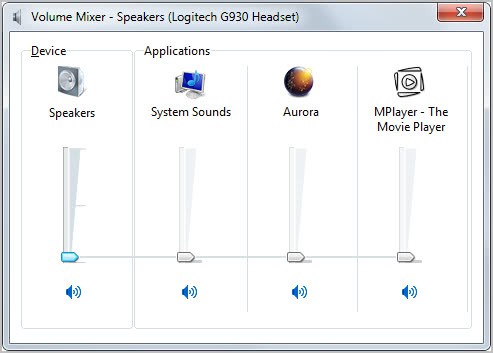
I remembered that Windows 7 had audio mixers for every application capable of playing audio. It could have happened that the volume for the Firefox browser was all turned down. Turned out it was not unfortunately.

firefox audio

Next check was the Google Chrome browser, and this is when things got really weird. I could not hear any audio in Chrome either. Checked on YouTube and several other video hosting sites and sound was not playing.

My next guess was a issue with Adobe’s Flash plugin. I switched to HTML5 playback on YouTube, but audio was still not playing. A check on Adobe’s website revealed that the latest Flash version was installed on the system.

My next – and last guess – was that the installed audio driver was corrupt somehow. I did not put to much hope into the solution though as it felt unrealistic as audio was still playing on the desktop.

Still, I went to the Logitech website and downloaded the latest driver version for my G930 wireless headset. I checked playback in Firefox and Chrome after driver installation, and guess what; Audio was playing again.

I have no idea how this happened in first place. Lets take a look at the troubleshooting steps again:

  • 1. Restart the browser, play again in same browser.
  • 2. Check audio on other sites
  • 3. Check Mixer in Windows
  • 4. Check audio playback in a second browser
  • 5. Check if the Adobe Flash plugin is up to date
  • 6. Check another audio playback option, e.g. HTML5
  • 7. Reinstall the audio driver

Is there anything else that you can do if those steps do not fix the issue on your end? Nothing comes to mind to be honest. Anyone with additional suggestions?


© Martin Brinkmann for gHacks Technology News | Latest Tech News, Software And Tutorials, 2012. | Permalink |
Add to del.icio.us, digg, facebook, reddit, twitter
Post tags: , ,


Thursday, November 24, 2011

Google Showing Ads In Chrome Browser, Is This The Beginning Of The End?

Internet users are accustomed to seeing ads on Internet pages. One of the most prominent advertisement schemes used these days is Google Adsense which is available for websites, searches on websites and for mobile devices. Adword ads dominate the Google search result pages, and other Google properties are also displaying their fair share of ads.

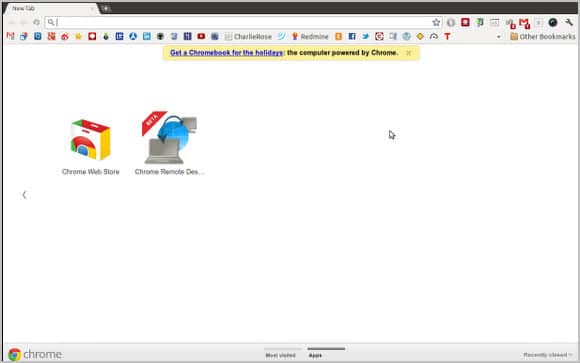
Salimane Adjao Moustapha recently posted a photo of another place where Google (seemingly) has started to display ads: The Chrome browser. The screenshot shows a new tab page of the Chrome browser. The Apps section is open and at the top of it is an ad for Google’s own Chromebook. It states: Get a Chromebook for the holidays: the computer powered by Chrome.

The first part of the ad is underlined. It is not clear where it leads to as it is not revealed by Salimane, and I was not able to reproduce it.

google chrome ads

The post on Google Plus sums up all the different opinions about the ad in Chrome. Some say it is Google’s right to display ads because the browser is free. Others that they should not do so without giving the user control over the ads. A third group is suggesting to switch to Firefox or Chromium. And a last group is angry but not angry enough to switch just yet. It would not make much sense either at the time considering that the majority may not have seen ads in Chrome yet.

I’d like to know your opinion about ads in web browsers. Do you think it is ok for Google to display ads in the browser, especially if it is for other company products? Or would you say that ads in a browser are a no-go, regardless of what they promote?

My personal opinion on the matter is that Chrome has turned adware if Google makes the decision to display these kind of ads to all Chrome users. It does not really matter if the ads promote Google products or third party products, it is still an ad.


© Martin Brinkmann for gHacks Technology News | Latest Tech News, Software And Tutorials, 2011. | Permalink |
Add to del.icio.us, digg, facebook, reddit, twitter
Post tags: , ,


Wednesday, October 26, 2011

A Look At New Google Chrome Browser Flags

Ghacks readers know that the chrome://flags page leads to a list of experimental features in the Chrome browser. These features are not yet ready for prime time. Adventurous Chrome users can enable select features to change the behavior of the web browser in core areas. A big warning paragraph warns users that these “experimental features may change, break, or disappear at any time”.

Depending on your personal preferences, you may want to enable none or some of the experiments in Google Chrome. The list of available settings is large, which is why I will look at only a handful of experiments that have been added to the flags listing in recent time.

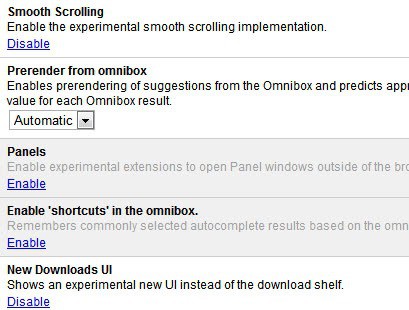
Chrome browser flags

  • Smooth Scrolling – Chrome users up until now had to install extensions like Smooth Scroller if they experienced scrolling issues in the Chrome web browser. With the Smooth Scrolling flag, they now can enable the feature natively.
  • Lazy Background Pages – All extension background pages are loaded when the browser starts. This setting changes the default behavior so that they are loaded when needed.
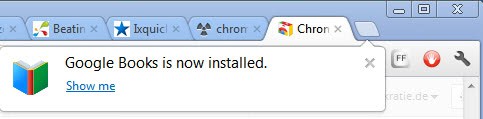
  • New Apps Install Bubble – When you install a new application in Chrome a new tab page is opened automatically. This can be irritating if you install many apps in the browser. This new flag changes the behavior by showing a bubble pointing at the new tab page instead.

chrome apps installation

  • Enable NTP bookmark features – The new tab page in Chrome currently only lists the most visited sites and apps in its interface. This setting enables a Bookmark page on the new tab page.

bookmarks

  • Enable syncing open tabs, syncing search engines – The two options can be used to sync both all open tabs and all custom search engines with all connected Chrome browsers.
  • Enable shortcuts in the omnibox – Remembers autocomplete results and offers those the next time the same search term is typed in the Chrome address box

Chrome users find several useful experiments on the flags page that can change the behavior of the Chrome browser noticeable. Are you a Chrome user? If so, are you making use of experimental features in the web browser? (thanks Vineeth)


© Martin Brinkmann for gHacks Technology News | Latest Tech News, Software And Tutorials, 2011. | Permalink |
Add to del.icio.us, digg, facebook, reddit, twitter
Post tags: , , , ,


Monday, October 24, 2011

Advanced Find For Chrome, Include Inflections In Search

All modern web browsers come with options to search the active web page for specific words or phrases. None as far as I know support wildcard searches or the inclusion of inflections. The Google Chrome extension efTwo Advanced Find on Page adds support for the latter to the Chrome web browser.

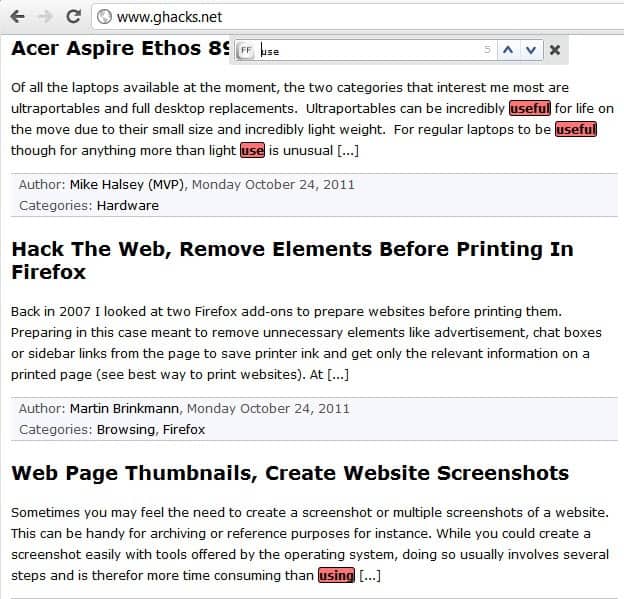
Sometimes when I search on a website I try to select a search term that includes inflections. Say I’m looking for the terms replace or replacing on the website. For that I would have to enter replac in the search form so that both terms are found on the page. Another example is the search term use which would reveal not only all instances of use on the page but also used, user and using.

With the Chrome extension, you can enter one term and find all occurrences of all matching terms highlighted on the page.

You bring up the advanced search form after installation by either pressing F2 once of the f-key twice in rapid succession.

advanced on page search

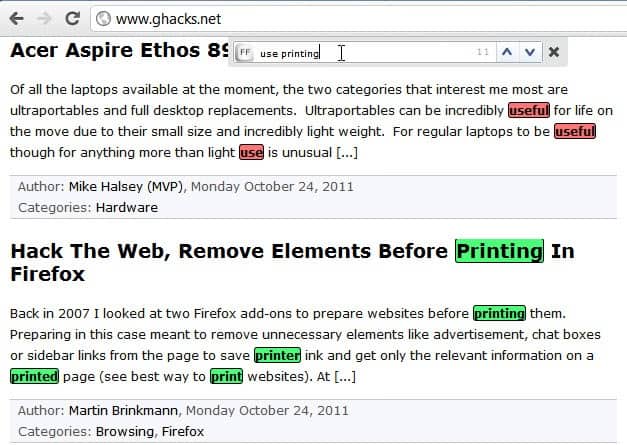
The extension highlights all occurrences on the page. If you add more than one search term you will notice that each is colored differently. That’s interesting as it allows you to run multiple searches at once on a page.

advanced search

The program found all occurrences of use and printing on the page. It will furthermore highlight the total result count in the search form. You can use the up and down arrow buttons to scroll to the next or previous occurrence of a search result on the active web page.

The inflection detection works both ways. You can enter use to find using or user, or enter using to find user or use as well on the page.

Advanced Search on Page is a handy Chrome extension for users who want to find related phrases on a website during searches. The free Chrome extension can be installed at the official Chrome Web Store.


© Martin Brinkmann for gHacks Technology News | Latest Tech News, Software And Tutorials, 2011. | Permalink |
Add to del.icio.us, digg, facebook, reddit, twitter
Post tags: , , , ,