Pages

Showing posts with label Search Engines. Show all posts

Thursday, February 16, 2012

DuckDuckGo Searches Going Waaaaay Up

DuckDuckGo, the search engine that I’m using as my primary information retrieval tool on the Internet, has just marked an all new high yesterday. For the first time ever since the search engine opened its doors, it received more than 1 million direct search queries. These are generated by direct user requests. Api requests sit steady at the ten million per day mark.

This may not seem that impressive in comparison to search engines like Google or Bing, who likely get that traffic in minutes and not days. For DuckDuckGo though, it is reason to celebrate, especially if you take a look at the current growth rate of the site.

The search engine received about 100,000 direct search queries a year ago, and about 500,000 in January 2012 (the first 500k hit in November 2011). Direct search queries have nearly doubled in a month’s time, and as you can see in the chart, is likely to climb at an accelerated pace in the future.

duck duck go search

With more users switching to the search engine, recommending it to friends, colleagues and family, and webmasters writing about it, it is likely that the upwards trend will continue at least for a while.

The big jump from 500k to one million came shortly after the last visual refresh and at the time of the Data Privacy Day. The search engine, unlike others, is not tracking its users nor personalizing its user’s search results.

The search engine still has a long way to go before it will become a force to be reckoned with in the search engine landscape that is dominated by Google, and to a lesser extend by Bing and Yahoo.

You can read up here why I switched to DuckDuckGo (with tips to do the same), and at this article afterwards that explains how you can improve your DuckDuckgo search experience.

On behalf of the Ghacks team, congratulations!


Saturday, February 11, 2012

How To Improve Your DuckDuckGo Search Experience

For the past weeks or so, I have been using the DuckDuckGo search engine for my Internet research. You can read about the motivation for the move here. In that time I have learned a few tricks that improved my search experience, and I would like to share those today with all of you.

One of the major issues with every search engine is that you sometimes cannot seem to find what you are looking for. That’s true for Bing, Google Search and also DuckDuckGo. When that happened, I initially loaded the web address of Google Search or Bing Search manually, pasted in the copied search phrase to search on the new search engine again in hope of finding an answer there.

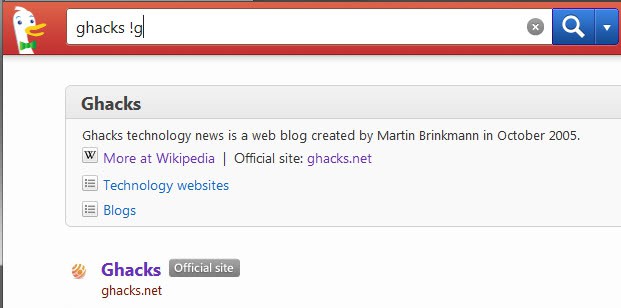
Soon thereafter I discovered a more comfortable way of redirecting searches to another search engine. All I had to do was to add !g for Google, !b for Bing or any of the hundreds of additional “bangs” to the search phrase to open the search results on the selected search engine.

duckduckgo tips

Those shortcuts are not only available for general search engines, but also for other sites that you may want to find information on. Here is a short selection of shortcuts that I found most useful:

  • !ms (Microsoft.com)
  • !apple (Apple.com)
  • !chrome (Google Web Store)
  • !firefox (Mozilla Addons Repository)
  • !opera (Opera.com)
  • !wp (WordPress)
  • !technet (search social.technet.microsoft.com)
  • !amazon (Amazon.com)
  • !ebay (Ebay.com)
  • !craigslist (Craigslist)
  • !w (Wikipedia)

You can find all of the shortcuts on this page. There are hundreds of them so be prepared to spend some time on the page.

The second tip that I have for you is about keyboard shortcuts you can use on the search engine to speed up navigating on the website.

You can for instance use the down cursor key to select one of the search results, and press enter to load it directly all without using the mouse. And if you hold down Ctrl while doing that, you can open the result in a new tab instead.

If you hit d instead, you perform a new search exclusively on the selected domain. The last helpful shortcut is 1 which opens the !bang menu to search on other sites.

Have other tips to share? Lets hear about them in the comments.


Thursday, February 2, 2012

MediaFire Download Links On Google Search Not Working Anymore

Mediafire was one of the file hosting sites that benefited from the Megaupload take down in January 2012. The site managed to increase its traffic significantly and it appeared as if it would be able to withstand the storm that reached other file hosting sites shortly thereafter. Other file hosting sites frantically started to protect their service from the same demise that had befallen Megaupload. Some like Filesonic blocked all of the site’s file sharing capabilities, while others blocked all traffic from the United States, switched to a country code domain to avoid falling under US jurisdiction or plain simply closed down completely.

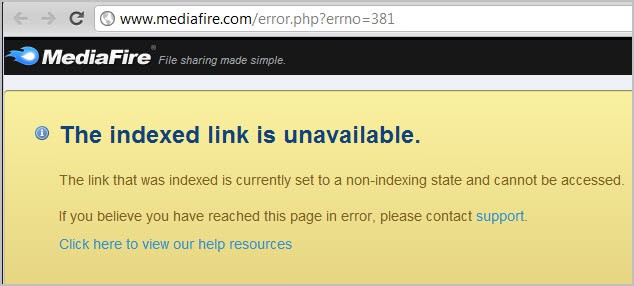
Today when you click on a file link in Google Search that is pointing to MediaFire, you are redirected to the error page http://www.mediafire.com/error.php?errno=381.

mediafire downloads not working

It reads:

The indexed link is unavailable.

The link that was indexed is currently set to a non-indexing state and cannot be accessed.

If you copy the link url and paste it directly in your browser’s address bar, you are taken to the download page from where you can download the file normally. It is also interesting to note that downloads are still working if you are using Bing Search instead of Google.

It is not clear at this point if Google Search is the only referrer that has been blocked by Mediafire, or if there are other sites that have been blocked as well by the file hosting service.

Another thing that is unclear is whether this has been an intentional move by the site, or if it is a technical issue that will be resolved at a later point in time. It does not make lots of sense from a legal point of view, unless law enforcement agencies are using Google exclusively for their research.

Users who find files that they cannot download should copy and paste the url into their browser’s address bar to download it. It is alternatively possible to install an extension like Refcontrol to modify the referrer for sites that are blocked by Mediafire.

Lets discuss the move in the comments.

Update: Download links are working again. It seems to have been a technical issue after all.


Why I Switched To The Duck Duck Go Search Engine

Some time ago I started to look into Google Search alternatives. This had a number of reasons, from too much noise on Google results pages over deteriorating quality to privacy concerns. I first switched to Bing, the most prominent alternative market share wise. And while it proved to be a solid search engine, especially for English queries, it failed to impress when it came to more advanced queries. I’m often researching issues, like “how to improve font rendering in Firefox”, “DVD drive letter not showing up in Windows Explorer” or “how to uninstall plug-ins in Microsoft Office”. Bing’s result were not impressive and I often had to switch to Google to get better results. I’m not saying that Google’s results were perfect, but they usually listed one or two results on the first pages that I could work with.

I moved to Ixquick and liked what I saw in the beginning. It too had the same issues that Bing had unfortunately. Complex search queries usually yielded results pages that would not help me in my research.

I switched to Duck Duck Go about two weeks ago and have not looked back since. Let me start the review by saying that I still have to switch to Google or Bing sometimes to get the results that I want. But that’s true for every search engine. There have been searches where Google could not provide me with results that I was looking for.

What I really like about Duck Duck Go is its simplicity. It is what Google has been a long time ago, a search engine that concentrates on search, and not on shoving advertisement and Google service promotions down the user’s throat.

search engine

The search results – often – begin with information at the top that are taken from Wikipedia. It is a quick one-liner that provides you with basic information about the site, service or name. The box links to Wikipedia and the official site, as well as related categories on the Duck Duck Go search engine. You can disable that box in the search settings.

Below the box is either the official site, outlined with a special button for better visibility, or a sponsored link result. This sponsored link is clearly distinguishable from the rest of the results.

duckduckgo

Search suggestions on the right can help you redefine the search. For Ghacks, you find suggestions such as software, windows or Google listed there that can be appended to the search phrase with a click.

Search results are not personalized, and users are not tracked when using the search engine.

The search engine offers access to so called !bangs that you can use to redirect your search directly to a supported site.

You can for instance enter !youtube phrase to be redirected to YouTube’s search results page for the phrase you have entered. Hundreds of bangs exist, from searching popular blogs like Arstechnica or Lifehacker over Chrome, Firefox and Opera add-ons and userscripts to software downloads or company websites.

You can furthermore use \ in front of your search term to be taken directly to the first search result.

Interested users can check out the goodies page which highlights some of the advanced capabilities of the search engine. This includes conversions and calculations that you can make directly in the search engine, dates that you can look up and other interesting stuff.
There is also a list of keyboard shortcuts, that include navigating back and forth with j and k, t to go to the top or m to highlight the first result (which you could then open with a tap on the enter key).

Switch To DuckDuckGo in your browser

Google Chrome users need to click on the wrench icon in the upper right corner, and select Settings from the menu that opens.

They then need to locate Search on the first page and click on the Manage search engines button. Locate DuckDuckGo in the list, hover over its entry and click on the Make default button that appears.

chrome default search engine

Firefox users need to enter about:config into their browser’s address bar. They then need to filter for the term keyword.URL, double click the parameter on the results page and replace the value with http://duckduckgo.com/?q=.

firefox search engine

Microsoft Internet Explorer users can head over to the Internet Explorer Gallery to install the Duck Duck go search provider plugin which adds the search engine to Microsoft’s browser.

What’s Missing?

Duck Duck Go does not maintain its own image search engine. If you want to search for images, you can either use a !bang to start the search on Duck Duck Go, or open an image search engine to search there directly.

The search engine does not link to cached versions of a page listed in the results. It is sometimes the only way to access information posted on the site, for instance if it is temporarily or permanently down.

Some searches still require you to switch search engines to find suitable results. My personal experience was that I had to switch engines less often than when I used Bing or Ixquick.

Verdict

I have not looked back yet after switching to Duck Duck Go. It is definitely an improvement over Bing or Ixquick. And while it may not be on pair with Google, it is close enough to justify the switch. I can still switch to Google or Bing if I cannot find a solution or answer in the search engine, which is even easier when using !bangs.

I’d encourage you to try the search engine for a week or so, to see if it meets your expectations. If not, you can still go back to Google or Bing. If it does, congratulations and welcome to the family.


Sunday, January 29, 2012

Webstagram, An Instagr.am Web Search Engine

Instagr.am is a popular photo taking and sharing application for Apple’s iPhone. You can basically use it to take snapshots with the phone’s camera and send them directly to sites such as Facebook, Twitter or Flickr. It comes with other social features that make it that more enticing to a crowd that likes to socialize on the web. The photos have a distinct look and feel which may be one of the reasons for the application’s popularity (besides from being free).

Webstagram is a web viewer and search engine for photos taken by Instragram users. You can just dive into the popular or hot listings on the site, or use the search to find photos taken by a specific user or by tag.

webstagram

Each photo that you see on the Webstagram website actually links back to the Instagr.am website where you can view it in tiny, medium, large or original size. The Webstagram page itself lists comments and likes directly on the page which are also taken from Instagram.

Users can log into their Instagram account to use part of the functionality on the web viewer’s site as well.

The site serves three main purposes. It first can be used by Instagram users for inspiration. Ever wanted to see what the iPhone app is capable off? Look no further than the popular or hot listings on the site.

The second purpose is as an image search engine and viewer, and the third to use features of the service on the website. Instagram users can for instance view the photos that people they follow have taken. They can furthermore follow and unfollow users, use social faetures such as like and comment, or see their own followers and the people they are following.

The search functionality is available to all users, regardless whether they are just visiting or logged in with their Instagram account.


Sunday, January 22, 2012

Google Search Alternative IxQuick

Ever since Google starting pumping up the results of their search engine with all kind of nonsense – read first and third party advertisement mainly but also other stuff like the unfair favoring of big brands – I have been looking for an alternative. And while I have found it in Bing, I have to admit that Bing is still not on pair with Google Search once the queries get complicated. Bing does well if you search for single or dual-word phrases like Google Docs, Hacker News or Reddit, but once you start searching for longer phrases like how to turn off JavaScript in Thunderbird you will notice that the browser won’t provide you with the necessary information. Here are the top 5 results for Bing and Google for that search:

Bing

Microsoft seems to favor ehow, one particular download site and several other sites in their search engine. Quality of those results is usually not that good. The first ehow article for instance is outdated and not applicable anymore, the four remaining answers either are not about Thunderbird or not about JavaScript.

  • How to Enable JavaScript in Thunderbird
  • How do I turn tabs OFF in Thunderbird 3? – ANSWERED
  • How do i disable archiving in thunderbird 3.0? – Will come in …
  • In Internet Explorer, how do I enable or disable Java or JavaScript?
  • How to Turn on Javascript in a Mac

Google

Google’s results are better. The second result leads to the information that answers your query (JavaScript is no longer supported for mail and news in the browser, and thus does not need to be turned off anymore). In Google, two of the five results give you the answer for your query. That’s better than in Bing, but not optimal either, especially since the first result leads you into the wrong direction.
  • Thunderbird: how to disable javascript?
  • Thunderbird 3.0 – New Features and Changes
  • ZyTrax Security – Email Agent FAQs
  • How can I enable javascript in thunderbird 3?
  • ThunderBrowse – The browser for Thunderbird – FAQ
  • I have been testing other search engines, DuckDuckGo and Ixquick in particular, to find out if they provide better results than Bing or Google.

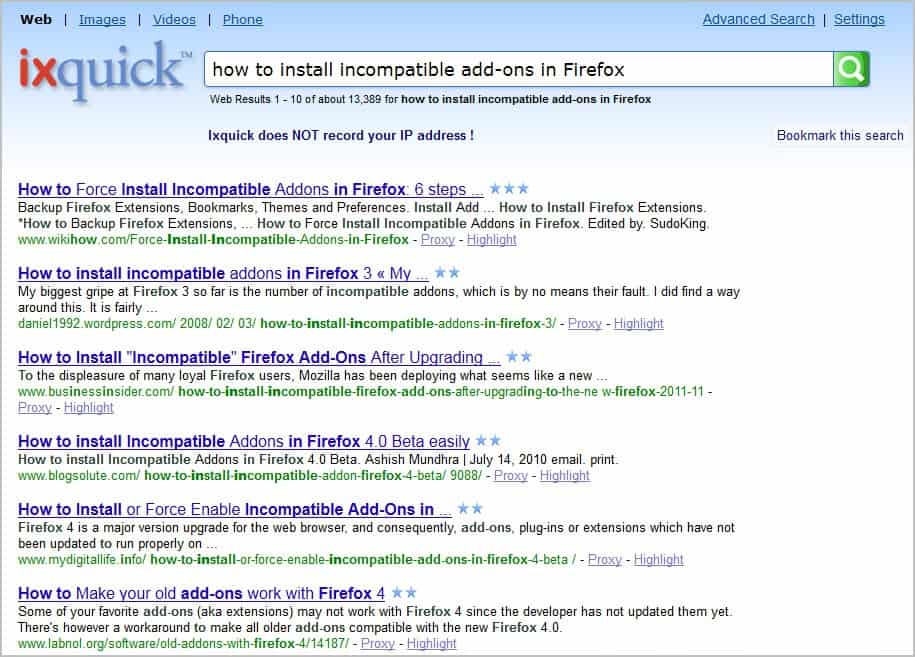
    Ixquick calls itself the world’s most private search engine. Unlike other search engines, IxQuick does not record user IP addresses or share personal data with third parties. A full page with privacy related information is available on the service’s website.

    ixquick

    I have used Ixquick for the last week as my main search engine. There are things that I like, and things that do not work out that well. IXquick, like Bing, provides solid results for short queries. If you are looking for a particular business, software or product, you usually find it in the top spot on the search results page.

    Results begin to deteriorate quickly if you add terms to the query. The first five results for the Thunderbird JavaScript query above for instance do not offer the information that you would need to get your question answered. The first result furthermore links to outdated information, just like they did on Bing (a different web property though).

    Results are not always that bad though, but they are often not that great either. I also noticed that Google’s results are not always that better for longer queries, but you find pages with the information you are looking for more often there.

    Back to Ixquick. Search results are always opened in new tabs instead of the same tab by default. It happened to me more than once that I clicked multiple times on a search result wondering why it would not open when in fact it was opened multiple times in new tabs in the browser. It takes some getting used to time but it is not really that bad.

    You can open any page with a proxy that is provided by the search engine itself. This can be handy if a website is blocked in your country.

    ixquick search results

    Do not get me wrong though, search results are not always that bad or that different from other search engines. A few things need improvement though:

    • When I’m looking for something product related, e.g. Swtor PVP, I expect the product developer site in the top 5 results.
    • When I’m searching for technology related things I expect recent information in the top 5 result if I do not add a version number to the product.
    • When I’m searching for a product or business, I expect it to be the number one result in the search results (you will notice that software searches sometimes list download portals in front of the developer site).

    All of this applies to Microsoft’s Bing search engine as well, and probably to the majority of other search engines out there. Google’s results are not really that much better or different, but the company somehow manages to often sneak in at least one result that you find your answer on.

    I’d still suggest you give Ixquick, Bing or DuckDuckGo a try to see if these search engines return satisfactory search results for you. I for one will now move on to DuckDuckGo for a week to see how it is holding up.

    Have you tried other search engines besides Google? Why do not you share your experience in the comments?


    Friday, January 20, 2012

    Too Many Ads Above The Fold Are Bad, Says Google

    Advertisements are what keeps many of the sites going on the Internet, including the site you are currently reading. As a user, I do understand that too many ads, or ads in the wrong position, or ads that are highly distracting, reduce the user experience. While I rarely stumble upon sites anymore that have their pages plastered with ads so that it becomes difficulty to find the regular content, I have to say that I welcome the change that Google just announced.

    The company basically stated that an algorithmic change was launched that analyzes the ad to content ratio above the fold. Sites that do not have much content above the fold can be affected by this change, according to Google. What does affected mean exactly? They are pushed down in the search results in favor of sites that have a better user experience.

    Sites that display ads to a normal degree are not affected by the change.

    I personally have two issues with the announcement.

    Parameters

    Google did not provide information about the parameters that they look at. What’s missing?

    • The definition of what the company considers to be an ad
    • What Google considers to be a normal ad ratio above the fold
    • The screen resolutions they use to calculate that ad to content ratio
    • If popup ads or interstitial ads are also considered by the change

    This leaves webmasters again with the nagging feeling that they may be affected by the change, even though they are likely not.

    Not everyone is equal

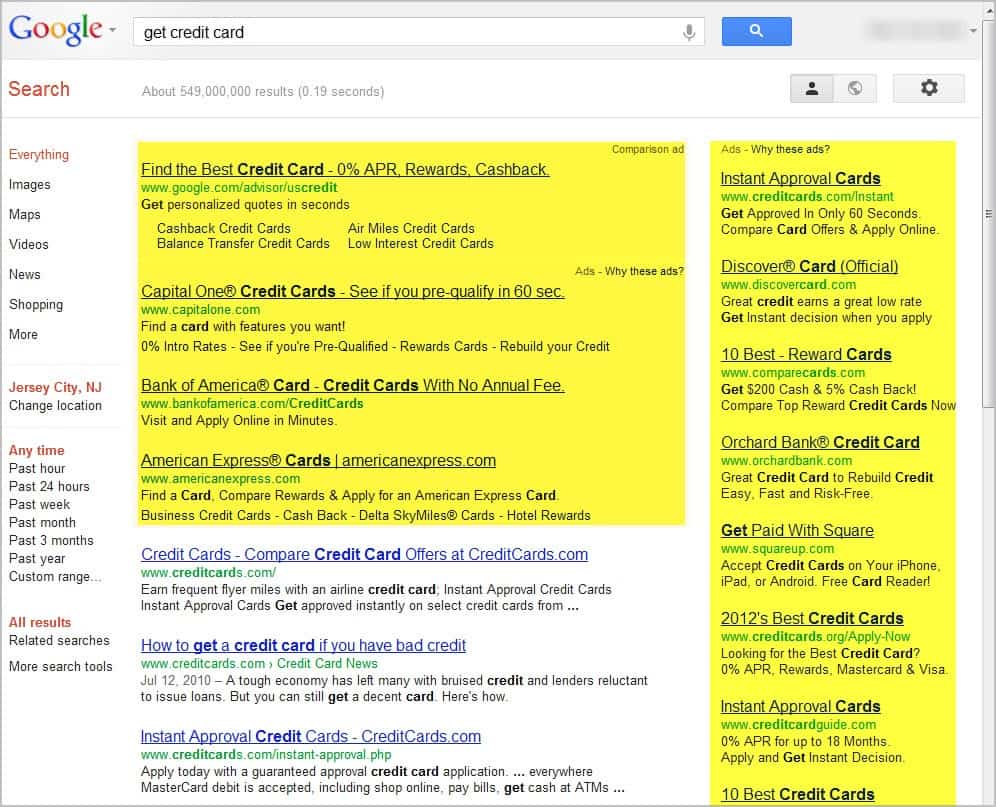
    The second aspect weights more heavily in my eyes. Take a look at the following screenshot and let me know if you would consider this a bad ad to content ratio on the page.

    google search ads

    Please note that this screenshot shows a 1000 to 800 resolution, and that your experience may differ depending on a number of factors.

    And now read Matt Cutts’ announcement again:

    If you click on a website and the part of the website you see first either doesn’t have a lot of visible content above-the-fold or dedicates a large fraction of the site’s initial screen real estate to ads, that’s not a very good user experience

    Is Matt saying that Google Search is not offering a good user experience? I think he does. Lets discuss in the comments.