Pages

Showing posts with label file hosting. Show all posts

Thursday, February 2, 2012

MediaFire Download Links On Google Search Not Working Anymore

Mediafire was one of the file hosting sites that benefited from the Megaupload take down in January 2012. The site managed to increase its traffic significantly and it appeared as if it would be able to withstand the storm that reached other file hosting sites shortly thereafter. Other file hosting sites frantically started to protect their service from the same demise that had befallen Megaupload. Some like Filesonic blocked all of the site’s file sharing capabilities, while others blocked all traffic from the United States, switched to a country code domain to avoid falling under US jurisdiction or plain simply closed down completely.

Today when you click on a file link in Google Search that is pointing to MediaFire, you are redirected to the error page http://www.mediafire.com/error.php?errno=381.
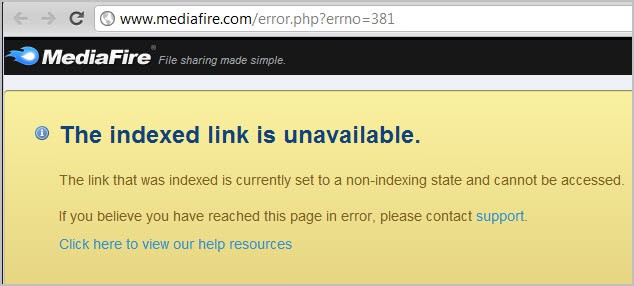
mediafire downloads not working

It reads:

The indexed link is unavailable.

The link that was indexed is currently set to a non-indexing state and cannot be accessed.

If you copy the link url and paste it directly in your browser’s address bar, you are taken to the download page from where you can download the file normally. It is also interesting to note that downloads are still working if you are using Bing Search instead of Google.

It is not clear at this point if Google Search is the only referrer that has been blocked by Mediafire, or if there are other sites that have been blocked as well by the file hosting service.

Another thing that is unclear is whether this has been an intentional move by the site, or if it is a technical issue that will be resolved at a later point in time. It does not make lots of sense from a legal point of view, unless law enforcement agencies are using Google exclusively for their research.

Users who find files that they cannot download should copy and paste the url into their browser’s address bar to download it. It is alternatively possible to install an extension like Refcontrol to modify the referrer for sites that are blocked by Mediafire.

Lets discuss the move in the comments.

Update: Download links are working again. It seems to have been a technical issue after all.


Monday, January 23, 2012

After Megaupload, How To Backup Your Online Files

Users who have been using the file hosting service Megaupload to host their own files were in for quite a shock when they received notice that authorities had taken down all company servers and files. For some it meant to upload the files again to another file hosting service, others who only had copies of the files on the hosting site realized that they did not have options to get their files back.

Uploading files to just another hoster is however no guarantee that the files stay available for a longer time. It should be clear by now that you need to have backups available either locally or in another location to reduce the likelihood that you will lose the data completely.

Mirror Services

One option that you have is to use so called mirror services such as Mirror Creator to distribute the files to multiple online hosting services. If one or two go down, you still have them available on others that you have selected.

mirror creator

The process of uploading files to those hosters is almost identical, with the difference that you cannot make use of existing accounts and their benefits.

  • Select files that you want to upload from your computer. A file limit is always displayed, in the case of MirrorCreator it is 500 Megabytes for free users.
  • Select the file hosting services you want to distribute your files to. Free users can select up to ten services.
  • Start to upload the files once, the mirror creation service will take care of the rest.

Here is a short list of file mirror creation services:

  • Gazup! – Supports six services in total, maximum file size 400 Megabyte if only four are selected.
  • Upload On All – Supports 12 services in total of which ten can be selected for distribution. Maximum file size is 300 Megabytes per upload.
  • Digzip – Lets you pick eight mirrors from a list of 18. Maximum upload size is 200 Megabytes.
  • Multi Upload – Upload to a total of nine different file hosting services
  • Upload Mirrors – Select up to 14 mirror servers where you want your files to be hosted. No information about file size limitations posted on site.

You can search for file hosting mirrors and similar phrases to find more services that distribute files for you.

Nothing changes for free users who stay below the upload maximum. Users who need to upload larger files have a few options as well. They could split the files using software like 7-zip or Haozip for this. Other services may be offered, for instance the option to delete uploads again, that are not available when mirror uploading services are used.

If you want to use a specific service, for instance because of the account benefits it provides, you should consider backing up your data at a second cloud hosting service to avoid total data loss if that particular services is no longer available. A suggestion here would be to use a backup and synchronization provider like Dropbox, or if more storage space is required Skydrive from Microsoft. This means however that you will have to upload the files at least twice for this. You could alternatively back them on a local device if you do not want to waste the bandwidth.

Have another suggestion? Lets discuss it in the comments.


Bitcasa Promises Unlimited Online Storage, How To Get An Invite

With file hosting sites closing left and right after the Megaupload takedown, it has become fairly uncertain if your file hosting service will offer you access to your files the next time you try to connect.

Bitcasa is a new file hosting service that is similar to Dropbox in many regards. Bitcasa just like Dropbox is application driven, which means that users need to install the Bitcasa client on their system to use the service. The client is currently available for Apple Macintosh OSX systems and Microsoft Windows (as an alpha), with a Linux version currently in development.

The client synchronizes data across all devices that have the Bitcasa software installed. Data gets encrypted before it is uploaded to the cloud to make sure that it is protected from unauthorized access. The developers state that they cannot access user data for any reason.

bitcasa

A core difference to Dropbox is that Bitcasa offers its users unlimited storage. It is not really clear how this will pan out in the long run, or if paid accounts will be introduced at a later time to make the service profitable. For now, users can upload, download and share as many files as they want.

Sharing is completely free as well, and the service highlights that friends and family can start accessing files “instantly without waiting for the entire files to download”. It seems though that recipients need to install the Bitcasa client and create and account as well for this.

Bitcasa has no web interface for users at this point. It is not clear if the developers will integrate one at a later time.

Bitcasa Beta Invites

Users can sign up for the beta queue on the Bitcasa homepage. If you do not want to wait, you can use the following link to sign up for an account directly. The link has been posted by Motou Xiao on Google+.

Just enter your email address and open the confirmation link once you receive the Bitcasa confirmation message. You can then download the software and create an account from within.

Closing Words

We cannot post screenshots of the application or signup process at this time as you have to agree to a NDA during signup. All information have been taken from public sources. We will post an update in the future.


Megaupload Fallout Continues, Filesonic Removes File Sharing

Megaupload, one of the world’s top file sharing and storage sites, has been taken down on request of US authorities on Thursday. Arrests have been made in various countries and assets as well as the service’s websites and servers have been seized.

No files were accessible anymore on the servers after the takedown, which had serious consequences for users who used the file hosting site for just that: to host their own files.

Users looking for a Megaupload alternative can check out our quick overview of file hosting services.

The Megaupload fallout has not ended yet though, as some file sharing sites have begun to change their business model, likely to avoid the fate of the service.

When you visit Filesonic’s website today you will notice an announcement on the frontpage that states:

filesonic no sharing

All sharing functionality on Filesonic is now disabled. Our service can only be used to upload and retrieve files that you have uploaded personally

Users who try to download files see the following message instead on the Filesonic website:

filesonic no downloads

All sharing functionality on FileSonic is now disabled. Our service can only be used to upload and retrieve files that you have uploaded personally.

If this file belongs to you, please login to download it directly from your file manager.

But FileSonic is not the only file sharing site that made changes to their business model after the Megaupload bust. Uploaded, another popular file sharing service, started to block visitors from the United States. Visitors from the United States see a blue landing page that tells them that the service is no longer available in their country.

Both file sharing companies are registered outside the United States. FileSonic operates from the Netherlands while Uploaded from Hong Kong.

Neither FileSonic nor Uploaded have released statements about the changes yet. There is no certainty that Megaupload’s takedown had anything to do with the decision but the proximity of events would suggest it did.

What’s going to happen next? It is likely that FileSonic will lose a good chunk of their traffic in the coming weeks. Users will move on and use other file sharing services to share files. It needs to be point out that this does not necessarily mean illegal activities. File sharing sites are ideal to share small to medium sized files with friends and family as well.

Users who have personal files on file sharing sites should consider making a backup of those files just in case. Services like Dropbox allow you to store files in the cloud, along with synchronization options and sharing.

Update: It appears that Fileserve has started to make changes as well. The file hosts affiliate program page is no longer accessible on the site, and according to Neowin, users are reporting that their accounts have been terminated. The message they receive when they log in states the following:

Unsuccessful login
Your account has been disabled due to violations of our Terms and Conditions

Update 2: File sharing service Uploadbox has announced that they will be shutting down servers. All files that they host will be deleted on January 30th.