Pages

Showing posts with label bittorrent. Show all posts

Tuesday, February 14, 2012

Bittorrent Live, Efficient P2P Video Streaming

When you look at today’s TV streaming offerings on the Internet, you will always see contents being served by the hosting site to all connecting users. Companies need the necessary infrastructure to make sure the contents can be streamed to all of their users in good quality (with good quality meaning an uninterrupted viewing experience and a good visual quality).

Bittorrent Live could change that distribution model for the better, at least for content publishers. The idea is simple but effective: Instead of streaming content from one site to all connected users, the users’ PCs are used to stream the contents as well to one another. The effect? A 99% data transfer offload for site operators that allows millions of users to watch the stream at the same time with a latency in the five seconds range.

This opens up new possibilities, as it allows smaller publishers to stream their contents to a larger audience without going broke on the bandwidth and hardware costs. Existing publishers who already stream to millions could significantly reduce their bandwidth bill if they’d utilize the technology.

The only catch? Users need to install and run Bittorrent Live on their system before they can start viewing content that is streamed that way. The operators recommend an upload speed of at least 2Mb to watch the streams, which could be a issue for some users who do not have that much upload bandwidth available. These issues could very well keep the technology from ever taking off. BitTorrent could however mitigate the distribution factor by distributing BitTorrent Live with popular clients such as uTorrent.

Bittorrent Live will be made available for free for publishers who want to stream their contents. Publishers who want to show ads in the streams are asked to pay licensing fees to do so.

bittorrent live

Bittorrent Live is available as a beta version for Windows, Mac and Linux.

For now, it is just a beta version. You can access a few sample streams here on the official site. Keep in mind though that most are off air most of the time. The beta client comes without preferences to change ports or connection speeds. It is likely that the final version will offer those features.

Will Bittorrent Live kill television? It is highly unlikely that it will. The technology certainly has its appeal, but the software requirements make it a hard sale.


Monday, February 6, 2012

Popular Bittorrent Website BTJunkie Closes Its Doors

Users of the popular Bittorrent indexing website BTJunkie who try to access the site’s content in a web browser are not seeing the usual site layout, but a goodbye message instead. The message states that the site operators have decided to close down the service voluntarily after more than seven years of operation.

No reason other than that is provided, but it is likely that the decision is linked to recent events, in particular the Pirate Bay case in Sweden where founders of the site recently lost the final appeal and are looking at prison time, and the Megaupload takedown and the fallout that followed.

The announcement on the BTJunkie website reads:

This is the end of the line my friends. The decision does not come easy, but we’ve decided to voluntarily shut down. We’ve been fighting for years for your right to communicate, but it’s time to move on. It’s been an experience of a lifetime, we wish you all the best!

btjunkie

BTJunkie, according to Alexa web statistics, was one of the top 400 Internet websites that was visited by millions of visitors per month. Much of the appeal of the site came from the fact that all of the site’s contents were publicly accessible.

It is likely that users, after a moment of grieving, will move on to other popular Bttorrent sites like The Pirate Bay and Kat.ph, or private Bittorrent sites that require an invitation to get access to the site’s contents. The very same sites have also benefited recently from the closure of Megaupload and other file hosting websites.

BTJunkie users who feel lost right now should check out the threads over at Reddit and Torrentfreak for a list of alternative sites.


Wednesday, February 1, 2012

Looking For A Torrific Alternative? Try These!

Torrific offered a handy service for users who needed to download torrents files but could not use Bittorrent software or seedboxes for it. The service basically did all the hard working for the user. It downloaded the files attached to the torrent to their servers, and provided users with direct http download links. Torrific unfortunately though has been down for the last few days, and it is unlikely that the service will return again.

I have received emails and user comments from several users who wanted to know if there is an alternative to Torrific. There is, and it goes by the name BitLet. It is a web Bittorrent client that is powered by Java. You can just visit the website to get started right away, an account is not needed. Torrents can be added in two ways, first as web urls and second from the local computer system. You can paste in urls right away, or click on the select local torrent button to select a torrent from your system.

A click on download torrent opens a download window that displays information about the download status.

download torrents website

You are asked to select a destination directory for the files, and sit back afterwards as everything else is handled automatically from that moment on. Once finished, you can keep the torrent open to continue seeding it, or close the window to close all connections.

Bitlet on the other hand is not completely identical to Torrific, as the latter service downloaded the files first to their service, before they were made available as http downloads to the user.

Users more interested in an identical service can try ziTorrent, which offers pretty much the same functionality as Torrific. A free account is good for 10 Gigabytes of traffic, with a maximum file size of 1 Gigabyte per torrent per month. The service did not work that well though during tests, but this may have been a temporary flux.


Friday, January 6, 2012

Bittorrent Share, Easy File Sharing

Sending big files over the Internet is still a big issue for many users. While it is possible to overcome those issues, it often means spending time preparing the files to do so. You could for instance pack and split the files before sending them, upload them to an ftp server or online file hosting service, use Microsoft’s Hotmail which uses the company’s own SkyDrive storage service to enable the sending of large files, or resort to handing out the data on physical discs.

Bittorrent is another solution, one that requires basic knowledge of creating torrents and seeding it to friends. Bittorrent Share tries to reduce the complexity by making it easier for users to share data with their friends (keep in mind that Share is a temporary name subject to change).

Users can download the alpha version from the official website. A free account is required which can be created directly in the application. Share is initially available for Windows systems, with Mac and Linux systems announced to be available at a later point in time.

bittorrent share

Share users can then use the file browser or drag and drop to add files to the program that they want to share with individual friends or groups. Multiple files, for instance a folder full of photos, are automatically grouped together.

share files

You can share the files with users either by entering individual email addresses into the share form, a name of a user that you previously shared with, or by selecting a previously created group. Groups allow you to share with multiple users at the same time, for instance your college football team, your family or colleagues at work.

The emails users receive point to a download page. Users who want to download the shared files need to create a Share account as well before they can download the files. This is different from downloading shared files with software like uTorrent, as no accounts are required to do so.

Share has no file size limitations as it is based on the same technology that powers all Bittorrent clients. Users should however keep in mind that they upload the files to the users they share with, which can mean that the total bandwidth spend sending those files may be larger than the size of all files.

All users with access can leave comments in the program interface. Invited users will also share the files automatically with other users that have been invited to download the files. This access restriction is one of the advantages of Share, as it allows users to limit access to files they want to share.

Bittorrent (the company) notes that it will “initially host and remotely seed a file for a limited time” to “ensure quality of service and file availability”.

The big issue here is that the initial seeder needs to be online when other users start the file download. This can be a issue if the software is not open about this to both seeders and downloaders. This is probably one of the reasons why Bittorrent made that decision.

The company intents to integrate Share into Bittorrent and uTorrent clients. What they mean by this is that both clients will include features to download files shared via Share in the future. This is beneficial to existing uTorrent or Bittorrent users who do not want to download another software to download those files to their computer.

Share in its current form is a dumbed down Bittorrent client with integrated social features that simplifies the sharing of files. While it simplifies the sharing, it adds to the complexity of the operation by requiring accounts prior to downloading files.

What’s your take on Bittorrent Share?


© Martin Brinkmann for gHacks Technology News | Latest Tech News, Software And Tutorials, 2012. | Permalink |
Add to del.icio.us, digg, facebook, reddit, twitter
Post tags: ,


Friday, December 9, 2011

uTorrent 3.1 Stable Now Available

If you have followed uTorrent’s development closely in past weeks you have probably asked yourself if the developers would ever stop releasing release candidate versions of uTorrent 3.1. The developers went through ten release candidate builds before they released the final version of uTorrent 3.1 yesterday. Another update was rushed on the same day to fix a crash that slipped into that final version.

Users of previous versions of uTorrent can check for the update under Help > Check for Updates. The update check should return that uTorrent 3.1 stable is available. A click on yes in the notification window will trigger the download and installation of the new version on the system.

utorrent 3.1

The new version is not yet advertised on the main uTorrent website; The download link on the other hand leads to the download of uTorrent 3.1.

The homepage does list the new paid service uTorrent Plus prominently which we have reviewed previously here on Ghacks. It appears as if the release of uTorrent 3.1 has also triggered the release of the new service.

So what’s new in the latest version of uTorrent? The release notes lists three new major features and a handful of changes and bug fixes.

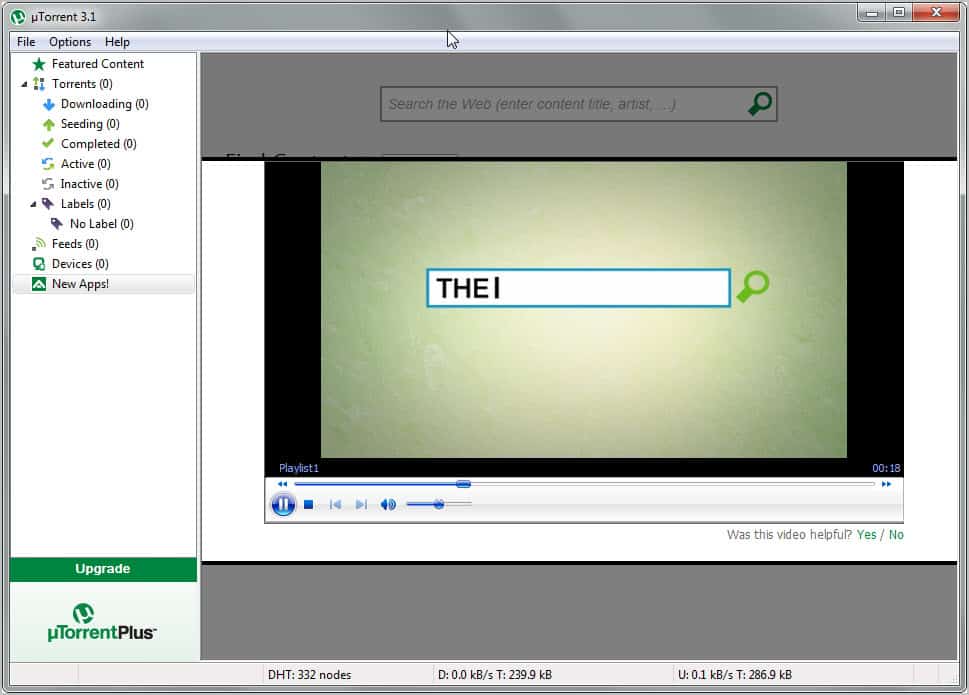
Among the new features are a built-in media player and a new device node to transfer content to connected devices such as mobile phones or gaming systems. Both features seem to be limited uTorrent Plus features. If you recall, uTorrent Plus adds a HD Media Player and converter option to the P2P software.

Fixes and changes mostly affect the program’s stability and performance.

The new client displays an ad for the uTorrent Plus service that can be hidden with a right-click and the selection to hide the advertisement. Some users have voiced concern over the addition of features that related directly to uTorrent Plus and not so much to the client’s original purpose.

utorrent plus

These users have selected uTorrent because its lightweight, fast and stable. The addition of new program modules could seriously dampen the program’s reputation in this regard.

utorrent media player

What’s your take on uTorrent’s latest version and uTorrent Plus?


© Martin Brinkmann for gHacks Technology News | Latest Tech News, Software And Tutorials, 2011. | Permalink |
Add to del.icio.us, digg, facebook, reddit, twitter
Post tags: , ,


Saturday, December 3, 2011

What’s uTorrent Plus?

If you have been to the uTorrent website these days you may have noticed an advertisement for uTorrent Plus placed prominently on the site. But even if you have not visited the main site recently, you may have spotted the uTorrent Plus application in the client itself.

So what’s uTorrent Plus, and how does it compare to uTorrent Free? Both programs use the same core, you could say that all features of uTorrent Free are included in uTorrent Plus.

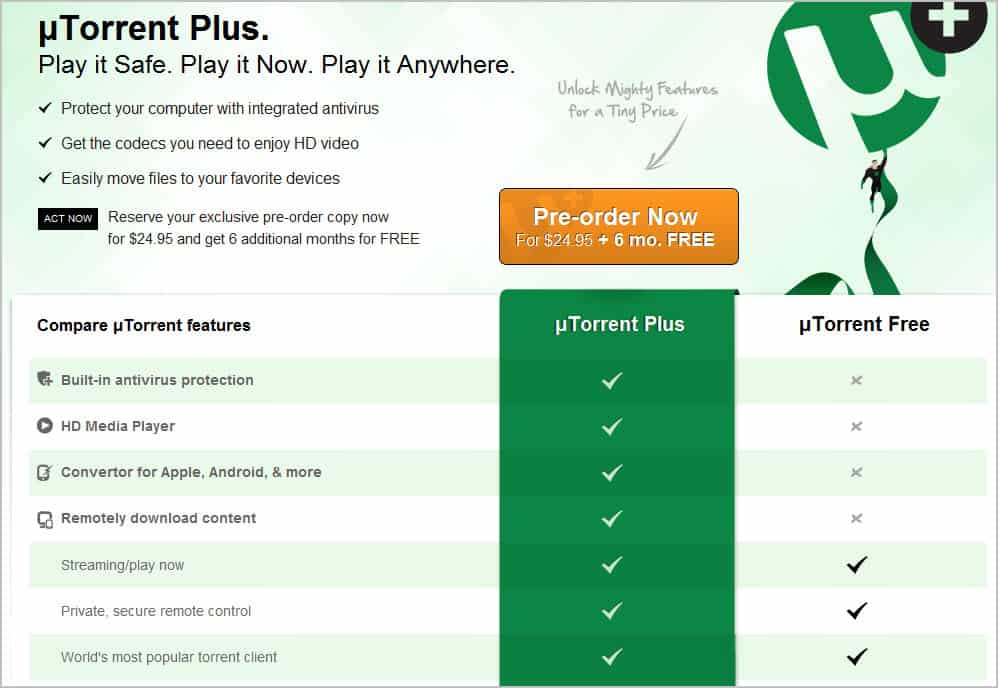
When you look at the comparison chart, you will notice that the company lists four additional uTorrent Plus features. The exclusive features are built-in antivirus protection, a HD media player, a mobile device converter and the option to download contents remotely.

utorrent plus

These new features come at a price; The company is asking for $24.95 for a 12-month subscription to uTorrent Plus (with six additional months for pre-orders). It is clear that the company is not targeting tech savvy users with the plus version of uTorrent, as they would not really have problems finding and running alternatives to what Plus offers.

But even inexperienced users who may benefit from the all-in-one application approach that uTorrent Plus offers may be left in bewilderment about the additional features. The program is currently in testing and that may explain the absence of information on the uTorrent website.

Questions that remain unanswered include:

  • Which antivirus solution is integrated into the client. How does it compare, and how compatible is the feature with other antivirus software installed on the computer system.
  • What exactly does remotely downloaded content mean?
  • Which functionality is provided by Convertor?

You need to look around quite a bit to find answers to those questions. According to an Extreme Tech article the antivirus solution is provided by BitDefender. uTorrent Free users can download the Virus Guard app for their client which provides basic virus detection. The built-in antivirus solution of uTorrent Plus includes a larger database and virus removal options, which the free version does not offer.

Remotely downloaded content adds capabilities to uTorrent Remote, the web-based control panel of the software. It allows uTorrent Plus users in particular to download files remotely from the web interface. Users can log in from any computer to transfer files to that computer right from the client running uTorrent.

The convertor adds device specific conversions to uTorrent. The idea is simple. You add your mobile and external devices, like your smartphone, gaming console or hardware media player to the list of devices in uTorrent. You can then use uTorrent to transfer optimized contents to those devices.

The features that uTorrent Plus offers can make the life of uTorrent users more comfortable. Especially the ability to convert media before it is transferred to external devices from inside the software, and the ability to download uTorrent files remotely are noteworthy.

The antivirus protection on the other hand and the HD media player are additions that may not be necessary for the majority of users. It does not really make sense to use a built-in antivirus solution if system wide antivirus protection is running on the system. I personally like some of the features provided by uTorrent Plus, and do not have issues with the commercial version as long as it is not limiting the free version in any way.

What’s your take on uTorrent Plus? Let me know in the comments.


© Martin Brinkmann for gHacks Technology News | Latest Tech News, Software And Tutorials, 2011. | Permalink |
Add to del.icio.us, digg, facebook, reddit, twitter
Post tags: , ,


Bittorrent Client µTorrent 3.0 Available Now

Bittorrent, the company, has released the stable version of their popular torrent client µTorrent. More than four million users have downloaded pre-release versions of the software from the developer forums.

µtorrent 3.0 introduces several new features. Before I take a closer look at those, I’d like to point out that µTorrent 2.x users need to download the new version from the developer website. There is no automatic update from version 2 to version 3 of the client at the time of writing. The latest version of µTorrent is available at the official download page. The torrent client is available for windows, Mac and Linux based operating systems. Users need to pay close attention to the installation dialog, as it includes offers to install unrelated software on the computer.

So what’s new in µTorrent 3.0?

utorrent 3 stable

The press release and official blog post list several new features. Lets take a look at each of them:

  • Streaming: µtorrent 3.0 users can now start viewing videos after they have started to download them in the client. This is done with the help of the progressive download feature which prioritizes the beginning of a video file on download. Users can click on the Streaming button to start viewing videos they download right away. This feature is not available for all video file types or supported by all media players.
  • µtorrent Remote: Access your µTorrent client and downloads from the web. Start, stop and monitor your downloads and uploads even if you are not near the computer that runs the software.
  • Ratings: Torrents can now be rated and commented on. This has been added as a quality control mechanism.
  • Drag and drop sending: Simply drag and drop files that you want to send into the drop area of the client. uTorrent creates a web link which can then be shared with recipients.
  • Portable Mode: A portable mode has been added so that uTorrent can be started from portable devices and without installation.

Another feature addition is uChat, a chat application that can be installed from the Find Content panel in uTorrent 3.0.

The company furthermore is now advertising µtorrent Plus on the company website which appears to be a paid version of the popular client.

A 12 month subscription costs $24.95 and includes built-in antivirus protection, a HD media player, converter for mobile devices and the ability to remotely download contents. The Plus version is advertised under Apps in the free client.

utorrent plus

The core features remain free. The new version of uTorrent adds several interesting and free versions to the popular p2p software. Especially the native ability to make the client portable, stability enhancements and the ability to watch movies while they are downloading are welcome additions. Utorrent Plus on the other hand does not seem disturb the core file downloading and seeding capabilities of the program. It instead adds programs and features to the software that some users may find useful, and others absolutely unnecessary.


© Martin Brinkmann for gHacks Technology News | Latest Tech News, Software And Tutorials, 2011. | Permalink |
Add to del.icio.us, digg, facebook, reddit, twitter
Post tags: , , , , ,