Pages

Showing posts with label utorrent. Show all posts

Saturday, January 14, 2012

How To Turn A Magnet Link Into A Torrent File

The popular Bittorrent indexer The Piratebay announced yesterday that they would switch the position of torrent and magnet link download links on the website in order to save bandwidth. Many media sites reported that The Piratebay would be dropping torrents altogether, but that is not true. While it is still possible to download torrent files directly from the site, most users will probably click on the first download link they see that is not advertisement, and that loads the magnet link instead.

If you have never heard about magnet links before I suggest you check out What Is A Magnet Link And How Does It Differ From Torrents?. For those in a hurry: A magnet link is a hypertext link that contains information that the torrent client can use to find the data to download.

Downloaders should not experience many issues when they switch from torrents to magnet links. It may take longer before the client begins the download, but that is about it.

Another issue is that without access to the torrent file, you cannot use it in a program like Torrific which turns torrents into direct http downloads.

What most users do not know is that their torrent client will actually save a torrent file once the magnet link has been added to the client and the download has been started.

magnet links torrents

Users of the popular uTorrent client can for instance open the %appdata%\Roaming\uTorrent\ directory to find all torrent files listed in that directory. Torrents only appear here once the client has started downloading the file, and not before.

Having to start to download the files to get the torrent link is not an optimal solution, but it seems to be the only option at this point in time. Maybe someone will create a program in the future that downloads only the torrent file, for now, that’s not possible.


Sunday, December 11, 2011

Combine Dropbox and uTorrent to Load Torrents Remotely

You may come upon torrents that you’d like to download when you are out of house. Maybe you are at a friend’s house, at work, or in a foreign country. The problem that you’ll encounter is always the same. How do you get the torrent from the computer to your home computer running uTorrent? You could use uTorrents remote feature and access the program this way, but that would mean leaving the remote port open all the time. Plus, it will only work if the computer at home is up and running uTorrent.

A far better solution is available for users of Dropbox. Dropbox, for those who do not know, is a file hosting and synchronization service. It allows users to synchronize files between multiple devices and the cloud. Dropbox users can access their files on the Dropbox website, and that access is what we will be using to send torrents to uTorrent from remote computer systems.

You need to configure Dropbox and uTorrent first before you can use the new functionality. Download and install Dropbox first. I suggest you create a torrent directory in the root Dropbox folder. This is the location where you will save the torrents into.

Open uTorrent afterwards and click on Options > Preferences. Switch to the Directories listing and locate the Automatically load .torrents from setting. Activate the option and select Dropbox’s torrent directory as the source folder.

This basically tells uTorrent to load all torrent files that are put into that folder automatically.

dropbox utorrent

You can from that moment on log into Dropbox’s web interface from any computer system to save torrents into that folder. Dropbox will synchronize the torrent files with the home computer when it is online. If the PC is online right away downloads start immediately, if it is turned off, downloads will start once the computer is turned on and uTorrent is started.

You can naturally use the method with other file synchronization services that offer cloud based storage space. Dropbox is just one of the popular options.


© Martin Brinkmann for gHacks Technology News | Latest Tech News, Software And Tutorials, 2011. | Permalink |
Add to del.icio.us, digg, facebook, reddit, twitter
Post tags: ,


Friday, December 9, 2011

uTorrent 3.1 Stable Now Available

If you have followed uTorrent’s development closely in past weeks you have probably asked yourself if the developers would ever stop releasing release candidate versions of uTorrent 3.1. The developers went through ten release candidate builds before they released the final version of uTorrent 3.1 yesterday. Another update was rushed on the same day to fix a crash that slipped into that final version.

Users of previous versions of uTorrent can check for the update under Help > Check for Updates. The update check should return that uTorrent 3.1 stable is available. A click on yes in the notification window will trigger the download and installation of the new version on the system.

utorrent 3.1

The new version is not yet advertised on the main uTorrent website; The download link on the other hand leads to the download of uTorrent 3.1.

The homepage does list the new paid service uTorrent Plus prominently which we have reviewed previously here on Ghacks. It appears as if the release of uTorrent 3.1 has also triggered the release of the new service.

So what’s new in the latest version of uTorrent? The release notes lists three new major features and a handful of changes and bug fixes.

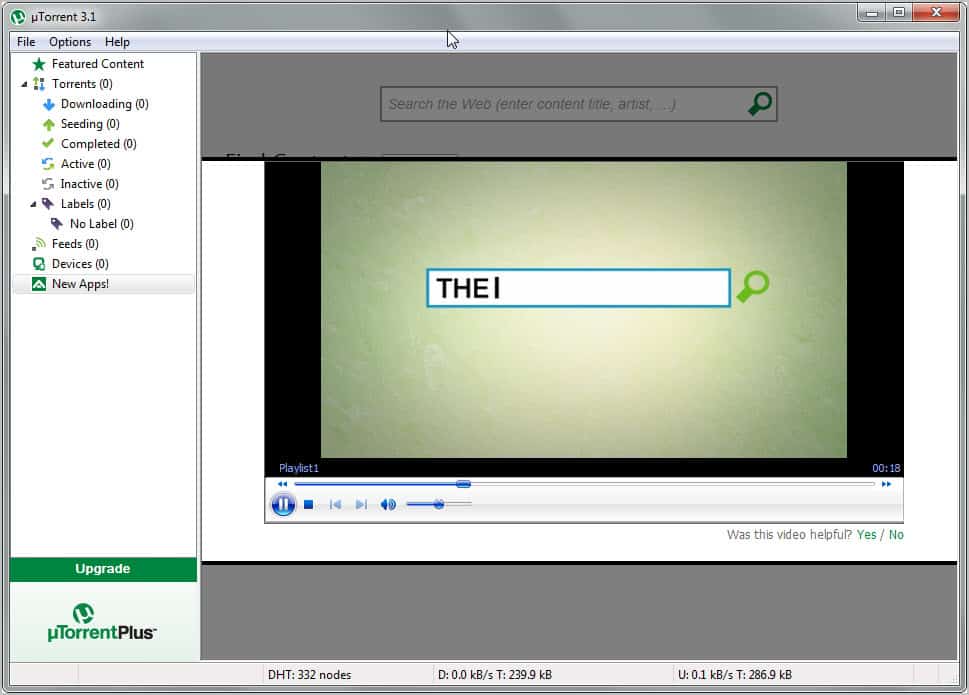
Among the new features are a built-in media player and a new device node to transfer content to connected devices such as mobile phones or gaming systems. Both features seem to be limited uTorrent Plus features. If you recall, uTorrent Plus adds a HD Media Player and converter option to the P2P software.

Fixes and changes mostly affect the program’s stability and performance.

The new client displays an ad for the uTorrent Plus service that can be hidden with a right-click and the selection to hide the advertisement. Some users have voiced concern over the addition of features that related directly to uTorrent Plus and not so much to the client’s original purpose.

utorrent plus

These users have selected uTorrent because its lightweight, fast and stable. The addition of new program modules could seriously dampen the program’s reputation in this regard.

utorrent media player

What’s your take on uTorrent’s latest version and uTorrent Plus?


© Martin Brinkmann for gHacks Technology News | Latest Tech News, Software And Tutorials, 2011. | Permalink |
Add to del.icio.us, digg, facebook, reddit, twitter
Post tags: , ,


Saturday, December 3, 2011

What’s uTorrent Plus?

If you have been to the uTorrent website these days you may have noticed an advertisement for uTorrent Plus placed prominently on the site. But even if you have not visited the main site recently, you may have spotted the uTorrent Plus application in the client itself.

So what’s uTorrent Plus, and how does it compare to uTorrent Free? Both programs use the same core, you could say that all features of uTorrent Free are included in uTorrent Plus.

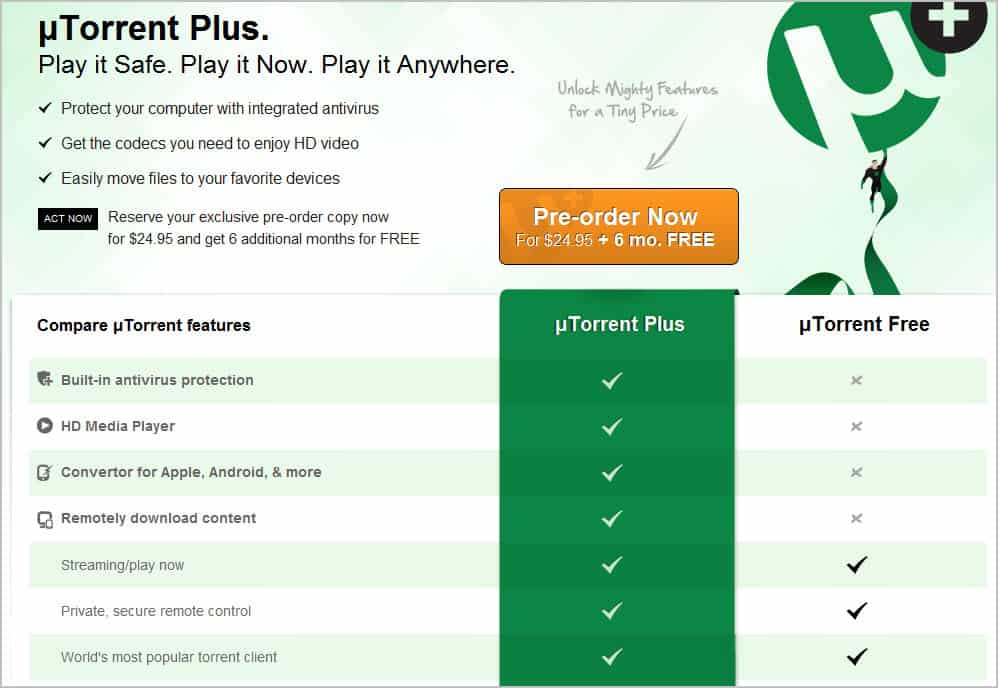
When you look at the comparison chart, you will notice that the company lists four additional uTorrent Plus features. The exclusive features are built-in antivirus protection, a HD media player, a mobile device converter and the option to download contents remotely.

utorrent plus

These new features come at a price; The company is asking for $24.95 for a 12-month subscription to uTorrent Plus (with six additional months for pre-orders). It is clear that the company is not targeting tech savvy users with the plus version of uTorrent, as they would not really have problems finding and running alternatives to what Plus offers.

But even inexperienced users who may benefit from the all-in-one application approach that uTorrent Plus offers may be left in bewilderment about the additional features. The program is currently in testing and that may explain the absence of information on the uTorrent website.

Questions that remain unanswered include:

  • Which antivirus solution is integrated into the client. How does it compare, and how compatible is the feature with other antivirus software installed on the computer system.
  • What exactly does remotely downloaded content mean?
  • Which functionality is provided by Convertor?

You need to look around quite a bit to find answers to those questions. According to an Extreme Tech article the antivirus solution is provided by BitDefender. uTorrent Free users can download the Virus Guard app for their client which provides basic virus detection. The built-in antivirus solution of uTorrent Plus includes a larger database and virus removal options, which the free version does not offer.

Remotely downloaded content adds capabilities to uTorrent Remote, the web-based control panel of the software. It allows uTorrent Plus users in particular to download files remotely from the web interface. Users can log in from any computer to transfer files to that computer right from the client running uTorrent.

The convertor adds device specific conversions to uTorrent. The idea is simple. You add your mobile and external devices, like your smartphone, gaming console or hardware media player to the list of devices in uTorrent. You can then use uTorrent to transfer optimized contents to those devices.

The features that uTorrent Plus offers can make the life of uTorrent users more comfortable. Especially the ability to convert media before it is transferred to external devices from inside the software, and the ability to download uTorrent files remotely are noteworthy.

The antivirus protection on the other hand and the HD media player are additions that may not be necessary for the majority of users. It does not really make sense to use a built-in antivirus solution if system wide antivirus protection is running on the system. I personally like some of the features provided by uTorrent Plus, and do not have issues with the commercial version as long as it is not limiting the free version in any way.

What’s your take on uTorrent Plus? Let me know in the comments.


© Martin Brinkmann for gHacks Technology News | Latest Tech News, Software And Tutorials, 2011. | Permalink |
Add to del.icio.us, digg, facebook, reddit, twitter
Post tags: , ,


Bittorrent Client µTorrent 3.0 Available Now

Bittorrent, the company, has released the stable version of their popular torrent client µTorrent. More than four million users have downloaded pre-release versions of the software from the developer forums.

µtorrent 3.0 introduces several new features. Before I take a closer look at those, I’d like to point out that µTorrent 2.x users need to download the new version from the developer website. There is no automatic update from version 2 to version 3 of the client at the time of writing. The latest version of µTorrent is available at the official download page. The torrent client is available for windows, Mac and Linux based operating systems. Users need to pay close attention to the installation dialog, as it includes offers to install unrelated software on the computer.

So what’s new in µTorrent 3.0?

utorrent 3 stable

The press release and official blog post list several new features. Lets take a look at each of them:

  • Streaming: µtorrent 3.0 users can now start viewing videos after they have started to download them in the client. This is done with the help of the progressive download feature which prioritizes the beginning of a video file on download. Users can click on the Streaming button to start viewing videos they download right away. This feature is not available for all video file types or supported by all media players.
  • µtorrent Remote: Access your µTorrent client and downloads from the web. Start, stop and monitor your downloads and uploads even if you are not near the computer that runs the software.
  • Ratings: Torrents can now be rated and commented on. This has been added as a quality control mechanism.
  • Drag and drop sending: Simply drag and drop files that you want to send into the drop area of the client. uTorrent creates a web link which can then be shared with recipients.
  • Portable Mode: A portable mode has been added so that uTorrent can be started from portable devices and without installation.

Another feature addition is uChat, a chat application that can be installed from the Find Content panel in uTorrent 3.0.

The company furthermore is now advertising µtorrent Plus on the company website which appears to be a paid version of the popular client.

A 12 month subscription costs $24.95 and includes built-in antivirus protection, a HD media player, converter for mobile devices and the ability to remotely download contents. The Plus version is advertised under Apps in the free client.

utorrent plus

The core features remain free. The new version of uTorrent adds several interesting and free versions to the popular p2p software. Especially the native ability to make the client portable, stability enhancements and the ability to watch movies while they are downloading are welcome additions. Utorrent Plus on the other hand does not seem disturb the core file downloading and seeding capabilities of the program. It instead adds programs and features to the software that some users may find useful, and others absolutely unnecessary.


© Martin Brinkmann for gHacks Technology News | Latest Tech News, Software And Tutorials, 2011. | Permalink |
Add to del.icio.us, digg, facebook, reddit, twitter
Post tags: , , , , ,


Wednesday, November 23, 2011

What Is Bittorrent DNA, Remote, And Should You Use It

Paulus just emailed me to let me know about a new version of uTorrent that had been released as a first release candidate recently. The developers of the Bittorrent client have added several new features and technologies to the popular distribution software. Two of the new technologies that got added are Bittorrent DNA and uTorrent Remote.

When you open the preferences in uTorrent, you will see a new DNA entry in the left menu. The preference lists a small explanation at the top:

Bittorrent DNA is a content delivery system that reduces publisher server load by using Bittorrent peer-to-peer delivery. Is is used only for content that you request.

DNA is enabled by default, at least in the latest test version of uTorrent 3.1. With DNA enabled, users may be able to download data that is powered by DNA faster. The service won’t accelerate standard torrent downloads.

It works exactly like those MMORPG downloaders that Blizzard and other companies offer. These downloaders use official servers and other users who download the data to speed up the downloading. DNA seems to be basically the same deal. Please note that you will also distribute part of the data to other users whenever you download with DNA enabled.

If you do not download data from websites or services that support DNA, you should consider disabling Bittorrent DNA in the preferences as it is of no benefit to you.

bittorrent dna

Just uncheck Enable DNA powered downloads to block Bittorrent DNA from being used by uTorrent. You may also check Alert me when DNA-powered downloads are added to uTorrent to receive notifications when downloads that make use of DNA are added to uTorrent.

Please note that DNA can also be distributed as a separate client alongside programs, games and other contents on websites. The program works in the same way but is completely independent of the Bittorrent client.

Remote is another new feature. Unlike DNA, it is disabled by default. The technology can be used to connect to the client from a web browser to manage and control the Bittorrent software remotely.

utorrent remote

You need to supply a username and password and check the Enable uTorrent Remote Access feature. All you need to do then is to open the remote service on the uTorrent website and enter your computer name and password to remotely connect to the uTorrent client.

Hope this answers some of the questions that users may have when they encounter Bittorent DNA and uTorrent Remote for the first time.


© Martin Brinkmann for gHacks Technology News | Latest Tech News, Software And Tutorials, 2011. | Permalink |
Add to del.icio.us, digg, facebook, reddit, twitter
Post tags: , , , ,


Thursday, October 6, 2011

Transmission-Qt Win Bittorrent Client

When you look at the most popular Bittorrent clients for Windows, you will probably notice that uTorrent is mentioned quite often. If you look over to Macintosh or Linux computer systems, you will likely hear the program name Transmission fairly often.

Transmission-QT is an unofficial Open Source port of that Bittorrent client for the Microsoft Windows operating system. It is an alternative to uTorrent, and maybe the better choice for users who work with Transmission on a Mac or Linux system.

Almost as important as the ability to download and seed files is support for popular features that users expect their Bittorrent client to support.

Transmission-QT users can tick off a lot of those features from their imaginary requirements list. The program supports features such as speed limits, encryption, PEX and DHT, a blocklist to prevent certain IP connections, the option to change the local port and a web client to manage the program from a remote web browser. It is definitely more than an average Bittorrent client offers, but not as much when compared to programs such as uTorrent.

transmission qt bittorrent client

The program is in many regards not as sophisticated as uTorrent. There is for instance no option to configure a transfer cap per day or month, no scheduler, no support for apps or add-ons, no torrent discovery options, and no option to stream video files even if they are still downloading.

transmission preferences

That does not necessarily mean that the program is inferior. It all depends on what you want to use the program for. If you only want to download files then Transmission-QT is a perfectly fine choice. If you want to use those extra features that uTorrent or comparable clients offer then it is not the best of choices. It needs to be noted that Transmission-QT supports loading an IP blocklist while uTorrent does not.

Some users at least will like the program’s simplicity and pick it because of that. Then again, uTorrent is not more complicated as all additional features are optional. If you do not want to use them, you simply ignore them.

Windows users who are looking for an open source Bittorrent client can take a closer look at Transmission-QT Win. The program is actively developed and definitely a solid application for downloading files via Bittorrent. The program is compatible with 32-bit and 64-bit editions of the Microsoft Windows operating system.


© Martin Brinkmann for gHacks Technology News | Latest Tech News, Software And Tutorials, 2011. | Permalink |
Add to del.icio.us, digg, facebook, reddit, twitter
Post tags: , , ,